1. Sarrera eta Overview
This manual provides essential information for the setup, operation, maintenance, and troubleshooting of your LG 42LG50 42-Inch 1080p LCD HDTV. Please read this manual thoroughly before using your television to ensure proper functionality and to maximize your viewesperientzia.
The LG 42LG50 is a 42-inch LCD HDTV featuring 1080p Full HD resolution (1920 x 1080), a 15,000:1 contrast ratio, and a wide 178-degree viewing angle. It includes an ATSC/NTSC/Clear QAM tuner, XD Engine for enhanced picture quality, and SRS TruSurroundXT for immersive audio. The television is designed with a slim profile, contoured edges, and a silver chrome accent, complete with a swivel stand.
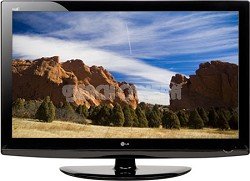
Irudia: Aurrealdea view of the LG 42LG50 42-Inch 1080p LCD HDTV, showcasinbere diseinu dotorea eta pantaila g.
2. Konfigurazioa
2.1 Zer dago kutxan
- Telebista Unitatea
- Mahai-postua
2.2 Kokatzea eta Muntatzea
Your LG 42LG50 HDTV comes with a table stand for convenient placement on a flat surface. Ensure the surface is stable and can support the weight of the television (approximately 49.6 pounds).
For wall mounting, ensure you use a compatible VESA-compliant wall mount (sold separately) and follow the instructions provided with the wall mount. Professional installation is recommended for wall mounting to ensure safety and proper setup.
2.3 Hasierako konexioa
Connect the power cord to the TV and then to a wall outlet. Connect your antenna, cable box, or other video sources to the appropriate input ports (HDMI, Component, etc.) on the back of the TV.
3. Funtzionamendu-argibideak
3.1 Piztu/Itzali
Sakatu telebistako edo urrutiko aginteko pizteko botoia telebista pizteko edo itzaltzeko.
3.2 Sarrera hautatzea
Use the 'Input' button on your remote control to cycle through available input sources (HDMI 1, HDMI 2, HDMI 3, Component, PC, etc.) to select your desired device.
3.3 AV Mode
The AV Mode feature allows for quick and easy optimization of audio and video settings based on your content. Select from three simple presets: Cinema, Sports, and Game mode.
- Zinema modua: Ideal for movies in a dim environment, providing a theater-like experience.
- Joko modua: Enhances vivid colors and sharp graphics for HD video gaming.
- Kirol modua: Provides the brightest, most colorful setting for optimal sports viewing in social settings.
Video: This video demonstrates the LG HDTVs AV Mode, explaining how it optimizes audio and video settings for different content types like movies, sports, and games.
3.4 Intelligent Sensor
Intelligent Sensor technology automatically adjusts picture settings by detecting ambient light conditions and color in your room. This ensures optimal picture quality day or night and can reduce power consumption.
Video: This video explains the LG HDTVs Intelligent Sensor feature, detailing how it adjusts picture settings based on ambient room light for optimal vieweta energia-eraginkortasuna.
3.5 ISFccc Calibration
Your LG HDTV is ISFccc capable, meaning it can be professionally calibrated by an ISF-certified technician. This calibration customizes the TV's picture settings to your specific room environment, ensuring a true film-like picture and peak performance. Calibrated settings can be locked to prevent accidental changes and are stored in the TV's memory.
Video: This video describes the benefits of ISFccc calibration for LG HDTVs, highlighting how professional calibration optimizes picture quality for specific viewinguruneak.
3.6 1080p Full HD Resolution
The LG 42LG50 features 1080p Full HD resolution, meaning the display has 1920 vertical columns and 1080 horizontal rows of pixels. This progressive scan technology ensures you see the entire frame and every pixel at once, delivering superior clarity and detail. This high resolution also allows for a closer viewing distance without pixelation, enhancing the immersive experience.
Video: This video explains 1080p Full HD resolution, detailing its technical aspects and benefits for high-definition viewing.
3.7 Invisible Speaker System
The LG 42LG50 incorporates an Invisible Speaker system, designed by audio expert Mr. Mark Levinson. This innovative technology uses tiny magnets to send subtle vibrations through microscopic channels within the TV's cabinet, effectively transforming the entire television into a speaker. This design eliminates the need for visible speaker grilles, contributing to the TV's sleek aesthetic without compromising sound performance, and offers a larger audio sweet spot.
Video: This video introduces the LG Invisible Speaker system, explaining its unique technology and how it delivers audio without visible speakers.
4. Konektibitatea
Your LG 42LG50 HDTV offers a variety of connectivity options for your entertainment devices:
- HDMI sarrerak: 3x HDMI v 1.3 digital inputs for high-definition audio and video.
- USB 2.0: USB gailu bateragarriak konektatzeko.
- PC sarrera: Connect your computer for use as a monitor.
- Audio sarrera: HDMI, USB.
5. Zehaztapenak
| Ezaugarri | Zehaztapena |
|---|---|
| Pantailaren tamaina | 42 hazbete |
| Marka | LG |
| Bistaratzeko Teknologia | LCDa |
| Ebazpena | 1080p |
| Ezaugarri Berezia | Laua |
| Dakarten osagaiak | Zutik, telebista |
| Konektibitate Teknologia | HDMI |
| Onartutako Interneteko zerbitzuak | Browser, Netflix |
| Kolorea | Beltza distiratsua |
| Muntatze Mota | Mahai-muntaia |
| Kontraste-erlazioa | 15,000:1 |
| Screen Finish | laua |
| Elementuaren pisua | 49.6 kilo |
| Internet Applications | Browser, Netflix |
| Audio Sarrera | HDMI, USB |
| Total Number of HDMI Ports | 3 |
| Hardware interfazea | HDMI, USB |
| Kontrol-metodoa | Urrunekoa |
| Kontrolagailu mota | Urruneko Kontrola |
| Hedabide integratua | Zutik, telebista |
| Eredu Urtea | 2018 |
| Modelo zenbakia | 42LG50 |
| Fabrikatzailea | LG Elektronika |
| UPC | 719192173019 |
| Fabrikako pieza-zenbakia | 42LG50 |
| ASIN | B0016PCPNS |
| Ezaugarri gehigarriak | Laua |
| Sintonizatzaile mota | ATSC, QAM |
| GTIN | 719192173019 |
6. Mantentzea
6.1 Pantaila garbitzea
Garbitu pantaila astiro-astiro zapi leun, lehor eta pelusik gabeko batekin. Orba egoskorrak izanez gero, garbitu astiro-astiro.ampen the cloth with water or a specialized screen cleaner and wipe carefully. Avoid using harsh chemicals or abrasive materials.
6.2 Armairua garbitzea
Wipe the TV cabinet with a soft, dry cloth. Do not use any liquid cleaners directly on the cabinet.
6.3 Aireztapena
Ensure adequate ventilation around the TV to prevent overheating. Do not block any ventilation openings.
7. Arazoak
7.1 Potentziarik gabe
- Egiaztatu elikatze-kablea ondo konektatuta dagoen telebistan eta hormako entxufean.
- Egiaztatu hormako entxufea funtzionatzen duela beste gailu bat konektatuz.
7.2 Irudirik ez edo irudiaren kalitate eskasa
- Ziurtatu sarrera-iturri zuzena hautatuta dagoela.
- Egiaztatu telebistaren eta kanpoko gailuen arteko kable-konexio guztiak.
- Adjust picture settings (brightness, contrast, sharpness) via the TV menu.
- Antena bat erabiltzen baduzu, egiaztatu haren konexioa eta kokapena.
7.3 Soinurik ez edo soinu kalitate eskasa
- Egiaztatu bolumen maila eta ziurtatu telebista ez dagoela isilarazita.
- Egiaztatu kanpoko gailuen audio-kableen konexioak.
- Kanpoko bozgorailuak erabiltzen badituzu, ziurtatu behar bezala konektatuta eta piztuta daudela.
8. Bermea eta Laguntza
8.1 Bermearen informazioa
The LG 42LG50 42-Inch 1080p LCD HDTV comes with a Urtebeteko piezen eta lanaren bermea erosketa-datatik aurrera. Gorde erosketaren egiaztagiria berme-erreklamazioetarako.
8.2 Bezeroarentzako laguntza
For technical assistance, troubleshooting beyond this manual, or warranty service, please contact LG Customer Support. Refer to the contact information provided in your product packaging or visit the official LG webwebgunea laguntza-xehetasun eguneratuenak lortzeko.