1. Sarrera
This manual provides instructions for the installation, operation, maintenance, and troubleshooting of the Juniper EX3200-24T Layer 3 Switch. The EX3200-24T is a fixed-configuration switch designed for access-layer deployments in various network environments, offering comprehensive Layer 2 and Layer 3 switching capabilities.
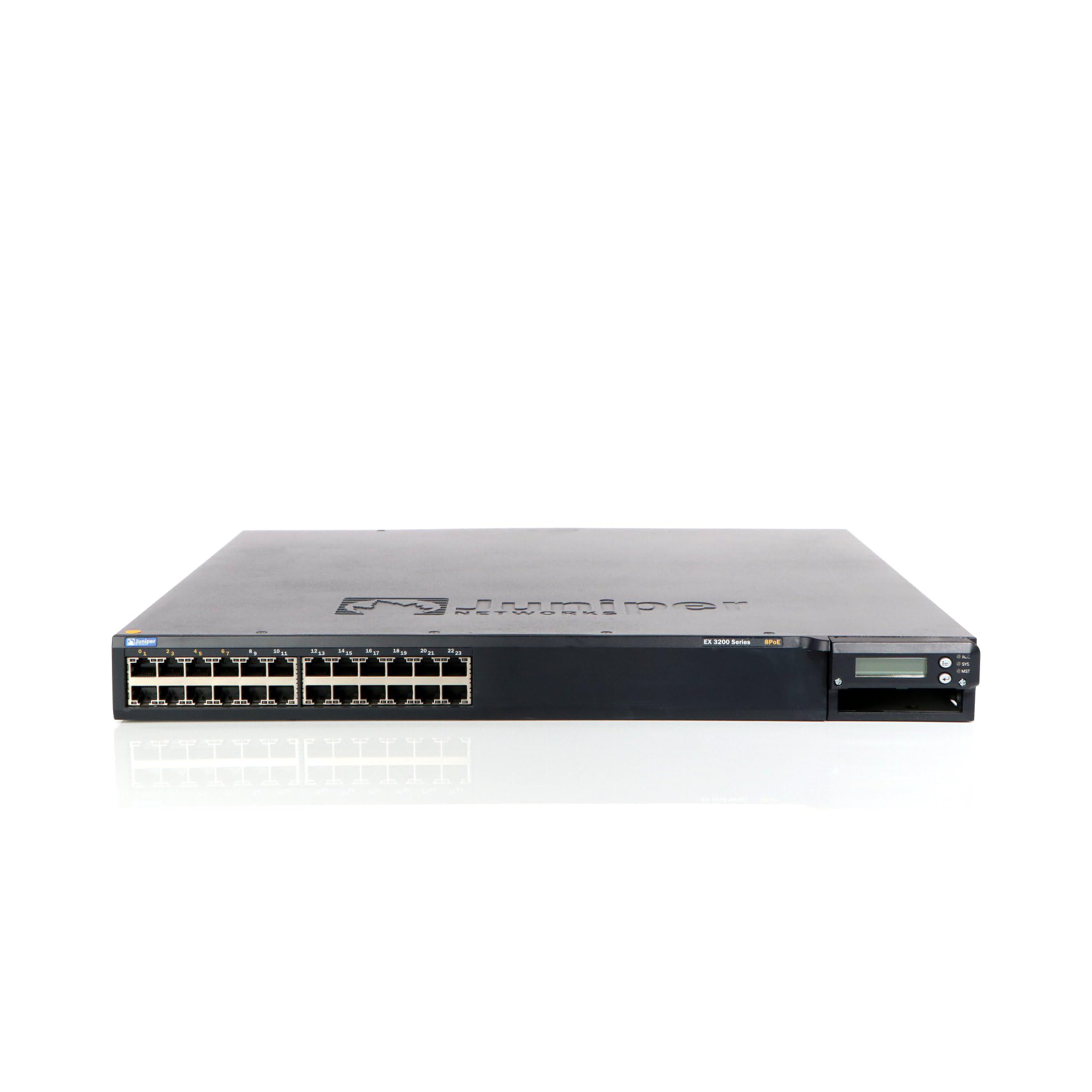
1. irudia: Aurrealdea view of the Juniper EX3200-24T Layer 3 Switch. This image displays the 24 Ethernet ports, along with various status indicator lights and the Juniper Networks branding.
2. Konfigurazioa
Follow these steps to properly set up your Juniper EX3200-24T switch.
2.1 Desontziratzea eta ikuskatzea
- Kontu handiz kendu etengailua ontzitik.
- Inspect the switch for any signs of physical damage. If damage is found, contact your vendor immediately.
- Egiaztatu ontziratze-zerrendan zerrendatutako osagai guztiak daudela.
2.2 Rack muntatzea (aukerakoa)
The EX3200-24T can be mounted in a standard 19-inch equipment rack. Use the provided rack-mount kit and follow the instructions included with the kit for secure installation.
2.3 Potentzia konektatzea
- Ensure the power switch on the rear panel of the switch is in the OFF position.
- Connect the provided AC power cord to the power inlet on the rear of the switch.
- Entxufatu korronte-kablearen beste muturra lurreko hartune elektriko batean.
2.4 Sareko kableak konektatzea
Connect Ethernet cables from your network devices (computers, servers, other switches) to the 10/100/1000Base-T ports on the front panel of the EX3200-24T switch. Ensure cables are securely seated.
3. Funtzionamendu-argibideak
This section outlines the basic operation of the Juniper EX3200-24T switch.
3.1 Etengailua piztea
After connecting the power cord, flip the power switch on the rear panel to the ON position. The system status LEDs on the front panel will illuminate during the boot process.
3.2 Understanding Status LEDs
The front panel features various LEDs to indicate the operational status of the switch and its ports:
- SYS LED: Indicates system status (e.g., green for normal operation, amber for warning, red for critical error).
- ALM LED: Alarma egoera adierazten du.
- PPM LED: Indicates power supply module status.
- Portuko LEDak: Each port has LEDs indicating link status and activity (e.g., green for link, blinking green for activity).
3.3 Initial Configuration (Console Access)
Hasierako konfiguraziorako, konektatu kontsola-kable bat (RJ-45etik DB-9ra) zure kudeaketa-lanpostutik switch-aren kontsola-porturaino. Erabili terminal-emulazio programa bat (adibidez, PuTTY, Tera Term) ezarpen hauekin:
- Baud-tasa: 9600
- Datu-bitak: 8
- Parekidetasuna: bat ere ez
- Gelditzeko bits: 1
- Emaria kontrola: bat ere ez
Refer to the Juniper Networks documentation for detailed configuration procedures.
4. Mantentzea
Regular maintenance ensures optimal performance and longevity of your EX3200-24T switch.
4.1 Garbiketa
- Periodically clean the exterior of the switch with a soft, dry, lint-free cloth.
- Ensure ventilation openings are free from dust and obstructions to prevent overheating. Do not use liquid or aerosol cleaners directly on the switch.
4.2 Firmware eguneraketak
Juniper Networks periodically releases firmware updates to improve performance, add features, and address security vulnerabilities. It is recommended to keep the switch firmware updated. Refer to the official Juniper Networks support website for the latest firmware and update procedures.
4.3 Ingurumen-gogoetak
Operate the switch within its specified environmental limits (temperature, humidity) to prevent damage and ensure reliable operation. Avoid exposing the switch to direct sunlight, excessive heat, or moisture.
5. Arazoak
This section provides solutions to common issues you might encounter with your EX3200-24T switch.
5.1 Potentziarik gabe
- Sintoma: No LEDs are illuminated, and the switch does not power on.
- Ekintza:
- Egiaztatu elikatze-kablea ondo konektatuta dagoela bai etengailura bai entxufe elektrikora.
- Ziurtatu atzeko paneleko etengailua ON posizioan dagoela.
- Check the electrical outlet with another device to confirm it is functional.
- If using a power strip or UPS, ensure it is powered on and functioning correctly.
5.2 Sare konexiorik ez
- Sintoma: Devices connected to the switch cannot access the network.
- Ekintza:
- Check the port LEDs on the switch for the connected device. A solid green LED indicates a link. If no link, try a different port or cable.
- Verify the network cable is securely connected at both ends (switch and device).
- Ziurtatu konektatutako gailuaren sare-egokitzailea gaituta eta behar bezala konfiguratuta dagoela.
- If multiple devices are affected, check the uplink connection from the EX3200-24T to your core network.
- Consult the switch's configuration for VLANs, IP addressing, and other network settings.
5.3 System Alarm LED (ALM) is Amber/Red
- Sintoma: The ALM LED is illuminated amber or red.
- Ekintza:
- Log in to the switch via the console or network management interface.
- Check system logs and alarm messages for details on the specific issue.
- Common causes include power supply issues, fan failures, or high temperature.
- Address the root cause as indicated by the logs.
6. Zehaztapenak
Key technical specifications for the Juniper EX3200-24T Layer 3 Switch:
| Ezaugarri | Zehaztapena |
|---|---|
| Marka | Juniper Networks |
| Modelo zenbakia | EX3200-24T |
| Portu kopurua | 24 (16 x 10/100/1000Base-T, 8 x 10/100/1000Base-T) |
| Zabaltzeko zirrikitua | 1 x Expansion Slot |
| Datuen transferentzia-tasa | 1 Gigabit segundoko |
| Geruza-laguntza | 3. geruza |
| Elementuaren pisua | 14.9 kilo |
| Kolorea | Beltza |
| Gailu bateragarriak | Mahaigaina |
| UPC | 832938037793 |
7. Bermea eta Laguntza
7.1 Produktuaren bermea
The Juniper EX3200-24T Layer 3 Switch is covered by a standard manufacturer's warranty. For detailed information regarding warranty terms, duration, and coverage, please refer to the warranty card included with your product or visit the official Juniper Networks webgunea.
7.2 Laguntza Teknikoa
For technical assistance, troubleshooting beyond this manual, or to report issues, please contact Juniper Networks technical support. Support resources, including documentation, FAQs, and contact information, are available on the official Juniper Networks support portal:


