Sarrera
Eskerrik asko erosketagatik.asing the Technics SL-PD807 MASH 5 Disc CD Player. This manual provides detailed instructions for the proper setup, operation, and maintenance of your new audio component. Please read this manual thoroughly before using the unit to ensure optimal performance and longevity.
The SL-PD807 features a 5-disc carousel changer, allowing for extended playback without interruption, and incorporates MASH (Multi-stage Noise Shaping) D/A conversion for high-quality audio reproduction.
Segurtasun informazio garrantzitsua
- Energia iturria: Ensure the unit is connected to an AC 120V, 60Hz power supply.
- Aireztapena: Ez blokeatu aireztapen-irekidurak. Utzi nahikoa leku unitatearen inguruan aire-fluxu egokia izan dadin eta gehiegi berotzea saihesteko.
- Hezetasuna: Ez jarri unitatea euripean edo hezetasunean. Ez jarri likidoz betetako objekturik, hala nola loreontziak, unitatearen gainean.
- Garbiketa: Garbitu aurretik, deskonektatu unitatea hormako entxufetik. Erabili zapi lehor bat garbitzeko.
- Zerbitzua: Ez saiatu unitate hau zeuk konpontzen. Konponketa guztiak zerbitzu-langile kualifikatuei eskatu.
Paketearen edukia
Mesedez, egiaztatu elementu guztiak paketean daudela:
- Technics SL-PD807 MASH 5 Disc CD Player
- Elikatze kablea
- RCA Audio kableak
Note: A remote control is not included with this unit.
Konfigurazioa
1. Deskargatzea
Carefully remove the CD player and all accessories from the packaging. Retain the packaging materials for future transport or storage.
2. Kokapen
Place the CD player on a stable, level surface away from direct sunlight, heat sources, and excessive dust or vibrations. Ensure there is sufficient space around the unit for proper ventilation.

1. irudia: Aurrealdea view of the Technics SL-PD807 CD Player with included RCA cables.
3. Konexioak
Connect the CD player to your amplifier or receiver using the supplied RCA audio cables.
- Connect one end of the RCA audio cables (red and white plugs) to the 'LINE OUT' jacks on the rear of the SL-PD807.
- Connect the other end of the RCA audio cables to an available 'CD IN' or 'AUX IN' input on your amplifier/receiver. Match the red plug to the 'R' (right) input and the white plug to the 'L' (left) input.
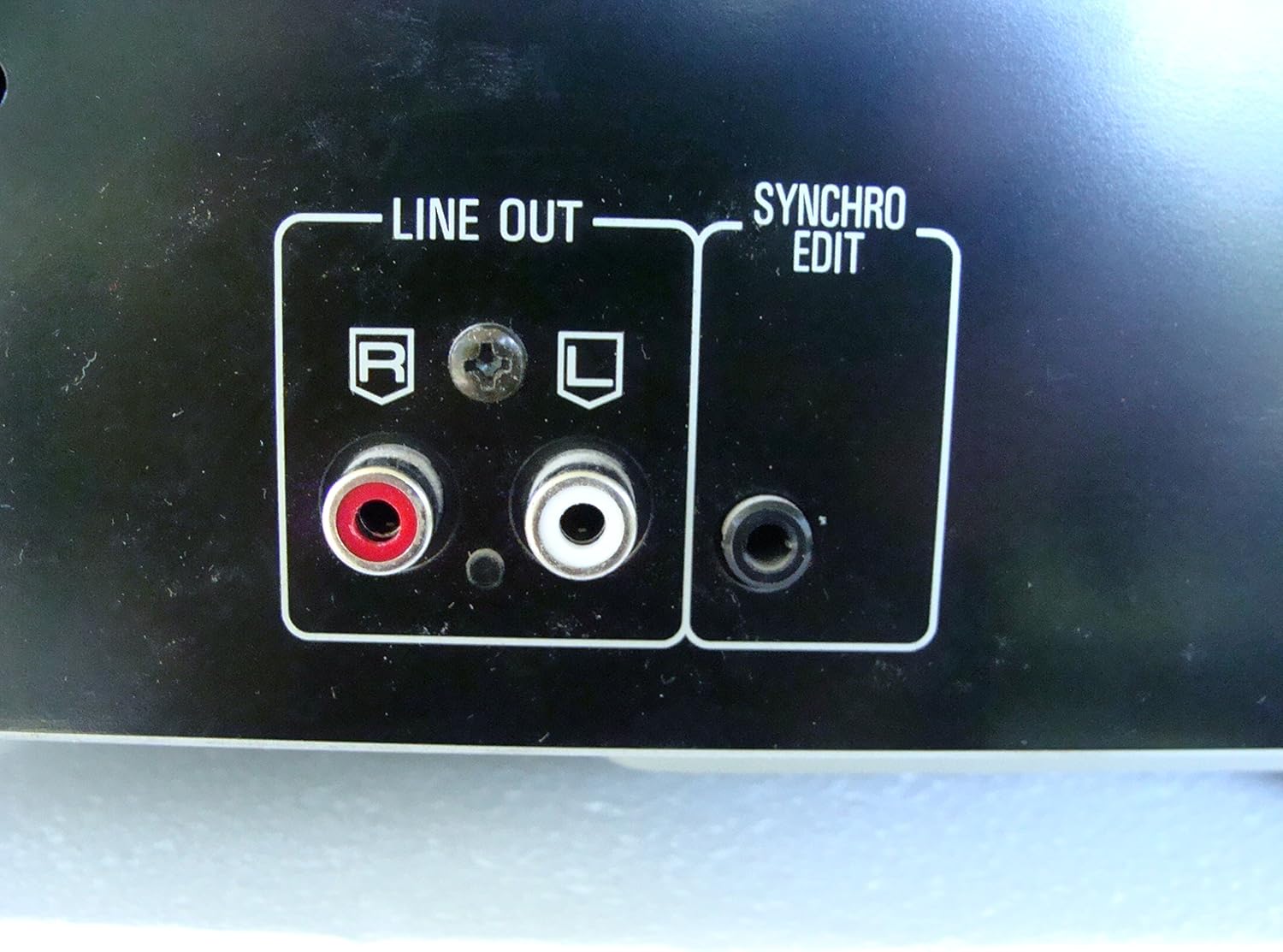
2. irudia: Rear panel connections, highlighting the 'LINE OUT' (RCA) and 'SYNCHRO EDIT' ports.
- Plug the power cord into the AC inlet on the rear of the CD player, then plug the other end into a standard AC wall outlet.
Funtzionamendu-argibideak
1. Piztu/Itzali
Sakatu BOTEREA button located on the front left of the unit to turn the CD player on or off.
2. Diskoak kargatzea
The SL-PD807 features a 5-disc carousel. Press the IREKI/ITXI button to open the disc tray. Place up to five CDs onto the numbered disc slots with the label side facing up. Press IREKI/ITXI berriro erretilua ixteko.

3. irudia: Front panel controls including disc tray, display, and playback buttons.
3. Oinarrizko erreprodukzioa
- Jolastu: Sakatu JOLASTU botoia (►) erreprodukzioa hasteko.
- Etenaldia: Sakatu PAUSENA button (⏸) to temporarily stop playback. Press again to resume.
- Gelditu: Sakatu GELDITU botoia (■) erreprodukzioa gelditzeko.
- Saltatu pistak: Sakatu SALTATU buttons (⏭︎ / ⏮︎) to skip to the next or previous track.
- Bilatu: Eutsi sakatuta BILATU buttons (⏪︎ / ⏩︎) to fast forward or rewind within a track.
4. Disc Exchange
You can exchange discs while another disc is playing. Press the DISKO SALTU button to rotate the carousel to an empty slot or a disc you wish to remove/replace. The currently playing disc will continue to play until you select a new disc to play.
5. Erreprodukzio moduak
- Ausazko jolasa: Sakatu Ausazko button to play tracks on the current disc or all loaded discs in a random order.
- Programaren erreprodukzioa: Erabili PROGRAMA button to create a custom playback sequence of tracks from the loaded discs. Refer to the on-screen display for programming steps.
- Errepikatu erreprodukzioa: Sakatu ERREPIKATU botoia uneko abestia, uneko diskoa edo disko guztiak errepikatzeko.
Mantentzea
1. Unitatea garbitzea
Wipe the exterior of the unit with a soft, dry cloth. For stubborn stains, slightly dampen the cloth with water and a mild detergent, then wipe dry. Do not use abrasive cleaners, benzene, thinner, or alcohol, as these can damage the finish.

4. irudia: Top surface of the unit, illustrating areas that may require cleaning or show wear.
2. Diskoen zaintza
- Diskoak ertzetik heldu jotzeko gainazalean hatz-markak ez uzteko.
- Keep discs clean. Wipe from the center outwards with a soft, lint-free cloth if necessary.
- Gorde diskoak beren zorroetan hautsetik eta marraduratik babesteko.
Arazoak konpontzea
If you experience problems with your CD player, please consult the following table before seeking service.
| Arazoa | Kausa posiblea | Irtenbidea |
|---|---|---|
| Botererik ez | Kable elektrikoa ez dago ondo konektatuta. | Egiaztatu kablearen konexioa unitatera eta hormako entxufera. |
| Soinurik ez | RCA audio cables not connected correctly. Amplifier/receiver input not selected. | Ensure RCA cables are securely connected to both the CD player and amplifier. Select the correct input on your ampargitzaile/hartzaile. |
| Diskoa ez da erreproduzitzen / Saltatzen ari da | Diskoa zikin edo urratuta dago. Diskoa gaizki sartuta dago. | Clean the disc with a soft, lint-free cloth. Ensure the disc is placed label-side up in the tray. Try another disc. |
| Carousel does not rotate | Obstruction in the disc tray. | Ensure no foreign objects are obstructing the carousel mechanism. |
Zehaztapenak
The following are the technical specifications for the Technics SL-PD807 MASH 5 Disc CD Player:
| Ezaugarri | Zehaztapena |
|---|---|
| Ereduaren izena | SL-PD807 |
| Fabrikatzailea | Teknikak |
| Diskoaren edukiera | 5 disko |
| Potentzia-eskakizunak | AC 120V, 60Hz, 13W |
| Paketearen neurriak | 17 x 17 x 5 hazbete |
| Elementuaren pisua | 15.02 kilo |
| Konektibitate Teknologia | Laguntzailea, Infragorria |
| Ezaugarri Berezia | Saltoen aurkako babesa |

5. irudia: Product label displaying model number and power specifications.
Bermea eta Laguntza
For information regarding warranty coverage and customer support for your Technics SL-PD807 CD Player, please refer to the warranty card included with your purchase or visit the official Technics website. If you require further assistance, please contact Technics customer service.


