Sarrera
This manual provides detailed instructions for the proper use and maintenance of your Royal DM2070 Electronic Organizer. Please read this manual thoroughly before operating the device to ensure safe and efficient use. Keep this manual for future reference.
Segurtasun Informazioa
- Ez jarri gailua tenperatura altuen, eguzki-argiaren eraginpean edo hezetasun handiaren eraginpean.
- Saihestu gailua erortzea edo kolpe gogorrak jasan.
- Ez saiatu gailua zeuk desmuntatzen edo konpontzen. Mantendu mantentze-lan guztiak langile kualifikatuen esku.
- Mantendu gailua uretatik eta beste likidoetatik urrun.
- Use only the specified battery type for replacement.
Paketearen edukia
Egiaztatu elementu guztiak zure paketean daudela:
- Royal DM2070 Electronic Organizer
- Stylus (if applicable)
- Hasierako gida azkarra
- Berme Txartela
Konfigurazioa
1. Bateriaren instalazioa
The Royal DM2070 requires batteries for operation. Follow these steps to install them:
- Bilatu bateriaren konpartimentuaren estalkia gailuaren atzealdean.
- Irristatu edo altxatu estalkia konpartimentua irekitzeko.
- Sartu beharrezko bateriak, konpartimentuaren barruan adierazten den polaritate zuzena (+ eta -) ziurtatuz.
- Jarri bateriaren konpartimenduaren estalkia ongi.
2. Hasierako piztea eta ezarpenak
After installing batteries, power on your device and configure basic settings:
- Eduki sakatuta BOTEREA botoia pantaila piztu arte.
- The device may prompt you to set the date and time. Use the navigation buttons or stylus to enter the correct information.
- Confirm your settings to complete the initial setup.
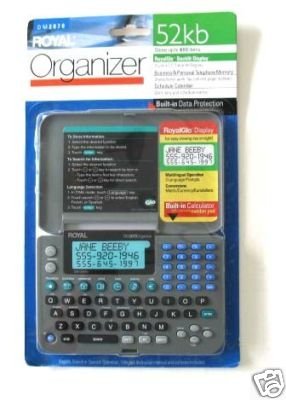
Image: Royal DM2070 Electronic Organizer. This image displays the device's front view, highlighting its screen and keypad, essential for navigation and data entry.
Funtzionamendu-argibideak
1. Nabigazioa
The DM2070 features a keypad and potentially a stylus for navigation. Use the arrow keys to move between menu options and press SARTU or a designated selection button to confirm.
2. Entering Data
To enter information such as contacts, appointments, or notes:
- Navigate to the desired application (e.g., 'Contacts', 'Calendar', 'Notes').
- Select 'New Entry' or a similar option.
- Use the alphanumeric keypad to input text. Some models may offer an on-screen keyboard via stylus.
- Save your entry before exiting the application.
3. Aplikazioak erabiltzea
The DM2070 includes various applications:
- Egutegia: View daily, weekly, or monthly schedules. Add and edit appointments.
- Kontaktuak: Store names, phone numbers, addresses, and email information.
- Oharrak: Create and manage text notes or memos.
- Kalkulagailua: Oinarrizko kalkulu aritmetikoak egin.
- Moneta bihurgailua: Convert between different currencies (requires manual update of exchange rates on some models).
Mantentzea
1. Gailua garbitzea
To keep your DM2070 in optimal condition:
- Garbitu pantaila eta casing with a soft, dry, lint-free cloth.
- Marka egoskorretarako, apur bat dampGarbitu zapi urarekin; saihestu produktu kimiko gogorrak edo garbitzaile urratzaileak.
- Ensure no moisture enters openings.
2. Bateria zaintzea
- Bateria baxuaren adierazlea agertzen denean, aldatu bateriak berehala.
- Kendu bateriak gailua denbora luzez erabiliko ez bada, isuriak saihesteko.
Arazoak konpontzea
If you encounter issues with your Royal DM2070, refer to the following common solutions:
| Arazoa | Kausa posiblea | Irtenbidea |
|---|---|---|
| Gailua ez da pizten. | Bateriak hilda edo gaizki instalatuta. | Ordeztu bateriak beste batzuekin, polaritate zuzena ziurtatuz. |
| Pantaila hutsik edo izoztuta dago. | Softwarearen akatsa edo bateria baxua. | Try a soft reset (refer to Quick Start Guide for specific button combination) or replace batteries. |
| Data loss. | Battery depletion or improper shutdown. | Ensure batteries are fresh. Always save data before powering off. |
| Teklatuak ez du erantzuten. | Dust/debris under keys or internal issue. | Clean keypad gently. If problem persists, contact support. |
Zehaztapenak
Key technical specifications for the Royal DM2070 Electronic Organizer:
| Ezaugarri | Xehetasuna |
|---|---|
| Marka | ERREGEA |
| Modelo zenbakia | DM2070 |
| Estalkiaren materiala | Larrua |
| Formatua | Antolatzailea |
| Elementuaren pisua | 181 g |
| Elementuaren neurriak (LxWxH) | 24.4 x 14.5 x 1 zentimetro |
| Helburu-publikoa | Heldua |
Bermea eta Laguntza
The Royal DM2070 Electronic Organizer comes with a standard manufacturer's warranty. Please refer to the warranty card included in your package for specific terms and conditions. For technical support, service, or inquiries, please contact Royal customer service through the contact information provided on the warranty card or the official Royal webgunea.


