1. Sarrera
Eskuliburu honek Altronix AL175X220 elikatze-iturriaren instalazio, funtzionamendu, mantentze eta arazoak konpontzeko argibide zehatzak eskaintzen ditu. Irakurri arretaz eskuliburu hau unitatea instalatzen edo erabiltzen saiatu aurretik, funtzionaltasun eta segurtasun egokia bermatzeko.
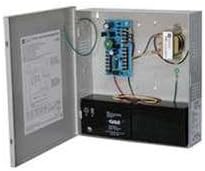
1. irudia: Altronix AL175X220 elikatze-iturria kaxa irekita duela.
Irudi honek Altronix AL175X220 elikatze-iturria erakusten du. Metalezko kaxa irekita dago, barneko zirkuitu-plaka, transformadorea eta beheko aldean dagoen bateria beltza erakusten dituena. Kableatuek kaxa barruko osagaiak lotzen dituzte.
2. Konfigurazioa eta instalazioa
AL175X220-ren funtzionamendu seguru eta eraginkorrerako ezinbestekoa da instalazio egokia egitea. Ziurtatu tokiko eta nazioko arau elektriko guztiak betetzen direla.
2.1 Muntaketa
- Aukeratu muntatzeko leku egoki bat, lehorra, ondo aireztatua eta muturreko tenperaturetatik eta hezetasunetik babestua.
- Muntatu elikatze-iturriaren kaxa horman edo beste gainazal egonkor batean, finkagailu egokiak erabiliz.
2.2 Kableatua
- Sarrerako potentzia: Konektatu 220V AC sarrerako korrontea elikatze-plakako terminal espezifikoetara. Ziurtatu elikatze-iturria deskonektatuta dagoela konexioak egin aurretik.
- Irteera potentzia: Konektatu 12VDC edo 24VDC behar dituzten gailuak irteera-terminal egokietara. Egiaztatu polaritate zuzena.
- Bateriaren babeskopia (aukerakoa): Bateria-erreserba erabiltzen baduzu, konektatu 12V edo 24V-ko bateria bateragarri bat bateriaren terminaletara. Polaritate zuzena errespetatu (+ +-tik eta - --tik).
- Lurreratzea: Ziurtatu unitatea behar bezala lurrera konektatuta dagoela tokiko araudi elektrikoen arabera.
OHARRA: Deskonektatu energia guztia unitatea konpontzen hasi aurretik.
3. Funtzionamendu-argibideak
Behin instalatuta, AL175X220 automatikoki funtzionatzen du. Jarraitu urrats hauek lehenengo pizteko.
- Kableatu guztiak osatu eta egiaztatu ondoren, konektatu 220V AC korrontea unitateari.
- Begiratu zirkuitu-plakako egoera-adierazle LEDak (baldin badaude). Kontsultatu produktuaren zehaztapen teknikoak LEDen esanahia ikusteko.
- Unitateak 12VDC edo 24VDC irteera erregulatua ematen hasiko da konektatutako gailuei eta konektatutako babeskopia-bateria kargatuko du (instalatuta badago).
4. Mantentzea
AL175X220 funtzionamendu fidagarrirako diseinatuta dago, mantentze-lan minimoarekin. Hala ere, aldizkako egiaztapenek iraupena eta errendimendua bermatzen lagun dezakete.
- Urteko ikuskapena: Urtero ikuskatu unitatea kalte fisikoen, konexio solteen edo korrosioaren zantzurik dagoen ikusteko.
- Bateriaren egiaztapena (hala badagokio): Erreserbako bateria instalatuta badago, egiaztatu aldian-aldian haren egoera eta karga-maila. Ordeztu bateriak 3-5 urtean behin edo bateriaren fabrikatzaileak gomendatzen duen moduan.
- Garbiketa: Mantendu kaxa garbi eta hautsik eta hondakinik gabe. Erabili zapi leun eta lehor bat garbitzeko. Ez erabili garbitzaile likidorik.
5. Arazoak
AL175X220ak espero bezala funtzionatzen ez badu, jo ezazu honako arazo eta irtenbide ohikoenei.
- Irteerako potentziarik ez:
- Egiaztatu 220V AC sarrerako elikatze iturria.
- Egiaztatu kableatu-konexio guztiak ondo eta ondo daudela.
- Egiaztatu unitatean edo kanpoko elikatze-zirkuituan fusible erretarik edo etengailu elektrikorik jauzi egin duen.
- Bateria ez da kargatzen:
- Ziurtatu bateria behar bezala konektatuta dagoela polaritate zuzenarekin.
- Egiaztatu bateriaren egoera; akastuna edo bere bizitzaren amaieran egon daiteke.
- Egiaztatu korronte alternoaren sarrerako korrontea badagoela.
- Gainkargaren egoera:
- Unitatea itzaltzen bada edo adierazleek gainkarga dagoela iradokitzen badute, deskonektatu karga-gailu batzuk.
- Ziurtatu konektatutako gailuen korronte-kontsumo osoak ez duela elikatze-iturriaren irteera nominala gainditzen (1.5AMP).
Irtenbide hauek saiatu ondoren arazoak konpontzen ez badira, jarri harremanetan Altronix-en laguntza teknikoarekin.
6. Zehaztapenak
| Zehaztapena | Balioa |
|---|---|
| Eredua | AL175X220 |
| Sarrera boltage | 220 V AC |
| Irteera boltage | 12VDC / 24VDC (hautagarria) |
| Irteera Korrontea | 1.5 AMP |
| Fabrikatzailea | ALTRONIX |
| ASIN | B002PNC9HC |
| Eskuragarri dagoen lehen data | 12ko otsailaren 2012a |
7. Bermearen informazioa
Altronix produktuak fidagarritasun handikoak izateko diseinatuta daude. Bermearen baldintza zehatzak ikusteko, jo Altronix-en webgune ofizialera. webwebgunean edo produktuaren ontzian datorren berme-txartelean. Gorde erosketaren frogagiria berme-erreklamazioetarako.
8. Laguntza Teknikoa
Laguntza teknikoa, produktuen kontsultak edo zerbitzua behar badituzu, jarri harremanetan Altronix-en bezeroarentzako arreta-zerbitzu ofizialaren bidez. webgunea edo zure produktuaren dokumentazioan emandako harremanetarako informazioa.
Altronix Ofiziala Webgunea: www.altronix.com (Kontuan izan: Hau leku-marka orokor bat da) URL laguntza-lotura zehatzak eman ez zirelako.)