1. Produktua amaitu daview
The Crest 3D Whitestrips Professional Effects Teeth Whitening Kit is designed to provide a professional-level teeth whitening treatment for at-home use. Featuring Advanced Seal Technology, these strips offer a comfortable, no-slip grip, allowing them to remain securely in place during use. This enables users to speak and drink water while the whitening process occurs. As a product from the #1 dentist-recommended at-home teeth whitening brand, this kit aims to deliver a noticeably whiter smile. The enamel-safe formulation is designed to whiten teeth by up to 18 levels. Each kit contains 40 teeth whitening strips (20 for upper teeth and 20 for lower teeth), intended for a 20-day application regimen of 45 minutes per day.

Image 1.1: Packaging for the Crest 3D Whitestrips Professional Effects Kit.

Image 1.2: Key benefits of Crest 3D Whitestrips Professional Effects, including enamel safety, professional-level results, up to 20 levels whiter, and #1 dentist recommendation.
2. Segurtasun informazioa
Please read all safety information carefully before using this product.
2.1. Tooth Sensitivity & Gum Discomfort
With all whitening products, you may experience tooth sensitivity and/or gum discomfort. These effects are generally mild, temporary, and not harmful. If significant tooth sensitivity or gum discomfort develops, try stopping usage for 2-3 days, then resume. If the problem persists, discontinue usage.
2.2. Neurri orokorrak
- Mantendu haur txikien eskura.
- Not intended for use in children under the age of 18.
- Do not swallow the plastic strip.
- Crest 3D Whitestrips are not a substitute for regular dental care. Visit your dentist regularly.
- Avoid eye contact. Rinse eyes thoroughly with water if gel comes into contact with them.
- Handle strips with dry hands. Gel that comes into contact with the skin can cause temporary skin irritation and/or whitening. Wash hands with soap and water after use.
- Avoid contact of gel with cloth, leather, or fabric.
- Do not eat, smoke, sleep, or drink (with the exception of water) during use.
2.3. Dental Work Considerations
If you are in need of dental work, have existing dental work, or have staining from medication, consult your dentist to determine if whitening is appropriate for you. Crest 3D Whitestrips are designed to adhere well to natural teeth. Do not use on loose teeth, restorations (such as fillings, crowns, veneers), or braces. Crest 3D Whitestrips will only whiten natural teeth and will not affect the color of caps, crowns, veneers, fillings, or dentures.
3. Osagaiak
The active and inactive ingredients in Crest 3D Whitestrips Professional Effects are:
- PVP
- PEG-8
- Ura
- Hidrogeno peroxidoa
- Akrilatoen kopolimeroa
- Sodio Hidroxidoa
- Sodium Saccharin
4. Konfigurazioa eta prestaketa
Before applying the Whitestrips, ensure your hands are dry. It is recommended to brush your teeth gently or rinse your mouth with water prior to application, but avoid using toothpaste immediately before applying the strips as it may interfere with the whitening process.
5. Erabilera-argibideak (Aplikazioa)
Follow these steps for proper application of Crest 3D Whitestrips Professional Effects:
- Zuritu: Carefully peel the Crest 3D Whitestrips from their backing liner. You will find one longer strip for your upper teeth and one shorter strip for your lower teeth.
- Aplikatu: Using a mirror, apply the gel side of the strip to the front of your teeth. Align the straight edge of the strip with your gumline. Gently fold the remainder of the strip over the back of your teeth and press to secure it firmly in place. Ensure good contact between the gel and your teeth.
- Higadura: Wear the Whitestrips for 45 minutes. During this time, you can talk and drink water.
- Agerrarazi: After 45 minutes, peel the strips from the back of your teeth first to ease removal. You may rinse your mouth or brush your teeth gently to remove any remaining gel.

Image 5.1: Visual guide for the 3-step application process: Peel the strip, Apply the gel side to teeth, and Reveal after 45 minutes.
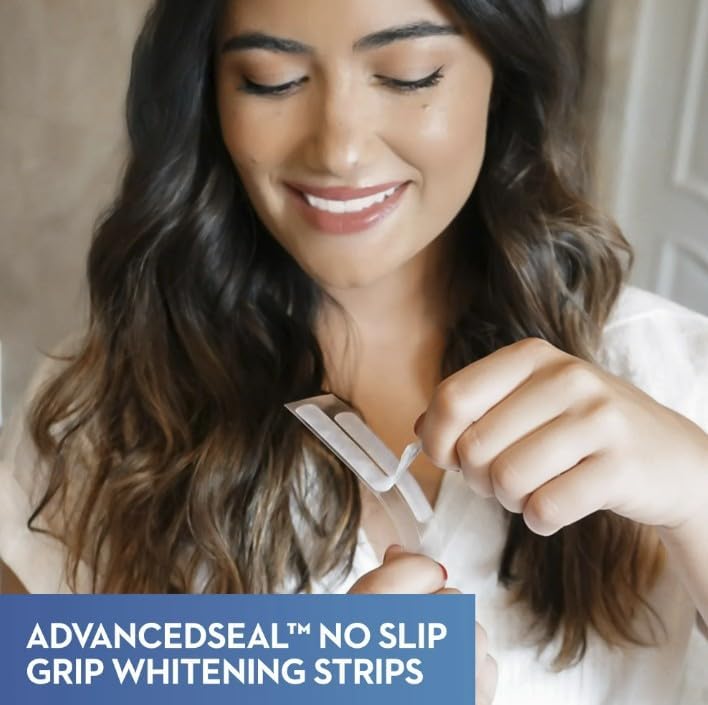
Image 5.2: A user applying a Crest 3D Whitestrip, highlighting the Advanced Seal No Slip Grip technology.
6. Usage Regimen and Maintenance
For optimal results, apply Crest 3D Whitestrips Professional Effects once a day for 45 minutes over a period of 20 days. This kit provides 40 strips, sufficient for the full 20-day treatment (one upper and one lower strip per day).
After completing the whitening regimen, maintain good oral hygiene practices, including regular brushing, flossing, and dental check-ups, to help preserve your whitened smile.
7. Arazoak
7.1. Tooth Sensitivity or Gum Discomfort
If you experience mild tooth sensitivity or gum discomfort, this is a common and usually temporary side effect of teeth whitening products. If the discomfort is significant, discontinue use for 2-3 days before resuming. If the problem persists or worsens, cease use entirely and consult your dentist.
7.2. Strips Not Adhering Properly
Ensure your hands are dry before handling the strips. Apply the gel side firmly to the front of your teeth, aligning with the gumline, and fold the excess strip over the back of your teeth. Press gently to secure. Avoid excessive saliva during application, as this can reduce adhesion.
8. Produktuaren zehaztapenak
| Zehaztapena | Xehetasuna |
|---|---|
| Modelo zenbakia | 889714000038 |
| Marka | Kresta |
| Elementu Inprimakia | Zerrenda |
| Elementu kopurua | 1 (Pack of 40 strips total, 20 treatments) |
| Produktuaren Abantailak | Zuritzea |
| Osagai Aktiboak | Hidrogeno peroxidoa |
| Produktuaren neurriak | 5.43 x 1.81 x 5.9 hazbete |
| Elementuaren pisua | 0.01 ontza |
| Eskuragarri dagoen lehen data | 3ko martxoaren 2010a |
9. Bermea eta Laguntza
Specific warranty information for the Crest 3D Whitestrips Professional Effects Teeth Whitening Kit is not provided in the product details. For any product-related inquiries or support, please refer to the contact information provided on the product packaging or visit the official Crest webgunea.


