1. Sarrera
The Antec TruePower TPQ-1200 is a high-performance 1200-watt power supply designed for demanding computer systems. It features an 80 PLUS Silver certification, indicating high energy efficiency, and provides stable power delivery through its six +12V rails. This manual provides essential information for the safe installation, operation, and maintenance of your TPQ-1200 power supply.
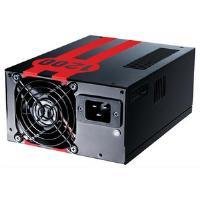
Image 1.1: The Antec TruePower TPQ-1200 Power Supply unit, showcasing its design and modular connectors.
2. Segurtasun informazioa
Please read and understand all safety instructions before installing or operating the power supply. Failure to do so may result in personal injury or damage to your equipment.
- Always disconnect the power cord from the wall outlet before installing, removing, or cleaning the power supply.
- This power supply is designed for use in personal computers only. Do not use it for any other purpose.
- Ez ireki elikatze-iturria casing. Bolumen handiatages are present inside, and there are no user-serviceable parts. Opening the casing-k bermea baliogabetuko du.
- Ziurtatu zure ordenagailu sistemaren lurreratze egokia.
- Avoid operating the power supply in high humidity or extreme temperature environments.
- Keep the power supply away from liquids and sources of heat.
3. Paketearen edukia
Egiaztatu zure paketeak elementu hauek dituela:
- Antec TruePower TPQ-1200 Power Supply Unit
- Modular Cable Set (PCIe, SATA, Molex, Floppy)
- AC korronte kablea
- Muntatzeko Torlojuak
- Erabiltzailearen eskuliburua (dokumentu hau)
If any items are missing or damaged, please contact your retailer or Antec customer support.
4. Ezaugarriak
The Antec TruePower TPQ-1200 power supply offers advanced features for reliable and efficient performance:
- 1200 Watt-eko etengabeko potentzia: Ematen du ample power for high-end gaming and workstation systems.
- 80 PLUS Silver Certified: Achieves up to 88% efficiency, reducing heat generation and operating costs.
- Six +12V Rails: Delivers stable and clean power to critical components.
- Advanced Cable Management: Semi-modular design allows for cleaner builds and improved airflow.
- PowerCache High Performance Capacitors: Enhances stability and transient response.
- Ultra-Quiet Pulse Width Modulation (PWM) Fan: Provides efficient cooling with minimal noise.
- Industrial Grade Protection Circuitry: Includes Over Current Protection (OCP), Over Voltage Protection (OVP), Under Voltage Protection (UVP), Short Circuit Protection (SCP), Over Power Protection (OPP), and Over Temperature Protection (OTP).
5. Konfigurazioa eta instalazioa
Follow these steps carefully to install your Antec TruePower TPQ-1200 power supply.
5.1 Instalazioaren aurreko kontrol zerrenda
- Ensure your computer case supports an ATX power supply.
- Bildu beharrezko tresnak: Phillips bihurkina.
- Unplug your computer from the wall outlet and discharge any residual power by pressing the power button.
5.2 Elikatze-iturria muntatzea
- Carefully place the power supply into the designated PSU bay in your computer case. Ensure the fan is oriented correctly (typically facing down for bottom-mounted PSUs, or according to case design for top-mounted).
- Lerrokatu elikatze-iturriko torloju-zuloak kaxakoekin.
- Secure the power supply using the provided mounting screws. Do not overtighten.
5.3 Elikatze-kableak konektatzea
Connect the necessary cables to your motherboard and components. The TPQ-1200 features both fixed and modular cables.
- 24-Pin ATX Motherboard Power: Connect the main 24-pin connector to the corresponding port on your motherboard. Ensure it clicks into place.
- 8-Pin EPS12V (CPU) Power: Connect the 8-pin (or 4+4 pin) EPS12V connector to the CPU power port on your motherboard.
- PCIe (Graphics Card) Power: For graphics cards requiring additional power, connect the appropriate 6-pin or 6+2 pin PCIe modular cables from the power supply to your graphics card(s).
- SATA potentzia: Connect SATA modular cables to your SATA hard drives, SSDs, and optical drives.
- Molex (Peripheral) Power: Use Molex modular cables for older peripherals or case fans that require this connector type.
- Kableen kudeaketa: Route cables neatly behind the motherboard tray or in other designated areas of your case to improve airflow and aesthetics.
5.4 Hasierako piztea
- Ziurtatu konexio guztiak seguruak direla.
- Connect the AC power cord to the power supply and then to a grounded wall outlet.
- Flip the power switch on the back of the power supply to the 'ON' (I) position.
- Piztu ordenagailua.
6. Funtzionamendu-argibideak
The Antec TruePower TPQ-1200 is designed for continuous operation within its specified limits. Ensure adequate ventilation around your computer case to prevent overheating. The intelligent PWM fan will adjust its speed based on the power supply's temperature to maintain optimal cooling and noise levels.
Always shut down your computer properly through the operating system before turning off the power supply switch or unplugging the AC cord.
7. Mantentzea
Mantentze-lan erregularrak zure energia-iturriaren iraupena eta errendimendu optimoa bermatzen laguntzen du.
- Hautsa garbitzea: Periodically (e.g., every 6-12 months), disconnect the power supply from the wall outlet and use compressed air to gently clean dust from the fan grille and ventilation openings. Do not open the power supply casing.
- Kableen ikuskapena: Noizean behin, egiaztatu kable elektrikoen konexio guztiak ondo finkatuta daudela eta kalterik ez dutela ziurtatzeko.
8. Arazoak
If you encounter issues with your power supply, refer to the following troubleshooting guide:
| Arazoa | Kausa posiblea | Irtenbidea |
|---|---|---|
| Ordenagailua ez da pizten. | AC power cord not connected or loose. Power supply switch is OFF. Faulty power supply. | Ensure AC cord is firmly connected. Flip PSU switch to 'ON' (I). Test with another power supply if possible. |
| Sistema piztu egiten da baina berehala itzaltzen da. | Overload, short circuit, or overheating. | Check for short circuits (e.g., loose screws). Ensure adequate ventilation. Disconnect non-essential components to check for overload. |
| System instability or random reboots. | Insufficient power, faulty component, or power supply issue. | Verify all power connectors are secure. Ensure total system wattage does not exceed PSU capacity. Test components individually if possible. |
| PSU-tik haizagailuaren zarata handia. | Dust accumulation, fan malfunction, or high load. | Clean dust from the fan grille. If noise persists and is excessive, contact support. |
If troubleshooting steps do not resolve the issue, contact Antec customer support for further assistance.
9. Zehaztapenak
Detailed technical specifications for the Antec TruePower TPQ-1200 power supply:
- Ereduaren izena: TruePower TPQ-1200
- Irteera Wattage: 1200 Watt
- Forma-faktorea: ATX12V
- Konektore mota: ATX
- Eraginkortasuna: 80 PLUS Silver Certified
- Hozteko metodoa: Air (PWM Fan)
- Zale kopurua: 1
- Gailu bateragarriak: Ordenagailu pertsonala
- Elementuaren pisua: 4.96 libra (2.25 kg)
- Paketearen neurriak: 12.91 x 9.84 x 5.59 hazbete (32.8 x 25 x 14.2 cm)
- Lehen eskuragarri dagoen data: 17ko apirilaren 2012a
10. Bermea eta Laguntza
For warranty information and technical support, please refer to the official Antec webwebgunera edo jarri harremanetan zuzenean bezeroarentzako arreta-zerbitzuarekin. Bermearen baldintzak eta zehaztapenak eskualdearen eta erosketa-dataren arabera alda daitezke.
Antec Official Webgunea: www.antec.com


