1. Sarrera
The ASUS USB-N10 Wireless-N USB Adapter provides a convenient solution for adding or upgrading wireless connectivity to your computer. This compact adapter supports IEEE 802.11b/g/n standards, offering wireless data rates of up to 150Mbps for both transmit and receive functions. It features a fast USB 2.0 interface and includes software-based WPS (Wi-Fi Protected Setup) button support for easy and secure network connections.
2. Ezaugarri nagusiak
- Excellent Connection: Strong and convenient USB connection for fast downloads, rapid file transfers, and low-latency media streaming.
- PSP Xlink Kai Support: Play system games with PSP users worldwide via the internet.
- EZ WPS: Improve Wi-Fi security with easy WPS Wizard.
- Sistema eragilearen euskarria: Compatible with Windows 7 and Mac 10.6 Operating Systems (and newer versions).
- Arauak: IEEE 802.11b, IEEE 802.11g, IEEE 802.11n.
- Ostalariaren interfazea: USB 2.0.
- Eragiketa-maiztasuna: 2.4 - 2.5 GHz.
- Antena: 2x Internal Antenna (MIFA antenna on USB connector).
- Eragiketa moduak: 11 for N. America, 14 Japan, 13 Europe (ETSI).
- Modulazioa: OFDM - BPSK, QPSK, 16-QAM, 64-QAM, DBPSK, DQPSK, CCK.
- Tartea: Gehienez 150m.
- Datu-tasa: 802.11n: Tx - 150Mbps (Max); Rx - 150Mbps (Max), 802.11g: 6, 9, 12, 18, 24, 36, 48, 54Mbps, 802.11b: 1, 2, 5.5, 11Mbps.
- Wireless Setting: Diagnose and configure your wireless network settings with on-line troubleshooting feature.
- WPS Wizard: High-speed wireless network is just a few clicks away.
- Hartzailearen sentikortasuna: -84 dBm @11 Mbps, -70 dBm @54 Mbps, -67 dBm @64-QAM, 20MHz channel spacing, -64 dBm @64-QAM, 40MHz channel spacing.
3. Paketearen edukia
The ASUS USB-N10 Wireless-N USB Adapter package typically includes:
- ASUS USB-N10 Wireless-N USB Adapter
- Hasiera Azkarreko Gida / Argibide Eskuliburua
- Driver CD or USB Drive (containing necessary software)
4. Konfigurazioa eta instalazioa
Follow these steps to install your ASUS USB-N10 Wireless-N USB Adapter:
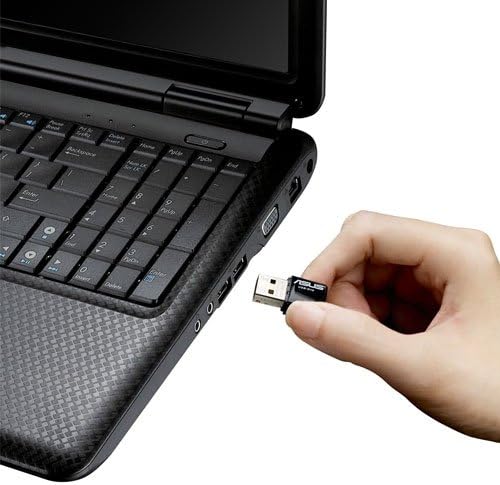
- Sartu egokitzailea: Carefully plug the ASUS USB-N10 adapter into an available USB 2.0 port on your computer. For optimal performance, especially if your computer has USB 3.0 ports, consider using one of those, though the adapter itself is USB 2.0.
- Instalatu kontrolatzaileak:
- Insert the provided driver CD or USB drive into your computer.
- Locate and double-click the 'Setup.exe' file.
- Follow the on-screen instructions to complete the Wi-Fi driver installation. It is recommended to use the manufacturer's drivers for best compatibility and performance.
- Wi-Fi sare batera konektatu:
- Once the drivers are installed, click on the network icon in your system tray (usually in the bottom-right corner of your screen on Windows, or top-right on Mac).
- Hautatu nahi duzun Wi-Fi sarea eskuragarri dauden sareen zerrendatik.
- Sareko segurtasun-gakoa (pasahitza) idatzi eskatzen bazaizu.
- Click 'Connect'. Your computer should now be connected to the Wi-Fi network.

5. Egokitzailearen funtzionamendua
Once installed and connected, the ASUS USB-N10 adapter operates seamlessly in the background, providing wireless internet access. You can manage your wireless connection through your operating system's network settings.
5.1. WPS (Wi-Fi Babestutako Konfigurazioa) erabiltzea
The adapter supports WPS for quick and secure connection to compatible routers. If your router has a WPS button:
- Sakatu hari gabeko bideragailuko WPS botoia.
- Within two minutes, activate the WPS function on your computer. This is typically done through the ASUS utility software installed with the drivers, or via your operating system's network settings.
- The adapter will automatically connect to the router securely.
6. Mantentzea eta Zainketa
- Mantendu garbi: Gently wipe the adapter with a soft, dry cloth to remove dust. Avoid using liquid cleaners.
- Saihestu kalte fisikoak: Handle the adapter with care. Avoid dropping it or exposing it to excessive force, which could damage the USB connector or internal components.
- Kokapen egokiena: For best signal strength, ensure the adapter is not obstructed by other objects or placed in an area with high electromagnetic interference.
- Gidarien eguneraketak: Aldian-aldian egiaztatu ASUSen laguntza weberrendimendu optimoa eta sistema eragilearen azken bertsioekin bateragarritasuna bermatzeko eguneratutako kontrolatzaileen gunea.
7. Arazoak
7.1. No Wireless Connection
- Egiaztatu konexio fisikoa: Ensure the USB-N10 adapter is securely plugged into a functioning USB port.
- Gidariaren instalazioa: Verify that the drivers were installed correctly. You can check this in your computer's Device Manager (Windows) or System Information (Mac). Reinstall drivers if necessary.
- Gaitu Wi-Fi: Ziurtatu zure ordenagailuaren Wi-Fia gaituta dagoela.
- Routerraren egoera: Confirm that your wireless router is powered on and broadcasting a Wi-Fi signal.
7.2. Konexio-abiadura motela
- Seinalearen indarra: Check the signal strength of your Wi-Fi network. Move closer to your wireless router or access point if the signal is weak.
- Interferentzia: Beste gailu elektroniko batzuek (mikrouhin-labeek, telefono haririk gabekoek) interferentziak sor ditzakete. Saiatu hauek gutxitzen edo egokitzailea haietatik urruntzen.
- USB ataka: Ensure the adapter is connected to a USB 2.0 port. While compatible with USB 1.1, performance will be significantly reduced.
- Bideratzailearen ezarpenak: Ensure your router is configured for 802.11n mode for maximum speed.
7.3. Egokitzailea ez da ezagutzen
- Probatu beste USB ataka bat: Test the adapter in a different USB port on your computer.
- Berrabiarazi ordenagailua: Berrabiarazte soil batek askotan konpondu ditzake aitortze arazoak.
- Berriro instalatu kontrolatzaileak: Uninstall any existing drivers for the adapter, restart your computer, and then perform a clean installation of the drivers.
8. Zehaztapenak
| Atributua | Balioa |
|---|---|
| Produktuaren neurriak | 0.67 x 1.18 x 0.35 hazbete |
| Elementuaren pisua | 2.4 ontza |
| Elementuaren eredu-zenbakia | USB-N10 |
| Eskuragarri dagoen lehen data | 26ko martxoaren 2010a |
| Fabrikatzailea | Asus |


9. Bermea eta Laguntza
9.1. Lege-oharra
Actual data throughput and Wi-Fi coverage will vary from network conditions and environmental factors, including the volume of network traffic, building material and construction, and network overhead, resulting in lower actual data throughput and wireless coverage.
9.2. Bezeroarentzako arreta
For technical support, warranty claims, or further assistance, please visit the official ASUS support website or contact their customer service. Refer to the product packaging or the ASUS webwebgunea, kontaktu-informazio eta bermearen xehetasun eguneratuenak lortzeko.


