1. Segurtasun-argibide garrantzitsuak
Please read these instructions carefully before operating the device and retain them for future reference. Failure to follow these instructions may result in electric shock, fire, or other hazards.
- Ez jarri aparatu hau euri edo hezetasunera.
- Ez blokeatu aireztapen-zulorik.
- Ez instalatu bero-iturriren ondoan.
- Erabili soilik fabrikatzaileak zehaztutako eranskinak/osagarriak.
- Deskonektatu tresna hau tximista-ekaitzetan edo denbora luzez erabiltzen ez baduzu.
2. Produktua amaitu daview
The Bernstein RAC20 Designradio is a high-quality audio system featuring a 3D sound system, FM/AM radio, clock, and alarm functions, all housed in an elegant wooden casing with a high-gloss finish.

2.1. irudia: Aurrealdea view of the Bernstein RAC20 Designradio, showing the clock, tuning dial, volume knob, and control buttons.
Ezaugarri nagusiak:
- 3D Sound System for immersive audio experience.
- High-quality FM/AM radio tuner with excellent reception.
- Integrated clock and alarm functions.
- Entzungailuen irteera entzute pribaturako.
- Elegant wooden casing with a piano black high-gloss finish.
- Internet radio reception capability.
3. Paketearen edukia
Ziurtatu elementu guztiak bertan daudela eta egoera onean daudela kutxa irekitzean:
- Bernstein RAC20 Designradio Unit
- Erabiltzailearen eskuliburua (dokumentu hau)
- 3.5 mm-ko audio kablea
4. Konfigurazioa
4.1. Desontziratzea eta kokatzea
- Carefully remove the radio from its packaging.
- Jarri irratia gainazal egonkor eta lau batean, eguzki-argitik, bero-iturrietatik eta hezetasunetik urrun.
- Ziurtatu unitatearen inguruan aireztapen egokia dagoela.
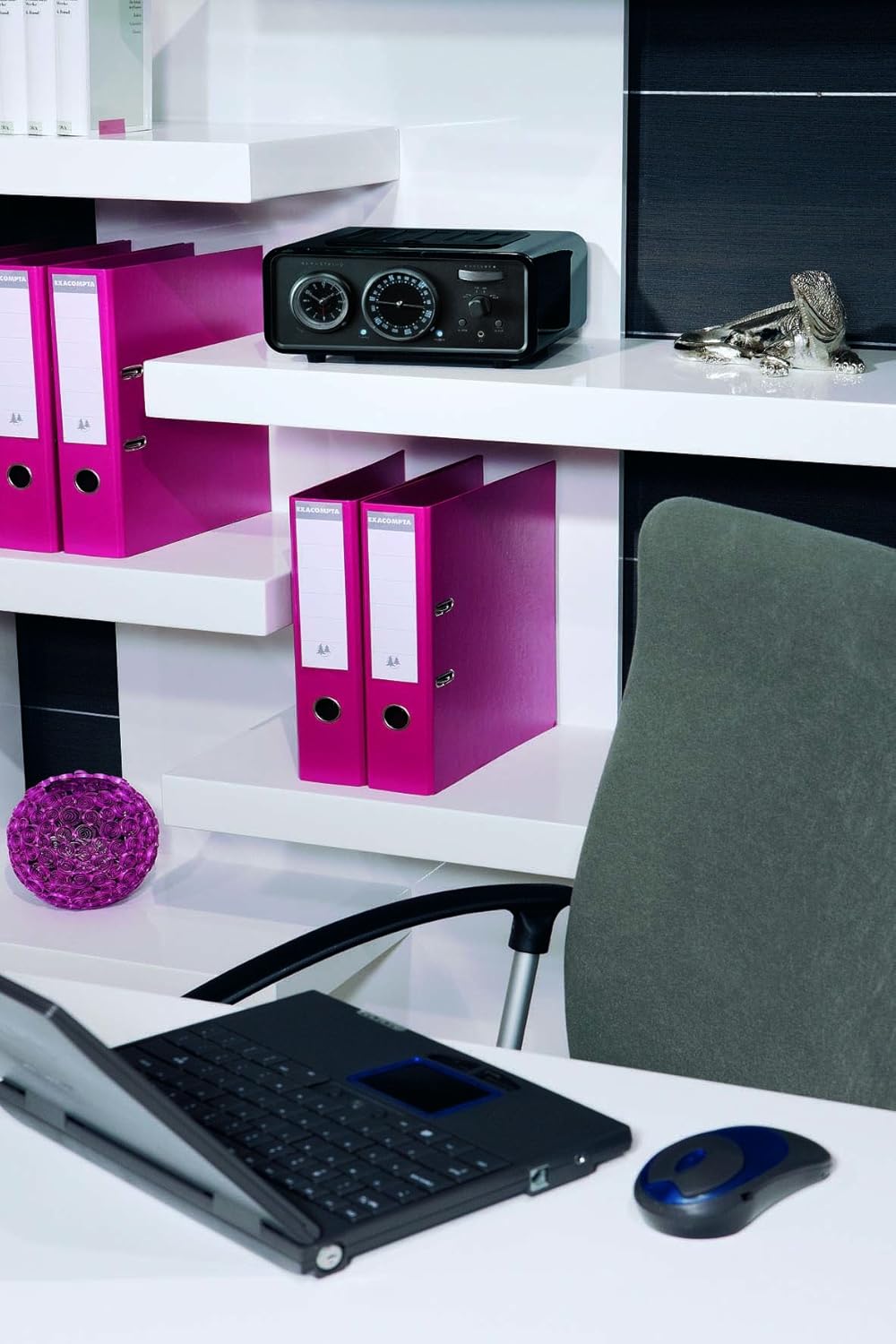
Figure 4.1: The Bernstein RAC20 Designradio positioned on a shelf in an office setting.
4.2. Energia-konexioa
The Bernstein RAC20 is battery-powered. Ensure fresh batteries are inserted into the designated compartment. (Note: Batteries are not included.)
4.3. Antena konexioa
For optimal FM/AM reception, extend the telescopic antenna fully. Adjust its position for the best signal quality.
5. Funtzionamendu-argibideak
5.1. Piztu/Itzaltzea
Sakatu BOTEREA button located on the front panel to turn the radio on or off. A blue indicator light will illuminate when the unit is on.
5.2. Bolumenaren kontrola
Biratu handia. BOLUMENA botoia erlojuaren orratzen noranzkoan bolumena igotzeko eta erlojuaren orratzen kontrako noranzkoan jaisteko.
5.3. Radio Tuning (FM/AM)
- Hautatu nahi duzun banda (FM edo AM) teklak erabiliz. FM/AM etengailua.
- Biratu TUNING dial to search for radio stations. The frequency will be displayed on the dial.
- Adjust the antenna for clearer reception if needed.

Figure 5.1: Close-up of the Bernstein RAC20's front panel, highlighting the tuning and volume controls.
5.4. Erlojua ezartzea
The clock is located on the left side of the front panel. Refer to the specific instructions in the included quick start guide for detailed clock setting procedures, as this model features an analog clock display.
5.5. Alarma ezartzea
To set the alarm, press the ALARMA button. Use the tuning dial or dedicated buttons (if present) to set the desired alarm time. Press ALARMA again to confirm. The alarm can be set to wake you with radio or a buzzer sound.
5.6. Lo Funtzioa
Sakatu LO button to activate the sleep timer. Each press cycles through preset sleep times (e.g., 15, 30, 60, 90 minutes). The radio will automatically turn off after the selected duration.
5.7. AUX sarrera erabiltzea
Connect external audio devices (e.g., smartphone, MP3 player, laptop) to the AUX port using the supplied 3.5mm audio cable. Switch the input selector to AUX to play audio from the connected device.
5.8. Entzungailuen irteera
Plug standard 3.5mm headphones into the headphone jack for private listening. The main speaker will be muted automatically when headphones are connected.
6. Mantentzea
6.1. Garbiketa
Wipe the unit with a soft, dry cloth. Do not use abrasive cleaners, waxes, or solvents as they may damage the high-gloss finish.
6.2. Bateria ordezkatzea
When the sound quality deteriorates or the unit fails to power on, replace the batteries with new ones of the same type. Dispose of old batteries responsibly.
7. Arazoak
| Arazoa | Kausa posiblea | Irtenbidea |
|---|---|---|
| Botererik ez | Bateriak agortuta daude edo gaizki sartuta daude. | Ordeztu bateriak; ziurtatu polaritate zuzena dutela. |
| Irrati-harrera eskasa | Antenna not extended or poorly positioned; weak signal. | Extend and adjust antenna; try moving the unit to a different location. |
| Ez dago soinurik AUXetik | AUX cable not fully connected; incorrect input selected; external device volume too low. | Check cable connections; ensure AUX input is selected; increase volume on external device. |
| Alarma ez da jotzen | Alarma ez dago behar bezala konfiguratuta; bolumena baxuegia da. | Verify alarm settings; increase volume. |
8. Zehaztapenak
| Ezaugarri | Xehetasuna |
|---|---|
| Eredua | Bernstein RAC 20 Piano Black |
| Marka | Bernstein (Manufacturer: Bernstein, Brand listed in specs: Audiovox) |
| Tuner Teknologia | FM, AM |
| Onartutako Irrati Bandak | AM, FM |
| Hardware interfazea | 3.5 mm-ko audioa |
| Gailu bateragarriak | Smartphone, MP3 player, Laptop, Speaker |
| Ezaugarri bereziak | Internet radio reception |
| Energia iturria | Bateriaren bidez |
| Pilak barne | Ez |
| Neurriak (paketea) | 41.4 x 31.4 x 17.4 cm |
| Pisua (Paketea) | 3.9 kg |
| ASIN | B0041GT30M |
| GTIN | 04039684496508 |
9. Bermea eta Laguntza
For warranty information and technical support, please refer to the contact details provided on the product packaging or the official Bernstein webgunea. Gorde erosketaren egiaztagiria bermearen erreklamazioetarako.
For further assistance, you may contact the manufacturer:
Manufacturer: Bernstein
Model: Bernstein RAC 20 Piano Black
ASIN: B0041GT30M


