Sarrera
This manual provides detailed instructions for the proper setup, operation, and maintenance of your Nortek NDVX 2503 DVD Player. Please read this manual thoroughly before using the device to ensure optimal performance and safety. Keep this manual for future reference.
Segurtasun Informazioa
- Energia iturria: Connect the DVD player only to the specified power supply voltage.
- Aireztapena: Ziurtatu aireztapen egokia dagoela unitatearen inguruan. Ez blokeatu aireztapen-irekidurak.
- Ura eta hezetasuna: Do not expose the unit to rain, moisture, or dripping/splashing liquids.
- Beroa: Mantendu unitatea bero-iturrietatik urrun, hala nola erradiadoreetatik, bero-erregistroetatik, sukaldeetatik edo beroa sortzen duten beste aparatu batzuetatik.
- Garbiketa: Garbitu aurretik, deskonektatu unitatea hormako entxufetik. Erabili zapi lehor bat garbitzeko.
- Zerbitzua: Ez saiatu produktu hau zuk zeuk ematen. Bidali zerbitzu guztiak zerbitzu kualifikatuko langileengana.
Paketearen edukia
Egiaztatu behean zerrendatutako elementu guztiak zure paketean sartuta daudela:
- Nortek NDVX 2503 DVD Player
- Urruneko kontrola (pilekin)
- AV kablea (RCA motakoa)
- Erabiltzailearen eskuliburua (dokumentu hau)
- Elikatze kablea
Produktua amaituview
Familiarize yourself with the components and controls of your DVD player.
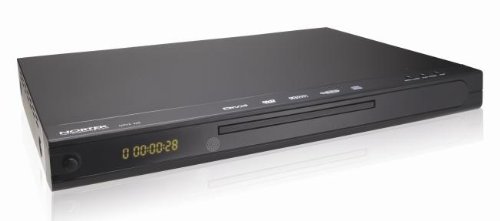
1. irudia: Aurrealdea view of the Nortek NDVX 2503 DVD Player. This image shows the sleek black casing, the central disc tray, the digital display on the left, and control buttons on the right side of the front panel.
Aurreko paneleko kontrolak:
- Pizteko botoia: Unitatea pizten edo itzaltzen du.
- Disko erretilua: Insert your DVD or CD here.
- Pantaila: Shows playback time, track number, and other status indicators.
- Ireki/Itxi botoia: Diskoaren erretilua ireki eta ixten du.
- Erreproduzitu/Pausatu botoia: Starts or pauses disc playback.
- Gelditzeko botoia: Stops disc playback.
- Skip Buttons (Forward/Backward): Hurrengo edo aurreko abestira/kapitulura salto egiten du.
Atzeko panelaren konexioak:
(Note: Specific connections may vary. Common connections include:)
- Audio/Video Output (RCA): Red, White (audio) and Yellow (video) jacks for connecting to a TV or ampbiziagoa.
- Coaxial/Optical Digital Audio Output: For connecting to a home theater receiver for digital audio.
- Potentzia sarrera: Elikatze-kablea konektatzen du.
Konfigurazioa
1. Connecting to a Television:
- Ensure both the DVD player and your television are turned off and unplugged.
- Connect the yellow RCA video cable from the "Video Out" jack on the DVD player to the "Video In" jack on your television.
- Connect the red and white RCA audio cables from the "Audio Out" jacks (Red for Right, White for Left) on the DVD player to the corresponding "Audio In" jacks on your television or audio receiver.
- If using digital audio, connect a coaxial or optical cable from the DVD player's digital audio output to your receiver's digital audio input.
2. Potentzia-konexioa:
- Plug the power cord into the power input on the rear of the DVD player.
- Entxufatu korronte-kablearen beste muturra hormako entxufe batera.
3. Hasierako piztea:
- Turn on your television and select the correct input source (e.g., AV1, Video 1) that corresponds to where you connected the DVD player.
- Press the Power button on the DVD player or its remote control to turn it on.
- The Nortek logo or a setup menu should appear on your TV screen.
Funtzionamendu-argibideak
1. Disc Playback:
- Sakatu IREKI/ITXI aurrealdeko paneleko edo urrutiko aginteko botoia diskoaren erretilua irekitzeko.
- Place a DVD, DVD+R, or Video CD disc gently into the tray with the label side facing up.
- Sakatu IREKI/ITXI botoia berriro erretilua ixteko.
- The player will automatically begin reading the disc. Playback should start shortly. If a menu appears, use the arrow keys on the remote to navigate and the SARTU botoia hautatzeko.
- Erabili JOLASTU/PAUSTU, GELDITU, eta SALTATU buttons on the remote or front panel to control playback.
2. Menuen nabigazioa:
- Erabili GEZIA buttons on the remote control to move through menu options.
- Sakatu SARTU or OK botoia hautaketa berresteko.
- The MENUA button typically returns you to the disc's main menu.
Mantentzea
Unitatea garbitzea:
- Unplug the DVD player from the power outlet before cleaning.
- Use a soft, dry cloth to wipe the exterior of the unit. Do not use liquid cleaners or aerosol sprays.
- Avoid getting dust or debris inside the disc tray mechanism.
Diskoak zaintzea:
- Diskoak ertzetik heldu jotzeko gainazalean hatz-markak ez uzteko.
- Store discs in their cases when not in use to prevent scratches.
- Garbitu disko zikinak oihal leun eta lihorik gabeko batekin, erdialdetik kanporantz garbituz.
Arazoak konpontzea
| Arazoa | Kausa posiblea | Irtenbidea |
|---|---|---|
| Botererik ez | Kable elektrikoa ez dago konektatuta; Entxufea ez dago aktibo. | Ziurtatu kablea ondo konektatuta dagoela. Probatu entxufea beste gailu batekin. |
| Ez dago irudi edo soinurik | AV cables not connected correctly; Incorrect TV input selected. | Check all AV cable connections. Select the correct input source on your TV (e.g., AV1, Video 1). |
| Diskoa ez da erreproduzitzen | Disc is dirty or scratched; Disc inserted incorrectly; Incompatible disc format. | Clean the disc. Ensure the disc is inserted label-side up. Verify the disc is a supported format (DVD, DVD+R, Video CD). |
| Urruneko kontrola ez dabil | Bateriak agortuta edo gaizki sartuta daude; urrutiko agintearen eta erreproduzitzailearen arteko oztopoa. | Replace batteries. Ensure correct battery polarity. Remove any obstructions. Point remote directly at the player's sensor. |
Zehaztapenak
- Marka: Nortek
- Ereduaren izena: NDVX 2503
- Media Types Supported: DVD, DVD+R, Video CD
- ASIN: B0044AL0TM
- Fabrikatzailea: Nortek
- Note: Other specifications such as dimensions, weight, and power consumption are not available in the provided data.
Bermea eta Laguntza
For warranty information or technical support, please refer to the warranty card included with your product or visit the official Nortek webgunea. Gorde erosketaren egiaztagiria berme-erreklamazioetarako.
For further assistance, you may contact Nortek customer service through their official channels.


