Sarrera
The Sharper Image Portable Travel Sound Soother 20 (Model SI601) is designed to provide a relaxing audio environment, assist with sleep, and function as a portable alarm clock. It features 20 digitally-recorded sound environments, an LCD display with time, date, year, and temperature, and a dual-time alarm with snooze. Its compact size and lightweight design make it ideal for travel.

Aurrealdea view of the Sharper Image Travel Sound Soother 20 packaging, highlighting key features.
Paketearen edukia
Mesedez, egiaztatu paketea elementu hauek dituen:
- Sharper Image Portable Travel Sound Soother 20 unit
- Entzungailuak
- Esku-uhala
- Bidaia-poltsa biguna

The Sharper Image Travel Sound Soother 20 unit and accessories as packaged.
Produktua amaituview
The device features a backlit LCD display and front-mounted controls for easy access.

Close-up of the product display and controls, as shown on the packaging.
Kontrolak eta pantaila:
- BISURATZEKO botoia: Toggles backlight, changes temperature unit (°F/°C).
- MODE botoia: Used to set time, date, and alarm.
- TIMER botoia: Sets the auto-shutoff timer.
- BOLUMEN- / BOLUMEN+ botoiak: Bolumena doitzen du.
- Soother Buttons (Up/Down Arrows): Selects sound environments.
- LCD pantaila: Displays time, date, year, temperature, and selected sound.
Konfigurazioa
Bateriaren instalazioa:
- Bilatu bateriaren konpartimentua unitatearen atzealdean.
- Ireki bateriaren konpartimenduaren estalkia.
- Insert 3 AA batteries (not included), ensuring correct polarity (+/-).
- Itxi bateriaren konpartimenduaren estalkia ondo.
Note: For optimal performance, use fresh alkaline batteries. Remove batteries if the unit will not be used for an extended period.
Funtzionamendu-argibideak
Ordua eta data ezartzea:
- Eduki sakatuta MODUA botoia sakatu orduaren pantaila keinuka hasi arte.
- Erabili Boluntario eta VOL+ botoiak ordua doitzeko. Sakatu MODUA baieztatzeko.
- Errepikatu prozesua minutuak, urtea, hilabetea eta eguna ezartzeko.
- Sakatu MODUA berriro ezarpen modutik irteteko.
Alarma ezartzea:
- Sakatu MODUA botoia behin eta berriz sakatu alarmaren ordua bistaratu arte.
- Eduki sakatuta MODUA botoia sakatu alarmaren ordua keinuka hasi arte.
- Erabili Boluntario eta VOL+ buttons to adjust the alarm hour. Press MODUA baieztatzeko.
- Repeat to set alarm minutes.
- Sakatu MODUA to select alarm type (buzzer or sound soother).
- Sakatu MODUA berriro alarma ezartzeko modutik irteteko.
- Alarma aktibatzeko/desaktibatzeko, sakatu MODUA button until the alarm icon appears/disappears.
Note: The alarm features a ramp-up volume and a snooze function. When the alarm sounds, press any button to activate snooze for a short period, or press the MODUA alarma itzaltzeko botoia.
Using the Sound Soother:
- Sakatu Soother Up or Soother Down arrow buttons to cycle through the 20 available sound environments.
- Erabili Boluntario eta VOL+ buttons to adjust the playback volume.
Available Sound Environments:
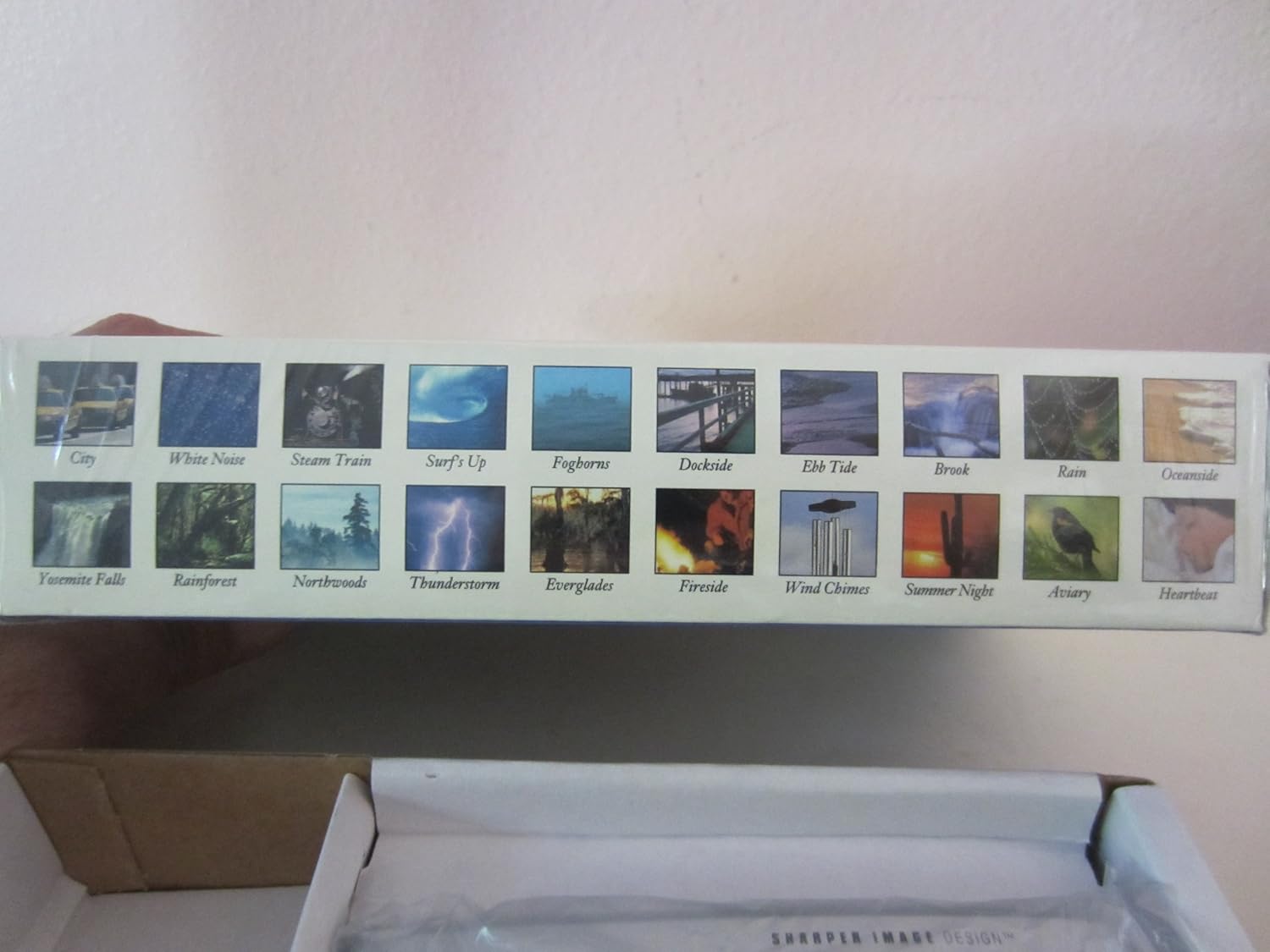
Visual representation of the 20 sound environments available on the device.
- Hiria
- Zarata Zuria
- Lurrun Trena
- Surf's Up
- Foghorns
- Dockside
- Marea Behera
- Erreka
- Euria
- Oceanside
- Yosemite Falls
- Oihana
- Northwoods
- Trumoi-ekaitza
- Everglades
- Sutondoa
- Haize-kanpaiak
- Udako Gaua
- Hegaztitegia
- Bihotz-taupadak
Tenporizadorea erabiltzea:
The unit features an auto-shutoff timer with settings from 15 to 120 minutes.
- While a sound environment is playing, press the tenporizadorea botoia behin eta berriz.
- The display will show the selected timer duration (e.g., 15, 30, 60, 90, 120 minutes).
- Unitatea automatikoki itzaliko da hautatutako denbora igaro ondoren.
Tenperatura bistaratzea:
The LCD displays the ambient temperature.
- Fahrenheit (°F) eta Celsius (°C) artean aldatzeko, sakatu BANTAILUA botoia.
Mantentzea
Garbiketa:
- Garbitu unitatea zapi leun eta lehor batekin.
- Ez erabili garbitzaile edo disolbatzaile urratzailerik.
- Avoid exposing the unit to excessive moisture.
Bateria ordezkatzea:
When the display dims or the unit functions erratically, it is time to replace the batteries. Follow the battery installation steps outlined in the Setup section.
Arazoak konpontzea
| Arazoa | Irtenbidea |
|---|---|
| Unitatea ez da pizten. | Egiaztatu bateriaren polaritatea. Ordeztu AA bateria berriekin. |
| Pantaila ilun edo hutsik dago. | Replace batteries. Ensure batteries are correctly inserted. |
| Soinua distortsionatua edo baxuegia/altuegia da. | Doitu bolumena erabiliz Boluntario eta VOL+ buttons. Ensure earbuds are properly connected if used. |
| Alarmak ez du jotzen. | Ensure the alarm is activated (alarm icon visible on display). Check alarm time settings. |
Zehaztapenak
- Eredua: SI601
- Energia iturria: 3 x AA bateria (ez dago barne)
- Neurriak: Approximately 4 7/8" (W) x 2 3/4" (H) x 1 1/3" (D)
- Pisua: Approximately 6 oz (without batteries)
- Pantaila: Atzeko argiztatutako LCDa
- Soinu-inguruneak: 20 digitally-recorded sounds
- Tenporizadorea: 15, 30, 60, 90, 120 minutes auto-shutoff
- Ezaugarriak: Dual-time alarm clock, thermometer (°F/°C), date, year display
Bermea eta Laguntza
For warranty information or technical support, please refer to the warranty card included with your product or contact Sharper Image customer service directly. Keep your purchase receipt as proof of purchase.
For further assistance, please visit the official Sharper Image webgunera edo jarri harremanetan haien bezeroarentzako arreta-telefonora.