1. Sarrera
Thank you for choosing the Coby SNAPP CAM3002 Mini Camcorder. This compact device is designed for easy video recording and photo capture, offering portability and user-friendly operation. This manual provides detailed instructions to help you set up, operate, and maintain your camcorder effectively.
2. Paketearen edukia
Mesedez, egiaztatu paketea elementu hauek dituen:
- Coby SNAPP CAM3002 Mini Camcorder
- 2 x AA pila alkalinoak
- TV Connection Cable (RCA/Composite Video Cable)
- Muvee Software (on CD or via download link)
- Erabiltzailearen eskuliburua (dokumentu hau)
3. Camcorder Overview
Familiarize yourself with the main components of your Coby SNAPP CAM3002 Mini Camcorder:
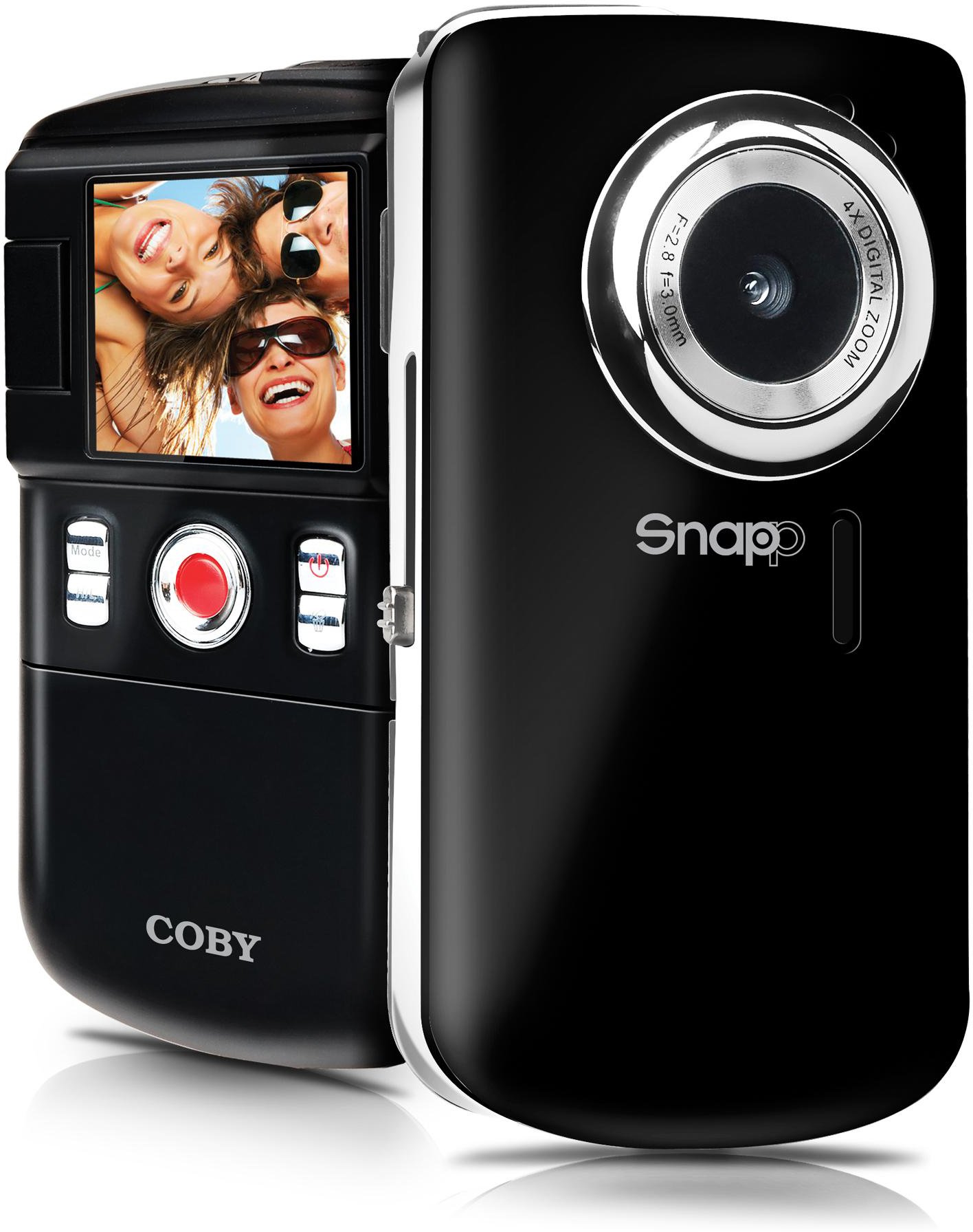
This image displays the front of the Coby SNAPP CAM3002 Mini Camcorder. Visible features include the camera lens, a small microphone opening, and several control buttons on the side, indicating its compact and portable design.
- Kameraren lentea: Bideoak eta irudi finkoak grabatzen ditu.
- Mikrofonoa: Bideoa grabatzen ari den bitartean audioa grabatzen du.
- 1.8 hazbeteko LCD pantaila: Displays menus, live view, and playback. This screen can flip out for self-portraits.
- Kontrol-botoiak: For power, mode selection, recording, photo capture, and navigation.
- Bateriaren konpartimendua: Holds 2 AA alkaline batteries.
- SD/SDHC txartelaren zirrikitua: For inserting a memory card (up to 16GB).
- Integrated USB Plug: For direct connection to a computer for file transfer and charging (if rechargeable batteries are used).
- TV Out Port: For connecting to a television using the included cable.
4. Konfigurazioa
4.1. Pilak instalatzea
- Locate the battery compartment cover on the camcorder.
- Irristatu edo altxatu estalkia irekitzeko.
- Sartu bi (2) AA pila alkalino, konpartimentuaren barruan adierazten den polaritate zuzena (+/-) ziurtatuz.
- Itxi bateriaren konpartimenduaren estalkia ondo.
4.2. Memoria Txartela sartzea
The camcorder requires an SD or SDHC memory card (up to 16GB) to store videos and photos.
- Locate the SD/SDHC card slot on the camcorder.
- Insert the memory card with the metal contacts facing down (or as indicated by a diagram near the slot) until it clicks into place.
- To remove the card, gently push it in until it clicks, then release, and it will eject slightly.
4.3. Piztu/Itzaltzea
- To power on, press and hold the Power button until the LCD screen illuminates.
- To power off, press and hold the Power button again until the screen turns off. The camcorder may also power off automatically after a period of inactivity to conserve battery life.
5. Bideo-kameraren funtzionamendua
5.1. Modu hautaketa
Use the Mode button to switch between the following functions:
- Bideoa grabatzeko modua: For capturing moving images with sound.
- Argazki finkoen modua: For taking single photographs.
- Erreprodukzio modua: Berrirakoviewing recorded videos and photos.
5.2. Bideoa grabatzea
- Aldatu bideoa grabatzeko modura.
- Frame your subject using the 1.8-inch LCD screen. The screen can be flipped out for self-recording.
- Press the Record/Capture button to start recording. A red indicator or timer will appear on the screen.
- Press the Record/Capture button again to stop recording.
5.3. Argazkiak ateratzea
- Aldatu Argazki finko modura.
- Enkoadratu zure subjektua LCD pantaila erabiliz.
- Press the Record/Capture button to take a photo. The image will be saved to the memory card.
5.4. Erreprodukzioa
- Aldatu erreprodukzio modura.
- Erabili nabigazio botoiak grabatutako bideo eta argazkietan arakatzeko.
- Press the Record/Capture button to play a video or view argazki bat pantaila osoan.
5.5. Telebistara konektatzea
Ahal duzu view your recorded content on a larger screen using the included TV connection cable.
- Ensure both the camcorder and the television are powered off.
- Connect one end of the TV connection cable to the TV Out port on the camcorder.
- Connect the other end of the cable to the corresponding video (yellow) and audio (white) input jacks on your television.
- Power on the television and select the correct AV input source.
- Power on the camcorder and switch to Playback Mode to view zure komunikabideak.
5.6. Transferitzea Files Ordenagailu batera
The camcorder features an integrated USB plug for easy file transferentzia.
- Ziurtatu kamera piztuta dagoela.
- Extend the integrated USB plug from the camcorder.
- Plug the camcorder directly into an available USB port on your computer (Mac or PC).
- Your computer should recognize the camcorder as a removable storage device. You can then access the files (videos and photos) and copy them to your computer.
5.7. Using Muvee Software
The included Muvee software is designed to help you edit your videos and photos, and facilitate uploading them to online platforms.
- Install the Muvee software on your computer using the provided CD or download link.
- Follow the software's on-screen instructions for editing and sharing your media.
6. Mantentzea
6.1. Garbiketa
- Use a soft, dry cloth to clean the exterior of the camcorder.
- For the lens and LCD screen, use a specialized lens cleaning cloth and solution to avoid scratches.
- Ez erabili produktu kimiko gogorrik edo garbigailu urratzailea.
6.2. Biltegiratzea
- Denbora luzez erabiltzen ez duzunean, kendu bateriak isuriak saihesteko.
- Store the camcorder in a cool, dry place, away from direct sunlight and extreme temperatures.
7. Arazoak
Zure kamerarekin arazoak badituzu, jo ezazu honako arazo eta irtenbide ohikoenei:
| Arazoa | Irtenbide posiblea |
|---|---|
| Bideokamerak ez du pizten. | Check if batteries are correctly inserted and fully charged. Replace with fresh AA alkaline batteries if necessary. |
| Poor video or photo quality. | Ensure sufficient lighting in the environment. Hold the camcorder steady during recording/capture. Clean the lens if it appears smudged. |
| Ezin da transferitu files ordenagailura. | Ensure the camcorder is powered on and correctly connected via the integrated USB plug. Try a different USB port on your computer. Verify your computer's operating system recognizes the device. |
| Bateriaren iraupen laburra. | Use fresh, high-quality AA alkaline batteries. Reduce screen brightness if possible (check settings). |
| Memoria txartelaren errorea. | Ensure the memory card is correctly inserted. Try reformatting the card (this will erase all data). Try a different compatible SD/SDHC card. |
8. Zehaztapenak
| Ezaugarri | Zehaztapena |
|---|---|
| Ereduaren izena | CAM3002 |
| Bistaratzea | 1.8-inch Full-color LCD Electronic Viewfinder (flips out) |
| Bideo Ebazpena | 480p (640x480) |
| Still Photo Resolution | 0.3 MP |
| Zoom digitala | 4x |
| Biltegiratze euskarria | SD/SDHC Memory Card (up to 16GB) |
| Konektibitatea | Integrated Hi-speed USB 2.0 plug, TV Out (RCA) |
| Energia iturria | 2 x AA pila alkalinoak |
| Onartua File Formatuak | Video: MP4, Photo: JPEG |
| Ezaugarri bereziak | Built-in speaker, Muvee software included |
9. Bermea eta Laguntza
Coby products are manufactured to high-quality standards. This product is covered by a limited warranty against defects in materials and workmanship. Please refer to the warranty card included with your purchase for specific terms and conditions.
For technical support or customer service inquiries, please visit the official Coby website or contact their customer support line. Keep your purchase receipt as proof of purchase for warranty claims.


