Sarrera
This manual provides essential instructions for the safe and efficient operation of your I-TEC T2404 Universal Wireless Bluetooth Portable Sound System (Model BTO-SPEAKRST). Please read this manual thoroughly before using the device and retain it for future reference.
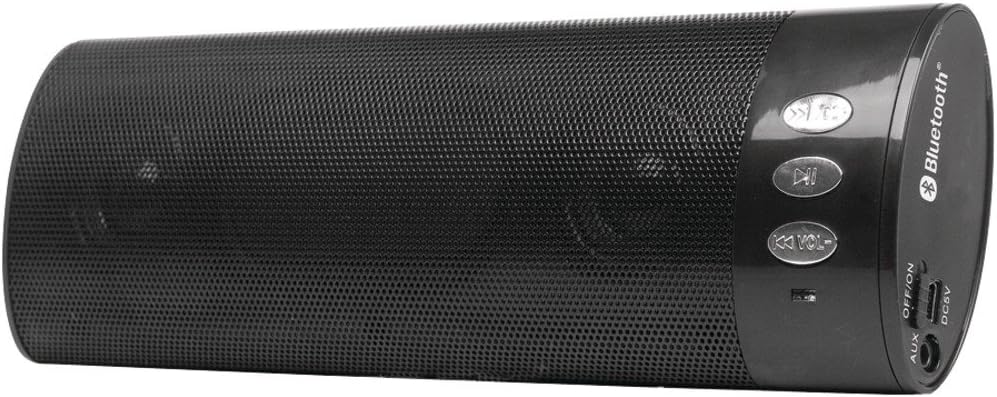
1. irudia: I-TEC T2404 Universal Wireless Bluetooth Portable Sound System. This image shows the cylindrical black speaker with a perforated metal grille, control buttons on one end, and input/output ports on the other end.
Konfigurazioa
1. Deskargatzea
Carefully remove the sound system from its packaging. Verify that all components are present. If any items are missing or damaged, contact your retailer.
2. Gailua piztea
The I-TEC T2404 is powered via a DC 5V input. Connect a standard USB power adapter (not included) to the DC5V port on the speaker using a compatible USB cable. Ensure the power source provides 5V DC.
3. Piztu/Itzali
Locate the "OFF/ON" switch on the side panel of the speaker. Slide the switch to the "ON" position to power on the device. Slide it to the "OFF" position to power off.
2. irudia: Close-up of the control panel and ports. This image highlights the buttons for track control and volume, the Bluetooth logo, and the AUX, OFF/ON switch, and DC5V ports on the side of the speaker.
Funtzionamendu-argibideak
1. Bluetooth parekatzea
- Ensure the speaker is powered on. It will automatically enter Bluetooth pairing mode, indicated by a flashing LED light (location not specified in product data, assume standard behavior).
- Activate Bluetooth on your mobile device (smartphone, tablet, computer).
- Bilatu available Bluetooth devices. The speaker will appear as "I-TEC T2404" or a similar name.
- Select the speaker from the list to pair. A confirmation tone or steady LED light will indicate successful pairing.
- Once paired, you can play audio from your device through the speaker.
2. AUX sarreraren funtzionamendua
AUX sarrera erabiltzeko:
- Konektatu 3.5 mm-ko audio-kable baten mutur bat (ez dago barne) bozgorailuaren AUX atakara.
- Connect the other end of the 3.5mm audio cable to the headphone jack or audio output of your external audio device.
- The speaker should automatically switch to AUX mode. If not, ensure no Bluetooth device is actively connected or try cycling the power.
3. Kontrol-botoiak
The speaker features several control buttons:
- Erreproduzitu/Pausatu botoia: Sakatu audio erreprodukzioa erreproduzitzeko edo pausatzeko.
- Previous Track / Volume Down (K<< VOL-): Press briefly to skip to the previous track. Press and hold to decrease the volume.
- Next Track / Volume Up (>>K VOL+): Press briefly to skip to the next track. Press and hold to increase the volume.
Mantentzea
1. Garbiketa
Wipe the exterior of the speaker with a soft, dry cloth. Do not use abrasive cleaners, waxes, or solvents as they may damage the finish. Avoid getting moisture into any openings.
2. Biltegiratzea
When not in use for extended periods, store the speaker in a cool, dry place, away from direct sunlight and extreme temperatures. Disconnect it from the power source.
Arazoak konpontzea
| Arazoa | Kausa posiblea | Irtenbidea |
|---|---|---|
| Botererik ez | Speaker is off; power cable not connected; power source issue. | Ensure the "OFF/ON" switch is in the "ON" position. Verify the DC5V power cable is securely connected to a working power source. |
| Ezin da Bluetooth bidez parekatu | Speaker not in pairing mode; Bluetooth disabled on device; device too far; interference. | Ensure the speaker is on and in pairing mode (flashing LED). Enable Bluetooth on your device. Move the device closer to the speaker. Turn off other Bluetooth devices to reduce interference. |
| Soinurik ez | Volume too low; incorrect input mode; audio source issue. | Increase the volume on both the speaker and your connected device. Ensure the correct input mode (Bluetooth or AUX) is active. Check if the audio source is playing correctly. |
| Soinuaren distortsioa | Volume too high; weak Bluetooth signal; damaged audio cable. | Reduce the volume. Move the Bluetooth device closer to the speaker. If using AUX, try a different audio cable. |
Zehaztapenak
- Marka: i-tek
- Eredua: BTO-SPEAKRST (T2404 Series)
- Konektibitate Teknologia: Bluetooth, Haririk gabekoa
- Bozgorailuaren konexioa: Bluetootha
- Ezaugarri bereziak: Eramangarria
- Wattage: 4 watt
- Muntatze mota: Mahaigaina
- Potentzia sarrera: DC 5V (via USB)
- Elementuaren pisua: 268 g
- Paketearen neurriak: 23.62 x 9.4 x 4.57 cm
- Lehenengo data eskuragarri: 29eko abuztuaren 2022n
Bermea eta Laguntza
For warranty information or technical support, please refer to the documentation provided with your purchase or visit the official i-tec webgunea. Gorde erosketaren egiaztagiria bermearen erreklamazioetarako.


