Sarrera
Eskerrik asko erosketagatik.asing the Sanyo DC-AS 1500 DX Home Cinema 2 (Stereo) System. This manual provides essential information for the safe and efficient operation of your new system. Please read this manual thoroughly before using the product and retain it for future reference.
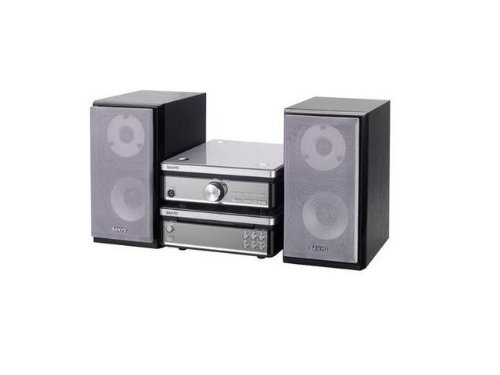
Image: The Sanyo DC-AS 1500 DX Home Cinema System, featuring the main unit and two stereo speakers.
Segurtasun Informazioa
Funtzionamendu segurua bermatzeko eta kalteak saihesteko, jarraitu neurri hauek:
- Energia iturria: Connect the system only to an AC outlet of the voltage unitatean zehaztuta.
- Aireztapena: Ez blokeatu aireztapen-irekidurak. Ziurtatu nahikoa leku dagoela unitatearen inguruan aire-fluxu egokia izan dadin.
- Ura eta hezetasuna: Ez jarri unitatea euripean, hezetasunean edo tantaka/zipriztinetan. Ez jarri likidoz betetako objekturik, hala nola loreontziak, unitatearen gainean.
- Beroa: Mantendu unitatea bero-iturrietatik urrun, hala nola erradiadoreetatik, bero-erregistroetatik, sukaldeetatik edo beste aparatu batzuetatik (adibidez, ampberoa sortzen duten argitzaileak).
- Garbiketa: Unplug the unit from the wall outlet before cleaning. Use a soft, dry cloth only. Do not use liquid cleaners or aerosol cleaners.
- Zerbitzua: Ez saiatu produktu hau zuk zeuk ematen. Bidali zerbitzu guztiak zerbitzu kualifikatuko langileengana.
Konfigurazioa
1. Desontziratzea eta kokatzea
Carefully remove all components from the packaging. Place the main unit on a stable, level surface with good ventilation. Position the two stereo speakers equidistant from your primary listening position for optimal sound.
2. Bozgorailuaren konexioa
- Identify the speaker terminals on the rear of the main unit (typically color-coded or labeled 'L' for Left and 'R' for Right).
- Connect the speaker wires from each speaker to the corresponding terminals on the main unit. Ensure correct polarity (+ to + and - to -) for optimal sound quality.
3. Energia-konexioa
After all audio connections are made, plug the power cord of the main unit into a suitable AC wall outlet.
Funtzionamendu-argibideak
1. Basic Playback (CD/DVD/DivX/Video CD)
- Sakatu BOTEREA sistema pizteko botoia.
- Sakatu IREKI/ITXI aurrealdeko paneleko edo urrutiko aginteko botoia diskoaren erretilua irekitzeko.
- Place a CD, DVD, DivX, or Video CD disc gently into the tray with the label side facing up.
- Sakatu IREKI/ITXI button again to close the disc tray. The system will automatically begin playback or display a menu.
- Erabili JOLASTU/PAUSTU, GELDITU, SALTATU (forward/backward), and BILATU buttons on the remote control or front panel to manage playback.
2. Bolumenaren kontrola
Doitu bolumena BOLUMENA +/- buttons on the remote control or the volume knob on the main unit.
3. Sarrera-iturria hautatzea
If your system has multiple input options (e.g., AUX, USB), use the ITURRIA or FUNTZIOA button on the remote control or main unit to cycle through available input sources.
Mantentzea
1. Unitatea garbitzea
Wipe the exterior surfaces of the main unit and speakers with a soft, dry, lint-free cloth. Do not use abrasive cleaners, waxes, or solvents as they may damage the finish. For stubborn stains, lightly dampBusti oihal bat urarekin eta gero berehala lehortu.
2. Diskoen zaintza
Handle discs by their edges. Keep discs clean and free of scratches. Store discs in their cases when not in use to prevent dust and damage.
Arazoak konpontzea
If you experience problems with your system, refer to the following common issues and solutions:
- Potentziarik gabe:
- Ensure the power cord is securely plugged into both the unit and the wall outlet.
- Check if the wall outlet is functioning by plugging in another appliance.
- Soinurik ez:
- Verify that the speakers are correctly connected to the main unit with correct polarity.
- Handitu bolumen-maila.
- Ziurtatu sarrera-iturri zuzena hautatuta dagoela.
- Check if headphones are connected, which might mute the speakers.
- Disc Not Playing / Disc Error:
- Ensure the disc is clean and free of scratches or smudges. Wipe gently from the center outwards with a soft cloth.
- Verify that the disc type (CD, DVD, DivX, Video CD) is supported by the system.
- Saiatu beste disko batekin arazoa diskoarekin edo erreproduzitzailearekin den zehazteko.
Zehaztapenak
| Ezaugarri | Zehaztapena |
|---|---|
| Ereduaren izena | DC-AS 1500 DX |
| Marka | Sanyo |
| Bozgorailuaren konfigurazioa | 2 (estereoa) |
| Wattage | 30 watt |
| Onartutako euskarri motak | CD, DVD, DivX, Video CD |
| ASIN | B0055ZKOBK |
| Eskuragarri dagoen lehen data | 21ko otsailaren 2020a |
Bermea eta Laguntza
Specific warranty details for the Sanyo DC-AS 1500 DX Home Cinema System are not provided in this manual. For warranty information, technical support, or service inquiries, please refer to the warranty card included with your purchase or contact Sanyo customer support directly. Contact information can typically be found on the manufacturer's official webgunea edo produktuaren ontziak.


