Produktua amaituview
The Technics ST-K55 is a Stereo Synthesizer Digital AM/FM Tuner designed for integration with digital amplifier systems. It offers precise radio reception and a range of features for convenient listening.

1. irudia: Aurrealdea view of the Technics ST-K55 tuner, showing the display and control buttons.

2. irudia: Top-down perspective of the Technics ST-K55 tuner, highlighting its compact design.
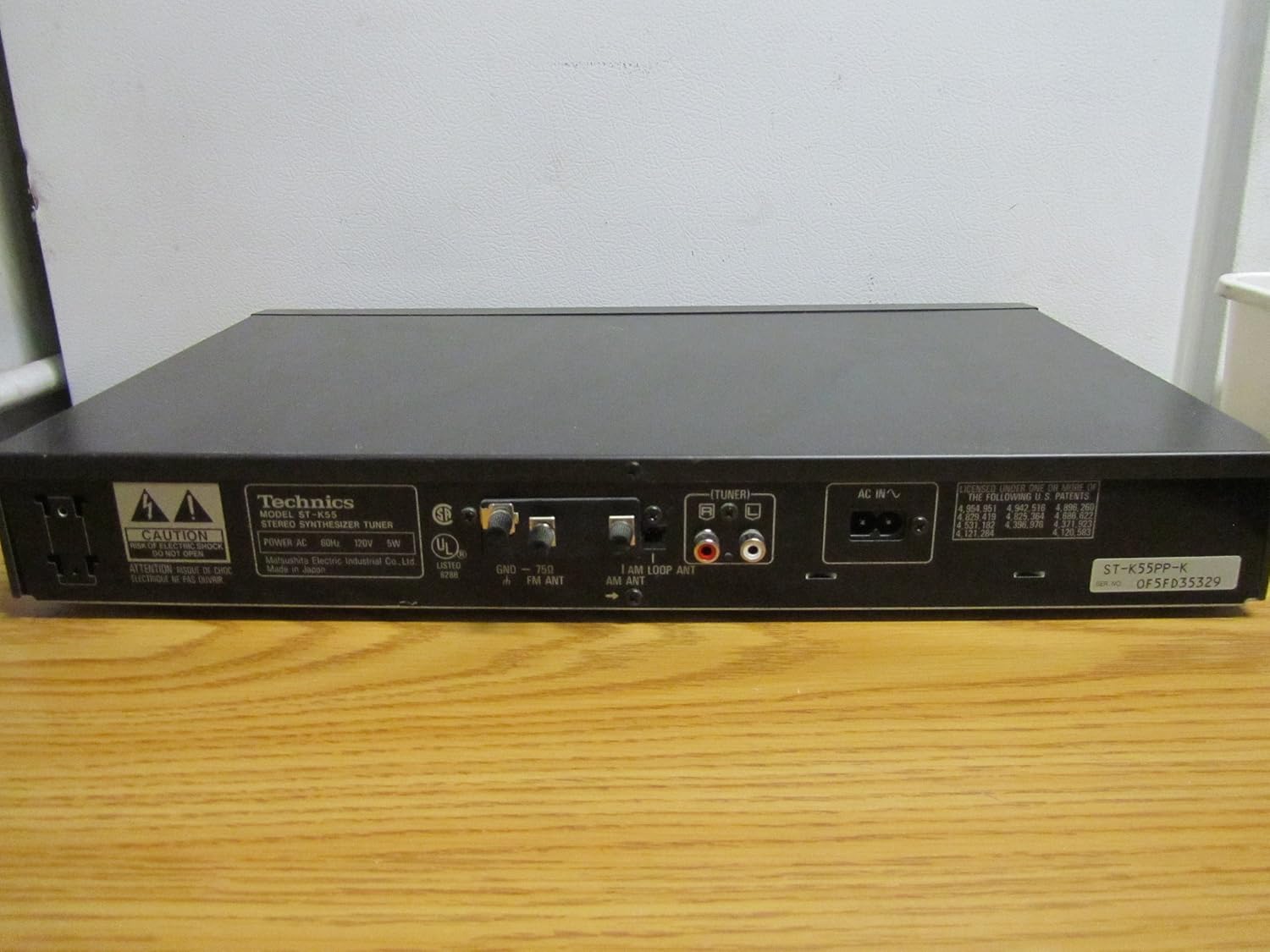
3. irudia: Rear panel of the Technics ST-K55 tuner, displaying audio output jacks and antenna connections.
Ezaugarri nagusiak
- 30 Programmable AM-FM Stereo Stations: Allows for quick access to your favorite radio frequencies.
- Automatic Radio Station Search and Programming: Simplifies the process of finding and storing available stations.
- Manual Radio Station Search and Programming: Provides precise control for tuning into specific frequencies.
Konfigurazioa
1. Deskargatzea
Carefully remove the ST-K55 tuner from its packaging. Ensure all components are present, including the main unit and any supplied accessories (e.g., AM loop antenna, FM wire antenna).
2. Kokapen
Place the tuner on a stable, flat surface, away from direct sunlight, heat sources, and excessive dust. Ensure adequate ventilation around the unit.
3. Konexioak
Aipatu 3. irudia for a visual guide to the rear panel connections.
- Audio irteera: Connect the audio output jacks (RCA L/R) of the ST-K55 to an available audio input on your amplifier or receiver using appropriate RCA cables.
- AM antena: Connect the supplied AM loop antenna to the AM antenna terminals. Position the loop antenna for optimal reception.
- FM Antena: Connect the supplied FM wire antenna to the FM antenna terminal. Extend the wire antenna fully and position it for best FM reception. For improved FM reception, a 75-ohm coaxial cable can be connected to the FM 75Ω coaxial terminal.
- Potentzia: Konektatu korronte alternoko kablea hormako hartune estandar batera.
Funtzionamendu-argibideak
1. Piztu/Itzali
Sakatu BOTEREA button on the front panel to turn the tuner on or off.
2. Selecting Band (AM/FM)
Sakatu FM MODUA or AM MODUA button to switch between FM and AM bands.
3. Doitze moduak
- Sintonizazio automatikoa: Sakatu AUTO TUNE button. The tuner will automatically scan and stop at the next available strong station.
- Eskuzko sintonizazioa: Erabili TUNING UP/DOWN buttons to manually adjust the frequency. Press briefly for step-by-step tuning, or hold down for continuous scanning.
4. Programming Stations (Presets)
The ST-K55 allows you to store up to 30 AM/FM stations as presets.
- Tune to the desired station using automatic or manual tuning.
- Sakatu MEMORIA button. The preset number display will flash.
- Within a few seconds, use the PRESET UP/DOWN botoiak nahi duzun aurrezarpen zenbakia hautatzeko (1-30).
- Sakatu MEMORIA button again to confirm and store the station.
5. Aurrez ezarritako geltokiak gogoratzea
Sakatu PRESET UP/DOWN buttons to cycle through your stored stations.
Mantentzea
1. Garbiketa
To clean the exterior of the tuner, use a soft, dry cloth. For stubborn marks, slightly dampGarbitu oihal bat urarekin eta detergente leun batekin, eta gero lehortu berehala. Ez erabili garbitzaile urratzailerik, disolbatzailerik edo alkoholik, hauek akabera kaltetu baitezakete.
2. Biltegiratzea
If storing the unit for an extended period, disconnect it from the power outlet and store it in a cool, dry place, away from direct sunlight and extreme temperatures.
Arazoak konpontzea
If you experience issues with your Technics ST-K55 tuner, consult the table below before seeking professional service.
| Arazoa | Kausa posiblea | Irtenbidea |
|---|---|---|
| Botererik ez | Kable elektrikoa ez dago ondo konektatuta. | Egiaztatu kablearen konexioa unitatera eta hormako entxufera. |
| Soinurik ez edo soinu ahula | Audio kablearen konexio okerra. Amplifier input not selected correctly. Antena ez dago behar bezala konektatuta edo kokatuta. | Ensure audio cables are securely connected to the correct input on your ampbiziagoa. Hautatu sarrera-iturri zuzena zure ampbiziagoa. Check antenna connections and adjust position for better reception. |
| Poor reception (static, weak signal) | Antenna issues. Beste gailu elektroniko batzuek eragindako interferentziak. Unitatearen kokapena. | Adjust antenna position. Consider an external antenna for improved reception. Move the tuner away from other electronic devices. Relocate the unit to an area with better signal strength. |
| Cannot program stations | Programazio-urrats okerrak. | Review the "Programming Stations" section in this manual and follow the steps carefully. |
Zehaztapenak
| Ezaugarri | Xehetasuna |
|---|---|
| Marka | Teknikak |
| Eredua | ST-K55 |
| Sintonizatzaile mota | Stereo Synthesizer Digital AM/FM Tuner |
| Programmable Stations | 30 (AM/FM) |
| Konektibitate Teknologia | Auxiliary, USB (Note: USB connectivity typically refers to modern devices. For this vintage tuner, it likely refers to compatibility with systems that might use USB for other components, not direct USB audio from the tuner itself. The primary audio output is RCA.) |
| Energia iturria | Kable elektrikoa |
| Elementuaren pisua | 5 libra (gutxi gorabehera 2.27 kg) |
| Paketearen neurriak | 18 x 11 x 2 hazbete (gutxi gorabehera 45.7 x 27.9 x 5.1 cm) |
Oharra: zehaztapenak aldatu egin daitezke, jakinarazi gabe.
Bermea eta Laguntza
For information regarding warranty coverage and technical support for your Technics ST-K55 tuner, please refer to the original purchase documentation or contact Technics customer service directly.
Ofizialki ere bisita dezakezu Technics Store on Amazon produktuari buruzko informazio eta baliabide gehigarrietarako.


