1. Produktua amaitu daview
The Mitel MiVoice 5304 IP Phone is a compact and cost-effective entry-level display phone designed for various environments such as hotel rooms, university dorms, classrooms, and retail spaces. It provides essential communication features and integrates seamlessly with Mitel IP-based communication platforms.
This phone supports both MiNet and SIP protocols, offering flexibility in deployment. It features a backlit display, two lines with LED indication, and programmable keys for enhanced functionality.
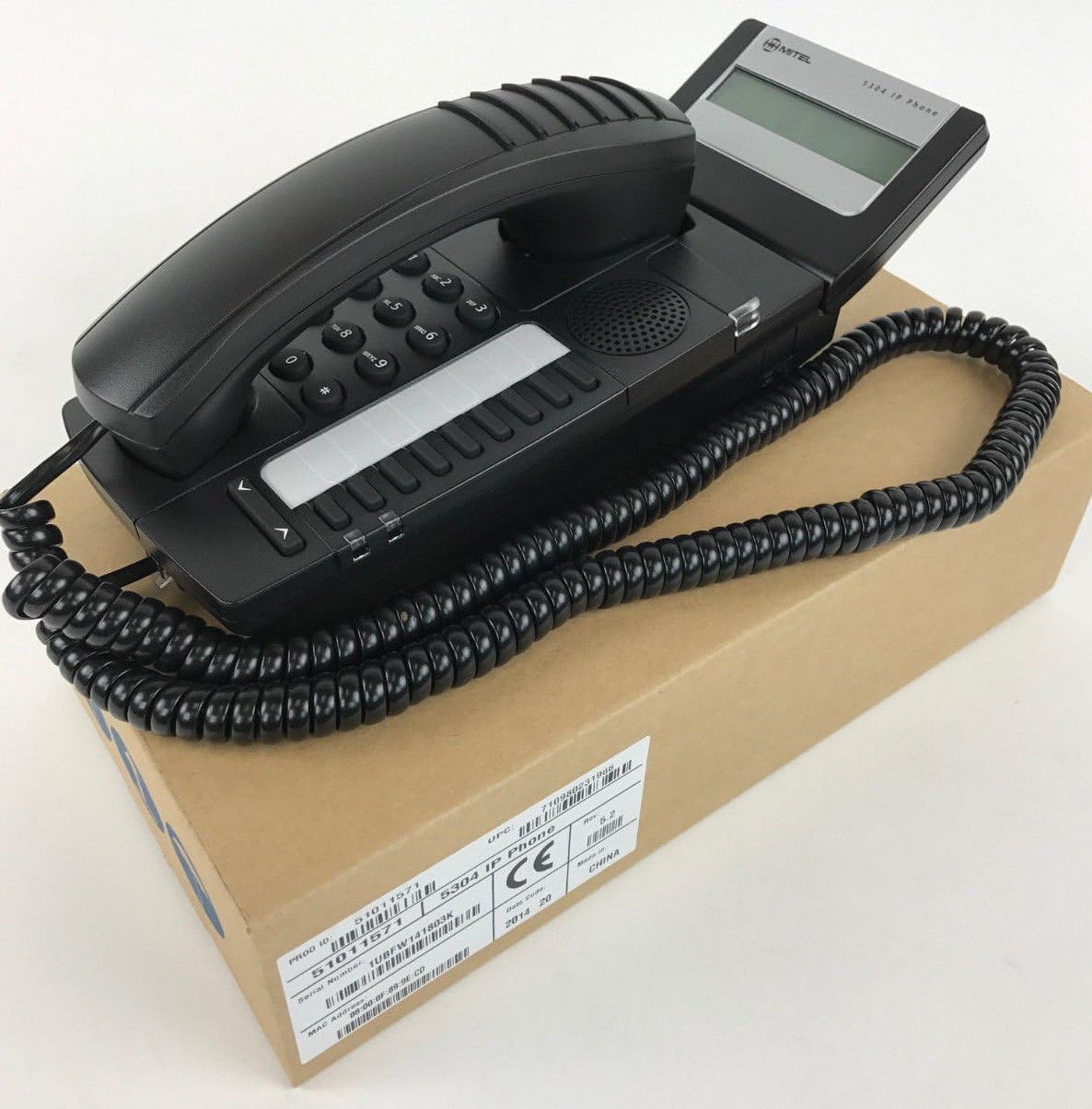
Figure 1: Mitel MiVoice 5304 IP Phone. This image shows the black IP phone with its coiled handset cord, resting on a brown cardboard box. The phone features a numeric keypad, several function buttons, and a small display screen.
2. Ezaugarri nagusiak
- Pantaila: Two x 20 character backlit display with auto-dimming.
- Lerroak: Two lines with LED indication (one prime line, one programmable key).
- Tekla programagarriak: Eight programmable keys for speed dials, feature access codes, paging, conferencing, voicemail access, etc.
- Orria: Paging and page receive capability, including direct page and group page support.
- Modu bikoitzeko laguntza: Compatible with both MiNet and SIP protocols.
- Adierazle bisualak: Incoming call visual indication and message waiting indication.
- Audio kontrolak: Adjustable volume and ringing controls.
- Muntaketa: Wall-mountable (optional accessory may be required).
- Elikadura: Multiple powering options, including 802.3af compliant Power over Ethernet (PoE).
- Irisgarritasuna: ADA-compliant (HAC handset).
- Diseinu trinkoa: Small footprint (approximately 26.5 cm x 10 cm or 10.5 x 4 inches).
- Energia eraginkorra: Designed for power conservation to reduce overall energy consumption.
3. Konfigurazioa eta instalazioa
3.1 Paketearen edukia
Hasi aurretik, ziurtatu osagai guztiak daudela:
- Mitel MiVoice 5304 IP Phone unit
- Telefonoa
- Telefonoaren kablea harilkatua
- Ethernet kablea
- (Optional) Power adapter if PoE is not used
3.2 Telefonoa konektatzea
- Konektatu telefonoa: Plug one end of the coiled handset cord into the handset and the other end into the handset port on the phone base.
- Konektatu sarera: Connect one end of the Ethernet cable to the LAN port on the back of the phone and the other end to an active network port (e.g., a wall jack or network switch). If using Power over Ethernet (PoE), the phone will power on automatically.
- Konektatu energia (PoE erabiltzen ez baduzu): If your network does not provide PoE, connect an optional Mitel-approved power adapter to the power port on the phone and then to a standard electrical outlet.
- Hasierako abiaraztea: The phone will power on and begin its boot-up sequence. This may take a few moments as it obtains an IP address and registers with your communication system.
3.3 Horman muntatzea (aukerakoa)
The Mitel 5304 IP Phone can be wall-mounted. An optional wall-mount kit (sold separately) may be required. Follow the instructions provided with the wall-mount kit for proper installation.
4. Funtzionamendu-argibideak
4.1 Deiak egitea eta erantzutea
- Dei bat egiteko:
- Altxa telefonoa edo sakatu Hizlaria botoia.
- Markatu nahi duzun zenbakia teklatua erabiliz.
- Sakatu Markatu or Bidali button (if available) or wait for the call to connect automatically.
- Dei bati erantzuteko:
- Altxatu telefonoa edo sakatu keinuka ari den linea-botoia edo Hizlaria botoia.
- Dei bat amaitzeko:
- Jarri telefonoa bertan behera edo sakatu tekla Amaitu deia or Hizlaria botoia.
4.2 Tekla programagarriak erabiltzea
The Mitel 5304 features eight programmable keys. Their functions are typically configured by your system administrator and can include:
- Speed Dial numbers
- Access to specific features (e.g., Call Forward, Do Not Disturb)
- Paging functions
- Voicemail access
- Hitzaldia
To use a programmable key, simply press the button corresponding to the desired function.
4.3 Bolumena doitzea
Use the volume control buttons (usually located below the keypad or on the side of the phone) to adjust the handset, speakerphone, or ringer volume. Press the + botoia bolumena igotzeko eta - bolumena jaisteko botoia.
4.4 Message Waiting Indication
A flashing LED indicator on the phone signifies that you have new voicemail messages. To retrieve messages, press the dedicated Mezua button (if configured) or dial your voicemail access code.
5. Mantentzea eta Zainketa
- Garbiketa: Erabili leuna, apur bat damp cloth to clean the phone's surface. Do not use abrasive cleaners, solvents, or strong chemicals, as these can damage the finish.
- Hautsa: Regularly dust the phone, especially around the keypad and display, to prevent accumulation that could affect performance.
- Ingurumena: Keep the phone away from excessive heat, direct sunlight, and moisture. Ensure proper ventilation if placed in an enclosed space.
- Kableak: Ziurtatu kable guztiak ondo konektatuta daudela eta ez daudela pitzatuta edo kaltetuta.
6. Arazoak
| Arazoa | Kausa posiblea | Irtenbidea |
|---|---|---|
| Telefonoa ez da pizten. | No power from Ethernet (PoE) or power adapter not connected/faulty. |
|
| Ez dago markatze-tonurik edo ezin dira deiak egin. | Network connectivity issue, phone not registered, or system configuration problem. |
|
| Pantaila hutsik edo irakurgaitza da. | Power issue or display fault. |
|
| Ezin dut deitzailea entzun edo deitzaileak ezin nau entzun. | Volume settings, handset/speaker issue, or network audio problem. |
|
7. Zehaztapenak
| Atributua | Xehetasuna |
|---|---|
| Modelo zenbakia | 51011571 |
| Produktuaren neurriak (L x W x H) | 10 x 10 x 6 hazbete (25.4 x 25.4 x 15.24 cm) |
| Elementuaren pisua | 1.9 libra (0.86 kg) |
| Kolorea | Beltza |
| Telefono Mota | Haridun IP telefonoa |
| Energia iturria | Corded Electric (PoE 802.3af compliant or optional power adapter) |
| Markagailu mota | Teklatu bakarra |
| Bistaratzea | Two x 20 character backlit display |
| Lineako euskarria | 2 Lines with LED indication |
| Onartutako protokoloak | MiNet, SIP |
| Gailu bateragarriak | VoIP services, IP-based communication systems, Mitel 3300, Mitel SX-200 IP Communications Platforms |
| Konferentzia-deien gaitasuna | norabide bakarrekoa |
8. Bermea eta Laguntza
For information regarding product warranty, please refer to the warranty card included with your purchase or visit the official Mitel website. For technical support, service, or further inquiries, please contact your Mitel authorized dealer or system administrator.
You can also find additional resources and contact information on the official Mitel webgunea: www.mitel.com


