Sarrera
This manual provides essential information for setting up, operating, maintaining, and troubleshooting your ASUS G53SX-DH71 Full HD 15.6-Inch Gaming Laptop. Please read this manual thoroughly to ensure proper use and to maximize the performance and longevity of your device.
Produktua amaituview
The ASUS G53SX-DH71 is a high-performance gaming laptop designed for immersive gaming experiences. It features an Intel Core i7 processor, NVIDIA GeForce GTX 560M graphics, and a 15.6-inch Full HD display.
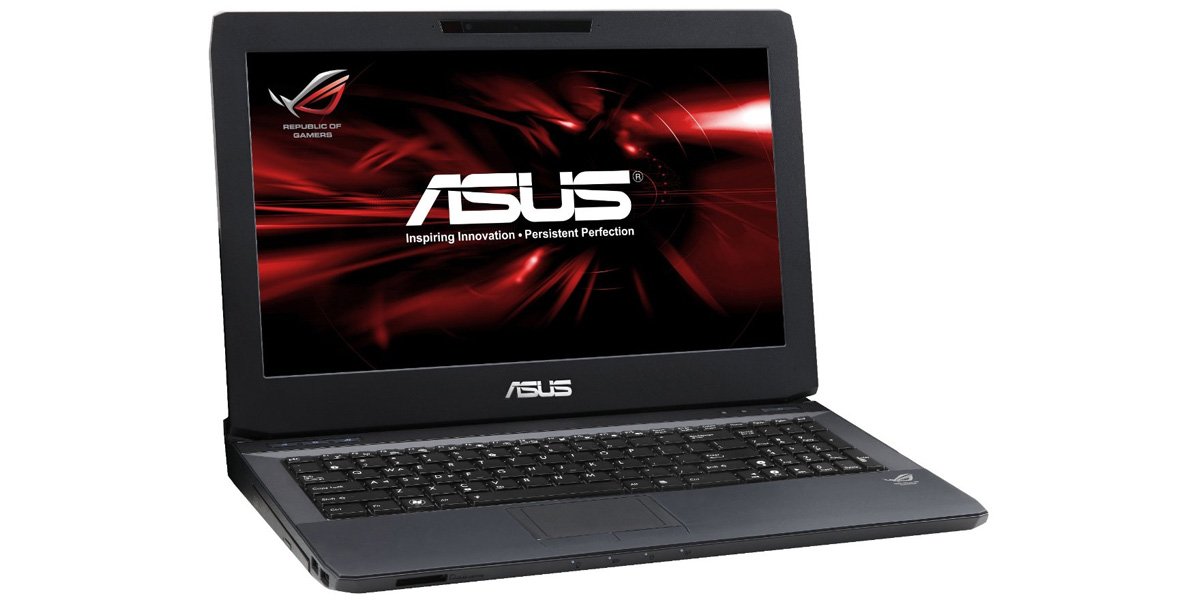
Figure 1: ASUS G53SX-DH71 Gaming Laptop.
Konfigurazio Gida
1. Despaketatzea eta Hasierako Ikuskapena
- Kontu handiz atera ordenagailu eramangarria eta osagarri guztiak paketetik.
- Verify that all components are present: laptop, power adapter, power cord, and any included documentation.
- Egiaztatu ordenagailu eramangarria kalterik duen. Kalterik aurkitzen baduzu, jarri harremanetan zure saltzailearekin berehala.
2. Energia-egokitzailea konektatzea
- Konektatu korronte kablea CA egokitzaileari.
- Entxufatu korronte-egokitzailea lurrera konektatutako entxufe elektriko batera.
- Connect the DC output plug of the AC adapter to the power input port on your laptop.
- Allow the battery to charge for at least 3 hours before initial use, even if the battery indicator shows a full charge.
3. Lehenengo abiaraztea eta sistema eragilearen konfigurazioa
- Ireki ordenagailu eramangarriaren tapa eta sakatu pizteko botoia.
- Follow the on-screen instructions to complete the Windows 7 Home Premium 64-bit operating system setup. This typically involves selecting language, region, accepting license agreements, and creating a user account.
- Konektatu Wi-Fi sare batera eskatzen zaizunean, sistemak beharrezko eguneraketak deskargatu ditzakeela ziurtatzeko.
Zure ordenagailu eramangarria erabiltzea
Teklatua eta Touchpad
The laptop features a full-sized keyboard and a multi-touch touchpad. The keyboard includes a numeric keypad and backlit keys for use in low-light conditions. The touchpad supports gestures for navigation and control.

Figure 2: Keyboard and Touchpad detail.
- Funtzio-teklak (Fn): Combine the Fn key with F1-F12 keys for various functions such as adjusting brightness, volume, or disabling the touchpad (Fn+F9).
- Ukipen-panela: Use the touchpad for cursor control. Two physical buttons below the touchpad serve as left and right mouse clicks.
Energia kudeatzeko moduak
Your laptop offers several power modes to optimize performance or battery life. These can typically be accessed via a dedicated button or through the operating system's power options.
- Errendimendu handikoa: Maximizes system speed and responsiveness, ideal for gaming and demanding applications.
- Bulego lasaia: Reduces fan noise and power consumption for general productivity tasks.
- Entertainment (Theater): Optimizes display and audio settings for media consumption.
- Bateria aurrezlea: Extends battery life by reducing performance and background activity.
Audio and Graphics
The ASUS G53SX-DH71 is equipped with advanced audio and NVIDIA GeForce GTX 560M graphics for an immersive experience. Ensure drivers are up-to-date for optimal performance.
Video 1: Republic of Gamers product overview. This video highlights the laptop's gaming capabilities, 3D audio, and powerful graphics processing unit (GPU) with Intel Core i7 processor.
Mantentzea eta zaintzea
- Garbiketa: Use a soft, lint-free cloth to clean the screen and exterior. Avoid harsh chemicals.
- Bateria zaintzea: To prolong battery life, avoid fully discharging the battery frequently. Store the laptop in a cool, dry place if not used for extended periods.
- Aireztapena: Ensure the laptop's ventilation openings are not blocked to prevent overheating.
Arazoak konpontzea
Ohiko arazoak eta irtenbideak
- Botererik ez:
- Ziurtatu korronte-egokitzailea ondo konektatuta dagoela ordenagailu eramangarrira eta funtzionatzen duen entxufe batera.
- Egiaztatu entxufea funtzionatzen duela beste gailu bat konektatuz.
- Check if the battery is completely drained. Allow it to charge for a while before attempting to power on.
- Screen Display Issues (e.g., white screen, black screen, pixelation):
- Berrabiarazi ordenagailu eramangarria.
- Connect an external monitor to determine if the issue is with the laptop's display or the graphics card.
- Ensure graphics drivers are updated.
- If the issue persists, it may indicate a hardware problem with the display cable or panel. Contact ASUS support for assistance.
- Gehiegi berotzea:
- Ensure ventilation vents are clear of obstructions.
- Use the laptop on a hard, flat surface rather than soft surfaces like beds or couches.
- Consider using a cooling pad.
- Garbitu hautsa aireztapen-hodietatik aire konprimatua erabiliz.
- Errendimendu motela:
- Check power management settings and ensure the laptop is in "High Performance" mode when needed.
- Itxi behar ez diren atzeko planoko aplikazioak.
- Birusen eskaneatzea egin.
- Ziurtatu disko gogorrean nahikoa leku libre dagoela.
Zehaztapenak
| Ezaugarri | Zehaztapena |
|---|---|
| Marka | ASUS |
| Modelo zenbakia | G53SX-DH71 |
| Pantailaren tamaina | 15.6 hazbete |
| Pantailaren bereizmena | 1920 x 1080 pixel (Full HD) |
| Prozesadorea | Intel Core i7-2670QM (2.2 GHz) |
| RAM | 12 GB DIMM (1333 MHz) |
| Disko gogorra | 750 GB 7200 RPM Serial ATA |
| Koprozesadore grafikoa | NVIDIA GeForce GTX 560M 2GB GDDR5 |
| Sistema eragilea | Windows 7 Home Premium 64 biteko |
| Haririk gabeko mota | 802.11bgn |
| USB 2.0 Portuak | 3 |
| USB 3.0 Portuak | 1 |
| Audio irteerako atakak | 1 |
| Elementuaren pisua | 2.1 kilo |
| Produktuaren neurriak | 11.7 x 15.6 x 0.8 hazbete |
| Kolorea | Beltza |
| Pilak | 1 litio ioizko bateria (barne) |
Bermea eta Laguntza
For warranty information and technical support, please refer to the documentation included with your product or visit the official ASUS support webgunea. Gorde erosketaren egiaztagiria bermearen erreklamazioetarako.
- ASUS laguntza Webgunea: www.asus.com/support/
- Produktuen Erregistroa: Register your product online to receive updates and support.


