1. Sarrera
This manual provides essential information for the proper setup, operation, and maintenance of your Lenovo ThinkPad X220 12.5-inch laptop. Please read these instructions carefully to ensure optimal performance and longevity of your device.
The ThinkPad X220 is a compact and powerful laptop featuring an Intel Core i5 processor, 4GB DDR3 RAM, a 128GB Solid State Drive, and a 12.5-inch display. It comes pre-installed with Windows 7 Home Premium and includes integrated Intel HD Graphics 3000, a webcam, and a fingerprint reader for enhanced security.

1. irudia: Angeludun view Lenovo ThinkPad X220 ordenagailu eramangarriaren erakustaldiaasinbere diseinu trinkoa dela eta.
2. Konfigurazioa
2.1 Desontziratzea eta hasierako ikuskapena
Carefully remove the laptop and all accessories from the packaging. Inspect the device for any signs of damage. If any components are missing or damaged, contact your vendor immediately.
2.2 Potentzia konektatzea
- Konektatu korronte-egokitzailea ordenagailu eramangarriaren elikatze-konektorera.
- Entxufatu korronte-egokitzailea lurrera konektatutako entxufe elektriko batera.
- Bateria automatikoki kargatzen hasiko da. Gomendagarria da bateria guztiz kargatzea lehenengo aldiz erabili aurretik.
2.3 Hasierako abiarazpena eta sistema eragilearen konfigurazioa
Press the power button to turn on the laptop. Follow the on-screen instructions to complete the Windows 7 Home Premium setup process. This typically involves setting up user accounts, language preferences, and network connections.
2.4 Kanpoko gailuak konektatzea
The ThinkPad X220 offers various ports for connecting peripherals:
- USB 2.0 portuak: Three ports are available for connecting USB devices such as mice, keyboards, or external storage.
- VGA ataka: Connect an external monitor or projector using a VGA cable.
- Ethernet (LAN) ataka: Sare kable bidezko konexioetarako.
- Audio Jack: Entzungailuak edo kanpoko bozgorailuak konektatzeko.
- ExpressCard Slot: For compatible expansion cards.

Figure 2: Left side of the ThinkPad X220, showing the USB, Ethernet, and audio jack ports.
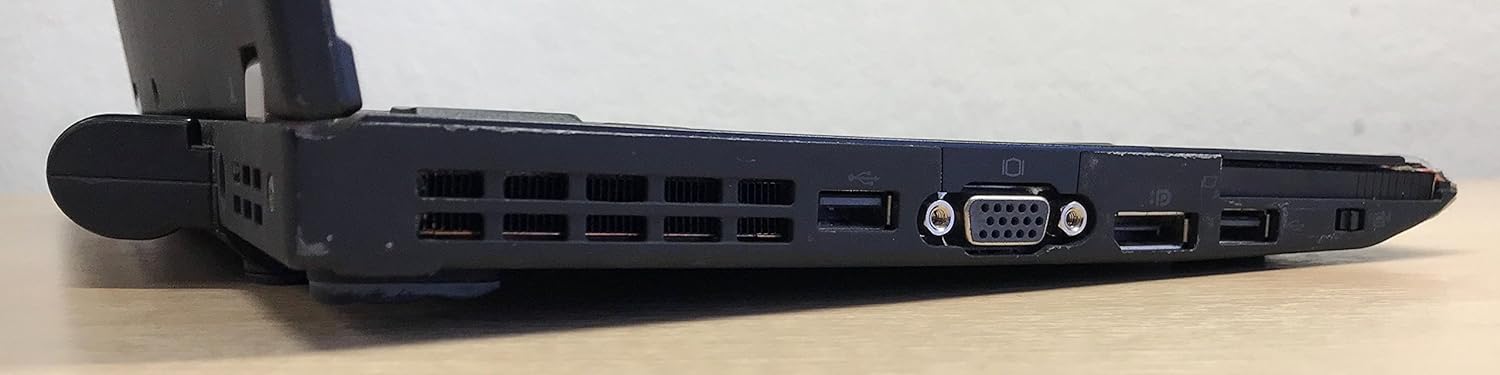
Figure 3: Right side of the ThinkPad X220, featuring the VGA port, additional USB ports, and the ExpressCard slot.
3. Zure ordenagailu eramangarria erabiltzea
3.1 Piztu/Itzali
- Piztu: Sakatu teklatuaren goiko eskuinaldean dagoen pizteko botoia.
- Itzali: Click the Start button in Windows, then select 'Shut down'. Do not force power off by holding the power button unless the system is unresponsive.
3.2 Teklatua eta sarrera-gailuak
The ThinkPad X220 features a full-sized keyboard, a TrackPoint pointing device (red dot in the center of the keyboard), and a multi-touch touchpad.
- Teklatua: QWERTY diseinu estandarra sistemaren kontroletarako funtzio-teklekin (Fn).
- TrackPoint: Use the TrackPoint to move the cursor and the associated buttons below the spacebar for left, right, and middle-click functions.
- Ukipen-panela: Use gestures for navigation, scrolling, and clicking.
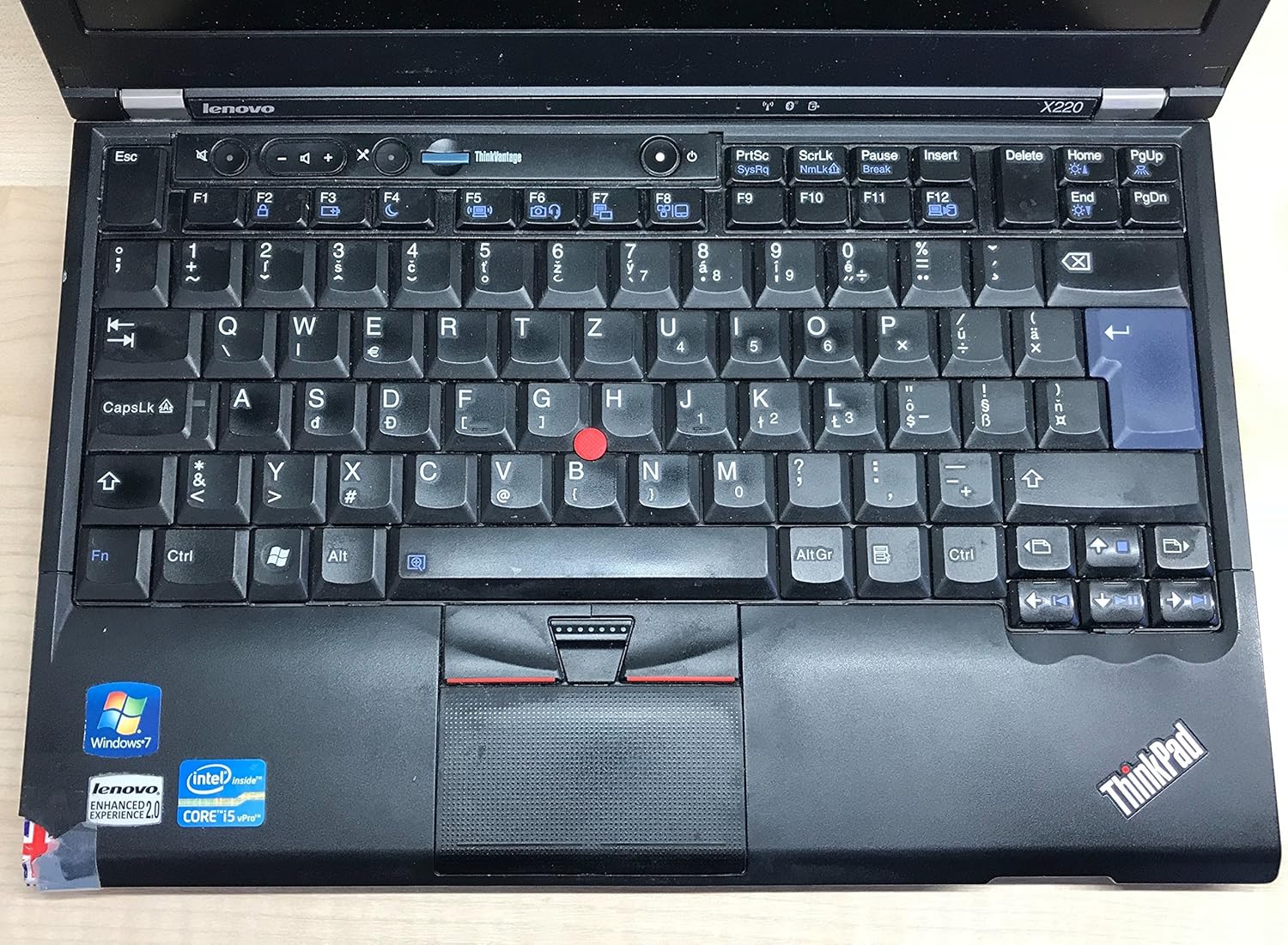
4. irudia: Xehetasuna view of the ThinkPad X220 keyboard, TrackPoint, and touchpad.
3.3 Haririk gabeko konexioa
- Wi-Fi (802.11bgn): To connect to a wireless network, click the network icon in the system tray and select your desired network. Enter the password if prompted.
- Bluetootha: Enable Bluetooth through the Windows settings to connect to compatible devices such as headphones or mice.
3.4 Erabili Webcam and Fingerprint Reader
- Webkamera: Integratua webcam can be used for video conferencing and recording. Access it through applications like Skype or the built-in camera software.
- Hatz-marken irakurgailua: For enhanced security, configure the fingerprint reader through Windows security settings to log in or authenticate.
4. Mantentzea
4.1 Ordenagailu eramangarria garbitzea
- Pantaila: Erabili lipurrik gabeko zapi leun bat dampUrarekin edo pantaila-garbitzaile batekin garbitu. Ez ihinztatu likidoa zuzenean pantailan.
- Teklatua eta Casing: Use a soft cloth and a mild cleaning solution. For dust, use compressed air. Ensure the laptop is powered off before cleaning.
4.2 Bateriaren kudeaketa
- To maximize battery life, avoid extreme temperatures and fully discharging the battery frequently.
- Calibrate the battery periodically by fully discharging and then fully recharging it.
- The average battery life is approximately 2.45 hours, but this can vary based on usage.
4.3 Software eguneraketak
Aldian-aldian egiaztatu eta instalatu sistema eragilearen eguneraketak (Windows Update) eta kontrolatzaileen eguneraketak Lenovo laguntzatik. webgunea sistemaren egonkortasuna eta segurtasuna bermatzeko.
5. Arazoak
Atal honek zure ThinkPad X220-arekin aurki ditzakezun arazo ohikoenak jorratzen ditu.
- Ordenagailu eramangarria ez da pizten: Ensure the AC adapter is securely connected and the power outlet is functional. If using battery power, ensure the battery is charged.
- Pantaila arazoak: If the screen is blank, try pressing Fn + F7 to cycle through display modes (internal, external, both). Ensure external monitors are properly connected.
- Input devices (keyboard/touchpad/TrackPoint) unresponsive: Restart the laptop. Check for driver updates if the issue persists. For the TrackPoint, ensure no debris is obstructing its movement.
- No internet connection: Verify Wi-Fi is enabled and connected to a network. For wired connections, ensure the Ethernet cable is properly inserted. Check network adapter drivers.
- System slow or unresponsive: Close unnecessary applications. Check Task Manager for processes consuming high CPU or memory. Consider running a virus scan.
Arazo konplexuagoetarako, jo Lenovo laguntzara. webgunea edo jarri harremanetan laguntza teknikoarekin.
6. Zehaztapenak
| Ezaugarri | Zehaztapena |
|---|---|
| Marka | Lenovo |
| Seriea | ThinkPad |
| Modelo zenbakia | 428743U |
| Pantailaren tamaina | 12.5 hazbete |
| Pantailaren bereizmena | 1366 x 768 pixel |
| Prozesadorea | Intel Core i5-2430M (2.4 GHz) |
| RAM | 4 GB DDR3 (1333 MHz) |
| Disko gogorra | 128 GB-ko SSDa (Serieko ATA) |
| Koprozesadore grafikoa | Intel HD Graphics 3000 |
| Haririk gabeko mota | 802.11bgn |
| USB 2.0 Portuak | 3 |
| Sistema eragilea | Windows 7 Home Premium |
| Bateriaren batez besteko iraupena | 2.45 ordu |
| Elementuaren pisua | 0.01 ounces (Note: This weight is likely incorrect and refers to packaging or a component, actual laptop weight is typically around 3 lbs) |
| Produktuaren neurriak (LxWxH) | 15 x 13 x 5 hazbete |
| Kolorea | Beltza |
| Ezaugarri Berezia | Hatz-marken irakurgailua |
7. Bermea eta Laguntza
7.1 Bermearen informazioa
Your Lenovo ThinkPad X220 laptop is covered by a limited warranty. The specific terms and duration of the warranty may vary based on your region and point of purchase. Please refer to the warranty documentation included with your product or visit the official Lenovo support webinformazio zehatza lortzeko gunea.
7.2 Laguntza Teknikoa
Laguntza teknikoa, kontrolatzaileak deskargatzeko edo arazoak konpontzeko informazio gehiago lortzeko, bisitatu Lenovo Laguntza ofiziala. website. You can typically find support resources by searching for your specific model (ThinkPad X220) on their site. Have your product's serial number ready when contacting support.
Lenovo laguntza Webgunea: https://support.lenovo.com