Sarrera
This manual provides essential information for the safe and effective use of your Sony Cyber-shot DSC-WX50 digital camera. Please read it thoroughly before operating the camera and retain it for future reference. The DSC-WX50 is a compact digital camera featuring a 16.2 MP Exmor R CMOS sensor, 5x optical zoom, and Full HD 1080/60i video recording capabilities.
Kutxan dagoena
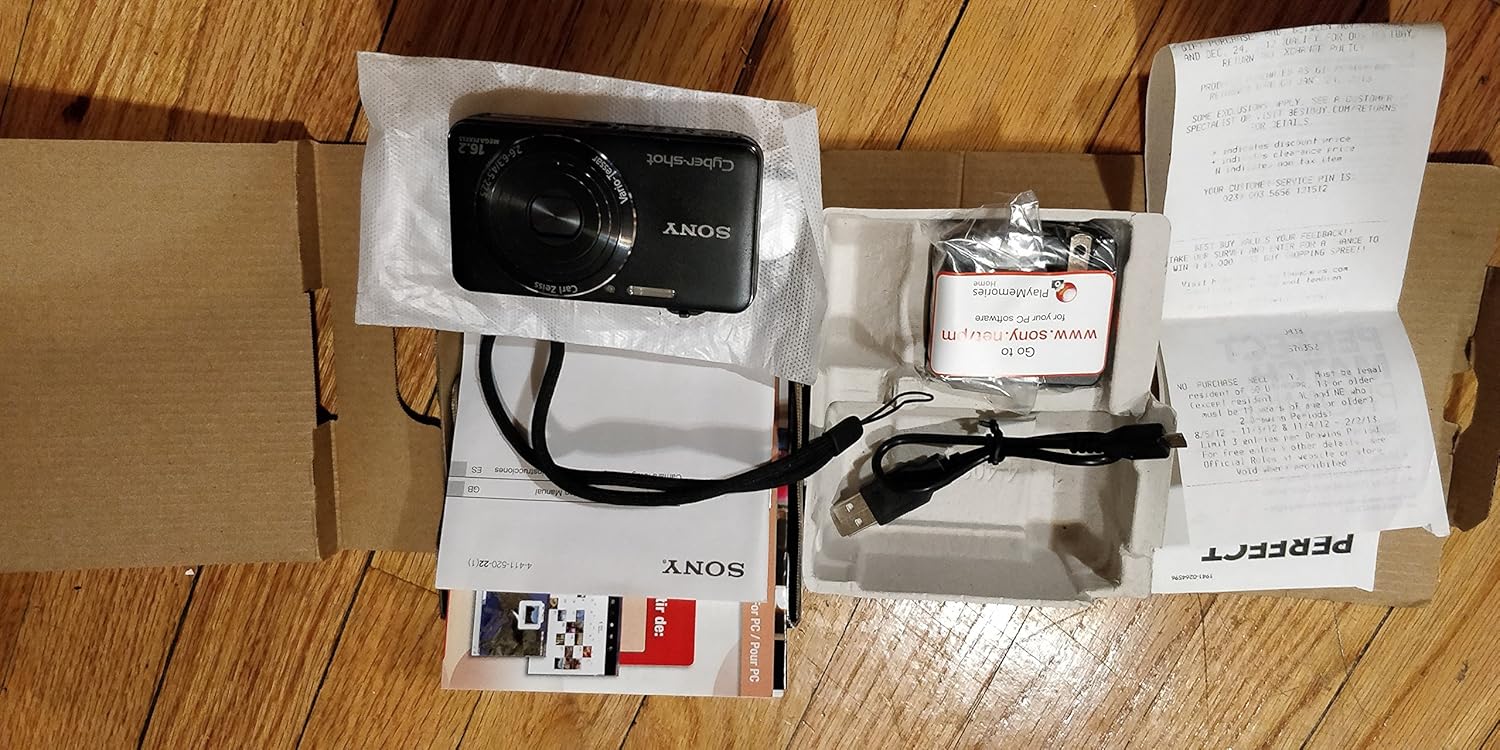
Carefully unpack your camera and ensure all items are present. The standard package contents include:
- Sony Cyber-shot DSC-WX50 Digital Camera
- Bateria kargagarria
- AC egokigailua
- USB konexio kablea
- Eskumuturreko uhala
- Instruction Manuals and Documentation
- HDMI Cable (Built-in Media)

Image: All contents of the Sony Cyber-shot DSC-WX50 package, including the camera, cables, and documentation, laid out.

Irudia: Hurbiltzaile bat view of the included accessories, such as the charger and USB cable, within their packaging.
Konfigurazioa
1. Bateria kargatzea
Before first use, fully charge the supplied battery pack. Connect the camera to the AC adaptor using the USB cable, then plug the AC adaptor into a wall outlet. The charge lamp kargatzen ari den bitartean piztuko da eta amaitutakoan itzali egingo da.
2. Bateria eta memoria txartela sartzea
Open the battery/memory card cover on the bottom of the camera. Insert the charged battery pack firmly until it locks into place. Insert a compatible memory card (SD/SDHC/SDXC or Memory Stick Duo/Pro Duo/Pro-HG Duo) into the memory card slot until it clicks. Close the cover securely.

Irudia: Aurrealdea view of the Sony Cyber-shot DSC-WX50 camera, showing the lens and flash.
3. Hasierako ezarpenak
When you turn on the camera for the first time, you will be prompted to set the date, time, and time zone. Follow the on-screen instructions to complete these settings.
Kameraren funtzionamendua
Piztu/Itzali
Sakatu BOTEREA botoia kamera pizteko edo itzaltzeko. Lentea luzatuko da piztean.
Basic Still Image Shooting (Intelligent Auto Mode)
- Piztu kamera.
- Ezarri modu-markagailuan Auto adimentsua (kamera berdearen ikonoa).
- Frame your subject on the 2.7-inch LCD screen.
- Sakatu obturadorearen botoia erdiraino fokatzeko. Fokatze-adierazlea berde jarriko da fokatzea lortutakoan.
- Sakatu obturadorearen botoia guztiz argazkia ateratzeko.
Irudia: Atzealdea view of the Sony Cyber-shot DSC-WX50, highlighting the 2.7-inch LCD screen and control buttons.
Zoom funtzioa
Use the zoom lever around the shutter button to adjust the focal length. The camera features 5x optical zoom and Clear Image Zoom for enhanced magnification without significant quality loss.
Video Recording (Full HD 1080/60i)
To record movies, press the dedicated ZINEA button. Press it again to stop recording. The camera supports Full HD 1080/60i video in AVCHD format, allowing for high-quality video capture with Optical SteadyShot Active Mode for reduced blur.
Special Shooting Modes and Features
- Modu automatiko hobea: Automatically detects 33 scenes and optimizes settings for dynamic pictures with reduced noise and improved clarity.
- Intelligent Sweep Panorama HR: Capture wide panoramic images by sweeping the camera. The camera stitches multiple frames automatically.
- 3D Still Image & 3D Sweep Panorama: Create 3D images for viewing on compatible 3D displays.
- Irudi efektua: Apply creative filters to your photos, such as Toy Camera, Pop Color, Partial Color, and more.
- Atzeko planoaren desenfokatzea: Blurs the background to emphasize your subject, similar to DSLR effects.
- Azal leunaren modua: Enhances portraits by reducing the appearance of blemishes and wrinkles.
- Face Detection & Smile Shutter: Aurpegiak automatikoki detektatzen ditu eta irribarre bat detektatzen denean obturadorea aktibatu dezake.
- Keinuaren aurkako funtzioa: Helps prevent photos with subjects blinking by capturing multiple shots.
- Flash naturala: Corrects colors for more lifelike images when using flash.
- Mugimendu-detekzioa: ISOa eta obturazio-abiadura doitzen ditu mugitzen ari diren subjektuen lausotasuna murrizteko.
- Sweep Multi Angle Mode: Captures 15 images at different angles to create a 3D-like view on the camera's LCD when tilted.
Mantentzea
Kamera garbitzea
- Kameraren gorputza: Garbitu zapi leun eta lehor batekin. Zikinkeria egoskorra bada, erabili zapi leun bat.ampened with water or a mild detergent, then wipe dry.
- Lentea: Erabili lenteen eskuila hautsa kentzeko, eta ondoren, garbitu astiro-astiro lenteak garbitzeko zapi batekin. Saihestu lentearen gainazala hatzekin ukitzea.
- LCD pantaila: Garbitu astiro zapi leun eta lehor batekin. Saihestu pantailan gogor sakatzea.
Bateria zaintzea
To prolong battery life, avoid exposing it to extreme temperatures. Store the battery in a cool, dry place when not in use. If the camera will not be used for an extended period, remove the battery.
Memory Card Care
Always format new memory cards in the camera before first use. Avoid removing the memory card while the camera is writing data (indicated by a flashing access lamp) to prevent data corruption.
Arazoak konpontzea
Kamerarekin arazoak badituzu, jo ezazu honako ohiko irtenbide hauetara:
| Arazoa | Irtenbidea |
|---|---|
| Kamera ez da pizten. |
|
| "Writing to Memory card was incomplete" error. |
|
| Irudiak lausoak dira. |
|
| Flasha ez da pizten. |
|
For further assistance, please contact Sony customer support.
Zehaztapenak
| Ezaugarri | Xehetasuna |
|---|---|
| Ebazpen finko eraginkorra | 16.2 MP |
| Argazki sentsoreen teknologia | BSI CMOS |
| Zoom optikoa | 5x |
| Zoom digitala | 20x |
| Pantailaren tamaina | 2.7 hazbete |
| Bistaratzeko mota | LCDa |
| Irudi Egonkortzea | SteadyShot optikoa |
| Bideo Ebazpena | Full HD 1080p (1080/60i AVCHD) |
| Onartua File Formatua | JPEG (Exif 2.3), 3D: MPF, Video: MPEG-4, AVCHD |
| Memoria Txartelaren bateragarritasuna | SD/SDHC/SDXC, Memory Stick Duo/Pro Duo/Pro-HG Duo |
| Konektibitatea | HDMI, USB |
| Gutxieneko Fokua | 25 milimetro |
| Fokuaren Gehienezko Luzera | 125 milimetro |
| Gehieneko irekiera | f/6.3 |
| Obturatzeko gutxieneko abiadura | 4 segundo |
| Obturadorearen Gehienezko Abiadura | 1/1600 segundo |
| Elementuaren pisua | 0.26 kilo |
Bermea eta Laguntza
For warranty information and customer support, please refer to the documentation included with your product or visit the official Sony support webgunea. Gorde erosketaren egiaztagiria bermearen erreklamazioetarako.
Sonyren laguntza ofiziala: www.sony.com/electronics/support


