1. Sarrera
ACV ISO kableatu-arnesaren egokitzailea (B006QTOC30 pieza) ezinbesteko osagaia da merkatu osteko audio-sistemak, hala nola Parrot esku-libreko kiteak edo unitate nagusi berriak, Volvo ibilgailu espezifikoetan integratzeko. Egokitzaile honek konexio azkar bat bermatzen du, ibilgailuaren jatorrizko kableatu-osotasuna mantenduz eta instalazio-prozesua sinplifikatuz. Bereziki errendimendu handiko audio-sistemekin hornitutako Volvo S40, V50 eta XC90 modeloetarako diseinatuta dago.
Eskuliburu honek kableatu-egokitzailearen instalazio eta funtzionamendu seguru eta zuzena egiteko argibide osoak eskaintzen ditu.
2. Konfigurazioa eta instalazioa
Segurtasuna lehenik: Edozein instalazio hasi aurretik, ziurtatu ibilgailuaren piztea itzalita dagoela eta bateriaren terminal negatiboa deskonektatuta dagoela, zirkuitulabur edo kalteak saihesteko.
2.1 Paketearen edukia
- ACV ISO kableatu-arnesaren egokitzailea (B006QTOC30 pieza)
2.2 Instalazio-urratsak
- Ibilgailua prestatu: Ziurtatu ibilgailua itzalita dagoela eta bateriaren terminal negatiboa deskonektatuta dagoela. Kontu handiz kendu autoko estereoa edo sartu ibilgailuaren fabrikako kableatu-sorta aginte-panelean. Kontsultatu zure ibilgailuaren zerbitzu-eskuliburua aginte-panela desmuntatzeko argibide zehatzak lortzeko.
- Identifikatu konektoreak: Bilatu ibilgailuaren fabrikako kableatu-konektoreak. Normalean konektore multipinekoak dira, jatorrizko irratiaren atzealdean konektatzen direnak.
- Konektatu egokitzailea: Konektatu ACV ISO kable-arnesaren egokitzailearen ibilgailu espezifikorako muturra zure Volvo-ko fabrikako kable-arnesaren konektoreetan. Ziurtatu konexio seguru eta sendoa dagoela.
- Konektatu ondorengo unitatea: Konektatu ACV egokitzailearen ISO konektoreak zure autoko estereoaren edo Parrot esku libreko kiteko ISO konektoreetara. Egokitzailea ISO pin-out estandarrarekin bat etortzeko diseinatuta dago, konexio hau erraztuz.
- Kableatu segurua: Kable guztiak txukun eta seguru bideratu, estutu edo interferentziak saihesteko. Beharrezkoa bada, erabili bridak.
- Proba funtzionaltasuna: Aginte-panela guztiz berriro muntatu aurretik, konektatu berriro ibilgailuaren bateria. Piztu piztea eta probatu instalatu berri den merkatuko unitatearen funtzionaltasuna. Egiaztatu potentzia, audio irteera eta beste edozein funtzio integratu (adibidez, bolantearen kontrolak, hala badagokio eta merkatuko unitateak eta egokitzaileak onartzen badituzte).
- Berriz muntatu: Funtzio guztiak baieztatu ondoren, arretaz muntatu aginte-paneleko osagaiak.
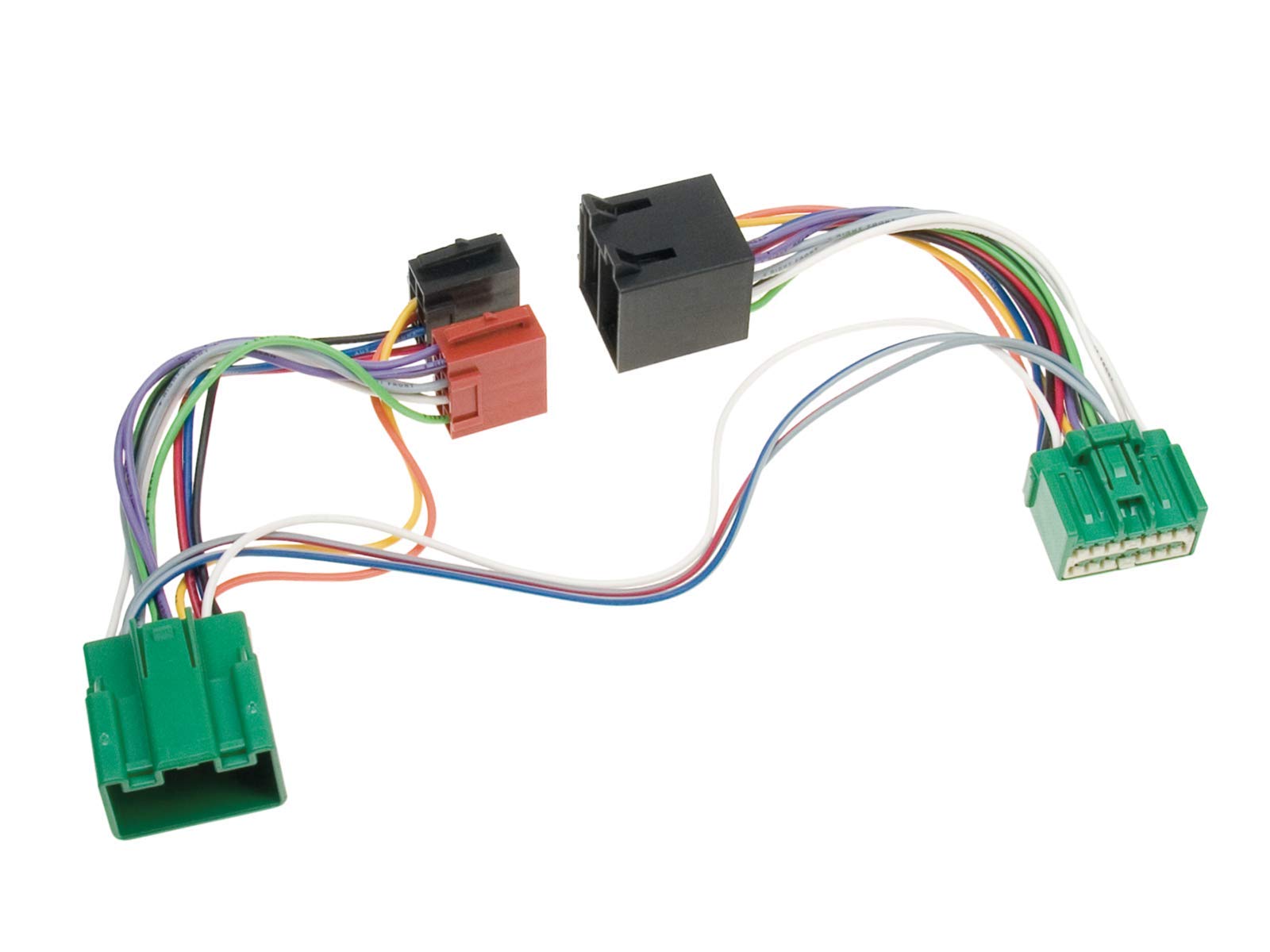
1. irudia: ACV ISO kableatu-arnesaren egokitzailea. Irudi honek hainbat plastikozko konektore beltz, gorri eta berde lotzen dituzten kolore anitzeko hariak erakusten ditu, ibilgailu baten sistema elektrikoan audio osagai desberdinak konektatzeko egokitzailearen diseinua ilustratuz.
Oharra: Instalazio prozesuko edozein urratsetan ziur ez bazaude, oso gomendagarria da auto audio instalatzaile edo automobilgintza teknikari kualifikatu baten laguntza eskatzea.
3. Egokitzailearen funtzionamendua
ACV ISO kableatu-egokitzailea konexio elektrikoak errazteko diseinatutako osagai pasiboa da. Behar bezala instalatu ondoren, atzeko planoan ezin hobeto funtzionatzen du, zure ondorengo audio-sistemak edo esku libreko kitek ibilgailuaren sistema elektrikoarekin behar bezala funtziona dezaten. Egokitzaileak berak ez du erabiltzaileak erabil dezakeen kontrolik.
4. Mantentzea
ACV ISO kableatu egokigailuak mantentze-lan minimoa behar du. Iraupena eta funtzionamendu egokia bermatzeko:
- Mantendu egokitzailea eta haren konexioak lehor eta hezetasunetik babestuta.
- Saihestu egokitzailea tenperatura altuen edo eguzki-argia zuzenean denbora luzez jartzea.
- Ez tolestu, bihurritu edo tiratu gehiegi hariak, barneko eroaleak edo konexioak kaltetu baititzake.
- Ziurtatu konexio guztiak denboran zehar seguru mantentzen direla.
5. Arazoak
ACV ISO kableatu-arnesaren egokitzailea instalatu ondoren arazorik baduzu, kontuan hartu arazoak konpontzeko urrats hauek:
| Arazoa | Kausa posiblea | Irtenbidea |
|---|---|---|
| Merkatu osteko unitateak ez du energiarik. | Konexio soltea; Fusible erreta; Kableatu okerra. | Egiaztatu konexio guztiak estu daudela. Ibilgailuaren fusible-kutxa eta ondorengo unitatearen fusiblea aztertu. Kableatua diagramarekin alderatu. |
| Bozgorailuetatik ez dago soinurik. | Bozgorailuen kableak deskonektatuta; AmpLikidatzailearen arazoa (aplikagarria bada); Bozgorailuen polaritate okerra. | Ziurtatu bozgorailuen kableak egokitzailera eta ondorengo unitatera behar bezala konektatuta daudela. Egiaztatu ampLikidatzailearen potentzia eta konexioak. Egiaztatu bozgorailuen polaritatea. |
| Unitatea piztu egiten da, baina ez da soinurik entzuten/tarteka egiten du soinua. | Lurrerako konexio txarra; Kable hondatua. | Ziurtatu lurrerako kablea metalezko gainazal garbi batera ondo konektatuta dagoela. Begiratu kableek kalterik ikusten ez duten. |
| Ibilgailuaren funtzio espezifikoak (adibidez, bolantearen kontrolak) ez dira funtzionatzen. | Egokigailuak ez du funtziorik onartzen; Merkatu osteko unitatea ez dago konfiguratuta. | Egiaztatu egokitzaile modelo espezifikoak funtzio hauek onartzen dituen. Egiaztatu merkatu osteko unitatearen ezarpenak bolantearen kontrolaren konfigurazioa ikusteko. Baliteke interfaze gehigarriak behar izatea. |
Arazoak konpondu ondoren arazoak konpontzen ez badira, jarri harremanetan bezeroarentzako arreta-zerbitzuarekin edo instalatzaile profesional batekin.
6. Zehaztapenak
- Marka: Acv
- Modelo zenbakia: B006QTOC30 zatia
- Materiala: Kobrea, Polibinil Kloruroa (PVC)
- Konektore mota: ISO
- Bateragarritasuna: Volvo S40, V50, XC90 (Errendimendu handiko audio sistemak)
- Fabrikatzailea: ACV
7. Bermea eta Laguntza
Produktu hau fabrikatzailearen berme estandarrak estaltzen du. Mesedez, kontsultatu erosketa unean emandako bermearen informazioa edo jarri harremanetan zure saltzailearekin bermearen baldintzei buruzko xehetasunak lortzeko.
Laguntza teknikoa, instalazio laguntza edo produktuaren bateragarritasunari buruzko kontsultak egiteko, jarri harremanetan fabrikatzailearekin (ACV) edo zure baimendutako saltzailearekin. Gorde erosketa ordainagiria erosketaren frogagiri gisa berme erreklamazioetarako.


