Sarrera
The Plantronics M25 Bluetooth headset is designed for convenient wireless communication and audio playback. It features an extended battery life with DeepSleep mode, ensuring readiness when needed. The headset provides whispered alerts for battery status and connection information, and allows for listening to music, internet radio, or navigation directions while managing calls.
Paketearen edukia
Egiaztatu elementu guztiak zure paketean daudela:
- Plantronics M25 Bluetooth entzungailua
- AC Charger (100-240v)
- Clip-on Earloop
Konfigurazioa
1. Entzungailua kargatzea
Before first use, fully charge the headset. Connect the AC charger to the headset's charging port. The indicator light will change to show charging status and turn off or change color when fully charged. A full charge can provide up to 5 months of readiness in DeepSleep mode.
2. Gailu batekin parekatzea
To pair your Plantronics M25 headset with a Bluetooth-enabled device (e.g., smartphone, tablet):
- Ziurtatu entzungailuak kargatuta eta itzalita daudela.
- Press and hold the Call button on the headset until the indicator light flashes red and blue, indicating pairing mode.
- Zure gailuan, gaitu Bluetooth-a eta bilatu gailu berriak.
- Select "Plantronics M25" from the list of available devices.
- Pasahitza eskatzen badizute, idatzi "0000" (lau zero).
- Once paired, the headset's indicator light will stop flashing and a voice prompt will confirm the connection.
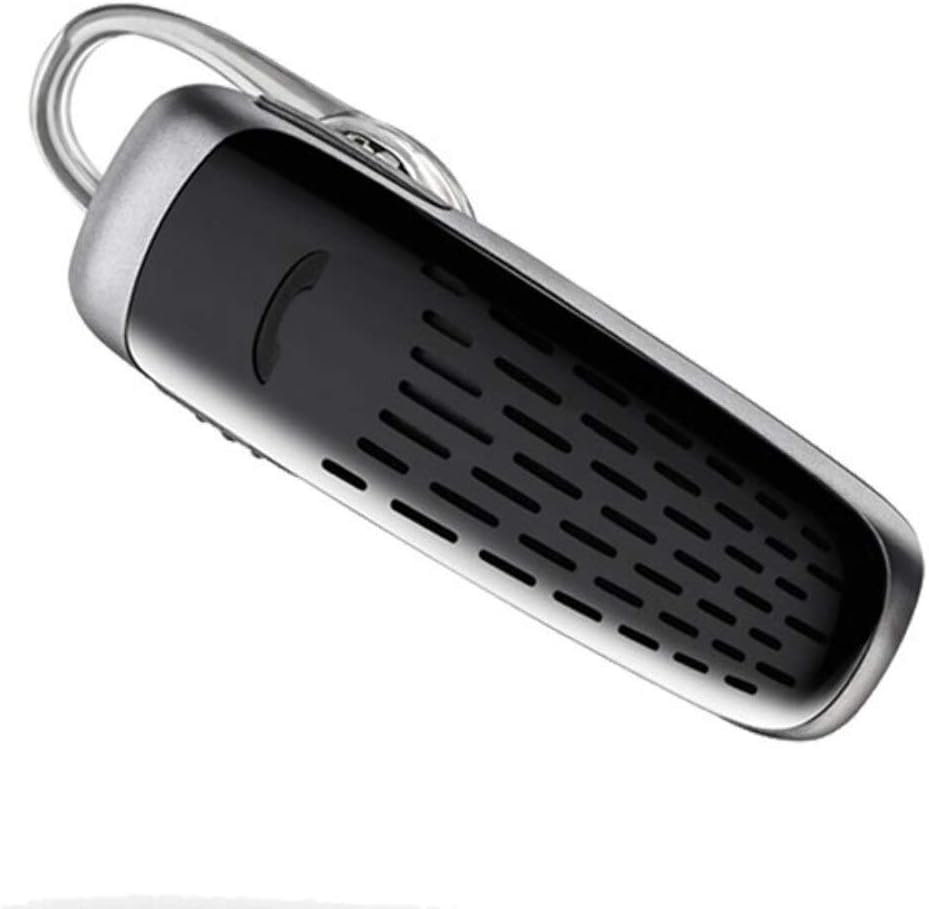
Image: The Plantronics M25 Bluetooth Headset, a compact black and silver device with an earloop, shown from an angled perspective. The call button is visible on the side.
Funtzionamendu-argibideak
Piztu/Itzali
- Piztu: Press and hold the Power button until the indicator light flashes blue.
- Itzali: Press and hold the Power button until the indicator light flashes red.
Deiak egitea eta jasotzea
- Erantzun deia: Sakatu Deitu botoia.
- Amaitu deia: Sakatu Deitu botoia.
- Deia baztertu: Eduki sakatuta Deitu botoia 2 segundoz.
- Berriz markatu azken zenbakia: Sakatu bi aldiz Deitzeko botoia.
Audio Erreprodukzioa
The headset supports streaming audio from your device, including music, podcasts, and GPS directions.
- Erreproduzitu/Pausatu: Press the Call button during audio playback.
DeepSleep modua
The headset enters DeepSleep power-saving mode if it is disconnected from your phone for over 90 minutes. To wake it up when it's back in range (within 33 feet), simply tap the Call button.
Mantentzea
- Garbiketa: Use a soft, dry cloth to clean the headset. Do not use liquid cleaners or aerosols.
- Biltegiratzea: Gorde entzungailuak leku fresko eta lehor batean, muturreko tenperaturetatik babestuta.
- Bateria zaintzea: To preserve battery life, avoid fully discharging the battery frequently. Charge the headset regularly, even if not in use.
- Uraren erresistentzia: Gailu hau da Ez Urarekiko ErresistenteaSaihestu uraren edo gehiegizko hezetasunaren eraginpean egotea.
Arazoak konpontzea
| Arazoa | Irtenbidea |
|---|---|
| Aurikularrak ez dira pizten. | Ensure the headset is charged. Connect it to the AC charger and allow it to charge for at least 30 minutes before attempting to power on. |
| Ezin dira entzungailuak nire gailuarekin parekatu. |
|
| No audio or low audio volume. |
|
| Headset frequently disconnects. |
|
Zehaztapenak
| Ezaugarri | Xehetasuna |
|---|---|
| Ereduaren izena | Plantronics M25 |
| Konektibitate Teknologia | Bluetootha |
| Haririk gabeko Komunikazio Teknologia | Bluetootha |
| Gailu bateragarriak | Smartphone-ak, ordenagailu eramangarriak, mahaigaineko ordenagailuak, tabletak, bozgorailu adimendunak, telebistak |
| Kontrol mota | Deien Kontrola |
| Elementuaren pisua | 0.3 ontza (gutxi gorabehera 8.5 gramo) |
| Uraren Erresistentzia Maila | Ez Urarekiko Erresistentea |
| Maiztasun barrutia | 20 Hz eta 20,000 Hz artean |
| Battery Life (DeepSleep) | 150 egun arte |
| Bluetooth barrutia | Gehienez 10 metro (33 oin) |
| Belarrien Kokatzea | Belarrian |
| Forma-faktorea | One Ear |
| Zarata Kontrola | Zarata Deuseztatze Aktiboa |
| Produktuaren neurriak | 1.85 x 0.59 x 0.35 hazbete |
| Kolorea | Beltza |
| Fabrikatzailea | Plantronics |
Bermea eta Laguntza
Bermearen informazioa: Kontuan izan produktu hau honekin saltzen dela No Warranty or Return as per the provided information. Users are advised to verify product condition upon receipt.
For further assistance or inquiries, please refer to the official POLY support channels or visit their website. Contact information may be available on the product packaging or the manufacturer's official webgunea.
Disclaimer: Product specifications and features are subject to change without notice. Always refer to the latest information provided by the manufacturer.


