1. Segurtasun-argibide garrantzitsuak
Please read these instructions carefully before operating the unit and retain them for future reference. Following these guidelines will ensure safe and proper use of your GPX R602B radio.
- Ura eta hezetasuna: Do not use this apparatus near water. Avoid exposure to rain or moisture.
- Bero iturriak: Ez instalatu bero-iturri inongo ondoan, esate baterako, erradiadoreak, bero-erregistroak, sukaldeak edo beste aparatu batzuk (barne ampberoa sortzen duten argitzaileak).
- Aireztapena: Ziurtatu aireztapen egokia dagoela. Ez blokeatu aireztapen-irekidurak.
- Energia iturriak: Operate only from the type of power source indicated on the marking label.
- Garbiketa: Garbitu zapi lehor batekin bakarrik.
- Eranskinak: Erabili fabrikatzaileak zehaztutako eranskinak/osagarriak soilik.
- Zerbitzua: Jarri zerbitzu-zerbitzu guztiak zerbitzu-pertsonal kualifikatuari. Zerbitzua behar da aparatua edozein modutan hondatu denean, hala nola, elikatze-kablea edo entxufea hondatuta dagoenean, likidoa isuri denean edo objektuak aparatura erori direnean, aparatua euria edo hezetasuna jasan duenean, ez du normalean funtzionatzen. , edo erori egin da.
Bateria Segurtasuna
- Ez nahastu bateria zaharrak eta berriak.
- Ez nahastu bateria alkalinoak, estandarrak (karbonoa-zinka) edo kargagarriak (nikel-kadmioa).
- Insert batteries correctly, observing the + and - polarities.
- Kendu agortutako bateriak berehala.
- Bota pilak behar bezala. Ez erraustu.
2. Ezaugarriak
The GPX R602B Portable AM/FM Radio offers a range of features designed for convenience and versatility:
- Portable AM/FM radio with a built-in handle for easy transport.
- Integrated speakers with analog volume control and durable metal grills.
- Digital clock with user-friendly setting buttons.
- Operates using the built-in AC power cable.
- Can also be powered by 3 C batteries (sold separately) for portable use.
- 3.5mm audio line input jack for connecting external audio devices.
- Telescopic antenna for improved FM reception.
- Stereo headphone jack for private listening.

Figure 2.1: Key features and connection points of the GPX R602B radio.
3. Paketearen edukia
Upon unpacking your GPX R602B radio, please ensure all the following items are present:
- GPX R602B Portable AM/FM Radio Unit
- Jabearen eskuliburua
- Built-in AC Power Adapter
4. Kontrolak eta adierazleak
Familiarize yourself with the controls and indicators on your radio for optimal operation.
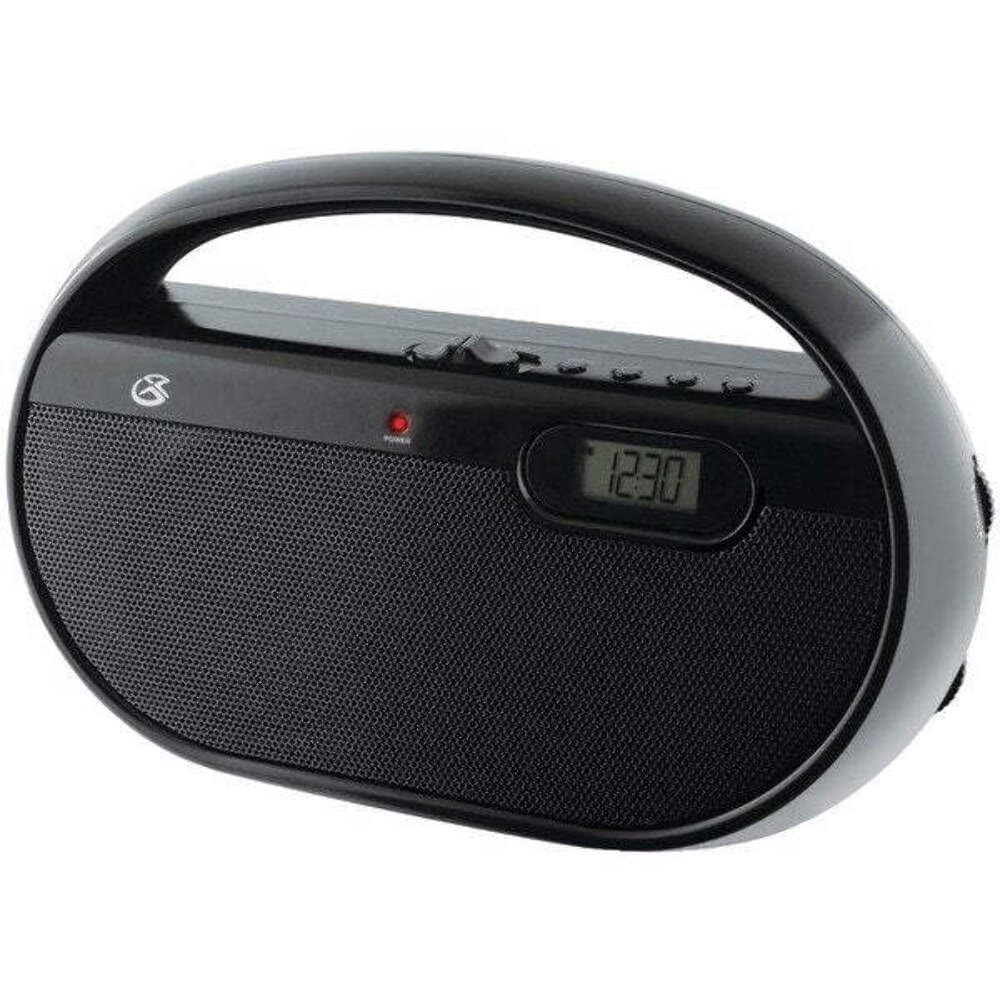
4.1. irudia: Aurrealdea view of the GPX R602B radio.
Control Layout (Refer to Figure 4.1)
- Potentzia/Bolumen botoia: Rotates to turn the unit ON/OFF and adjust the volume level.
- Afinatzeko botoia: Rotates to select AM or FM radio stations.
- Banda hautatzeko etengailua: Slides to select between AM and FM radio bands.
- Bistaratze digitala: Shows the current time or radio frequency.
- Set Time Button: Used in conjunction with H/M buttons to set the clock.
- H/M Buttons: Used to adjust hours and minutes when setting the clock.
- Display Time Button: Briefly shows the time when the radio is playing.
- Aux In Jack (3.5mm): Konektatu kanpoko audio gailuak.
- Aurikularretarako Jack (3.5 mm): Konektatu entzungailuak entzuteko modu pribatuan.
- Telescopic FM Antenna: Extend and adjust for optimal FM reception.
5. Unitatea elikatzea
The GPX R602B radio can be powered by either AC power or batteries.
Korronte alternoko funtzionamendua
- Locate the built-in AC power cord. This cord is typically stored in the battery compartment when not in use.
- Plug the AC power cord into a standard wall outlet (120V AC, 60Hz).
- Unitatea funtzionatzeko prest dago orain.
Bateriaren funtzionamendua
For portable use, the radio requires 3 'C' size batteries (not included).
- Ireki unitatearen atzealdean dagoen bateriaren konpartimentuaren estalkia.
- Insert 3 'C' size batteries, ensuring the correct polarity (+ and -) as indicated inside the compartment.
- Itxi bateriaren konpartimenduaren estalkia ondo.
- The unit is now ready for battery-powered operation.

Figure 5.1: Power options for the GPX R602B radio.
6. Konfigurazioa eta oinarrizko funtzionamendua
Hasierako konfigurazioa
- Potentzia-konexioa: Connect the radio to AC power or insert batteries as described in Section 5.
- Antena doikuntza: For FM reception, extend the telescopic antenna fully. For AM reception, the unit has a built-in antenna, so no external adjustment is needed. Position the unit for best AM reception.
Irratia ustiatzea
- Aktibatu: Rotate the Power/Volume knob clockwise until it clicks and the unit powers on.
- Aukeratu banda: Slide the Band Selector switch to either AM or FM.
- Sintonizazio-estazioa: Rotate the Tuning knob to find your desired radio station. The frequency will be displayed on the digital screen.
- Doitu bolumena: Rotate the Power/Volume knob to adjust the sound level.
- Itzali: Rotate the Power/Volume knob counter-clockwise until it clicks and the unit powers off.
Using the Line Input (Aux In)
You can connect external audio devices, such as smartphones or MP3 players, to play audio through the radio's speakers.
- Connect a 3.5mm audio cable (not included) from the headphone jack or line-out jack of your external device to the Aux In jack on the radio.
- Turn on the radio and your external device.
- Adjust the volume on both the radio and your external device for optimal sound.

Figure 6.1: Devices compatible with the Aux In feature.
Entzungailuak erabiltzea
For private listening, plug standard 3.5mm headphones (not included) into the Headphone Jack. The internal speakers will automatically mute.
Erloju digitala ezartzea
The digital clock can be set when the radio is turned off.
- Ensure the radio is turned OFF using the Power/Volume knob.
- Eduki sakatuta biak Ezarri Ordua botoia eta H/M botoia aldi berean.
- eusten duen bitartean Ezarri Ordua button, repeatedly press the H/M button to adjust the hour and then the minutes.
- Askatu Ezarri Ordua button once the desired time is set.
- To view the time while the radio is playing, press the Bistaratzeko ordua button. The time will appear briefly on the digital display.
7. Mantentzea
Proper care and maintenance will ensure the longevity of your GPX R602B radio.
- Garbiketa: Garbitu unitatearen kanpoaldea oihal leun eta lehor batekin. Ez erabili garbitzaile urratzailerik, argizaririk edo disolbatzailerik.
- Bateria ordezkatzea: If using batteries, replace all three 'C' batteries when the unit's performance diminishes. Always replace with new batteries of the same type.
- Biltegiratzea: If storing the unit for an extended period, remove the batteries to prevent leakage and corrosion.
8. Arazoak
If you encounter issues with your GPX R602B radio, refer to the following common problems and solutions:
| Arazoa | Kausa posiblea | Irtenbidea |
|---|---|---|
| Botererik ez | AC cord not plugged in; Batteries exhausted or incorrectly inserted. | Ensure AC cord is securely plugged into a live outlet. Replace batteries with new ones, checking polarity. |
| Irrati-harrera eskasa | Antenna not extended (FM); Unit poorly positioned (AM); Weak signal. | Extend and adjust the telescopic FM antenna. For AM, rotate the unit for better reception. Try moving the radio to a different location. |
| Bozgorailuen soinurik ez | Bolumena baxuegia; Entzungailuak konektatuta. | Increase the volume using the Power/Volume knob. Disconnect headphones if not desired. |
| Clock not setting correctly | Botoien sekuentzia okerra. | Ensure the radio is OFF. Press and hold both 'Set Time' and 'H/M' buttons simultaneously, then repeatedly press 'H/M' to adjust. Release 'Set Time' when done. |
| Soinua distortsionatua edo ez dago argia | Volume too high; Poor reception; External device volume too high. | Lower the volume. Adjust antenna or unit position for better reception. If using Aux In, adjust volume on the external device. |
9. Zehaztapenak
Detailed technical specifications for the GPX R602B Portable AM/FM Radio:
- Modelo zenbakia: R602B
- Produktuaren neurriak (L x W x H): 9.62 x 3.74 x 6.3 hazbete (24.43 x 9.50 x 16.00 cm)
- Elementuaren pisua: 1.76 libra (0.80 kg)
- Energia iturria: AC 120V, 60Hz or 3 x 'C' size batteries (not included)
- Tuner Teknologia: AM/FM
- Onartutako irrati-taldeak: 2-Band (AM/FM)
- Konektibitate Teknologia: Radio, 3.5mm Aux In
- Ezaugarri bereziak: Built-In AM Antenna, Built-In Clock, Portable, Telescopic FM Antenna, 3.5mm Headphone Jack
- Kolorea: Beltza
- Fabrikatzailea: Digital Products International, Inc.
- Lehen eskuragarri dagoen data: 5ko ekainaren 2012a
10. Bermea eta Laguntza
For warranty information and customer support regarding your GPX R602B radio, please refer to the warranty card included with your purchase or visit the official GPX webgunea. Gorde erosketa-agiria erosketaren frogagiri gisa, berme-erreklamazioetarako.
If you require technical assistance or have questions not covered in this manual, please contact GPX customer service directly. Contact details are typically available on the manufacturer's webgunean edo produktuaren ontzian.


