1. Sarrera
Thank you for choosing the Hama 95236 8-inch LCD Digital Photo Frame. This manual provides important information regarding the safe operation, setup, and maintenance of your device. Please read it thoroughly before using the product and keep it for future reference.
2. Segurtasun-argibideak
- Do not open the device. Incorrect assembly or repair can lead to electric shock.
- Ez erabili produktua nabarmen hondatuta badago.
- Protect the product from dirt, moisture, and overheating. Use it only in dry environments.
- Ez utzi produktua erortzen eta ez jarri bibrazio handietan.
- Erabili produktua bere xederako soilik.
- Mantendu produktu hau, produktu elektriko guztiak bezala, haurren eskura.
- Bota ezazu berehala ontziratzeko materiala tokian tokiko araudiaren arabera.
3. Paketearen edukia
Please check that the package contains the following items:
- Hama 95236 8-inch LCD Digital Photo Frame
- Elikatze-moldagailua
- Erabiltzailearen eskuliburua (dokumentu hau)
4. Produktua amaitu daview
Familiarize yourself with the components and controls of your digital photo frame.
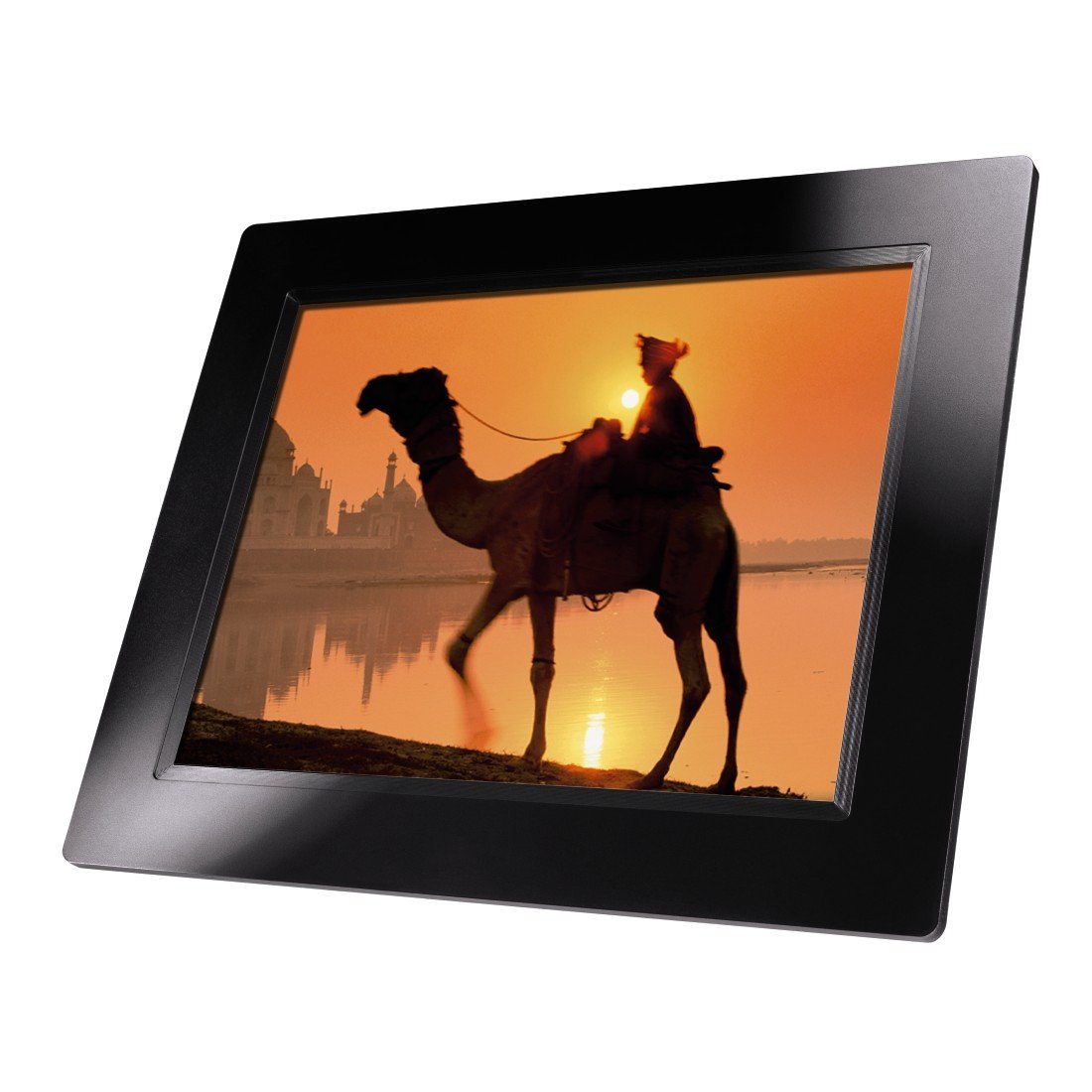
4.1. irudia: Aurrealdea view of the Hama 95236 Digital Photo Frame, showing the 8-inch LCD screen.

4.2. irudia: Aldea view of the digital photo frame, highlighting the various input ports including the SD/MMC/MS card slot, USB port, and DC IN power port.

4.3. irudia: Atzekoa view of the digital photo frame, showing the stand attachment point, ventilation grilles, and the control panel with power, navigation, and menu buttons.
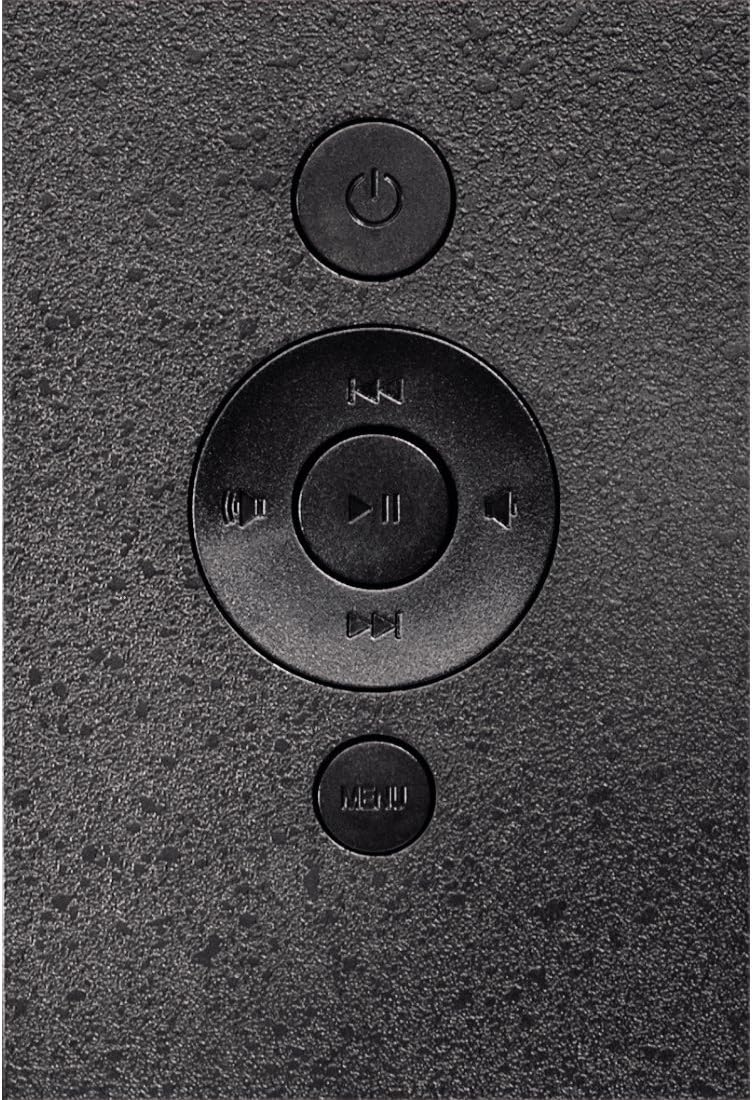
4.4. irudia: Close-up of the control buttons located on the back of the frame. These include the power button, directional navigation buttons (up, down, left, right), play/pause/enter button, and the menu button.
4.1. Ataka eta kontrolak
- SD/MMC/MS Card Slot: For inserting memory cards to display photos and videos.
- USB ataka: For connecting USB flash drives or other compatible USB storage devices.
- DC IN: Power input for connecting the provided power adapter.
- Pizteko botoia: Gailua pizten edo itzaltzen du.
- Nabigazio botoiak (Gora/Behera/Ezkerra/Eskuina): Menuetan nabigatzeko eta aukerak hautatzeko erabiltzen da.
- Play/Pause/Enter Button: Confirms selections or controls media playback.
- Menuko botoia: Ezarpen eta aukeren menu nagusira sartzen da.
5. Konfigurazioa
5.1. Euskarria lotzea
Insert the metal stand into the designated slot on the back of the digital photo frame. Ensure it is securely fastened to provide stable support for the frame.
5.2. Energia-konexioa
- Connect the power adapter to the DC IN port on the back of the photo frame.
- Entxufatu korronte-egokigailua entxufe elektriko egoki batean.
- The frame will typically power on automatically or can be turned on using the power button.
5.3. Inserting a Memory Card or USB Drive
The Hama 95236 supports SD/MMC/MS memory cards and USB flash drives.
- Locate the SD/MMC/MS card slot or the USB port on the side of the frame (refer to Figure 4.2).
- Carefully insert your memory card or USB drive into the corresponding slot/port. Ensure it is inserted correctly to avoid damage.
- The frame should automatically detect the storage device and prompt you to view edukia edo diapositiba-aurkezpen bat hasi.
6. Funtzionamendu-argibideak
6.1. Oinarrizko nabigazioa
Use the navigation buttons on the back of the frame to move through menus and options. The Play/Pause/Enter button confirms your selection.
6.2. Menu nagusia
Sakatu MENUA button to access the main menu. From here, you can select different modes and settings:
- Argazkia: View photos in a slideshow or individually.
- Musika: Erreproduzitu audioa files.
- Bideoa: Erreproduzitu bideoa files.
- Calendar/Clock: Display the calendar and time.
- Ezarpenak: Adjust various device parameters.
6.3. Photo Playback
- Menu nagusitik, hautatu Argazkia.
- Navigate to your desired folder or select all photos.
- Sakatu Erreproduzitu/Pausatu/Sartu button to start the slideshow.
- During a slideshow, you can use the navigation buttons to skip photos or pause playback.
6.4. Sistemaren ezarpenak
Sartu Ezarpenak menu to customize your photo frame:
- Pantailaren ezarpenak: Adjust brightness, contrast, and display mode.
- Diapositiba-aurkezpenaren ezarpenak: Configure transition effects, display time per photo, and repeat mode.
- Data eta ordua: Ezarri uneko data eta ordua. Note: Some users have reported that date and time settings may reset after power loss.
- Hizkuntza: Hautatu menuaren interfazerako nahiago duzun hizkuntza.
- Biltegiratzeko informazioa: View details about connected storage devices.
7. Mantentzea
7.1. Gailua garbitzea
- Deskonektatu beti gailua elikadura-iturritik garbitu aurretik.
- Clean the screen and exterior surfaces with a soft, dry, lint-free cloth.
- Do not use aggressive cleaning agents, solvents, or abrasive materials.
7.2. Biltegiratzea
Gailua denbora luzez gordetzen baduzu, deskonektatu korrontetik eta gorde leku fresko eta lehor batean, eguzki-argitik eta muturreko tenperaturetatik babestuta.
8. Arazoak
| Arazoa | Kausa posiblea | Irtenbidea |
|---|---|---|
| Gailua ez da pizten. | Energia-egokitzailea ez dago konektatuta edo akastuna. | Ensure the power adapter is securely connected to both the frame and the power outlet. Test the outlet with another device. |
| No images displayed. | No memory card/USB drive inserted or files not supported. | Insert a compatible memory card or USB drive with supported image formats (e.g., JPEG). Check if the storage device is properly inserted. |
| Date and time reset after power off. | Ez dago barne bateriarik erlojuarentzat. | This model may not retain date/time settings without continuous power. Re-enter settings if necessary after power interruption. |
| Video playback is choppy or distorted. | Unsupported video format or high bitrate. | Ziurtatu bideoa files are in a supported format and resolution. Convert videos to a lower resolution or bitrate if issues persist. |
| Botoiek ez dute erantzuten. | Softwarearen aldi baterako akatsa. | Disconnect the power adapter, wait a few seconds, then reconnect it to restart the device. |
9. Zehaztapenak
| Ezaugarri | Xehetasuna |
|---|---|
| Modelo zenbakia | 00095236 |
| Pantailaren tamaina | 8 hazbete |
| Bistaratzeko ebazpena | 800 x 600 pixel |
| Aspektu-erlazioa | 4:3 |
| Barne Biltegiratzea | 2 GB (2048 MB) |
| Konektibitatea | USB, SD/MMC/MS Card Slot |
| Neurriak (L x W x H) | 2.6 x 22.2 x 17.8 cm |
| Pisua | 550 g |
| Fabrikatzailea | Hama |
10. Bermearen informazioa
Hama GmbH & Co KG provides a manufacturer's warranty for this product. The specific terms and conditions of the warranty period and coverage are subject to the purchase date and the region of purchase. Please retain your proof of purchase (receipt) for any warranty claims.
For detailed warranty information, please refer to the official Hama webgunera edo jarri harremanetan zuzenean bezeroarentzako arreta-zerbitzuarekin.
11. Bezeroarentzako arreta
Should you have any questions regarding this product, please contact Hama Customer Support:
- Webgunea: Bisitatu Hama ofiziala website for FAQs, drivers, and further product information. www.hama.com
- Harremanetarako: Refer to the contact section on the Hama webzure eskualdeko telefono zenbakiak edo posta elektroniko bidezko laguntza lortzeko gunea.
Laguntza-zerbitzura deitzean, izan prest modelo zenbakia (00095236) eta erosketaren egiaztagiria.


