Sarrera
This manual provides detailed instructions for the operation and maintenance of your PENTAX Q10 digital interchangeable lens camera. The PENTAX Q10 is a super-compact and lightweight camera designed to deliver high-quality photography with a 12.4MP CMOS image sensor and improved autofocus performance.
Kutxan dagoena
- PENTAX Q10 Camera Body
- 02 Standard Zoom Lens (5-15mm)
- Litio-ioizko bateria kargagarria
- Bateria kargagailua
- USB kablea
- Uhala
- Body Mount Cap
- Lenteen estalkiak (aurrealdekoak eta atzekoak)
- Software CD-ROMa
- Argibide eskuliburua (dokumentu hau)
Kamera amaitu daview

1. irudia: Aurrealdea View (Lens Removed) - This image displays the front of the Pentax Q10 camera body with the lens detached, revealing the image sensor and the Q-mount for interchangeable lenses. The 'PENTAX' logo is visible at the top, and 'SR' (Shake Reduction) is indicated on the grip.
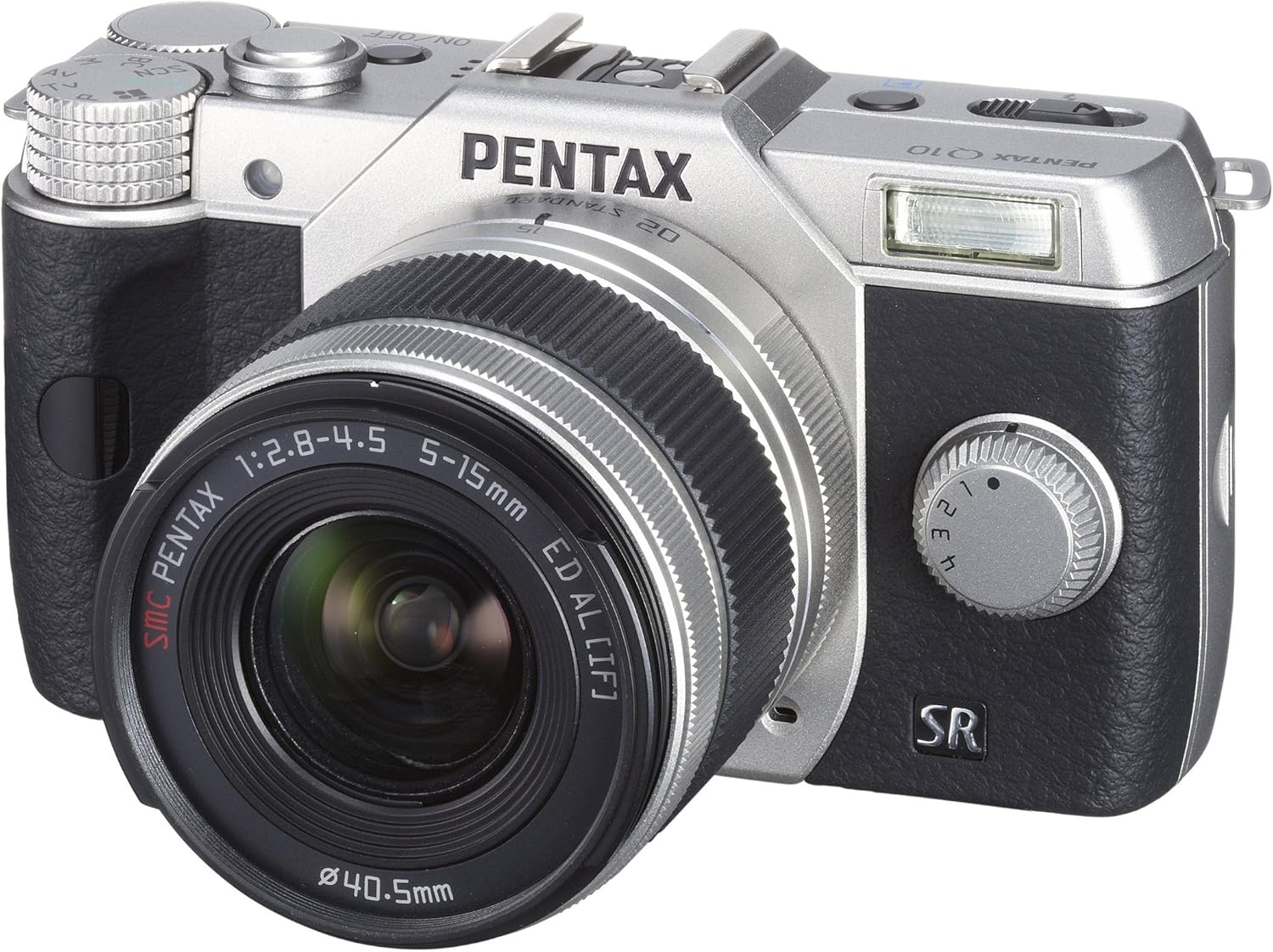
2. irudia: Aurrealdea View with Lens Attached - The Pentax Q10 camera is shown with the 02 Standard Zoom Lens (5-15mm) mounted. This view highlights the compact size of the camera with its standard kit lens.

3. irudia: Goikoa View - This overhead view of the Pentax Q10 shows the main controls on the top panel, including the mode dial (with Auto, P, Av, Tv, M, SCN settings), the power ON/OFF button, the shutter release button, and the hot shoe for external flash units.

4. irudia: Aurrealdea View with Flash Activated - The Pentax Q10 is depicted with its built-in pop-up flash extended, ready for use. This view also shows the 02 Standard Zoom Lens attached.

5. Irudia: Atzealdea View - The back of the Pentax Q10 camera features the 3-inch LCD screen, along with various control buttons such as the playback button, delete button, ISO, OK, WB, and menu navigation buttons.
Oinarrizko konfigurazioa
1. Bateria kargatzea
Insert the provided rechargeable battery into the battery charger. Connect the charger to a power outlet. The charging indicator light will show the charging status. Once fully charged, remove the battery.
2. Bateria eta memoria txartela sartzea
Open the battery/memory card compartment cover located at the bottom of the camera. Insert the charged battery with the correct orientation until it clicks into place. Insert an SD/SDHC/SDXC memory card into the card slot until it locks. Close the compartment cover securely.
3. Lentea eranstea
Align the red dot on the lens with the red dot on the camera's lens mount. Rotate the lens clockwise until it clicks into place. To remove the lens, press the lens release button on the camera body and rotate the lens counter-clockwise.
4. Hasierako ezarpenak
Upon first power-on, the camera may prompt you to set the date, time, and language. Follow the on-screen instructions using the control buttons and LCD screen.
Kameraren funtzionamendua
Piztu/Itzali
Sakatu ON/OFF button located on the top panel to power the camera on or off.
Filmatzeko moduak
Biratu kameraren goiko aldean dagoen modu-markagailua nahi duzun argazki-modua hautatzeko:
- Auto: Fully automatic shooting for ease of use.
- P (AE programa): Camera sets aperture and shutter speed, but allows for program shift.
- Av (Aperture Priority AE): Zuk diafragma ezartzen duzu, kamerak obturazio-abiadura ezartzen du.
- Tv (Shutter Priority AE): Zuk ezartzen duzu obturazio-abiadura, kamerak ezartzen du diafragma.
- M (Eskuzkoa): Diafragma eta obturazio-abiadura biak ezartzen dituzu.
- SCN (Scene Modes): Pre-set modes for specific situations (e.g., Portrait, Landscape, Night Scene, Macro, Blue Sky, Forest, Blur control).
Argazkiak ateratzen
- Select a shooting mode using the mode dial.
- Enkoadratu zure argazkia LCD monitorearekin.
- Press the shutter release button halfway down to focus. The camera will confirm focus.
- Press the shutter release button fully to take the picture.
Bideo Grabaketa
The PENTAX Q10 supports Full 1080p HD video recording at 30 frames per second with H.264 compression. To record video:
- Switch the camera to movie mode (if available on the mode dial or via menu setting).
- Press the dedicated movie recording button (if present) or the shutter release button to start recording.
- Sakatu botoia berriro grabaketa gelditzeko.
Flash Eragiketa
The camera features a built-in pop-up flash. To activate the flash, slide the flash release lever. The flash has various modes (e.g., Auto, Flash On, Red-eye Reduction) which can be selected via the camera's menu or dedicated flash button.
Autofokatze Sistema
The PENTAX Q10 utilizes a contrast detection autofocus system with 25 autofocus points. Available AF modes include Continuous, Face Detection, Multi-area, Selective single-point, Single, and Tracking. Select the appropriate AF mode from the camera's menu to suit your shooting conditions.
Irudi Egonkortzea
The camera incorporates a sensor-shift shake reduction system to minimize blur caused by camera shake, especially in low light conditions or when using longer focal lengths.
Mantentzea
Kameraren gorputza garbitzea
Garbitu kameraren gorputza oihal leun eta lehor batekin. Zikinkeria egoskorra bada, garbitu pixka bat.ampen the cloth with water or a mild cleaning solution specifically designed for electronics. Avoid using strong solvents.
Lentea garbitzea
Use a lens blower to remove dust from the lens surface. For smudges, use a specialized lens cleaning cloth and lens cleaning fluid. Never touch the lens surface with your fingers.
Sentsoreen garbiketa
The PENTAX Q10 features an integrated DRII (Dust Removal II) dust reduction system. If dust spots appear on your images, consult a professional service center for sensor cleaning. Attempting to clean the sensor yourself can cause damage.
Bateria zaintzea
Store batteries in a cool, dry place. Do not expose them to extreme temperatures. If the camera will not be used for an extended period, remove the battery.
Arazoak konpontzea
Kamera ez da pizten
- Ziurtatu bateria guztiz kargatuta eta behar bezala sartuta dagoela.
- Egiaztatu bateriaren kontaktuak garbi dauden.
Cannot Take Pictures
- Verify that a memory card is inserted and has sufficient free space.
- Check if the lens is properly attached and unlocked.
- Ensure the camera is not in playback mode.
- If the flash is set to a slow sync mode, the shutter may not release immediately.
Irudiak lausoak dira
- Ziurtatu lentea garbi dagoela.
- Check if the camera is properly focused.
- Use a faster shutter speed or increase ISO in low light conditions.
- Confirm that the image stabilization (SR) is active if needed.
Memoria txartelaren errorea
- Sartu berriro memoria txartela.
- Try a different, compatible memory card.
- Format the memory card (note: this will erase all data).
Zehaztapenak
| Ereduaren izena | Pentax Q10 |
| Irudi-sentsorea | 12.4 MP Backlit CMOS (1/2.3-inch) |
| Ebazpen finko eraginkorra | 12.4 MP |
| Lentearen muntaia | Pentax Q-mount |
| Irudi Egonkortzea | Sentsore-aldaketa |
| Bideo Ebazpena | Full HD 1080p (1920x1080) at 30fps (H.264) |
| Bistaratzea | 3 hazbeteko LCDa (460,000 puntu) |
| ISO sentikortasuna | ISO Gutxieneko Hedatua 100 |
| Obturatzeko Abiadura | 1/8000 eta 30 segundo artean |
| Autofokatze Sistema | Contrast Detection (25 points) |
| Etengabeko filmaketa | Gehienez 5 fps |
| Biltegiratze euskarria | SD/SDHC/SDXC memoria txartela |
| Konektibitatea | HDMI (Type C Mini), USB |
| Pisua (gutxi gorabehera) | 0.44 Pounds (Body only) |
Oharra: zehaztapenak aldatu egin daitezke, jakinarazi gabe.
Bermea eta Laguntza
Bermearen informazioa
The PENTAX Q10 camera comes with a 1 urteko piezak eta eskulanaren bermea from the date of purchase. Please retain your proof of purchase for warranty claims. This warranty covers manufacturing defects and workmanship under normal use.
Bezeroarentzako Arreta
For technical assistance, service, or further inquiries, please visit the official Pentax support webwebgunera edo jarri harremanetan bezeroarentzako arreta-zerbitzuarekin. Harremanetarako informazioa normalean fabrikatzailearen webgunean aurki daiteke. webgunean edo produktuarekin batera datorren berme-txartelean.


