1. Sarrera
The STANLEY TLM 165/STHT1-77139 is a precision laser distance meter designed for accurate and efficient measurement tasks. This device offers a measurement range of up to 50 meters with an accuracy of ±1.5 mm. It features a backlit display, multiple measurement functions, memory storage, and a durable, dust and water-resistant design. This manual provides essential information for the safe and effective use of your laser distance meter.
2. Segurtasun informazioa
OHARRA: This device uses a Class 2 laser. Avoid direct eye exposure to the laser beam. Do not stare into the beam or view directly with optical instruments. Always operate the device in a safe manner.
- Ez saiatu gailua aldatzen edo desmuntatzen.
- Mantendu gailua haurren eskura.
- Erabili zehaztutako bateriak soilik.
- Ez erabili gailua atmosfera lehergarrietan.
- Ensure the measurement surface is appropriate and safe.
3. Paketearen edukia
Egiaztatu elementu guztiak zure paketean daudela:
- STANLEY TLM 165/STHT1-77139 Laser Distance Meter
- 3 x AAA alkalinoak
- Eramateko zorroa
- Erabiltzailearen eskuliburua (dokumentu hau)
4. Produktua amaitu daview
Familiarize yourself with the components of your laser distance meter.

1. irudia: Aurrealdea view of the device, highlighting the display and main control buttons.
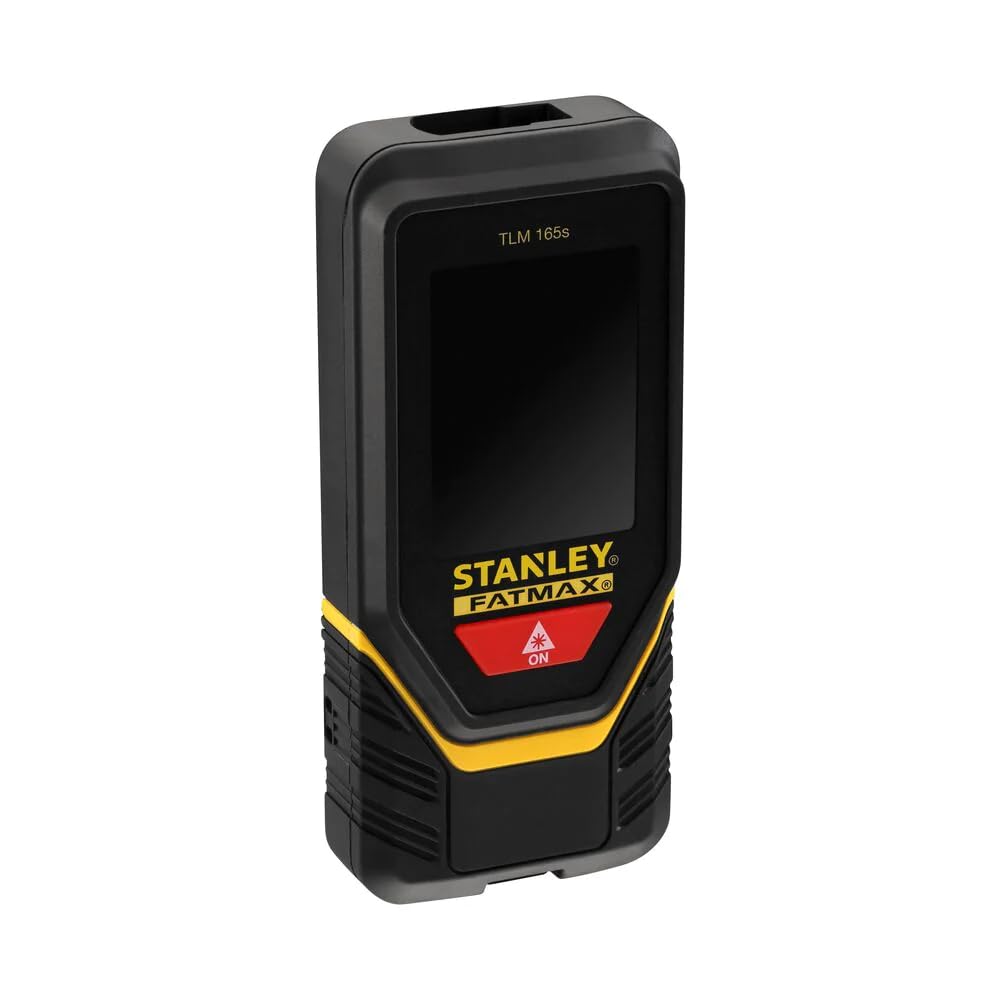
2. irudia: Angeludun view showing the device's screen with active measurement data.

3. irudia: Aldea view illustrating the foldable end piece for precise corner measurements.
5. Konfigurazioa
5.1 Bateriaren instalazioa
- Bilatu bateriaren konpartimentuaren estalkia gailuaren atzealdean.
- Irristatu edo askatu estalkia irekitzeko.
- Insert three (3) AAA alkaline batteries, ensuring correct polarity (+/-).
- Itxi bateriaren konpartimenduaren estalkia ondo.
6. Funtzionamendu-argibideak
6.1 Piztu/Itzali
- Pizteko: Sakatu botoia ON button (usually red with a laser icon). The laser will activate.
- Itzaltzeko: Sakatu eta eutsi botoiari OFF button (often marked with an 'X' or 'Clear' icon). The device will also automatically shut down after 180 seconds of inactivity (laser after 90 seconds).
6.2 Oinarrizko distantzia neurtzea
- Power on the device. The laser beam will emit.
- Aim the laser dot at the target point.
- Sakatu ON button again to take a measurement. The measured distance will appear on the display.

Figure 4: User performing a distance measurement on a wall.
6.3 Neurketa jarraitua (jarraipena)
- From the basic measurement mode, press the measurement button once more (or a dedicated tracking button if available).
- Move the device slowly. The display will continuously update with the current distance, often showing minimum and maximum values.
- Press the measurement button again to stop continuous measurement.
6.4 Area and Volume Measurement
- Access the area/volume function via the mode button (refer to on-screen icons).
- Follow the on-screen prompts to measure the required lengths (e.g., length, width for area; length, width, height for volume).
- The device will automatically calculate and display the area or volume.
6.5 Memoriaren biltegiratzea
- The device can store up to 5 measurements.
- To save a measurement, press the memory button (if available) after a measurement is taken.
- To recall measurements, press the memory button repeatedly or use navigation buttons.
6.6 Unitate-bihurketa
- Press the unit button (if available) to cycle through available measurement units (e.g., meters, feet).
6.7 Using the Foldable End Piece
- For measurements from edges or corners, extend the foldable end piece.
- Ensure the device's measurement reference point is correctly set (usually indicated by an icon on the screen).
6.8 Bluetooth konexioa
- The device supports Bluetooth connectivity for data transfer to compatible applications.
- Refer to the specific application's instructions for pairing and data synchronization.
7. Mantentzea
- Garbiketa: Garbitu gailua leun batekin, damp oihal. Ez erabili produktu kimiko gogorrak edo garbitzaile urratzaileak.
- Biltegiratzea: Gorde gailua bere zorroan leku lehor eta fresko batean erabiltzen ez duzunean. Kendu bateriak denbora luzez gordetzen baduzu.
- Bateria ordezkatzea: Replace all three AAA batteries when the low battery indicator appears on the display.
8. Arazoak
| Arazoa | Kausa posiblea | Irtenbidea |
|---|---|---|
| Gailua ez da pizten | Bateriak agortuta edo gaizki sartuta | Egiaztatu bateriaren polaritatea; ordezkatu bateriak. |
| Neurri okerrak | Unstable surface, obstruction, or incorrect reference point | Ensure stable positioning, clear laser path, and correct reference setting. |
| Laser ez da ikusten | Bright ambient light or long distance | Use in lower light conditions or at shorter distances. |
| Erakutsi errore-mezua | Measurement out of range or internal error | Move closer to target or restart the device. If persistent, contact support. |
9. Zehaztapenak
| Ezaugarri | Xehetasuna |
|---|---|
| Modelo zenbakia | STHT1-77139 |
| Accuracy (Point) | ± 1.5 mm |
| Eragiketa-eremua | 0.1 - 50 metro |
| Laser Klasea | 2. klasea |
| Laser diodoa | 635 nm |
| Pilak | 3 x AAA (Alkaline, supplied) |
| Bateriaren iraupena | Gutxi gorabehera. 3000 neurketa |
| Funtzionamendu-tenperatura | 0°C eta 40°C artean |
| IP balorazioa | IP54 (Hauts eta Urarekiko Erresistentea) |
| Automatic Shutdown (Laser) | 90 segundo |
| Automatic Shutdown (Unit) | 180 segundo |
| Memoria Biltegiratzea | 5 sarrera |
| Pisua (pilekin) | 282 g |
| Materiala | Plastikoa |
| Konektibitatea | Bluetootha |
10. Bermea eta Laguntza
For warranty information, please refer to the documentation provided at the time of purchase or contact your local STANLEY dealer or customer service. For technical support, visit the official STANLEY webwebgunera edo jarri harremanetan bezeroarentzako arreta-zerbitzuarekin. Gorde erosketa-agiria erosketaren frogagiri gisa.
STANLEY Customer Service: www.stanleytools.com/support


