Sarrera
This manual provides essential information for the safe and efficient operation of your Sony KDL-55W900A 55-Inch 3D Internet LED HDTV. Please read these instructions thoroughly before using the television and retain them for future reference.
The Sony KDL-55W900A features a 55-inch display with 1080p resolution, 240Hz refresh rate, 3D capabilities, and integrated internet connectivity. It incorporates X-Reality PRO for enhanced detail and a TRILUMINOS display for brilliant colors.

Irudia: Aurrealdea view of the Sony KDL-55W900A 55-Inch 3D Internet LED HDTV, showcasinbere diseinu dotorea eta pantaila g.
Kutxan dagoena
Egiaztatu telebistarekin elementu hauek guztiak datozela:
- Television Unit (Sony KDL-55W900A)
- Urruneko Kontrola
- Telebista
- Elikatze kablea
- Active 3D Glasses (quantity may vary, typically 4 pairs)
- AA Batteries (2 for remote control)
- Documentation (Quick Setup Guide, Safety Information)
Konfigurazioa
1. Telebistaren euskarria jartzea
Place the TV screen face down on a soft, clean surface to prevent damage. Align the stand with the mounting holes on the bottom of the TV and secure it using the provided screws. Ensure the stand is firmly attached before proceeding.

Irudia: Diagram showing the dimensions of the Sony KDL-55W900A TV, including width, height, and depth.

Irudia: Aldea view of the Sony KDL-55W900A TV, highlighting its slim profile.
2. Periferikoak konektatzea
Connect your external devices such as Blu-ray players, gaming consoles, or cable/satellite boxes to the appropriate input ports (HDMI, USB, etc.) on the rear of the TV.
- HDMI: For high-definition audio and video.
- USBa: USB biltegiratze gailuak konektatzeko.
- Ethernet: Interneteko kable bidezko konexio baterako.
- RF: For antenna or cable connection.
3. Energia-konexioa
Konektatu elikatze-kablea telebistaren elikatze-sarreran, eta gero hormako entxufe batean.
4. Hasierako konfigurazio morroia
Upon first power-on, the TV will guide you through an initial setup process. This includes language selection, time zone, channel scanning, and network configuration.

Irudia: A person interacting with a tablet displaying a program guide, with the Sony TV visible in the background, demonstrating smart TV control.
Funtzionamendu-argibideak
1. Oinarrizko telebista funtzioak
- Potentzia: Sakatu urrutiko agintean edo telebistan pizteko botoia pizteko/itzaltzeko.
- Sarrera hautatzea: Use the "Input" or "Source" button on the remote to switch between connected devices (HDMI 1, HDMI 2, TV, etc.).
- Bolumena: Adjust using the Volume Up/Down buttons.
- Kanala: Change channels using the Channel Up/Down buttons or number pad.
2. Smart TV Features and Internet Connectivity
Your TV can connect to the internet via Wi-Fi or Ethernet. Access various online services and applications through the Smart TV interface.
- Navigate the Smart TV menu using the remote's directional pad.
- Select apps like Netflix, Hulu, or Amazon Prime Video for streaming content.
- Erabili integratua web browser for internet surfing.

Irudia: A family enjoying content on the Sony TV, with a smartphone mirroring its display to the TV, illustrating connectivity features.
3. Irudi eta soinu ezarpenak
Access the "Picture" and "Sound" menus to customize your viewentzuteko eta entzuteko esperientzia.
- Irudi moduak: Choose from Standard, Vivid, Cinema, Game, etc.
- Distira, Kontrastea, Kolorea: Egokitu ezarpen hauek zure lehentasunen arabera.
- X-Reality PRO: This feature enhances detail and texture.
- TRILUMINOS pantaila: Provides a wider spectrum of colors.
- Motionflow XR 960: Eszena azkarretan mugimenduaren argitasuna hobetzen du.

Irudia: A split-screen comparison demonstrating the enhanced detail and clarity provided by X-Reality PRO technology on the Sony TV.
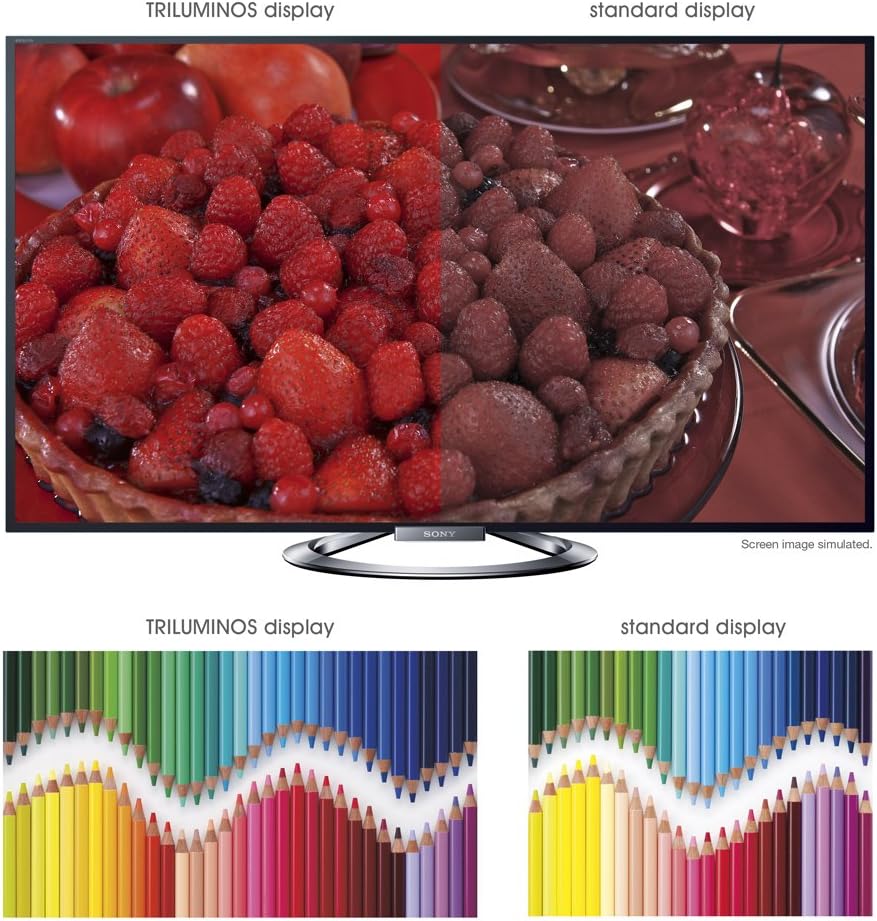
Irudia: A split-screen comparison illustrating the vibrant and expanded color palette of the TRILUMINOS display versus a standard display.
4D Viewing
To enjoy 3D content, ensure you have active 3D glasses and a 3D-compatible source (e.g., 3D Blu-ray player).
- Put on the active 3D glasses.
- Play 3D content from a connected source. The TV should automatically detect and switch to 3D mode.
- If 3D mode does not activate automatically, check the TV's picture settings for 3D options.
- Ensure 3D glasses are charged or have fresh batteries.
Mantentzea
1. Telebista garbitzea
- Pantaila: Garbitu pantaila astiro-astiro mikrofibrazko zapi leun eta lehor batekin. Orba egoskorrak izanez gero, garbitu apur batampGarbitu oihal bat urarekin edo pantaila-garbitzaile espezializatu batekin (ez ihinztatu zuzenean pantailan).
- Kabinete: Garbitu telebistaren armairua oihal leun eta lehor batekin. Saihestu garbitzaile, argizari edo disolbatzaile urratzaileak erabiltzea.
- Deskonektatu beti telebista garbitu aurretik.
2. Software eguneraketak
Periodically check for software updates to ensure optimal performance and access to the latest features.
- Navigate to the "Settings" menu on your TV.
- Look for "System Software Update" or similar options.
- Follow the on-screen instructions to download and install updates. Ensure the TV remains powered on during the update process.
3. 3D Glasses Care
- Clean lenses with a soft, dry cloth.
- Store glasses in a protective case when not in use.
- Replace batteries as needed (typically AA batteries).
Arazoak konpontzea
| Arazoa | Balizko Kausa / Irtenbidea |
|---|---|
| Botererik ez |
|
| Irudirik ez / Pantaila beltza |
|
| Soinurik ez |
|
| Sareko konexio arazoak |
|
| 3D Image is Blurry or Not Working |
|
If the problem persists after attempting these solutions, please refer to the support section for further assistance.
Zehaztapenak
| Ezaugarri | Xehetasuna |
|---|---|
| Marka | Sony |
| Modelo zenbakia | KDL-55W900A |
| Pantailaren tamaina | 55 hazbete |
| Bistaratzeko Teknologia | LED |
| Ebazpena | 1080p |
| Freskatze tasa | 240 Hz (Motionflow XR 960) |
| Aspektu-erlazioa | 16:9 |
| Ezaugarri bereziak | Flat, 3D Capable, Internet TV, X-Reality PRO, TRILUMINOS Display, Dynamic Edge LED Backlight |
| Konektibitate Teknologia | Ethernet, HDMI, RF, USB, Wi-Fi |
| Produktuaren neurriak (euskarriarekin) | 48.9" Z x 29.9" A x 11.8" S |
| Produktuaren neurriak (euskarririk gabe) | 48.9" Z x 28.5" A x 2.5" S |
| Elementuaren pisua | 48.5 kilo |
| Beharrezko bateriak | 2 AA pila (urrutiko agintearentzat) |
| Eskuragarri dagoen lehen data | 7ko urtarrilaren 2013a |
Bermearen informazioa
Your Sony KDL-55W900A television is covered by a limited warranty. The specific terms and duration of the warranty may vary by region and purchase date. Please refer to the warranty card included with your product or visit the official Sony support webwebgunean bermearen estaldurari, baldintzei eta terminoei buruzko informazio zehatza lortzeko.
Gorde erosketaren frogagiria (ordainagiria), bermearen erreklamazioetarako beharrezkoa izango baita.
Bezeroarentzako Arreta
For further assistance, technical support, or service inquiries regarding your Sony KDL-55W900A, please contact Sony customer support.
- Lineako laguntza: Bisitatu Sonyren laguntza ofiziala webMaiz egiten diren galderen, arazoak konpontzeko giden, softwarearen deskargen eta harremanetarako aukeren gunea.
- Telefono-laguntza: Refer to the contact information provided in your product documentation or on the Sony support website for regional telephone numbers.
When contacting support, please have your TV model number (KDL-55W900A) and serial number ready.