Sarrera
This manual provides essential instructions for the safe and effective use of your Pentax MX-1 Digital Camera. Please read this manual thoroughly before using the camera and keep it in a safe place for future reference.
Produktua amaituview
The Pentax MX-1 is a high-end compact digital camera featuring a 12-megapixel back-illuminated CMOS sensor and a 4x optical zoom lens (28-112mm equivalent) with an f/1.8-2.5 aperture. It includes a 3-inch tilting LCD display and a dual shake reduction system for clear images and video.

1. irudia: Aurrealdea view of the Pentax MX-1 Digital Camera.
Konfigurazioa
1. Bateria instalatzea eta kargatzea
- Ireki kameraren behealdean dagoen bateriaren konpartimentuaren estalkia.
- Insert the provided Lithium-Ion battery, ensuring the correct orientation as indicated inside the compartment.
- Itxi bateriaren konpartimenduaren estalkia ondo.
- Connect the camera to the AC adapter using the supplied USB cable. The charging indicator will illuminate.
- Charge the battery fully before first use. A full charge typically takes approximately 3 hours.
2. Memoria Txartelaren Instalazioa
- Locate the memory card slot, typically adjacent to the battery compartment or on the side of the camera.
- Insert an SD, SDHC, or SDXC memory card into the slot with the label facing the correct direction until it clicks into place.
- To remove the card, push it in gently until it springs out.

2. irudia: Aldea view of the camera showing the open port cover for USB/HDMI connections.
3. Hasierako ezarpenak
- Piztu kamera sakatuz ON/OFF botoia.
- Follow the on-screen prompts to set the language, date, and time.
- Format the memory card before first use to ensure optimal performance. Navigate to the MENUA, hautatu KONFIAZIOA, eta gero FORMATUA TXARTELA.
Kameraren funtzionamendua
1. Oinarrizko Argazkilaritza
- Piztu: Sakatu ON/OFF button. The lens will extend.
- Aukeratu modua: Rotate the mode dial on the top of the camera to select your desired shooting mode (e.g., Auto Pict, Program, Aperture Priority, Shutter Priority, Manual).
- Fokua: Point the camera at your subject. Press the shutter button halfway down to focus. The focus frame will turn green when focus is achieved.
- Tiroa: Press the shutter button fully down to take a picture.

3. irudia: Goikoa view of the camera showing the mode dial, shutter button, and exposure compensation dial.
2. Using the Tilting LCD Monitor
The 3-inch LCD monitor can be tilted up or down to facilitate shooting from various angles, such as low-angle shots or overhead shots. Gently pull the top or bottom edge of the LCD screen to adjust its position.
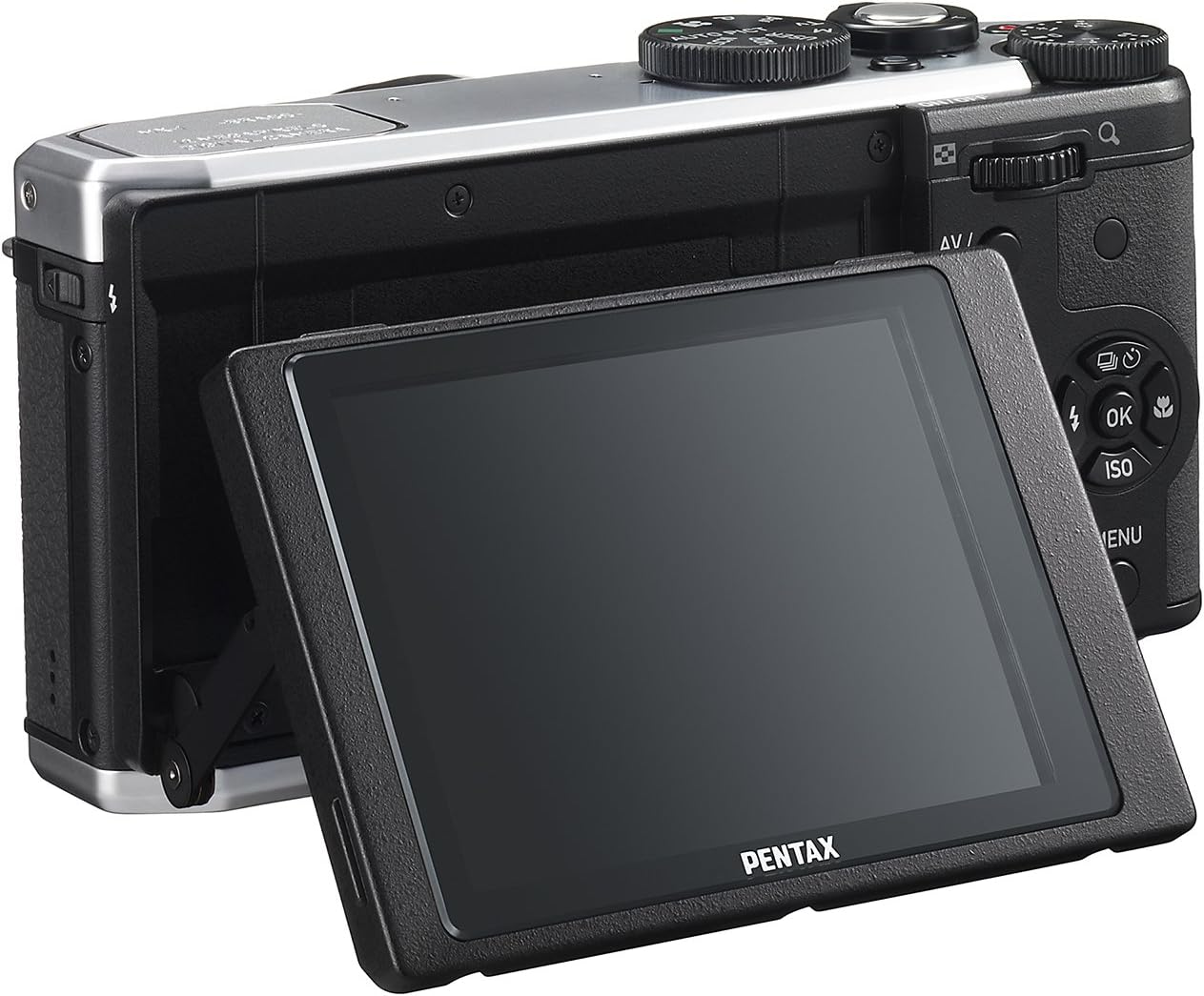
4. Irudia: Atzealdea view of the camera demonstrating the tilting LCD screen.
3. Flasharen funtzionamendua
To use the built-in flash, slide the flash release lever to pop up the flash unit. The flash modes (Auto, On, Off, Slow Sync, Rear Curtain Sync) can be selected via the camera's menu or a dedicated button, depending on the shooting mode.

5. irudia: Aurrealdea view of the camera with the pop-up flash in the extended position.
4. Erreprodukzio modua
- Sakatu JOLASTU botoia erreprodukzio moduan sartzeko.
- Use the directional pad to scroll through your photos and videos.
- Sakatu OK botoia view information about the selected image or to play a video.
- Sakatu MENUA button to access playback options such as deleting, rotating, or resizing images.
Mantentzea
1. Kamera garbitzea
- Kameraren gorputza: Erabili zapi leun eta lehor bat kameraren gorputza garbitzeko. Zikinkeria egoskorra bada, garbitu pixka batampen the cloth with water or a mild cleaning solution. Avoid using organic solvents.
- Lentea: Use a lens brush or a blower to remove dust. For smudges, use a lens cleaning cloth and lens cleaning fluid. Do not touch the lens surface with your fingers.
- LCD monitorea: Gently wipe the screen with a soft, lint-free cloth. Avoid pressing hard on the screen.
2. Biltegiratzea
- Denbora luzez erabiltzen ez duzunean, kendu bateria kameratik.
- Gorde kamera leku fresko, lehor eta ondo aireztatu batean, eguzki-argitik, tenperatura altuetatik eta hezetasunetik urrun.
- Use a desiccant to prevent mold growth if storing in humid environments.
Arazoak konpontzea
If you encounter issues with your Pentax MX-1, refer to the table below for common problems and their solutions.
| Arazoa | Kausa posiblea | Irtenbidea |
|---|---|---|
| Kamera ez da pizten. | Bateria agortuta dago edo gaizki sartuta dago. | Kargatu bateria edo sartu berriro behar bezala. |
| Ezin dira argazkiak atera. | Memoria txartela beteta, blokeatuta edo sartu gabe dago. | Insert a memory card, unlock it, or delete unnecessary files. |
| Irudiak lausoak dira. | Camera shake, incorrect focus, or dirty lens. | Hold the camera steady, ensure proper focus, or clean the lens. |
| Flasha ez da pizten. | Flash is set to "Off" or not popped up. | Pop up the flash and set the flash mode to "Auto" or "On". |
| LCD screen is difficult to see in bright light. | High ambient light. | Adjust the tilting LCD for a better viewing angle or find shade. |
Zehaztapenak
| Ezaugarri | Xehetasuna |
|---|---|
| Ereduaren izena | Pentax MX-1 |
| Argazki sentsorearen bereizmena | 12 MP |
| Argazki-sentsorearen tamaina | 1/1.7 hazbetekoa |
| Zoom optikoa | 4x |
| Lentearen Fokua | 28-112mm (35mm equivalent) |
| Irekiera | f/1.8-2.5 |
| Irudi Egonkortzea | Sentsore-aldaketa |
| Pantailaren tamaina | 3 hazbete |
| Bistaratzeko mota | LCD inklinagarria |
| Onartua File Formatua | JPEG 2.3, RAW |
| Bideo Ebazpena | FHD 1080p (H.264) |
| ISO tartea (zabaldua) | 100-12800 |
| Obturadorearen abiadura tartea | 30 segundotik 1/8000 segundora |
| Memoria Txartel Mota | SD/SDHC/SDXC |
| Konektibitatea | HDMI (Mini HDMI type-D), USB |
| Bateria mota | Litio ioia |
| Elementuaren pisua | 13.76 ontza |
Bermea eta Laguntza
Bermearen informazioa
The Pentax MX-1 Digital Camera comes with a 1 urteko bermea covering parts and labor from the date of purchase. This warranty covers manufacturing defects and malfunctions under normal use. It does not cover damage caused by misuse, accidents, unauthorized repairs, or normal wear and tear. Please retain your proof of purchase for warranty claims.
Bezeroarentzako Arreta
For technical assistance, service, or further inquiries, please visit the official Pentax support website or contact their customer service department. Refer to the product packaging or the official Pentax webgunea kontaktu-informazio eguneratuena lortzeko.
Visit the Pentax Store on Amazon produktuari eta osagarriei buruzko informazio gehigarria lortzeko.


