1. Sarrera
This manual provides essential information for the safe and efficient operation of your Hitachi CP-DX300 DLP Projector. Please read this manual thoroughly before using the projector and retain it for future reference. The Hitachi CP-DX300 is designed to deliver bright, clear, and detailed images for various applications, including business presentations and home entertainment.
3. Paketearen edukia
Egiaztatu behean zerrendatutako elementu guztiak zure paketean sartuta daudela:
- Hitachi CP-DX300 DLP Projector
- Elikatze-kablea
- Urruneko Kontrola
- HDMI kablea
- VGA Cable (if included with specific models)
- Erabiltzailearen eskuliburua (dokumentu hau)
Note: Additional accessories may vary by region or retailer.
4. Produktua amaitu daview
The Hitachi CP-DX300 is a compact and powerful DLP projector designed for versatility. Below are key physical features and connection ports.
Aurrealdea View
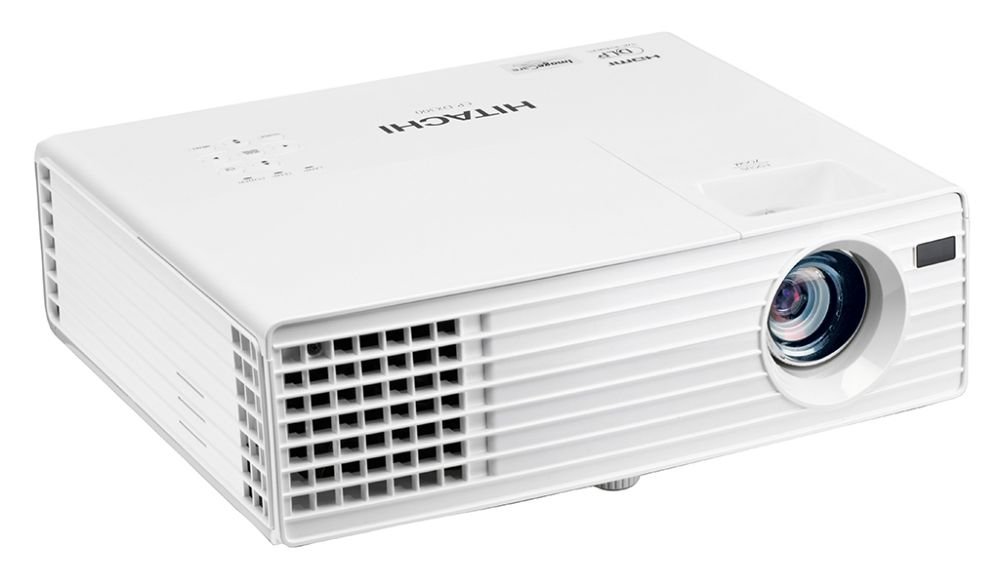
This image displays the front of the Hitachi CP-DX300 projector, highlighting the main projection lens and the front ventilation grille. The lens is centrally located, and the Hitachi brand logo is visible on the right side of the front panel.
Aldea View (Portuak)

This image shows the side panel of the Hitachi CP-DX300 projector, detailing the various input and output ports. These include HDMI, VGA, S-Video, Composite Video, Component Video, and audio input/output jacks, providing comprehensive connectivity options.
Ezaugarri nagusiak:
- Proiekzio Teknologia: 0.55" single chip DLP
- Ebazpena: XGA - 1024 x 768
- Argiaren irteera: 3,000 ANSI lumen
- Koloreak: 1.07 mila milioi kolore
- Aspektu-erlazioa: Native 4:3 / 16:9 compatible
- Kontraste-erlazioa: 2500: 1
- Lamp Bizitza: Approximately 4,500 hours (standard mode), 6,000 hours (Eco mode)
- Bozgorailuaren irteera: 2W x 1
- Konektibitatea: HDMI x 1 (HDCP compliant), Computer Input (15-pin mini D-sub) x 2, Computer Monitor Output (15-pin mini D-sub) x 1, S-Video Mini DIN 4-pin x 1, Composite Video RCA jack x 1, Component Video (shared with computer inputs), Audio Input (3.5 mm stereo mini jack) x 1, Audio Output (3.5 mm stereo mini jack) x 1.
6. Funtzionamendu-argibideak
6.1 Piztu/Itzali
- Piztu: Press the Power button on the projector or the remote control. The lamp will warm up, and the image will appear shortly.
- Itzali: Press the Power button again. A confirmation message may appear; press Power again to confirm shutdown. The projector will enter a cooling cycle before completely powering off.
6.2 Fokua eta Keystone doikuntza
- Fokua: Biratu proiektorearen lentearen fokatze-eraztuna irudia pantailan zorrotz eta garbi agertu arte.
- Keystone zuzenketa: Use the keystone adjustment feature (typically found in the projector's menu or via dedicated buttons on the remote) to correct trapezoidal distortion, ensuring a rectangular image. The CP-DX300 supports +/- 30 Degree vertical keystone correction.
6.3 Iturria hautatzea
Press the "Source" button on the projector or remote control to cycle through available input sources (HDMI, VGA, S-Video, Composite, etc.) until your desired source is displayed.
6.4 Audio irteera
The projector has a built-in 2W speaker. For enhanced audio, connect external speakers or a sound system to the 3.5 mm stereo mini Audio Output jack.
6.5 3D Viewing
The Hitachi CP-DX300 is 3D capable. To enjoy 3D content, you will need compatible 3D glasses and a special graphic card (sold separately) connected to a 3D-enabled source device.
6.6 Wall Color Correction
This feature allows the projector to automatically adjust color output when projecting onto colored walls, ensuring accurate color reproduction without needing a white screen.
7. Mantentzea
7.1 Proiektorea garbitzea
- Kanpoaldea: Wipe the projector's exterior with a soft, dry cloth. Do not use abrasive cleaners or solvents.
- Lentea: Garbitu lentea astiro-astiro lenteak garbitzeko zapi batekin edo lente-paper batekin. Saihestu lentea zuzenean hatzekin ukitzea.
- Aireztapena: Regularly check and clean the ventilation grilles to ensure proper airflow and prevent dust buildup.
7.2 lamp Ordezkoa
Lamp door is conveniently located on top of the model for easy maintenance. Refer to the detailed instructions in the full user manual for safe lamp replacement procedures. Always use genuine Hitachi replacement lamps.
L espero zenamp Bizitza: Approximately 4,500 hours (standard mode), 6,000 hours (Eco mode).
7.3 Power Saving Standby Mode
The projector features a power-saving standby mode that reduces power consumption to less than 0.5W, contributing to energy efficiency.
7.4 Image Care Technology
Image Care is a lamp power control function that optimizes picture performance with maximum energy savings by decreasing energy usage, improving contrast ratio, and lengthening lamp life. This results in a lower total cost of ownership and decreased maintenance cost.
7.5 Intelligent Eco Mode
This mode automatically adjusts the lamp's brightness according to the screen's brightness level, further enhancing energy efficiency and lamp iraupena.
8. Arazoak
Proiektorearekin arazoak badituzu, jo ezazu honako arazo eta irtenbide ohikoenei:
- Irudirik ez:
- Ziurtatu kablea ondo konektatuta dagoela eta proiektorea piztuta dagoela.
- Egiaztatu sarrera-iturria behar bezala hautatuta dagoela eta iturburu-gailua aktibo dagoela.
- Check the connection cable (HDMI, VGA) for damage or loose connections.
- Irudi lausoa:
- Doitu lentearen fokatze-eraztuna.
- Ziurtatu proiekzio-gainazala laua dela eta proiektorea egonkorra dela.
- Irudia trapezoidala da:
- Erabili keystone zuzenketa funtzioa irudiaren forma doitzeko.
- Audiorik ez:
- Egiaztatu proiektorearen bolumen-ezarpenak.
- Ensure external audio devices are properly connected and powered on if used.
- Verify the audio source is playing.
- Gehiegizko berotze abisua:
- Ziurtatu aireztapen-saretak ez daudela blokeatuta.
- Clean any dust from the grilles.
- Erabili proiektorea ondo aireztatutako gune batean.
For more complex issues, please contact Hitachi customer support.
10. Bermea eta laguntza
For warranty information and customer support, please refer to the documentation included with your product or visit the official Hitachi webgunea. Gorde erosketa-agiria berme-erreklamazioetarako.
Note: Returns may be subject to specific terms and conditions, especially for brand new items, as indicated by the seller. Technical issues are typically covered.


