Sarrera
The Logitech MK270 Wireless Keyboard and Mouse Combo provides a reliable and convenient wireless solution for your computing needs. This combo features a 2.4 GHz wireless connection, offering a range of up to 10 meters with minimal delays or dropouts. Designed for ease of use, it includes a full-size keyboard with media hotkeys and a compact, ambidextrous mouse. This manual provides instructions for setup, operation, maintenance, and troubleshooting to ensure optimal performance of your device.
Kutxan dagoena
Paketea irekitzean, egiaztatu osagai guztiak daudela:
- Logitech MK270 Haririk gabeko Teklatua
- Logitech haririk gabeko sagua
- USB Nano hargailua
- 2 AAA pila (teklatuarentzat)
- AA bateria 1 (saguarentzat)


Konfigurazio Argibideak
- Instalatu bateriak: Open the battery compartments on the underside of both the keyboard and the mouse. Insert the included AAA batteries into the keyboard and the AA battery into the mouse, ensuring correct polarity (+/-).
- Konektatu USB hargailua: Locate an available USB port on your computer. Plug the tiny Logitech Nano Receiver into the USB port. The system should automatically detect the receiver and install necessary drivers.
- Piztu gailuak: Locate the ON/OFF switch on the top right of the keyboard and on the underside of the mouse. Slide both switches to the 'ON' position.
- Proba konexioa: Once powered on, the keyboard and mouse should be ready for use. Test by typing on the keyboard and moving the mouse cursor. If they do not respond, ensure the receiver is securely plugged in and the devices are powered on.
The Logitech MK270 is designed for plug-and-play simplicity and is compatible with Windows 10 or later, Windows 8, 7, Windows Vista, Windows XP, and Chrome OS. It is not Bluetooth compatible.
Funtzionamendu-argibideak
Teklatuaren Ezaugarriak
- Tamaina osoko diseinua: The keyboard features a standard full-size layout with deep-profile, quiet keys for comfortable typing.
- Eight Hot Keys: Access frequently used functions instantly with the dedicated hotkeys located above the function row. These include controls for movies, music, internet, email, volume adjustment, and play/pause.
- Piztu/Itzali etengailua: Conserve battery life by using the ON/OFF switch located on the top right of the keyboard when not in use.


Saguaren ezaugarriak
- Diseinu trinkoa eta anbidestroa: The mouse is designed for comfortable control, suitable for both left and right-handed users.
- Jarraipen leuna: Provides responsive and accurate cursor control.
- 10m Wireless Range: Maintain a reliable connection up to 10 meters from your computer.
- Hartzailearen biltegiratzea: The USB Nano Receiver can be conveniently stored inside the mouse when not in use, making it ideal for portability.
- Piztu/Itzali etengailua: An ON/OFF switch on the underside of the mouse helps conserve battery power.


Mantentzea
Baterien kudeaketa
The Logitech MK270 combo is designed for extended battery life:
- Keyboard Battery Life: Up to 36 months (3 years) with typical use.
- Mouse Battery Life: Up to 12 months with typical use.
Battery life may vary based on user and computing conditions. To maximize battery life, always use the ON/OFF switches on both the keyboard and mouse when not in use. The devices also feature an auto-sleep function to conserve power during periods of inactivity.

Garbiketa
To clean your devices, use a soft, damp cloth. Avoid using harsh chemicals or abrasive cleaners, as these can damage the surfaces. Ensure devices are powered off before cleaning.
Arazoak konpontzea
- Teklatuaren/saguaren erantzunik ez:
- Ensure both the keyboard and mouse are switched 'ON'.
- Check that the USB Nano Receiver is securely plugged into a working USB port on your computer.
- Replace the batteries in both the keyboard and mouse. Low batteries are a common cause of connectivity issues.
- Saiatu USB hargailua beste USB ataka batera konektatzen.
- Konexio etengabea edo atzerapena:
- Move the keyboard and mouse closer to the USB receiver. The optimal range is up to 10 meters, but environmental factors (e.g., metal objects, other wireless devices) can reduce this.
- Avoid placing the receiver near other electrical devices that may cause interference (e.g., speakers, monitors, Wi-Fi routers).
- If using a USB hub, try connecting the receiver directly to a USB port on your computer.
- Hotkeys Not Working:
- Ziurtatu zure sistema eragilea eguneratuta dagoela.
- While plug-and-play, some advanced functions or specific hotkey behaviors might benefit from Logitech's optional software, available on their official support webgunea.
Zehaztapenak
| Marka | Logitech |
| Modelo zenbakia | 920-004536 |
| Konektibitate Teknologia | Haririk gabekoa (2.4 GHz-ko irrati-maiztasuna) |
| Wireless Range | Gehienez 10 metro (33 oin) |
| Teklatuaren bateriaren iraupena | Up to 36 months (3 years) |
| Saguaren bateriaren iraupena | Gehienez 12 hilabete |
| Sistema eragileen bateragarritasuna | Windows 10, Windows 7, Windows 8, Windows Vista, Windows XP, Chrome OS |
| Teklatuaren neurriak (LxZxA) | 441 mm x 149 mm x 18 mm (gutxi gorabehera 17.36 x 5.87 x 0.71 hazbete) |
| Teklatuaren pisua | 481 g (gutxi gorabehera 1.06 lb) |
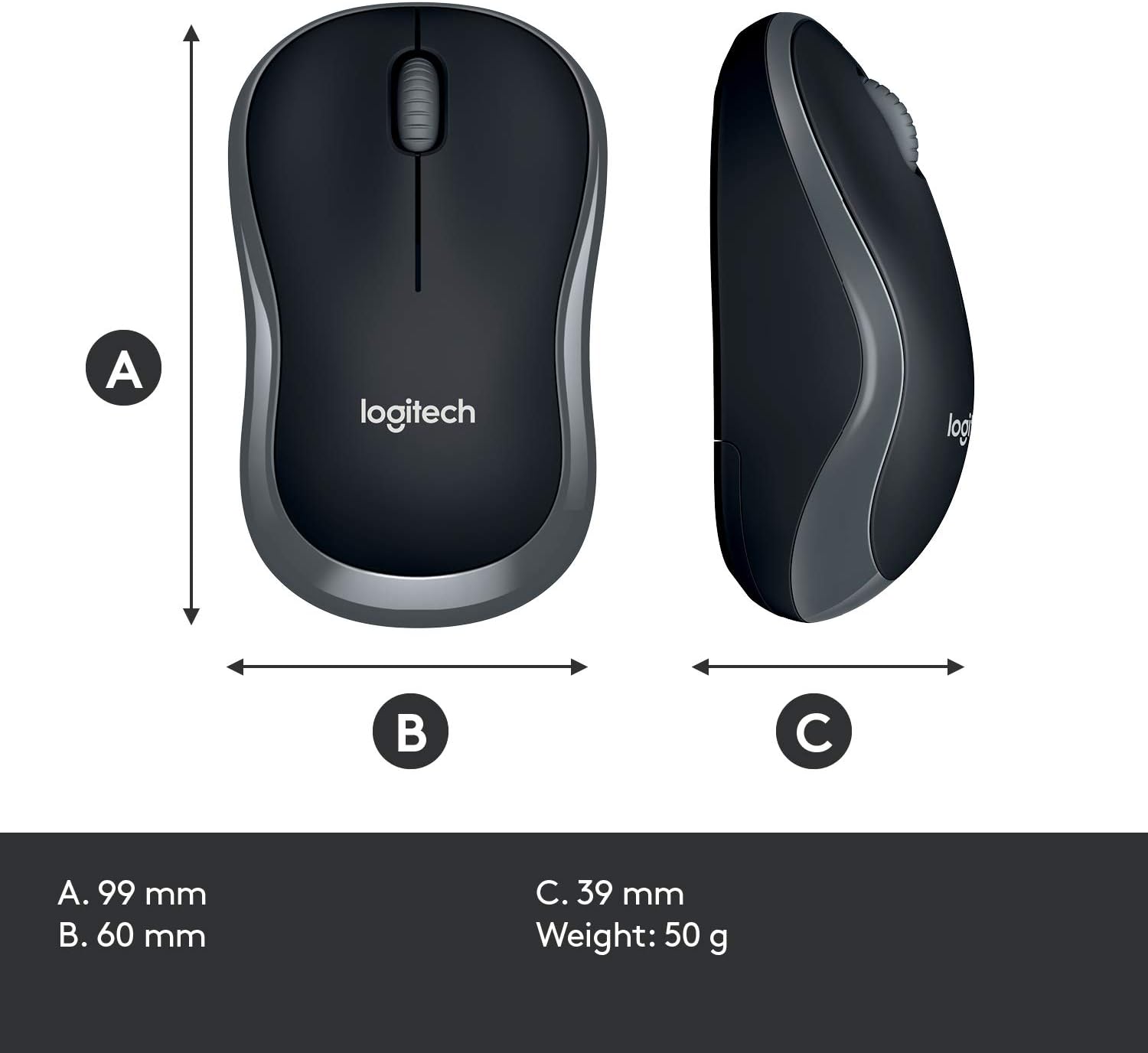
| Saguaren neurriak (LxZxA) | 99 mm x 60 mm x 39 mm (gutxi gorabehera 3.90 x 2.36 x 1.54 hazbete) |
| Saguaren pisua | 50 g (gutxi gorabehera 0.11 lb) |
| Kolorea | Beltza |

Bermea eta Laguntza
Warranty information for the Logitech MK270 Wireless Keyboard and Mouse Combo is typically provided with your product packaging or can be found on the official Logitech webgunea. Mesedez, kontsultatu baliabide hauek bermearen baldintza eta zehaztapen zehatzak ikusteko.
Laguntza gehiago, euskarri teknikoa edo azken kontrolatzaileak eta softwarea deskargatzeko, bisitatu Logitech-en euskarri ofiziala. webgunea: