Produktua amaituview
The Panasonic Bluetooth Cordless Phone KX-TG7875S Link2Cell system offers advanced communication features for home or small business environments. It integrates seamlessly with up to two smartphones via Bluetooth, allowing users to make and receive cell calls directly from the cordless handsets. Key functionalities include a digital answering machine with message forwarding, a USB charging port for mobile devices, and enhanced noise reduction technology for clearer conversations.
- Link2Cell Connectivity: Connects up to two smartphones via Bluetooth, enabling cell calls to be made and received from any of the 5 portable handsets. No traditional landline is required for this feature.
- Digital Answering Machine with Message Forwarding: Records incoming messages and can forward them to a registered cell phone, ensuring you stay connected even when away from home.
- USB Charge and Power Back-up: Features a convenient USB input on the base unit to charge your smartphone. The system is designed to maintain connectivity during power outages.
- Hizketan deitzailearen IDa: Utilizes text-to-speech technology to announce the caller's information between rings, allowing you to identify callers from across the room.
- Enhanced Noise Reduction Technology: Suppresses background noise and simultaneously enhances your voice for improved call clarity.
- Extensive Phonebook and Call Block: Stores up to 3,000 numbers in the phonebook and allows blocking of up to 250 unwanted numbers.
- Kristalezko pantaila garbia: Handsets feature a 1.8-inch white backlit display for easy readability.
Kutxan dagoena
Upon unpacking your Panasonic KX-TG7875S system, please verify that all the following components are included:
- 1 x Oinarrizko unitatea erantzun-makina digitalarekin
- 5 x Haririk gabeko telefonoak
- 4 x Handset Chargers (one handset charges on the base unit)
- 2 x AC Adapters (one for the base unit, one for the chargers)
- 1 x Telephone Line Cord (for landline connection, if desired)
- 10 x AAA Rechargeable Batteries (2 per handset)
- 1 x Erabiltzailearen eskuliburua (dokumentu hau)

Figure 1: Panasonic KX-TG7875S system showing the main base unit with one handset and four additional charging cradles with handsets.
Konfigurazio Gida
- Instalatu bateriak: Open the battery compartment on the back of each cordless handset. Insert the two supplied AAA rechargeable batteries, ensuring correct polarity. Close the compartment cover.
- Oinarrizko unitatea konektatu:
- Connect the AC adapter to the base unit's power jack and plug the other end into a standard electrical outlet.
- (Optional for Landline) Connect the telephone line cord to the base unit's LINE jack and the other end to your telephone wall jack.
- Konektatu telefonoaren kargagailuak: Plug the AC adapters for the individual handset chargers into electrical outlets.
- Kargatzeko telefonoak: Place each handset on its respective base unit or charging cradle. The display will indicate "Charging." Allow at least 7 hours for a full charge before initial use.
- Hasierako konfigurazioa: Once charged, the handset display will prompt you to set the date, time, and language. Follow the on-screen instructions using the navigation keys.
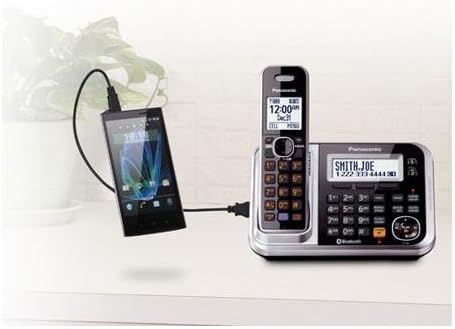
Figure 2: The base unit features a USB port for charging a smartphone, demonstrating its versatile connectivity.
Funtzionamendu-argibideak
Deiak egitea eta jasotzea
- Dei bat egiteko: Lift a handset from its cradle or press the HITZALDI botoia. Markatu telefono zenbakia.
- Dei bat jasotzeko: Telefonoak jotzen duenean, altxatu telefonoa edo sakatu tekla HITZALDI botoia.
- Bozgorailua: Dei batean zehar, sakatu SP-PHONE botoia bozgorailu modura aldatzeko. Sakatu berriro telefonoaren modura itzultzeko.
- Bolumenaren doikuntza: Erabili VOL ▲/▼ buttons on the side of the handset during a call to adjust the earpiece or speakerphone volume.
Link2Cell (Bluetooth) Features
- Smartphone bat parekatzea: Access the Bluetooth menu on the base unit or handset. Follow the prompts to search for and pair your smartphone. Up to two smartphones can be paired.
- Mugikorreko deiak egitea: Once paired, you can select to make calls using your connected cell line directly from the cordless handset.
- Mugikorreko deiak jasotzea: Incoming calls to your paired smartphone will ring on the cordless handsets, allowing you to answer from anywhere within range.
- USB kargatzea: Connect your smartphone to the USB port on the base unit for convenient charging.
Erantzungailu digitala
- Piztu/Itzaltzea: Sakatu ERANTZUNA ON / OFF button on the base unit to activate or deactivate the answering machine.
- Mezuak erreproduzitzen: Sakatu JOLASTU/GELDITU button on the base unit to listen to messages. Use the skip buttons (◄◄ / ►►) to navigate.
- Urruneko sarbidea: You can access your messages remotely from an outside line by following the instructions in the full user guide.
- Mezua birbidaltzea: Set up message forwarding to your registered cell phone through the answering machine settings.
Ezaugarri aurreratuak
- Hizketan deitzailearen IDa: Ensure this feature is enabled in the settings. The handset will announce the caller's name or number.
- Deiak blokeatzea: To block an unwanted number, press the DEI BLOKEA button on the handset during or after a call, or add numbers manually through the menu. The system can block up to 250 numbers.
- Zarata murriztea: Dei batean zehar, sakatu ZARATA MURRIZTEA button on the handset to reduce background noise from the other party's end.
- Telefono-agenda: Store up to 3,000 contacts. Names and numbers entered into one handset are automatically shared with all other registered handsets.
- Interfonoa: Use the intercom feature to communicate between handsets within your home.
- Tonu berdintzailea: Adjust the audio quality (treble/bass) during a call for a more comfortable listening experience.
Mantentzea
- Garbiketa: Wipe the phone and base unit with a soft, dry cloth. Avoid using abrasive cleaners, benzene, thinner, or any other solvents.
- Bateria zaintzea: Erabili adierazitako bateria kargagarriak soilik. Telefonoa denbora luzez erabiliko ez baduzu, kendu bateriak isuriak saihesteko.
- Ingurumen-baldintzak: Avoid exposing the unit to excessive smoke, dust, moisture, or direct sunlight.
Arazoak konpontzea
If you experience issues with your Panasonic KX-TG7875S system, please refer to the following common solutions before contacting support:
- No Dial Tone / Cannot Make or Receive Calls:
- Ensure the base unit's AC adapter is securely plugged into both the unit and a working electrical outlet.
- If using a landline, check that the telephone line cord is properly connected to both the base unit and the wall jack.
- Verify that the handset batteries are fully charged.
- Soinu kalitate eskasa / estatikoa:
- Hurbildu oinarrizko unitatera.
- Ziurtatu telefonoaren bateriak guztiz kargatuta daudela.
- Check for interference from other electronic devices (e.g., microwaves, Wi-Fi routers).
- Answering Machine Not Recording Messages:
- Confirm the answering machine is turned ON (indicator light on base unit).
- Check if the memory is full. Erase old messages if necessary.
- Handset Display is Blank or Not Working:
- Place the handset on the charger to ensure it is receiving power.
- Verify batteries are correctly installed and charged.
For more detailed troubleshooting or issues not listed here, please consult the comprehensive user manual or visit the Panasonic support webgunea.
Zehaztapenak
| Ezaugarri | Xehetasuna |
|---|---|
| Modelo zenbakia | KX-TG7875S |
| Marka | Panasonic |
| Telefono Mota | Haririk gabekoa |
| Kolorea | Beltza/Zilarrezkoa |
| Telefono-kopurua | 5 |
| Erantzungailu mota | Digitala |
| Energia iturria | Kable elektrikoa |
| Pilak | 10 AAA pila behar dira (barne) |
| Produktuaren neurriak | 4.6 x 7.1 x 6.7 hazbete |
| Elementuaren pisua | 2.9 kilo |
| Materiala | Plastikoa |
| Markagailu mota | Teklatu bikoitza |
| Eskuragarri dagoen lehen data | 30ko martxoaren 2013a |
Bermea eta Laguntza
Produktuaren bermeari buruzko informazioa lortzeko, kontsultatu erosketarekin batera datorren berme-txartela edo bisitatu Panasonic-en webgune ofiziala. webgunea. Bermeak normalean fabrikazio akatsak estaltzen ditu erosketa-datatik aurrerako denbora-tarte jakin batean.
For technical support, frequently asked questions, or to download the full comprehensive user manual, please visit the Panasonic support section on their official website. You may also find contact information for customer service there.
Sareko baliabideak: www.panasonic.com