1. Sarrera
This manual provides instructions for the APEX LD200RM remote control, designed for use with various APEX LCD and LED television models. This remote control offers full functionality for your compatible APEX television, ensuring convenient operation of all features.
Compatible APEX TV Models:
- LD3249
- LD3288, LD3288T, LD3288M
- LD4077, LE4077M
- LD4088
- LD4688
- LE3212, LE3212D
- LE4012
- LE4612
- LE3242
- LE3942
- LE40B12
- LE4243
- LE4643
- LE5043
2. Konfigurazioa
2.1 Bateriaren instalazioa
The APEX LD200RM remote control requires two (2) AA batteries for operation. Follow these steps to install the batteries:
- Kokatu bateriaren konpartimentuaren estalkia urrutiko agintearen atzealdean.
- Sakatu fitxa behera eta irristatu estalkia kentzeko.
- Sartu bi AA pila, ziurtatu terminal positiboa (+) eta negatiboa (-) konpartimentuaren barruko markekin behar bezala lerrokatuta daudela.
- Irristatu bateriaren konpartimentuaren estalkia berriro bere lekuan klik egin arte.
Oharra: Ordeztu beti bi bateriak aldi berean. Ez nahastu bateria zaharrak eta berriak, edo bateria mota desberdinak.
2.2 Hasierako Erabilera
The APEX LD200RM remote control is an original replacement and typically does not require any programming or pairing. Once batteries are installed, point the remote control towards your compatible APEX television and begin operation.
3. Funtzionamendu-argibideak
This section details the functions of the buttons on your APEX LD200RM remote control.
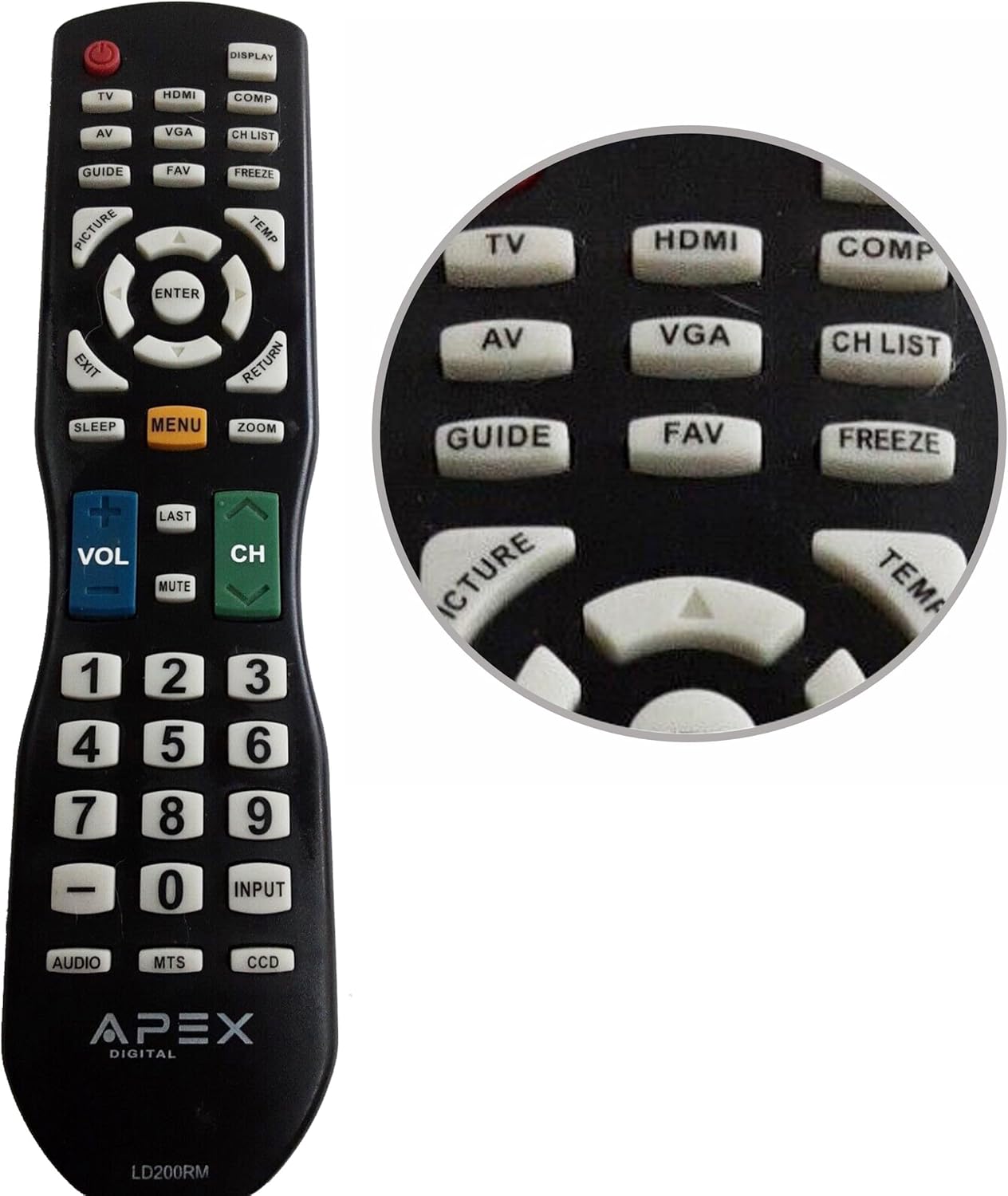
Figure 1: APEX LD200RM Remote Control Layout. This image displays the entire remote control, highlighting the arrangement of its various function buttons, including power, input selection, navigation, volume, channel, and numeric keypad.

Figure 2: Close-up of APEX LD200RM Remote Control Top Buttons. This image provides a detailed view of the upper section of the remote, focusing on buttons such as TV, HDMI, AV, VGA, COMP, CH LIST, DISPLAY, GUIDE, FAV, FREEZE, PICTURE, TEMP, MENU, ENTER, EXIT, RETURN, SLEEP, and ZOOM.
3.1 Power and Input Selection
- POWER (Botoi gorria): Telebista pizten edo itzaltzen du.
- Telebista: Selects the TV tuner input.
- HDMI: Selects the HDMI input.
- OF: Selects the Audio/Video input.
- VGA: Selects the VGA input.
- COMP: Selects the Component video input.
- DISPLAY: Shows on-screen display information.
3.2 Channel and Volume Control
- VOL (+/-): Bolumen-maila handitu edo murrizten du.
- CH (Gora/Behera): Telebistako kanala gora edo behera aldatzen du.
- AZKENA: Aurrekora itzultzen da viewed kanala.
- MUTU: Telebistako audioa desaktibatu edo aktibatzen du.
- CH ZERRENDA: Kanalen zerrenda bistaratzen du.
3.3 Menua eta nabigazioa
- MENUA: Telebistaren menu nagusia irekitzen du.
- SARTU: Menu barruko hautaketa bat berresten du.
- Gezi-botoiak (Gora/Behera/Ezkerra/Eskuina): Navigates through menu options and adjusts settings.
- IRTEERA: Uneko menutik edo pantailako bistaratzeatik irteten da.
- ITZULERA: Aurreko menura edo pantailara itzultzen da.
3.4 Numeric Keypad and Special Functions
- 0-9 (Numeric Buttons): Kanal zenbakiak zuzenean sartzen ditu.
- Sarrera: Eskuragarri dauden sarrera-iturrien artean ziklatzen du.
- GIDA: Displays the electronic program guide (if available).
- FAV: Gogoko kanaletara sartzen da.
- IZOZTU: Freezes the current image on the screen.
- IRUDIA: Irudiaren ezarpenak doitzen ditu.
- TEMP: (Function may vary by model, often related to picture temperature or a specific mode).
- LO: Lo egiteko tenporizadorea ezartzen du.
- ZOOM: Pantailaren zoom maila doitzen du.
- AUDIOA: Selects audio modes or tracks.
- MTS: Multi-channel Television Sound (stereo/SAP).
- DCC: Closed Captioning Display.
4. Mantentzea
4.1 Bateria ordezkatzea
When the remote control's performance degrades or it stops responding, it is likely time to replace the batteries. Refer to Section 2.1 for detailed battery installation instructions. Always use fresh AA batteries.
4.2 Garbiketa
Urrutiko agintea garbitzeko, erabili zapi leun eta lehor bat. Zikinkeria egoskorra bada, garbitu apur bat.ampGarbitu zapia urarekin edo garbitzaile leun eta ez-urratzaile batekin. Saihestu produktu kimiko gogorrak edo material urratzaileak erabiltzea, hauek urrutiko agintearen gainazala edo barneko osagaiak kaltetu baititzakete.
4.3 Biltegiratzea
Store the remote control in a cool, dry place away from direct sunlight and extreme temperatures. If the remote will not be used for an extended period, it is advisable to remove the batteries to prevent leakage and potential damage.
5. Arazoak
- Urrutiko agintea ez da erantzuten:
- Ziurtatu bateriak behar bezala instalatuta daudela, polaritate zuzenarekin (+/-).
- Ordeztu bateria zaharrak AA bateria berriekin.
- Check for any obstructions between the remote control and the television's infrared sensor.
- Ensure you are within the effective range of the television's IR receiver.
- Botoi batzuk ez dute funtzionatzen:
- Honek bateriaren energia baxua adieraz dezake. Ordeztu bateriak.
- Ensure the remote is clean and there is no debris lodged under the buttons.
- Verify that the button function is applicable to your specific TV model. Some functions may not be supported by all compatible TVs.
- Television is not turning on/off:
- Confirm the television is plugged into a working power outlet.
- Try using the power button directly on the television to rule out a TV issue.
6. Zehaztapenak
| Ezaugarri | Xehetasuna |
|---|---|
| Modelo zenbakia | LD200RM |
| Marka | Apex |
| Gailu bateragarriak | APEX LCD & LED Televisions |
| Energia iturria | 2 x AA pila (ez daude barne) |
| Produktuaren neurriak | 10 x 6 x 2 hazbete (gutxi gorabehera) |
| Elementuaren pisua | 3.2 ontza (gutxi gorabehera) |
| Kolorea | Beltza |
| Ezaugarri Berezia | Diseinu ergonomikoa |
7. Bermearen informazioa
This APEX LD200RM remote control typically comes with a 30-day warranty from the date of purchase. This warranty covers manufacturing defects. For specific details regarding warranty claims, returns, or replacements, please refer to your purchase documentation or contact the seller directly.
8. Laguntza
If you encounter issues not covered in this manual or require further assistance, please contact the retailer or the manufacturer's customer support. When contacting support, please have your product model number (LD200RM) and your television model number readily available.


