Sarrera
This manual provides instructions for the Vivanco RR 220 remote control, designed for compatibility with Samsung Smart TVs. Please read this manual thoroughly before using the device to ensure proper operation and to understand its features.
Paketearen edukia
- Vivanco RR 220 Remote Control
- Erabiltzailearen eskuliburu hau
Oharra: Bateriak ez daude barne eta aparte erosi behar dira.
Konfigurazioa
1. Bateriaren instalazioa
- Kokatu bateriaren konpartimendua urrutiko agintearen atzealdean.
- Irristatu bateriaren estalkia beherantz edo sakatu pestilloa eta altxa irekitzeko.
- Insert two (2) AAA batteries, ensuring the positive (+) and negative (-) terminals align with the markings inside the compartment.
- Jarri bateriaren estalkia berriro, ondo sartuta dagoela ziurtatuz klik eginez.
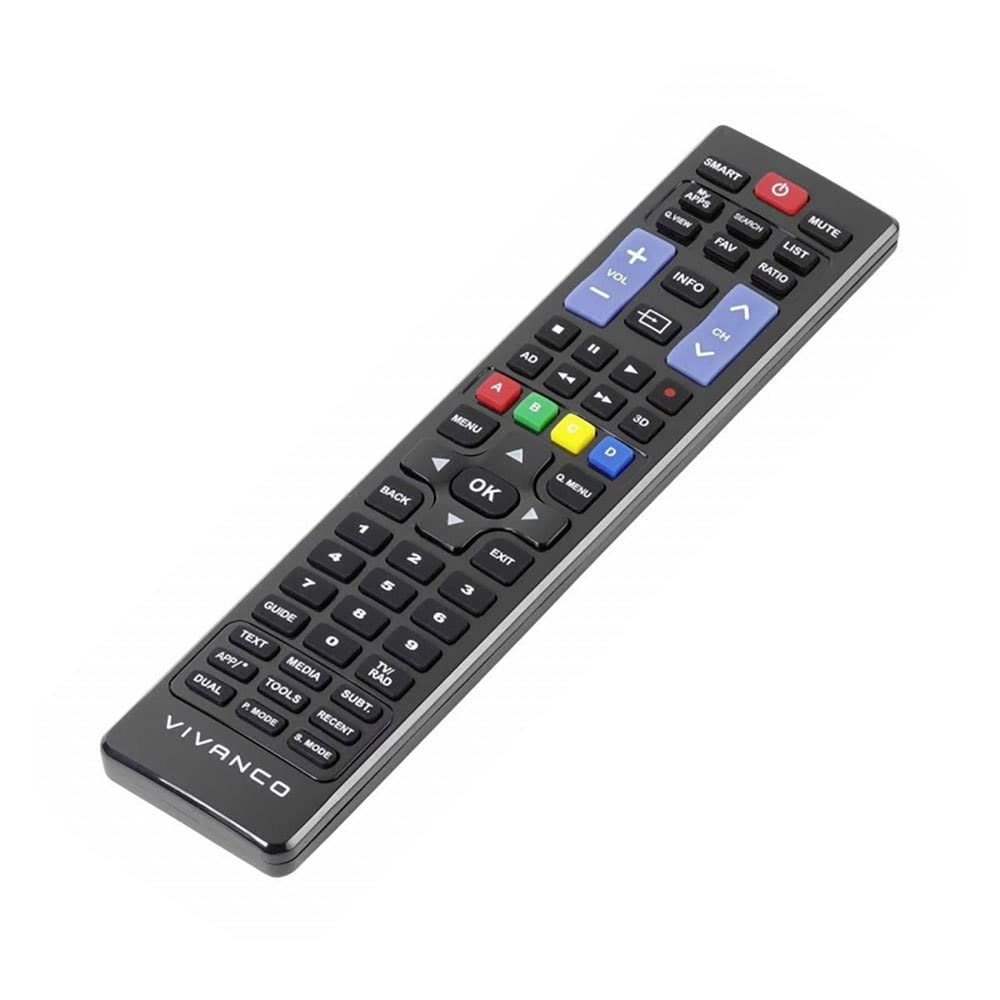
1. irudia: Vivanco RR 220 remote control. This image displays the front of the remote control, highlighting its 57 buttons and ergonomic design. The battery compartment is located on the reverse side.
2. Hasierako Erabilera
The Vivanco RR 220 is pre-programmed for Samsung Smart TVs. No additional setup or pairing is typically required. Once batteries are installed, point the remote control towards your Samsung Smart TV and press the Power button to test functionality.
Funtzionamendu-argibideak
The remote control features 57 buttons, providing comprehensive control over your Samsung Smart TV and compatible devices. Below are common button functions:
- Pizteko botoia: Telebista pizten edo itzaltzen du.
- Zenbaki-botoiak (0-9): For direct channel selection or data input.
- Bolumena igo/behera: Audioaren bolumena doitzen du.
- Kanal gora/behera: Telebistako kateak aldatzen ditu.
- Mututu botoia: Telebistaren audioa isilarazten du.
- Nabigazio-tekla (Gora, Behera, Ezkerra, Eskuina, Sartu): Menuetan nabigatzeko eta aukerak hautatzeko erabiltzen da.
- Atzera/Itzuli botoia: Aurreko pantailara edo menura itzultzen da.
- Smart Hub/Home Button: Accesses the Smart Hub or main menu of your Samsung Smart TV.
- Iturria/Sarrera botoia: Sarrera iturriak hautatzen ditu (HDMI, AV, etab.).
- Kolore-botoiak (gorria, berdea, horia, urdina): For specific functions within certain applications or menus, as indicated on-screen.
- Erreproduzitzeko kontrolak (erreproduzitu, pausatu, gelditu, aurreratu, atzeratu): Controls media playback on compatible devices or apps.
For specific functions related to your TV model, refer to your Samsung TV's user manual.
Mantentzea
Urruneko agintea garbitzea
- Erabili zapi leun eta lehor bat urrutiko agintearen gainazala garbitzeko.
- Zikinkeria egoskorrerako, apur bat lehortuampeu zapi urarekin edo garbitzaile leun eta ez urratzaile batekin.
- Ez erabili produktu kimiko gogorrik, disolbatzailerik edo garbiketa-oihal urratzailerik, hauek urrutiko agintearen akabera edo barneko osagaiak kaltetu baititzakete.
- Ensure no liquid enters the remote control through button gaps or the battery compartment.
Bateria ordezkatzea
Replace batteries when the remote's response becomes sluggish or it stops functioning. Always replace both batteries simultaneously with new AAA alkaline batteries. Do not mix old and new batteries or different types of batteries.
Arazoak konpontzea
| Arazoa | Kausa posiblea | Irtenbidea |
|---|---|---|
| Urruneko kontrola ez dabil. |
|
|
| Botoi batzuek ez dute funtzionatzen. |
|
|
Zehaztapenak
- Marka: Vivanco
- Ereduaren izena: RR 220
- Produktuaren eredu zenbakia: 38016
- Gailu bateragarriak: Home cinema, DVD/Blu-ray player, Television (Samsung Smart TV compatible)
- Konektibitate Teknologia: Wireless IR (Infrared)
- Botoi kopurua: 57
- Bateria mota: 2 x AAA (Alkaline recommended)
- Bateriak barne: Ez
- Produktuaren neurriak: 18 x 4.8 x 2.3 cm
- Produktuaren pisua: 80 g
- Gehienezko barrutia: 15 metro
- Ezaugarri bereziak: IPTV, DVB-T, HDTV compatibility


