1. Sarrera
Eskerrik asko erosketagatik.asing the Fonestar AS-170RU Hi-Fi Amplifier. This device is designed to provide high-fidelity stereo audio amplification, featuring a built-in USB/MP3 player, AM/FM digital tuner, and multiple audio inputs. This manual provides detailed instructions for safe installation, operation, and maintenance of your amplifatzailea. Mesedez, irakurri arretaz eskuliburu hau erabili aurretik eta gorde etorkizunean erreferentzia gisa.
2. Segurtasun-argibideak
- Elikatze-iturria: Ziurtatu ampLikidatzailea bolumenarekin bat datorren elikatze-iturri batera konektatuta dagotage specified on the unit. Disconnect the power cord from the outlet if the unit will not be used for an extended period.
- Aireztapena: Ez blokeatu aireztapen-irekidurak. Ziurtatu nahikoa leku dagoela unitatearen inguruan aire-fluxu egokia izan dadin eta gehiegi berotzea saihesteko.
- Ura eta hezetasuna: Ez jarri unitatea euripean, hezetasunean edo tantaka/zipriztinetan. Ez jarri likidoz betetako objekturik, hala nola loreontziak, unitatearen gainean.
- Bero iturriak: Mantendu unitatea bero-iturrietatik urrun, hala nola erradiadoreetatik, bero-erregistroetatik, sukaldeetatik edo beste aparatu batzuetatik (adibidez, ampberoa sortzen duten argitzaileak).
- Garbiketa: Garbitu zapi lehor batekin bakarrik. Ez erabili garbitzaile likidorik edo aerosol garbigarririk.
- Zerbitzua: Ez saiatu produktu hau zuk zeuk ematen. Bidali zerbitzu guztiak zerbitzu kualifikatuko langileengana.
- Lekua: Jarri unitatea gainazal egonkor eta lau batean. Saihestu eguzki-argitan edo eremu magnetiko indartsuen ondoan jartzea.
3. Paketearen edukia
Mesedez, egiaztatu elementu hauek zure paketean sartuta daudela:
- Fonestar AS-170RU Hi-Fi Ampbiziagoa
- Urruneko Kontrola
- AM Antena
- FM antena
- Erabiltzailearen eskuliburua (dokumentu hau)
4. Produktua amaitu daview
4.1 Aurreko panela
The front panel provides access to essential controls and the display.
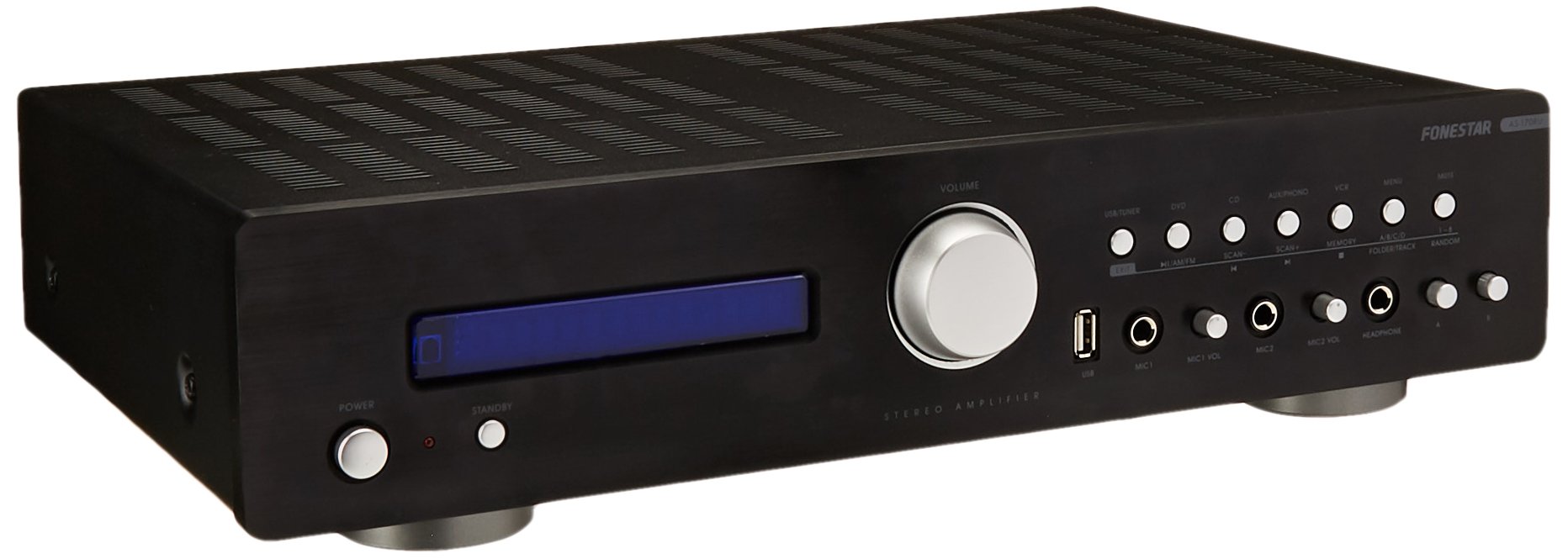
Image: Fonestar AS-170RU Front Panel. Irudi honek aurrealdea erakusten du view ren amplifier, showing the VFD display, USB port, headphone output, input selectors, volume knob, and other control buttons.
- Pizteko botoia: Biratzen du ampbiziago edo aktibatuta.
- VFD Display: Shows current input, volume level, tuner information (frequency, RDS), and USB/MP3 track details (ID3 tag).
- USB ataka: For connecting USB storage devices to play MP3 files.
- Aurikularretarako irteera: Entzungailuak konektatzeko 6.3 mm-ko konektorea.
- Sarrera hautatzaileak: Buttons for choosing audio sources (CD, DVD, VCR, AUX/Phono, USB/Tuner).
- Bolumen kontrola: Rotary knob to adjust the master volume level.
- Mikrofonoaren sarrerak: Two 6.3mm microphone jacks with independent volume control.
- Tonu kontrolak: Buttons or menu options for adjusting Bass, Treble, and Balance.
4.2 Atzeko panela
The rear panel contains all the necessary connections for your audio sources, speakers, and antennas.

Image: Fonestar AS-170RU Rear Panel. This image illustrates the rear connections of the amplifier, including speaker terminals (A/B), various RCA input jacks (CD, DVD, VCR, AUX/Phono), REC OUT, PRE OUT, AMP IN, and antenna connections (FM COAX, AM LOOP ANT).
- Speaker Outputs (A/B): Terminals for connecting two pairs of speakers. Supports 4-16 ohms for A or B, or 8-16 ohms for A+B.
- Audio Inputs (RCA):
- CD sarrera: For connecting a CD player.
- DVD Input: For connecting a DVD player or other audio source.
- VCR Input: For connecting a VCR or other audio source.
- AUX/PHONO Input: For connecting auxiliary devices or a turntable (Phono input may require a pre-amplifier if your turntable does not have one built-in).
- ERREKTEERA: RCA output for connecting to a recording device.
- AURRERA AURRERA: RCA irteera kanpoko energia-iturri batera konektatzeko ampbiziagoa.
- AMP IN: RCA input for connecting an external pre-ampbiziagoa.
- Antenen konexioak:
- FM COAX 75Ω: For connecting an FM antenna.
- AM LOOP ANT: For connecting the supplied AM loop antenna.
4.3 Urruneko kontrola
The included remote control allows convenient operation of the ampurrutiko argitzailea.

Image: Fonestar AS-170RU Remote Control. This image shows the remote control unit with various buttons for power, input selection, volume, mute, tuner functions, USB playback controls, and tone adjustments.
- ITXARON: Piztu / itzali.
- Sarrera hautatzaileak: Buttons for CD, DVD, VCR, AUX/PHONO, USB/TUNER.
- Bolumena igo/behera (VOL +/-): Master bolumena doitzen du.
- MUTU: Audio irteera isilarazten du.
- AM / FM: Switches between AM and FM tuner modes.
- ESKANEA: Irrati-kateak bilatzen ditu.
- OROIMENA: Stores radio station presets.
- USB Playback Controls: Play/Pause, Stop, Skip Track, Folder/Track navigation.
- EQ OFF / BASS / TREBLE: Access tone controls.
- RDS / ID3: Displays RDS information for radio or ID3 tag MP3rako files.
5. Konfigurazioa
5.1 Bozgorailuak konektatzea
- Ziurtatu ampLikidorea itzalita eta korronte-entxufetik deskonektatuta dago.
- Connect your speakers to the "SPEAKERS OUTPUT" terminals on the rear panel.
- Match the positive (+) terminal of the amplifier (red) to the positive (+) terminal of your speaker, and the negative (-) terminal (black) to the negative (-) terminal.
- The AS-170RU supports two groups of speakers (A and B). You can connect one pair to "SPEAKERS A" and another to "SPEAKERS B".
- Ensure your speakers' impedance matches the amplifier's specifications: 4-16 ohms for A or B, or 8-16 ohms for A+B.
5.2 Audio iturriak konektatzea
Use RCA cables to connect your audio components to the corresponding input jacks on the rear panel.
- CD erreproduzitzailea: Konektatu "CD" sarrerara.
- DVD erreproduzitzailea: Connect to the "DVD" input.
- VCR: Connect to the "VCR" input.
- Auxiliary Device (e.g., smartphone, tablet): Connect to the "AUX/PHONO" input.
- Birak: Connect to the "AUX/PHONO" input. If your turntable does not have a built-in pre-amplifier, you may need an external phono pre-ampbiziagoa.
5.3 Antenak konektatzea
- FM Antena: Connect the supplied FM wire antenna to the "FM COAX 75Ω" terminal. Extend the wire for optimal reception.
- AM antena: Connect the supplied AM loop antenna to the "AM LOOP ANT" terminals. Position the loop for best reception.
5.4 Energia-konexioa
Audio eta bozgorailu konexio guztiak egin ondoren, konektatu ampKonektatu gailuaren elikatze-kablea korronte alternoko entxufe egoki batera.
6. Funtzionamendu-argibideak
6.1 Oinarrizko funtzionamendua
- Piztu/Itzali: Press the Power button on the front panel or the STANDBY button on the remote control to turn the ampbiziago edo aktibatuta.
- Hautatu Sarrera-iturria: Press the desired input selector button on the front panel (CD, DVD, VCR, AUX/PHONO) or the remote control (CD, DVD, VCR, AUX/PHONO, USB/TUNER).
- Doitu bolumena: Rotate the Volume knob on the front panel or use the VOL +/- buttons on the remote control to adjust the sound level.
- Ezkutatu: Press the MUTE button on the remote control to temporarily silence the audio. Press it again to restore sound.
6.2 USB/MP3 Playback
- Insert a USB storage device (flash drive) into the USB port on the front panel.
- Select "USB/TUNER" as the input source. The amplifier will automatically detect and begin playing MP3 files.
- Use the playback controls on the remote control (Play/Pause, Stop, Skip Track, Folder/Track) to navigate and control your music.
- The VFD display will show track information, including ID3 tags eskuragarri badago.
- The amplifier supports up to 65,000 indexable folders and files, with a maximum of 8 folder levels.
6.3 AM/FM sintonizatzailearen funtzionamendua
- Select "USB/TUNER" as the input source, then press the AM/FM button on the remote control to switch between AM and FM bands.
- Eskaneatu automatikoa: Press the SCAN button on the remote control to automatically search for and store available radio stations.
- Eskuzko sintonizazioa: Use the tuning buttons (usually arrow keys) on the remote control to manually adjust the frequency.
- Aurrez ezarritako geltokiak: The amplifier supports 64 presets. Use the MEMORY button to store and recall your favorite stations.
- RDS funtzioa: If available, press the RDS button on the remote control to display Radio Data System information (e.g., station name, program type).
6.4 Mikrofono Sarrera
- Connect microphones to the 6.3mm MIC 1 and MIC 2 jacks on the front panel.
- Adjust the independent volume controls for each microphone to achieve the desired level.
6.5 Tone and Balance Control
The amplifier allows adjustment of bass, treble, and balance through its menu system or dedicated buttons on the remote control. Refer to the remote control section for specific buttons like EQ OFF, BASS, TREBLE.
7. Mantentzea
- Garbiketa: Disconnect the power before cleaning. Use a soft, dry cloth to wipe the exterior surfaces. Do not use abrasive cleaners, waxes, or solvents.
- Aireztapena: Aldian-aldian egiaztatu aireztapen-irekiduretatik hautsik eta hondakinik gabe daudela.
- Biltegiratzea: Unitatea denbora luzez gordetzen baduzu, deskonektatu entxufetik eta gorde leku fresko eta lehor batean, eguzki-argitik eta muturreko tenperaturetatik urrun.
8. Arazoak
If you encounter problems with your amplifier, refer to the following table for possible solutions.
| Arazoa | Kausa posiblea | Irtenbidea |
|---|---|---|
| Botererik ez | Kable elektrikoa ez dago konektatuta; Entxufea akastuna; Ampitxaroteko moduan dagoen argigailua. | Ensure power cord is securely plugged in. Test the outlet with another device. Press the Power/STANDBY button. |
| Soinurik ez | Sarrera okerra hautatu da; Bolumena baxuegia da; Bozgorailuak ez daude behar bezala konektatuta; Isilarazteko funtzioa aktibo dago. | Select the correct input source. Increase volume. Check speaker connections. Deactivate MUTE. |
| Irrati-harrera eskasa | Antenna not connected or poorly positioned; Interference. | Connect and adjust the position of the AM/FM antennas. Move the ampLifter-a beste gailu elektronikoetatik urrun. |
| USB erreprodukzioa ez da funtzionatzen | USB device not inserted correctly; Incompatible file format; USB device faulty. | Ensure USB device is fully inserted. Check if files are MP3 format. Try a different USB device. |
| Amplifier turns off unexpectedly or cycles power | Overheating; Short circuit in speaker wiring; Internal fault. | Ensure adequate ventilation. Check speaker wires for frayed strands causing short circuits. If the problem persists, disconnect power and contact qualified service personnel. |
9. Zehaztapenak
- Eredua: AS-170RU
- Potentzia irteera: 80 + 80 W RMS at 4 Ω
- Bozgorailuaren inpedantzia: 4-16 Ω (A or B), 8-16 Ω (A+B)
- Babesa: 3 circuits (short circuits, overload, overvoltage)
- USB erreproduzitzailea: MP3 file playback, ID3 tag support. Max 65,000 indexable folders/files, max 8 folder levels.
- Sintonizatzailea: Digital AM/FM, 64 presets, RDS.
- Sarrerak: 2 x Microphone (6.3mm), 4 x RCA (CD, DVD, VCR, AUX/Phono), 1 x RCA (AMP IN).
- Irteerak: 1 x RCA (REC OUT), 1 x RCA (PRE OUT), Headphone (6.3mm).
- Pantaila: Blue VFD.
- Tonuen kontrola: Bass, Treble, Balance (via menu/remote).
- Neurriak: 40 x 40 x 60 cm (gutxi gorabehera 15.7 x 15.7 x 23.6 hazbete)
- Pisua: 7.2 kg (15.87 lb inguru)
10. Bermea eta Laguntza
For warranty information and technical support, please refer to the warranty card included with your product or contact your authorized Fonestar dealer. Do not attempt to repair the unit yourself, as this may void your warranty.


