Sarrera
The Behringer Pro Mixer NOX101 is a premium 2-channel DJ mixer designed for demanding turntablists, remixers, and digital DJs. This manual provides comprehensive instructions for setting up, operating, and maintaining your NOX101 mixer to ensure optimal performance and longevity.

1. irudia: Goikoa view of the Behringer Pro Mixer NOX101, showing main controls and layout.
Segurtasun Informazioa
Please read and follow all safety instructions carefully before operating the device. Retain this manual for future reference.
- Energia iturria: Connect the mixer only to the specified power supply. Ensure the voltage eskakizunekin bat dator.
- Aireztapena: Ez blokeatu aireztapen-irekidurak. Instalatu fabrikatzailearen argibideen arabera.
- Ura eta hezetasuna: Ez erabili aparatu hau uraren ondoan, ezta tantaka edo zipriztinen eraginpean jarri ere.
- Garbiketa: Garbitu zapi lehor batekin bakarrik.
- Zerbitzua: Jarri zerbitzu-zerbitzu guztiak zerbitzu-pertsonal kualifikatuari. Zerbitzua behar da aparatua edozein modutan hondatu denean, hala nola, elikatze-kablea edo entxufea hondatuta dagoenean, likidoa isuri denean edo objektuak aparatura erori direnean, aparatua euria edo hezetasuna jasan duenean, ez du normalean funtzionatzen. , edo erori egin da.
Konfigurazioa
Follow these steps to set up your Behringer NOX101 mixer:
- Despaketatzea: Carefully remove the mixer from its packaging. Verify that all components listed in the "What's in the Box" section are present.
- Lekua: Jarri nahasgailua gainazal egonkor eta lau batean. Ziurtatu aireztapen egokia dagoela unitatearen inguruan.
- Potentzia-konexioa: Connect the provided power cord to the mixer's power input and then to a suitable electrical outlet.
- Audio sarrerako konexioak:
- Connect your turntables to the PHONO inputs using RCA cables. Ensure the PHONO/LINE switch is set to PHONO.
- Connect CD players, media players, or other line-level devices to the LINE inputs using RCA cables. Ensure the PHONO/LINE switch is set to LINE.
- Connect a microphone to the MIC input (XLR or 1/4" TRS).
- Audio irteerako konexioak:
- Connect the MAIN OUTPUTS (RCA or 1/4" TRS) to your amplifter-a, bozgorailu indartuak edo PA sistema.
- Connect headphones to the HEADPHONE output for monitoring.

2. Irudia: Atzealdea view of the Behringer Pro Mixer NOX101, showing the crossfader curve adjustment and headphone jack.

3. irudia: Xehetasuna view of the input and output connections on the Behringer NOX101 mixer, including RCA and TRS options.
Funtzionamendu-argibideak
This section details the functions of the Behringer NOX101 mixer's controls.
Channel Controls (Channels 1 & 2)
- GAIN botoia: Adjusts the input level for the respective channel. Set to an appropriate level to avoid clipping (indicated by the PEAK LED).
- EQ botoiak (ALTUA, ERTAINA, BAXUA): These are 3-band EQs with "full-kill" filters, allowing you to completely remove specific frequency ranges.
- ALTUAK: Adjusts treble frequencies.
- MID: Erdi-mailako maiztasunak doitzen ditu.
- BAXUA: Adjusts bass frequencies.
- PHONO/LINE etengailua: Selects between PHONO (for turntables) and LINE (for CD players/other line-level devices) input for the channel.
- Kanal Fader: Controls the volume level of the individual channel.
- PFL/CUE Button: Sends the channel's audio to the headphone output for pre-fader listening.
- CURVE Knob: Adjusts the curve of the channel fader, from a smooth fade to a sharp cut.
Mikrofonoen Atala
- MIC GAIN botoia: Adjusts the input level for the microphone.
- MIC LEVEL botoia: Controls the overall volume of the microphone output.
Atal nagusia
- MASTER KOTOLA: Nahastailearen irteerako bolumen orokorra kontrolatzen du.
- CUE GAIN botoia: Entzungailuen irteeraren bolumena doitzen du.
- CUE MIX Slider: Blends between the PFL (Pre-Fader Listen) signal and the Master output in your headphones.
- VU neurgailuak: Displays the output level of the main mix and PFL signal. Aim for levels that are strong but do not consistently peak into the red.
crossfader
- Crossfader: Blends between Channel 1 and Channel 2.
- XFADE CURVE Knob: Located on the rear panel, this knob adjusts the curve of the crossfader, from a smooth blend to a sharp cut for scratching.
- REV Button: Crossfader-aren norabidea alderantzikatzen du.
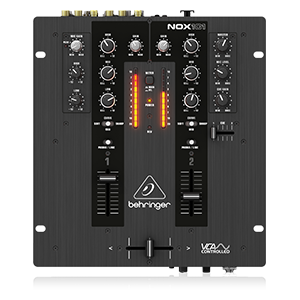
Figure 4: Simplified diagram of the Behringer NOX101 mixer's control layout.
Mantentzea
Proper maintenance ensures the longevity and optimal performance of your NOX101 mixer.
- Garbiketa: Regularly wipe the mixer's surface with a soft, dry, lint-free cloth. Avoid using abrasive cleaners, solvents, or waxes.
- Hautsaren babesa: Erabiltzen ez duzunean, estali irabiagailua hautsetik eta hondakinetatik babesteko.
- Faderren zaintza: While the faders are designed for durability, excessive force or exposure to liquids can cause damage. Keep them clean and free of foreign particles.
- Biltegiratzea: Gorde nahasgailua leku fresko eta lehor batean, eguzki-argitik eta muturreko tenperaturetatik babestuta.
Arazoak konpontzea
If you encounter issues with your Behringer NOX101 mixer, refer to the following common problems and solutions:
| Arazoa | Kausa posiblea | Irtenbidea |
|---|---|---|
| Ez dago soinu irteerarik |
|
|
| Soinu distortsionatua |
|
|
| Crossfader not working smoothly |
|
|
Zehaztapenak
| Ezaugarri | Xehetasuna |
|---|---|
| Eredua | NOX101 |
| Marka | Behringer |
| Kanal kopurua | 2 |
| EQ | 3-band EQs with "Full-kill" Filters |
| crossfader | VCA-controlled Ultraglide Crossfader with adjustable curve |
| Konektibitate Teknologia | XLR, TRS, RCA |
| Energia iturria | Kable elektrikoa |
| Kolorea | Beltza |
| Elementuaren pisua | 4.63 libra (2.1 kg) |
| Produktuaren neurriak (L x W x H) | 10.04 x 10.79 x 3.94 hazbete (25.5 x 27.4 x 10 cm) |
| Eskuragarri dagoen lehen data | 1ko maiatzaren 2013a |
Bermea eta Laguntza
Bermeari buruzko informazioa eta laguntza teknikoa lortzeko, jo Behringer-en webgune ofizialera. webwebgunera edo jarri harremanetan bezeroarentzako arreta-zerbitzura zuzenean. Gorde erosketa-agiria erosketaren frogagiri gisa berme-erreklamazioetarako.
Ez zegoen saltzailearen produktuaren bideo ofizialik eskuliburu honetan txertatzeko.


