Berme garrantzitsuak
Etxetresna elektrikoak erabiltzean, oinarrizko segurtasun-neurriak bete behar dira beti, besteak beste:
- Read all instructions before operating the breadmaker.
- Ez ukitu gainazal beroak. Erabili heldulekuak edo eskutokiak.
- Deskarga elektrikoetatik babesteko, ez sartu kablea, entxufeak edo aparatua uretan edo beste likido batzuetan.
- Gainbegiratzea beharrezkoa da aparaturen bat umeek edo umeen ondoan erabiltzen dutenean.
- Deskonektatu entxufetik erabiltzen ez duzunean eta garbitu aurretik. Utzi hozten piezak jarri edo kendu aurretik.
- Ez erabili aparaturik kablea edo entxufea hondatuta dagoenean, edo aparatuak gaizki funtzionatzen duenean edo nolabait hondatu ondoren.
- Gailuaren fabrikatzaileak gomendatzen ez dituen osagarriak erabiltzeak lesioak eragin ditzake.
- Ez erabili kanpoan.
- Ez utzi kablea mahaiaren edo erakusmahaiaren ertzetik zintzilik zintzilik, ezta gainazal beroak ukitu ere.
- Ez jarri gas edo erregailu elektriko bero baten gainean edo inguruan, edo berotutako labe batean.
- Kontuz ibili behar da olio beroa edo beste likido beroa duen tresna bat mugitzean.
- Deskonektatzeko, jarri edozein kontrol "itzali" posizioan, eta gero atera entxufea hormako entxufetik.
- Ez erabili aparatua aurreikusitako erabilera ez den beste baterako.
- Produktu honek Kaliforniako Estatuak minbizia eta jaiotza-akatsak edo ugalketa-kalte batzuk eragiten dituen produktu kimikoak ditu.
Produktua amaituview
The Breadman TR520 is a horizontal loaf breadmaker designed to produce loaves up to 2 pounds. It features an intuitive control panel with 8 pre-programmed functions, a 13-hour delay timer, and crust control settings. The unit includes a removable bread pan and a kneading paddle for easy operation and cleaning.

1. irudia: Angeludun view of the Breadman TR520 Breadmaker, showcasing its white plastic exterior and top viewleihoa.

2. irudia: Goikoa view of the Breadman TR520, highlighting the yellow control panel with program selections, display, and operation buttons.
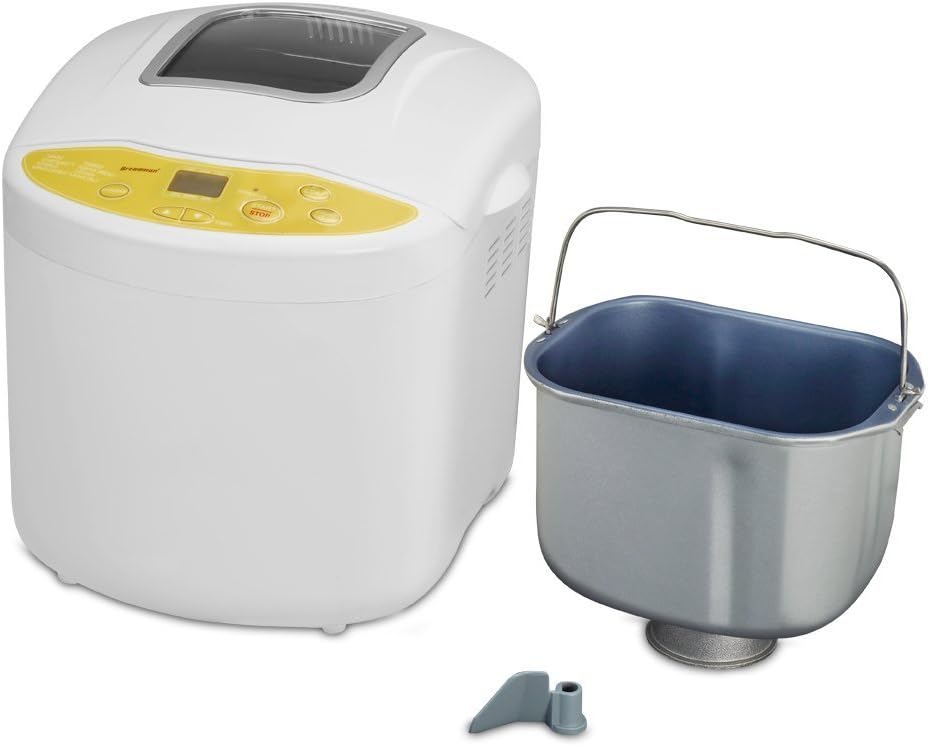
Figure 3: The Breadman TR520 Breadmaker shown alongside its removable bread pan and kneading paddle, ready for assembly.
Osagaiak:
- Unitate nagusia: The primary housing for the baking chamber and control panel.
- Ogi-ontzia: A removable, non-stick pan where ingredients are mixed and baked.
- Orekatzeko pala: Attaches to the shaft inside the bread pan to mix and knead dough.
- Measuring Cup/Spoon (not pictured, but typically included): Osagaien neurketa zehatza lortzeko.
Lehen erabilera / konfigurazioa baino lehen
- Desegin: Carefully remove the breadmaker and all accessories from the packaging. Retain packaging for future storage or transport.
- Garbitu: Wash the bread pan and kneading paddle with warm, soapy water. Rinse thoroughly and dry completely. Wipe the exterior of the breadmaker with a damp oihal. Ez sartu unitate nagusia uretan.
- Lekua: Place the breadmaker on a stable, flat, heat-resistant surface, away from direct sunlight and heat sources. Ensure adequate ventilation around the appliance.
- First Bake Cycle (Recommended): To eliminate any manufacturing odors, perform an empty bake cycle.
- Insert the empty bread pan with the kneading paddle attached into the breadmaker.
- Itxi tapa.
- Plug in the breadmaker.
- Select the "Bake Only" program (Program 8).
- Press "Start/Stop". Allow the cycle to run for approximately 10-15 minutes, then press "Start/Stop" to cancel and unplug.
- Allow the unit to cool completely before cleaning again.
Funtzionamendu-argibideak
Osagaiak gehitzea:
- Attach the kneading paddle to the shaft inside the bread pan. Ensure it is securely in place.
- Add ingredients to the bread pan in the order specified by your recipe. Typically, liquids are added first, followed by dry ingredients, with yeast added last on top of the dry ingredients, away from liquids and salt.
- Carefully place the filled bread pan into the breadmaker, pressing down firmly until it clicks into place.
- Itxi estalkia ongi.
Kontrol panelaren funtzioak:
- PROGRAMA: Press to cycle through the 8 available programs. The selected program number will display on the LCD screen.
- OGIA: Press to select the desired loaf size (e.g., 1.5 lb or 2 lb).
- AZALAREN KOLOREA: Press to choose light, medium, or dark crust.
- TIMER (+/-): Use these buttons to set the delay timer for delayed baking. Each press adjusts the time in 10-minute increments.
- HASI / GELDITU: Press once to start the selected program. Press and hold for a few seconds to stop or cancel a program.
Programa bat abiaraztea:
- Plug the breadmaker into a grounded electrical outlet.
- Select the desired program using the "PROGRAM" button.
- Select the loaf size using the "LOAF" button.
- Select the crust color using the "CRUST COLOR" button.
- If immediate baking is desired, press the "START/STOP" button. The breadmaker will begin its cycle.
- If using the delay timer, set the desired delay time using the "TIMER (+/-)" buttons, then press "START/STOP". The timer will count down before the program begins.
Removing Bread:
- Once the baking cycle is complete, the breadmaker will beep and may enter a 1-hour keep-warm cycle.
- Unplug the breadmaker.
- Using oven mitts, carefully remove the bread pan from the breadmaker. The pan and surrounding areas will be hot.
- Invert the bread pan onto a wire rack and shake gently until the bread loaf slides out. If the kneading paddle remains in the loaf, carefully remove it with a non-metallic utensil after the bread has cooled slightly.
- Allow the bread to cool on a wire rack for at least 15-30 minutes before slicing to ensure proper texture.
Programaren Gida
The Breadman TR520 offers 8 pre-programmed cycles to simplify various bread and dough preparations:
| Programa zk. | Programaren izena | Deskribapena |
|---|---|---|
| 1 | OINARRIZKOA | For white and mixed breads, primarily using basic bread flour. |
| 2 | FRANTSESA | For light breads made from fine flour, typically with a crispier crust. |
| 3 | GARI OSOA | Gari osoko irina proportzio esanguratsu bat duten ogietarako. |
| 4 | GOZOA | For breads with high sugar, fats, and proteins, such as brioche or sweet rolls. |
| 5 | OREA | Prepares dough for rolls, pizza, or other baked goods that will be shaped and baked in a conventional oven. No baking cycle. |
| 6 | RAPID | A quicker cycle for basic breads, often resulting in a denser loaf. |
| 7 | ULTRA AZKARRA | An even faster cycle for basic breads, suitable for quick results. |
| 8 | LABEAN BAKARRIK | For baking pre-prepared dough or for adding additional baking time to a loaf. No kneading or rising. |
Note: Specific timings for each program may vary. Refer to your recipe book for detailed instructions and ingredient quantities for each program.
Zainketa eta Garbiketa
Proper cleaning and maintenance will extend the life of your breadmaker.
- Deskonektatu beti ogi-makina eta utzi guztiz hozten garbitu aurretik.
- Ogi-ontzia eta oratzeko pala: Zati hauek dira Eskuz garbitu bakarrik. Wash with warm, soapy water. Do not use abrasive cleaners or scouring pads, as this can damage the non-stick coating. Rinse thoroughly and dry completely before storing or reassembling. If the kneading paddle is stuck, fill the pan with warm water and let it soak for 10-15 minutes to loosen it.
- Kanpoaldea: Garbitu ogi-makinaren kanpoaldea zapi leun eta lehor batekinamp cloth. Do not use harsh chemicals or abrasive cleaners. Never immerse the main unit in water or other liquids.
- Barrualdea: Erabili biguna, damp cloth to wipe the inside of the baking chamber. Remove any crumbs or residue.
- Biltegiratzea: Ensure all parts are clean and dry before storing the breadmaker. Store in a cool, dry place.
Arazoak konpontzea
If you encounter issues with your Breadman TR520, consult the following common problems and solutions:
| Arazoa | Kausa posiblea | Irtenbidea |
|---|---|---|
| Ogia ez da igotzen edo gehiegi igotzen da. | Incorrect yeast quantity, old yeast, water temperature too hot/cold, incorrect flour type, too much salt/sugar. | Ensure yeast is fresh and active. Use lukewarm water (105-115°F / 40-46°C). Measure ingredients precisely. Check recipe for correct flour and ingredient ratios. |
| Ogia trinkoa edo astuna da. | Too much flour, not enough liquid, incorrect program selected, old yeast. | Accurately measure flour (spoon into cup, level off). Ensure correct liquid amount. Select appropriate program for the bread type. |
| Ogiaren gainean itsatsita dagoen oratzeko pala. | Ohiko gertakaria. | Allow bread to cool slightly. Use a non-metallic utensil (e.g., plastic spatula) to carefully pry out the paddle. Avoid metal utensils to prevent scratching the non-stick coating. |
| Machine does not start or respond. | Ez dago konektatuta, itzalita dagotage, lid not closed properly, program not selected. | Check power connection. Ensure lid is fully closed. Select a program and press "START/STOP". If still unresponsive, unplug for 5 minutes and try again. |
| Control panel labels are difficult to read. | Low contrast between text and background color. | Use the manual as a reference for button functions. Consider using a small task light for better visibility when operating the machine. |
If the problem persists after attempting these solutions, please refer to the support section or contact customer service.
Zehaztapenak
| Ezaugarri | Xehetasuna |
|---|---|
| Modelo zenbakia | TR520 / COMINHKR058410 |
| Marka | Ogia |
| Ogiaren edukiera | Gehienez 2 lbs |
| Programak | 8 (Basic, French, Whole Wheat, Sweet, Dough, Rapid, Ultra Fast, Bake Only) |
| Atzeratu tenporizadorea | 13-hour programmable delay |
| Lurrazalaren kontrola | Argia, Ertaina, Iluna |
| Mantendu Bero Funtzioa | 1-hour automatic keep-warm |
| Boterea | 560 Watt |
| Kolorea | Zuria |
| Elementuaren pisua | 11.15 lb inguru |
| Produktuen zainketa | Hand Wash Only (Bread Pan & Paddle) |
| Fabrikatzailea | Aplikazioa |
Bermea eta Laguntza
For detailed warranty information, please refer to the warranty card included with your product or visit the official Breadman webgunea. Berme-baldintzek normalean fabrikazio-akatsak estaltzen dituzte erosketa-datatik aurrerako denbora-tarte jakin batean.
If you require technical assistance, have questions about operation, or need to inquire about replacement parts, please contact Breadman customer support. Contact details can usually be found on the manufacturer's webgunean edo produktuaren ontzian.
When contacting support, please have your model number (TR520 / COMINHKR058410) and date of purchase readily available.


