Sarrera
This manual provides essential information for setting up, operating, and maintaining your Microsoft Xbox 360 E 250GB Console. Please read this guide thoroughly before using your console to ensure proper function and longevity.
Paketearen edukia
Egiaztatu zure paketeak elementu hauek dituela:
- Xbox 360 E 250GB Console
- Xbox 360 Wireless Controller (Black)
- Elikatze-iturria eta Elikatze-kablea
- HDMI kablea
- AA Batteries for Wireless Controller
Kontsola amaitu daview
Familiarize yourself with the various ports and buttons on your Xbox 360 E console.

Image: Microsoft Xbox 360 E 250GB Console. This image displays the front and side view of the Xbox 360 E console, showing its compact design and disc drive slot.
Aurrealdeko panela
- Pizteko botoia: Kontsola piztu edo itzaltzen du.
- Disko unitatea: Insert game discs or DVDs.
- USB atakak: Connect accessories like USB drives or wired controllers.
- Controller Connect Button: Used to wirelessly sync controllers.
Atzeko panela
- Potentzia ataka: Konektatu elikadura iturria.
- HDMI ataka: Connect to a TV or monitor for high-definition video and audio.
- AV ataka: For older composite or component cables (not included with all models).
- Ethernet ataka: Konektatu kablezko sare batera.
- USB atakak: Additional ports for accessories.
Wireless Controller Overview
The Xbox 360 Wireless Controller allows for intuitive gameplay. Familiarize yourself with its buttons and functions.
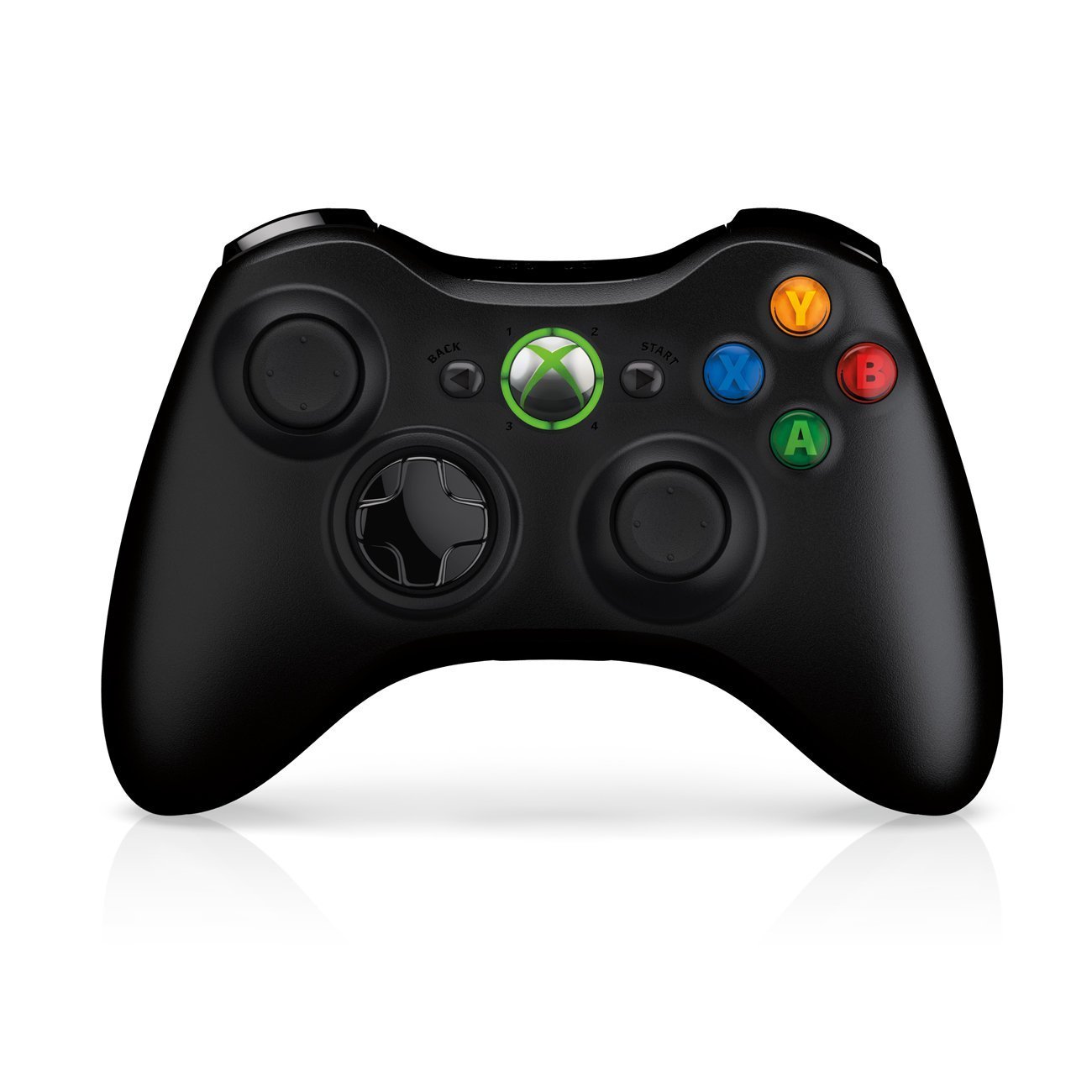
Image: Xbox 360 Wireless Controller. This image displays the front view of the black wireless controller, highlighting the D-pad, analog sticks, face buttons (A, B, X, Y), Guide button, Start button, and Back button.
Kontrolagailuaren botoiak eta funtzioak
- Ezkerreko/eskuineko analogikoen makilak: Mugimendurako eta kamera kontrolatzeko.
- D-Pad (Norabide-pada): For menu navigation and specific game controls.
- A, B, X, Y botoiak: Primary action buttons, color-coded (Green A, Red B, Blue X, Yellow Y).
- Hasi botoia: Pauses games or opens in-game menus.
- Atzera botoia: Returns to previous screens or opens specific game functions.
- Guide Button (Xbox Logo): Powers on the console, accesses the Xbox Guide, or turns off the controller.
- Ezkerreko/eskuineko babesleak (LB, RB): Sorbaldako botoiak jokoan hainbat ekintza egiteko.
- Ezker/Eskuineko abiarazleak (LT, RT): Analog triggers for precise control, often used for acceleration/braking or firing weapons.
Bateriaren instalazioa
The wireless controller requires two AA batteries. To install:
- Press the tab on the top of the battery pack and pull down to remove it.
- Sartu bi AA pila, polaritate zuzena ziurtatuz (+/-).
- Slide the battery pack back into the controller until it clicks into place.
Konfigurazio Gida
1. Kontsola konektatzea
- Potentzia-konexioa: Connect the power cord to the power supply, then connect the power supply to the console's power port. Plug the power cord into a wall outlet.
- Video/Audio Connection: Connect one end of the HDMI cable to the HDMI port on the back of your Xbox 360 E console. Connect the other end to an available HDMI input on your TV or monitor.
- Interneteko konexioa (aukerakoa): For wired internet, connect an Ethernet cable from your router/modem to the Ethernet port on the console. For wireless, the console has built-in Wi-Fi.
2. Connecting the Wireless Controller
- Ensure batteries are installed in the controller.
- Turn on the console by pressing the Power button on the console or the Guide button on the controller.
- Press and release the Connect button on the console (small button near the USB ports on the front).
- Within 20 seconds, press and release the Connect button on the controller (small button on the top edge, between the bumpers).
- The lights around the Guide button on the controller and the console will flash and then glow steadily, indicating a successful connection.
3. Initial Power On and System Settings
After connecting, turn on your console. Follow the on-screen prompts to:
- Hautatu zure hizkuntza eta eskualdea.
- Adjust display settings (resolution, aspect ratio).
- Set up your internet connection (wired or wireless).
- Create or sign in to an Xbox Live profile.
Operating Your Console
Playing Games and Media
- Turn on your console and TV.
- Open the disc tray by pressing the eject button on the console.
- Place a game disc or DVD/Blu-ray disc into the tray, label side up.
- Close the disc tray. The console should automatically start the game or media. If not, select it from the dashboard.
- Digital games can be launched directly from the Xbox Dashboard.
Xbox Live-ra konektatzea
Xbox Live allows you to play online, download games and content, and access streaming services. Ensure your console is connected to the internet.
- From the Xbox Dashboard, navigate to the "Social" or "Settings" tab.
- Select "Join Xbox Live" or "Network Settings" to configure your connection and create/manage your profile.
- A 1-month Xbox LIVE Gold trial may be included with your console.
Sistemaren ezarpenak
Access system settings to customize your console experience:
- Pantaila eta soinua: Adjust resolution, audio output, and screen format.
- Biltegiratzea: Manage your 250GB hard drive, view free space, and delete content.
- Sarearen ezarpenak: Configure wired or wireless internet connections.
- Family Settings: Set parental controls for content and online access.
Mantentzea
Cleaning Your Console
- Always power off and unplug the console before cleaning.
- Use a soft, dry, lint-free cloth to wipe down the exterior of the console and controller.
- Ez erabili garbitzaile likidorik, aerosolik edo material urratzailerik.
- Keep ventilation openings clear of dust and obstructions to ensure proper airflow.
Storage and Placement
- Place the console on a stable, flat surface.
- Ensure adequate ventilation around the console. Do not place it in an enclosed cabinet or on soft surfaces that can block vents.
- Avoid exposing the console to direct sunlight, excessive heat, or extreme cold.
Arazoak konpontzea
If you encounter issues with your Xbox 360 E console, refer to the following common solutions:
No Power / Console Not Turning On
- Ensure the power cord is securely connected to the console, power supply, and wall outlet.
- Check the power supply unit (PSU) indicator light. If it's off or red, try a different outlet or contact support.
- Saiatu beste korronte bat.
No Video or Audio Output
- Verify the HDMI cable is securely connected to both the console and your TV/monitor.
- Ziurtatu zure telebista/monitorea HDMI sarrera-iturri zuzenera konfiguratuta dagoela.
- Saiatu beste HDMI kable edo HDMI ataka bat zure telebistan.
- Egiaztatu telebistaren bolumena eta isilarazteko ezarpenak.
Diskoa irakurtzeko erroreak
- Ziurtatu diskoa garbi dagoela eta marradurarik edo orbanik gabe. Garbitu astiro-astiro zapi leun batekin erdialdetik kanporantz.
- Try a different game or movie disc to determine if the issue is with the disc or the console.
- Ensure the console is placed on a stable, flat surface and not being moved during disc operation.
Wireless Controller Not Connecting
- Ziurtatu kontrolatzaileak bateria berriak dituela.
- Resync the controller by pressing the Connect buttons on both the console and controller as described in the "Setup Guide".
- Ziurtatu inguruan haririk gabeko interferentzia indartsurik ez dagoela.
For further assistance, please refer to the official Microsoft Xbox support webgunea.
Zehaztapenak
| Ezaugarri | Xehetasuna |
|---|---|
| Modelo zenbakia | M9V-00001 |
| Biltegiratzea | 250 GB disko gogorra |
| Haririk gabeko konexioa | Wi-Fi integratua |
| Kontrolatzailea | 1 Black Wireless Controller |
| Eskualde Kodea | NTSC |
| Produktuaren neurriak | 12 x 6 x 24 hazbete |
| Elementuaren pisua | 10.32 kilo |
| Beharrezko bateriak | 2 AA batteries for controller |
| Argitaratze data | 1ko ekainaren 2013a |
Bermearen informazioa
For detailed warranty information regarding your Microsoft Xbox 360 E 250GB Console, please refer to the warranty card included with your product or visit the official Microsoft Xbox support webgunea. Bermearen baldintzak eta zehaztapenak eskualdearen eta erosketa-dataren arabera alda daitezke.
Laguntza
If you require technical assistance, have questions about your console, or need to report an issue, please contact Microsoft Xbox Support:
- Lineako laguntza: Bisitatu ofiziala Xbox euskarria webgunea maiz egiten diren galderen, arazoak konpontzeko giden eta harremanetarako aukeren bila.
- Telefono-laguntza: Refer to your product packaging or the Xbox Support webeskualdeko telefono zenbakien webgunea.


