Sarrera
The Zalman ZM-NS2000 is a high-performance laptop cooling pad designed to prevent overheating and enhance the longevity and stability of your notebook. It features a large, quiet 200mm fan and an ergonomic design with adjustable tilt, providing a comfortable and efficient cooling solution for laptops up to 17 inches. Additionally, it includes an integrated USB hub to expand your connectivity options.
Produktuaren Ezaugarriak
- Diseinu ergonomikoa: Features an adjustable tilt mechanism for comfortable typing and viewangeluak.
- Hozte eraginkorra: Equipped with a large 200mm fan that operates quietly at approximately 20 dB(A).
- Fan abiadura erregulagarria: Manually regulate fan speed from 470 to 610 RPM to optimize cooling performance.
- Integrated USB Hub: Includes three additional USB 2.0 ports for connecting peripherals such as a mouse, keyboard, or external drives.
- Bateragarritasun zabala: Designed to accommodate laptops up to 17 inches.
- USB elikatua: Conveniently powered directly from your laptop's USB port, with the connection cable included.
- Kableen kudeaketa: Features a system to keep cables organized for a tidy workspace.
Paketearen edukia
- Zalman ZM-NS2000 Laptop Cooling Pad
- USB konexio kablea
Konfigurazioa
- Lekua: Place the Zalman ZM-NS2000 cooling pad on a stable, flat surface.
- Ordenagailu eramangarriaren kokapena: Carefully place your laptop onto the cooling pad, ensuring it is centered over the fan area for optimal airflow.
- Inklinazioa doitu: Adjust the integrated stand at the rear of the cooling pad to achieve your desired ergonomic typing or viewangelua.
- Konektatu USB Power: Connect one end of the provided USB cable to the USB input port on the cooling pad and the other end to an available USB port on your laptop. The cooling fan will begin to operate.
- Periferikoak konektatu (aukerakoa): Utilize the three additional USB 2.0 ports on the cooling pad to connect external devices such as a mouse, keyboard, or USB flash drive.

Image: The Zalman ZM-NS2000 cooling pad shown with its adjustable stand extended and USB ports visible on the side.
Funtzionamendu-argibideak
- Piztu/Itzali: The cooling pad powers on automatically when connected to a powered USB port on your laptop. Disconnect the USB cable to turn it off.
- Fan abiadura kontrola: Locate the fan speed adjustment dial or switch on the side of the cooling pad. Rotate the dial or move the switch to increase or decrease the fan speed according to your cooling needs.
- USB Hub Usage: The integrated USB 2.0 ports function as a standard USB hub. Connect your devices to these ports as needed. Note that these ports are for data transfer and power for low-power devices; high-power devices may require an external power source or direct connection to the laptop.
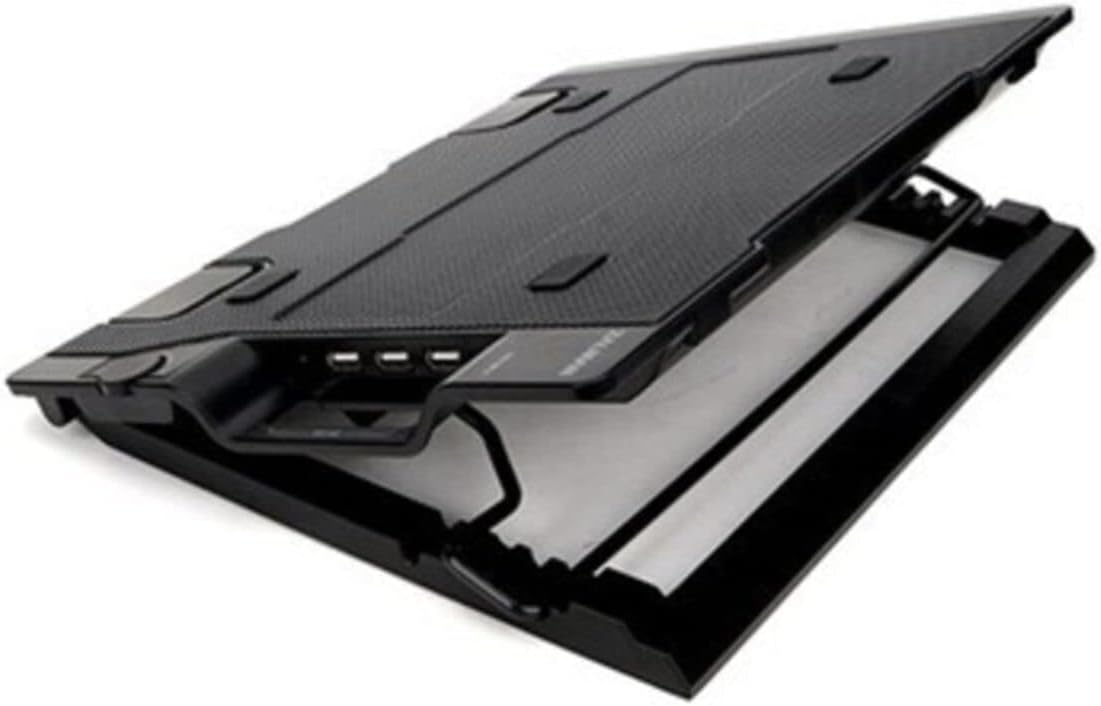
Irudia: Alde hurbiletik view of the Zalman ZM-NS2000, highlighting the three USB 2.0 ports and the fan speed control dial.
Mantentzea
- Garbiketa: Regularly clean the fan and the surface of the cooling pad to prevent dust accumulation, which can impede airflow and fan performance. Use a soft, dry cloth or compressed air. Do not use liquid cleaners directly on the fan or electronic components.
- Biltegiratzea: Erabiltzen ez duzunean, gorde hozte-kutxa leku fresko eta lehor batean, eguzki-argitik eta muturreko tenperaturatik urrun.
Arazoak konpontzea
- Haizagailua ez dabil biraka:
- Ensure the USB connection cable is securely plugged into both the cooling pad and a functioning USB port on your laptop.
- Try connecting the cooling pad to a different USB port on your laptop or another device to rule out a faulty port.
- Check if the fan speed control is set to a minimum or off position. Adjust it to increase speed.
- Hozte nahikoa:
- Verify that your laptop's intake and exhaust vents are not obstructed by the cooling pad or other objects.
- Increase the fan speed to its maximum setting.
- Ensure the cooling pad is placed on a hard, flat surface to allow for proper airflow underneath.
- USB atakak ez dute funtzionatzen:
- Confirm the main USB connection to your laptop is secure and providing power.
- Test the peripheral device by connecting it directly to your laptop to ensure it is working correctly.
- Some high-power USB devices may not function correctly through the cooling pad's hub due to power limitations. Connect such devices directly to your laptop.
Zehaztapenak
| Marka | Zalman |
| Modelo zenbakia | ZM-NS2000 |
| Kolorea | Beltza |
| Fan Tamaina | 200 mm |
| Fan Abiadura | 470 - 610 RPM (Manually Adjustable) |
| Zarata Maila | 20 dB(A) gutxi gorabehera |
| USB atakak | 3 x USB 2.0 |
| Hozteko metodoa | Airea |
| Materiala | Altzairua |
| Elementuaren pisua | 2.4 lb (gutxi gorabehera 1.09 kg) |
| Ordenagailu eramangarrien bateragarritasuna | 17 hazbete arte |
| UPC | 823884205312 |
Bermea eta Laguntza
For technical assistance, warranty information, or customer support regarding your Zalman ZM-NS2000 Laptop Cooling Pad, please contact Zalman customer service directly through their official website or the contact information provided with your purchase documentation. Please retain your proof of purchase for warranty claims.


