1. Sarrera
Thank you for choosing the SCHWAIGER DCR600HD Full HD Cable TV Receiver. This manual provides essential information for the safe and efficient use of your device. Please read these instructions carefully before installation and operation, and keep them for future reference.
2. Segurtasun-argibideak
- Elikatze-iturria: Erabili gailuarekin batera datorren korronte-egokitzailea soilik. Ziurtatu bolumenatage zure tokiko elikadura hornidura bat dator.
- Aireztapena: Do not block ventilation openings. Ensure adequate space around the receiver for proper airflow to prevent overheating.
- Hezetasuna: Keep the device away from water, moisture, and high humidity. Do not expose it to rain or splashes.
- Garbiketa: Deskonektatu korrontea garbitu aurretik. Erabili zapi leun eta lehor bat. Ez erabili garbitzaile likido edo aerosolik.
- Lekua: Place the receiver on a stable, flat surface. Avoid direct sunlight, heat sources, and strong magnetic fields.
- Zerbitzua: Ez saiatu gailua zeuk irekitzen edo konpontzen. Mantendu konponketa guztiak langile kualifikatuen esku.
3. Paketearen edukia
Mesedez, egiaztatu paketea elementu hauek dituen:
- SCHWAIGER DCR600HD Cable TV Receiver
- Urruneko Kontrola
- Power Cable (integrated or separate adapter)
- Erabiltzailearen eskuliburua (dokumentu hau)
4. Produktua amaitu daview
4.1 Aurreko panela
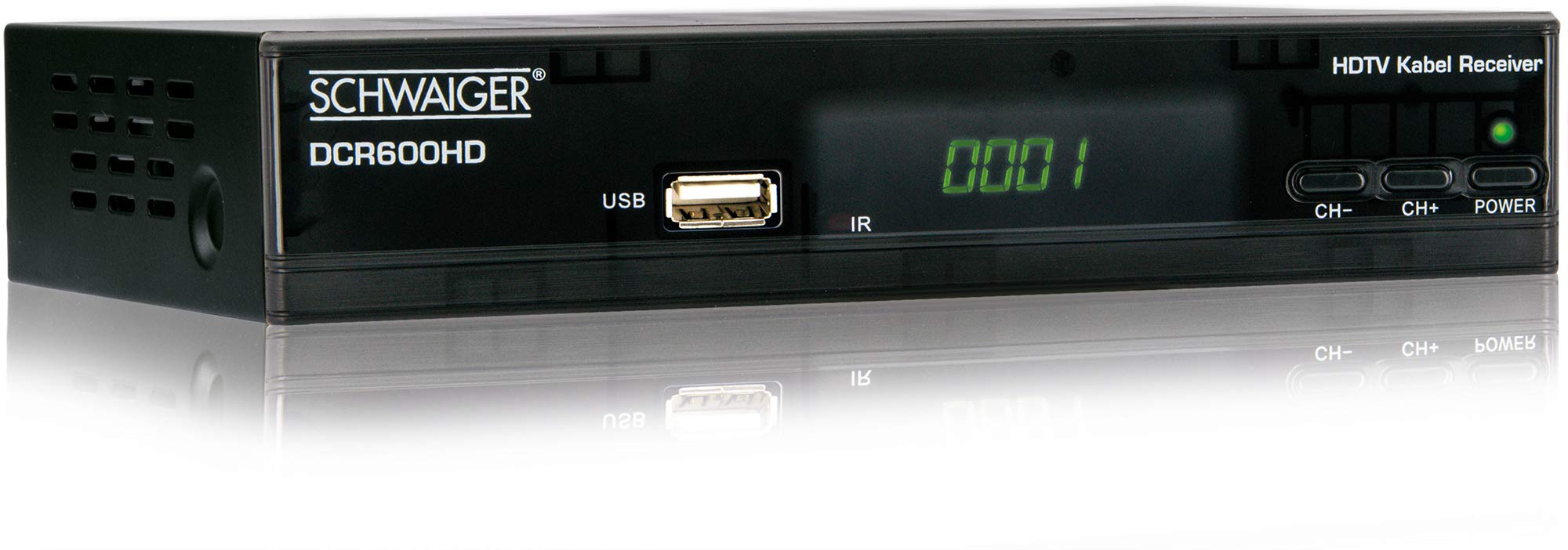
Irudia: Aurrealdea view of the SCHWAIGER DCR600HD receiver, showing the display, USB port, IR receiver, and control buttons.
- Pantaila: Kanal zenbakia edo ordua erakusten du.
- USB ataka: USB biltegiratze gailuak konektatzeko multimedia erreproduzitzeko.
- IR: Urruneko aginterako infragorrien hargailua.
- CH- / CH+: Buttons for changing channels.
- POTENTZIA: Button to turn the receiver on or off (standby).
4.2 Atzeko panela

Irudia: Atzekoa view of the SCHWAIGER DCR600HD receiver, displaying various input and output ports.
- RF IN: Input for connecting to your cable TV network.
- ETHERNET / LAN: For network connection (if supported for updates or specific services).
- HDMI: High-Definition Multimedia Interface output for connecting to an HD TV.
- TV SCART (CVBS): SCART output for connecting to older TVs or other devices.
- ~220-240V 50/60Hz: Power input for the receiver.
4.3 Urruneko kontrola

Irudia: Layout of the SCHWAIGER DCR600HD remote control, showing various function buttons.
The remote control allows you to operate all functions of your receiver. Familiarize yourself with the button layout for easy navigation.
5. Konfigurazioa
5.1 Hartzailea konektatzea
- Connect to Cable Network: Connect your cable TV antenna cable to the RF IN ataka hargailuaren atzeko panelean.
- Telebistara konektatu:
- For High Definition (HD) picture quality, connect an HDMI cable from the HDMI port on the receiver to an HDMI input on your TV.
- For standard definition (SD) or older TVs, connect a SCART cable from the TV SCART (CVBS) port on the receiver to the SCART input on your TV.
- Konektatu energia: Plug the power cable into the receiver's power input and then into a wall outlet.
- Turn on TV: Switch on your television and select the correct input source (HDMI or SCART) corresponding to your connection.
5.2 Lehen Instalazioa
Upon first power-on, the receiver will typically guide you through an initial setup process:
- Hizkuntza hautaketa: Use the remote control to select your preferred language for the on-screen menus.
- Herrialdearen hautaketa: Select your country. This helps configure regional settings and channel frequencies.
- Kanalen miaketa: The receiver will prompt you to perform an automatic channel scan. Confirm to start scanning for available cable TV channels. This process may take several minutes.
- Gorde ezarpenak: Once the scan is complete, save the found channels. Your receiver is now ready for use.
6. Funtzionamendu-argibideak
6.1 Oinarrizko funtzionamendua
- Piztu/Itzali: Sakatu BOTEREA button on the remote control or front panel to switch the receiver on or to standby mode.
- Kanalaren hautaketa: Erabili CH+ / CH- buttons on the remote or front panel to change channels sequentially. Alternatively, use the number buttons to directly enter a channel number.
- Bolumenaren doikuntza: Erabili VOL+ / Boluntario buttons on the remote control to adjust the audio volume.
- Ezkutatu: Sakatu MUTU botoia soinua aldi baterako itzaltzeko. Sakatu berriro leheneratzeko.
6.2 Programaren Gida Elektronikoa (EPG)
The EPG provides a schedule of current and upcoming TV programs.
- Sakatu EPG button on the remote control to access the Electronic Program Guide.
- Navigate through channels and program times using the arrow buttons.
- Sakatu OK to view hautatutako programa bati buruzko informazio zehatza.
6.3 Multimedia erreprodukzioa USB bidez
You can play multimedia files (AVI, MKV, MP3) from a USB storage device.
- Insert a USB flash drive or external hard drive into the USBa port on the front panel.
- The receiver should detect the USB device and prompt you to open the media player, or you can access it via the main menu.
- Nabigatu zure bidez files and folders using the arrow buttons and press OK to select and play a file.
- Use the media control buttons (Play, Pause, Stop, Fast Forward, Rewind) on the remote control for playback.
6.4 Teletestua
Access teletext services provided by broadcasters.
- Sakatu TTX button on the remote control to activate teletext.
- Use the number buttons to enter page numbers or the arrow buttons to navigate.
- Sakatu TTX again to exit teletext.
7. Mantentzea
- Garbiketa: Regularly wipe the receiver with a soft, dry, lint-free cloth. Do not use abrasive cleaners, waxes, or solvents.
- Aireztapena: Ensure that the ventilation slots are not obstructed by dust or other objects.
- Software eguneraketak: Aldian-aldian egiaztatu fabrikatzailearen website for any available software updates for your model. Follow the instructions provided with the update carefully.
8. Arazoak
If you encounter problems with your receiver, refer to the following common issues and solutions:
| Arazoa | Balizko Kausa / Irtenbidea |
|---|---|
| Ez dago irudi edo soinurik |
|
| Urruneko kontrola ez dabil |
|
| No channels found during scan |
|
| USB euskarria ez da erreproduzitzen |
|
9. Zehaztapenak
| Ezaugarri | Deskribapena |
|---|---|
| Ereduaren izena | DCR600HD |
| Produktu Mota | Digital DVB TV Tuner / Digital Player |
| Kolorea | Beltza |
| Neurriak (W x D x H) | 17 cm x 4.5 cm x 10 cm |
| Pisua | 380 g |
| Konektibitate Teknologia | HDMI, USB, SCART, RF |
| Gailu bateragarriak | Telebista |
| Bideo-kodeketa | H.264 |
| Onartutako Ebazpenak | 576i, 576p, 720p, 1080i, 1080p |
| Aspektu-erlazioak | 4:3, 16:9 |
| Audio irteera modua | Estereoa |
| Onartutako audio formatuak | MP3 |
| Onartutako euskarri motak | AVI, MKV, MP3 |
| USB portuak guztira | 1 (USB 4-pin Type A) |
| HDMI portuak guztira | 1 |
| Energia-kontsumoa | 3.8 W |
| liburukiatage | 240 Volt |
| Ezaugarri bereziak | Electronic Program Guide (EPG), Teletext, Built-in Bluetooth (Note: Bluetooth functionality may vary by region/firmware) |
| Urruneko Kontrola | Barne |
10. Bermea eta Laguntza
For warranty information and technical support, please refer to the documentation included with your product packaging or visit the official SCHWAIGER webgunea. Gorde erosketa-agiria erosketaren frogagiri gisa berme-erreklamazioetarako.


