Sarrera
The EDUP EP-B3511 is a compact wireless Bluetooth music receiver designed to add Bluetooth audio streaming capabilities to any device with a 3.5mm audio input. This device allows you to wirelessly connect your smartphone, laptop, or other Bluetooth-enabled devices to car stereos, home audio systems, headphones, and more. It also features an integrated microphone for hands-free calling.
Segurtasun Informazioa
- Ez jarri gailua tenperatura altuen, hezetasunaren edo eguzki-argiaren eraginpean.
- Saihestu gailua kolpe gogorrak erortzea edo jasaten.
- Mantendu haurren eskura.
- Erabili emandako kargatzeko kablea edo baliokide ziurtatu bat soilik.
- Ez saiatu gailua desmuntatzen edo aldatzen. Horrek bermea baliogabetuko du.
Paketearen edukia
Mesedez, egiaztatu paketea elementu hauek dituen:
- EDUP EP-B3511 Wireless Bluetooth Music Receiver
- USB Mini-USB kargatzeko kablea
- 3.5mm Male-to-Male Audio Connector
- Erabiltzailearen eskuliburua (dokumentu hau)
Produktua amaituview
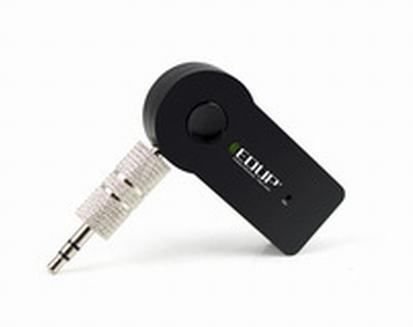
Image: The EDUP EP-B3511 Wireless Bluetooth Music Receiver, a small black rectangular device with a 3.5mm audio jack on one side and a mini-USB charging port on the other. It features a central multi-function button and an indicator light.
The EDUP EP-B3511 is designed for ease of use. It typically features:
- Funtzio anitzeko botoia: For power on/off, pairing, play/pause, and call management.
- 3.5mm Audio Output Jack: Connects to your audio system's AUX input.
- Mini-USB Charging Port: Barneko bateria berriro kargatzeko.
- LED adierazle argia: Energia, parekatzea eta kargatze egoera erakusten ditu.
- Mikrofono integratua: Eskurik gabeko komunikaziorako.
Konfigurazioa
1. Gailua kargatzea
- Connect the Mini-USB end of the charging cable to the receiver's charging port.
- Connect the USB end of the cable to a USB power source (e.g., car charger, computer USB port, USB wall adapter).
- The LED indicator will typically glow red during charging and turn off or change color when fully charged.
- Karga oso batek normalean 1-2 ordu behar ditu.
2. Audio-sistema batera konektatzea
- Ensure your audio system (car stereo, home theater, headphones) has a 3.5mm AUX input.
- Insert the 3.5mm male-to-male audio connector into the receiver's 3.5mm audio output jack.
- Connect the other end of the 3.5mm connector to the AUX input of your audio system.
- Set your audio system's input source to AUX.
3. Bluetooth Gailu batekin parekatzea
- Piztu: Press and hold the multi-function button on the receiver until the LED indicator flashes blue rapidly (or red and blue alternately), indicating it is in pairing mode.
- Gaitu Bluetootha: Zure telefonoan, tabletan edo ordenagailu eramangarrian, gaitu Bluetooth-a eta bilatu gailu berriak.
- Hautatu gailua: Look for "EP-B3511" or a similar name in the list of available Bluetooth devices and select it to pair.
- Berrespena: Once successfully paired, the LED indicator will typically flash blue slowly or remain solid blue. A voice prompt might also confirm the connection.
- The device will automatically attempt to reconnect to the last paired device when powered on.
Funtzionamendu-argibideak
Piztu/Itzali
- Piztu: Press and hold the multi-function button for approximately 3 seconds until the LED indicator flashes blue.
- Itzali: Sakatu eta eutsi funtzio anitzeko botoia 5 segundo inguruz, LED adierazlea itzali arte.
Musika erreproduzitzea
- Once paired, open your music player on your Bluetooth device.
- Music will stream wirelessly to your connected audio system.
- Use the controls on your Bluetooth device to play, pause, skip tracks, and adjust volume. The receiver's multi-function button may also act as a play/pause control (single press).
Esku libreko deiak
- Erantzun deia: When a call comes in, press the multi-function button once to answer.
- Amaitu deia: During a call, press the multi-function button once to end the call.
- Deia baztertu: Sakatu eta eutsi funtzio anitzeko botoia 2 segundo inguru sarrerako dei bat baztertzeko.
- Berriz markatu azken zenbakia: Double-press the multi-function button to redial the last number.
- The integrated microphone will pick up your voice for communication. Ensure you are within reasonable proximity to the receiver for clear audio.
Mantentzea
- Garbiketa: Erabili zapi leun eta lehor bat gailua garbitzeko. Ez erabili garbitzaile likidorik edo disolbatzailerik.
- Biltegiratzea: Denbora luzez erabiltzen ez duzunean, gorde gailua leku fresko eta lehor batean, eguzki-argitik eta muturreko tenperaturetatik babestuta.
- Bateria zaintzea: Bateriaren iraupena luzatzeko, saihestu bateria maiz erabat deskargatzea. Kargatu gailua aldizka, etengabe erabiltzen ez baduzu ere.
Arazoak konpontzea
| Arazoa | Irtenbidea |
|---|---|
| Gailua ez da pizten. | Ensure the device is charged. Connect it to a power source using the USB cable. |
| Ezin da Bluetooth gailuarekin parekatu. |
|
| Soinurik ez edo soinu kalitate eskasa. |
|
| Mikrofonoa ez dabil deietan zehar. |
|
| Gailua automatikoki itzaltzen da. | The device may have an auto-off feature if not connected or active for a period (e.g., 5 minutes). Recharge the battery if it's low. |
Zehaztapenak
- Eredua: EP-B3511
- Konektibitate Teknologia: Bluetootha
- Haririk gabeko komunikazio estandarra: Bluetooth V4.1 (supports all Bluetooth versions of mobile/tablet)
- Energia iturria: Battery Powered (inbuilt rechargeable battery)
- Gailu bateragarriak: Headphone, Laptop, Smartphone, Car Audio Systems, Home Audio Systems
- Elementuaren pisua: Gutxi gorabehera 60 g
- Paketearen neurriak: 13.6 x 11.4 x 2.6 cm gutxi gorabehera
- Ezaugarriak: Integrated Microphone for calls
Bermea eta Laguntza
This product comes with a standard manufacturer's warranty. For specific warranty terms, duration, and support inquiries, please refer to the documentation provided at the time of purchase or contact your retailer or the manufacturer directly. Keep your proof of purchase for warranty claims.


