1. Sarrera
This manual provides comprehensive instructions for the installation, operation, and maintenance of your Swann SWDVK-163208S-US 3200S 16-Channel 960H DVR Security System. Please read this manual thoroughly before using the product to ensure proper setup and functionality. Keep this manual for future reference.
The system includes a 16-channel 960H Digital Video Recorder (DVR) with a pre-installed 1TB hard drive and eight 700TVL security cameras designed for both indoor and outdoor use. It supports continuous recording, motion detection, and remote viewgaitasunak.
2. Segurtasun informazioa
- Ensure all power connections are secure and correctly rated for the device.
- Do not expose the DVR or cameras to water or excessive moisture.
- Avoid placing the DVR in direct sunlight or near heat sources.
- Use only the power adapters supplied with the system.
- Do not attempt to open or service the DVR or cameras yourself. Refer all servicing to qualified personnel.
- Keep cables organized to prevent tripping hazards and ensure proper ventilation.
3. Paketearen edukia
Verify that all items listed below are present in your package. If any items are missing or damaged, contact Swann customer support.
- Swann SWDVK-163208S-US 16-Channel 960H DVR with 1TB HDD
- 8 x 700TVL Security Cameras
- 8 x BNC Cables (60ft/18m)
- Power Adapters for DVR and Cameras
- Ethernet kablea
- HDMI kablea
- USB sagua
- Muntatzeko torlojuak eta tapoiak
- Hasierako gida azkarra
- Lapurretak eragozteko eranskailuak
4. Sistema amaituview
4.1 DVR Front Panel
The front panel of the DVR provides access to essential controls and indicators.
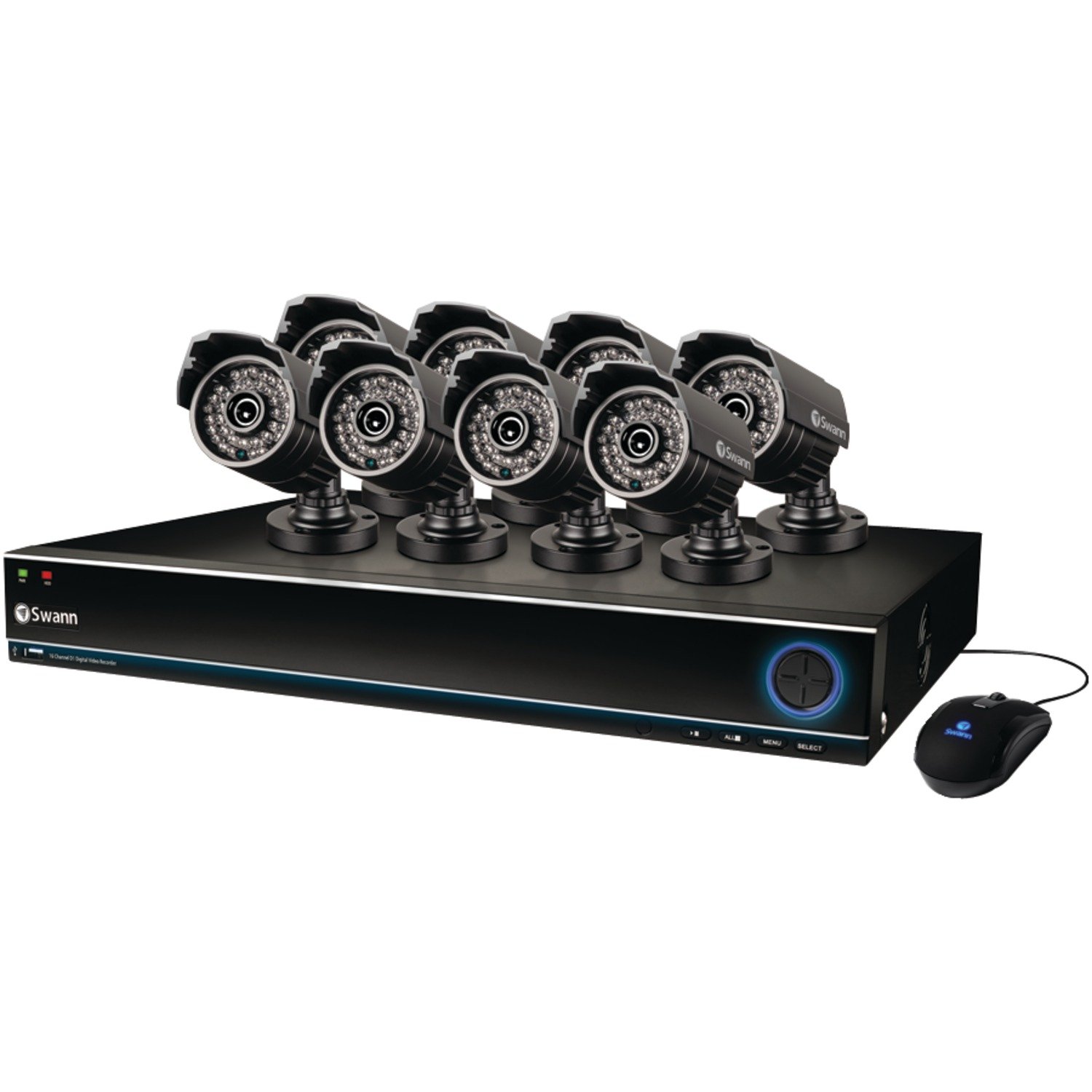
Image: The Swann SWDVK-163208S-US security system, showing the DVR unit and several cameras. The DVR features a blue-lit front panel with control buttons and status indicators.
- Potentzia adierazlea: Illuminates when the DVR is powered on.
- HDD adierazlea: Disko gogorra aktibatuta dagoenean keinu egiten du.
- Sarearen adierazlea: Sarearen konexioa adierazten du.
- USB ataka: For connecting a USB mouse or for data backup.
- Kontrol-botoiak: Navigate menus and control playback.
4.2 DVR Rear Panel
The rear panel contains all the necessary ports for connecting cameras, monitors, and network cables.
- Bideo sarrera (BNC): 16 ports for connecting security cameras.
- Bideo irteera (HDMI/VGA): For connecting a monitor or TV.
- Audio Sarrera/Irteera (RCA): For connecting microphones and speakers (if supported).
- Ethernet ataka (RJ45): Sareko konexiorako.
- USB atakak: Periferikoentzako USB ataka gehigarriak.
- eSATA ataka: For connecting an external hard drive for expanded storage.
- Potentzia sarrera: For connecting the DVR power adapter.
4.3 Kameraren Ezaugarriak
The included 700TVL cameras offer clear video surveillance with night vision capabilities.
- Ebazpena: 700TVL (Television Lines) for detailed images.
- Gaueko ikuspegia: Infrared LEDs provide visibility up to 82ft (25m) in low light or complete darkness.
- Eguraldi erresistentea: Designed for both indoor and outdoor installation.
- Muntaketa: Adjustable brackets for flexible positioning.
5. Konfigurazioa
5.1 DVRra konektatzea
- Connect the included USB mouse to one of the USB ports on the DVR.
- Connect the HDMI cable from the DVR's HDMI output to an HDMI input on your TV or monitor. Alternatively, use a VGA cable for VGA connections.
- Urrunekorako viewing, connect an Ethernet cable from the DVR's Ethernet port to your router or network switch.
5.2 Kamerak konektatzea
- Mount each camera in your desired location using the provided screws and plugs. Ensure the camera has a clear field of view and is protected from direct impact.
- Connect one end of the BNC cable to the camera's video output.
- Connect the other end of the BNC cable to a video input port on the DVR (e.g., Video In 1, Video In 2, etc.).
- Connect the camera's power input to the power splitter cable, then connect the power adapter to the splitter and a power outlet.
5.3 Piztea
- Connect the DVR power adapter to the DVR's power input and then to a power outlet.
- The DVR will power on automatically. The power indicator light on the front panel will illuminate.
- Wait for the system to boot up. The Swann logo will appear on your connected monitor, followed by the live view bistaratzea.
5.4 Hasierako konfigurazioa
Upon first boot-up, the DVR will guide you through an initial setup wizard.
- Hizkuntza hautaketa: Aukeratu zure hizkuntza hobetsia.
- Data eta ordua: Set the correct date, time, and time zone. This is crucial for accurate recording timestamps.
- Sarearen ezarpenak: Configure network settings (DHCP is usually sufficient for automatic setup).
- Pasahitza konfiguratzea: Create a strong password for the administrator account to secure your system.
- Disko gogorreko formatua: The system may prompt to format the hard drive. Confirm to proceed.
6. Sistemaren funtzionamendua
6.1 Bizi View
Hasierako konfigurazioaren ondoren, DVRak zuzeneko irudiak bistaratuko ditu view konektatutako kamera guztietatik. Kamera bakarreko kameraren artean alda dezakezu view, multi-camera grids (e.g., 4-channel, 8-channel, 16-channel), and sequence modes using the on-screen menu or front panel controls.
6.2 Grabaketa moduak
DVRak hainbat grabazio modu onartzen ditu:
- Grabaketa jarraitua: Records 24/7, overwriting the oldest footage disko gogorra beteta dagoenean.
- Mugimendua detektatzeko grabazioa: Kameraren mugimendua detektatzen denean bakarrik grabatzen du. view. This conserves hard drive space. Sensitivity and detection areas can be configured for each camera.
- Programatutako grabazioa: Eguneko edo asteko ordu zehatzetan grabaketak.
- Eskuzko grabaketa: Start and stop recording manually from the DVR interface.
Access recording settings via the DVR's main menu: Menu > Record > Record Schedule.
6.3 Erreprodukzioa
Berrizview foo grabatuatage:
- Zuzenetik view, right-click with the mouse to open the main menu.
- Hautatu Erreprodukzioa.
- Choose the desired date and camera channel(s).
- Use the timeline to navigate through recorded events. Different colors on the timeline indicate different recording types (e.g., continuous, motion).
- Erabili erreprodukzio-kontrolak (erreproduzitu, pausatu, aurreratu, atzeratu) berriro egitekoview footage.
6.4 Babeskopia
You can back up important video footage to a USB flash drive or external hard drive.
- Insert a USB storage device into a USB port on the DVR.
- Joan zaitez Menu > Backup.
- Select the camera channel, date, and time range for the footage you wish to back up.
- Choose the backup device and file format (e.g., AVI).
- Egin klik Hasi to begin the backup process.
6.5 urrunekoa Viewing (SwannLink & SwannView)
The SwannLink and SwannView applications allow you to view your cameras remotely from a smartphone or tablet.
- Ensure your DVR is connected to the internet via the Ethernet port.
- Download the SwannView aplikazioa zure gailuaren aplikazio-dendatik.
- Open the app and follow the on-screen instructions to add your DVR. This typically involves scanning a QR code displayed on the DVR's monitor (Menu > Network > SwannLink) or manually entering the device ID.
- Enter the DVR's username and password when prompted.
- Orain gai izan beharko zenuke view bizi footage and access playback remotely.
7. Mantentzea
7.1 Disko gogorraren kudeaketa
1 TB-ko disko gogorrak automatikoki gainidatziko ditu fitxategi zaharrenak.tage when full. To ensure optimal performance, it is recommended to periodically check the hard drive status via Menu > HDD > Disk Manage. You can also connect an external hard drive to the eSATA port for additional storage capacity.
7.2 Kamerak garbitzea
Garbitu kameraren lenteak aldian-aldian zapi leun eta lehor batekinamp zapi bat hautsa, zikinkeria edo ur orbanak kentzeko, estaldura izan dezaketenak view. Do not use harsh chemicals or abrasive materials.
7.3 Firmware eguneraketak
Swann may release firmware updates to improve system performance or add new features. Check the Swann support website for the latest firmware for your model. Follow the instructions provided with the firmware update carefully to avoid damaging the DVR.
8. Arazoak
| Arazoa | Kausa posiblea | Irtenbidea |
|---|---|---|
| Ez dago irudirik monitorean | Bideo-kablea soltea, sarrera okerra hautatuta monitorean, DVR-a ez dago piztuta. | Egiaztatu HDMI/VGA kablearen konexioak. Ziurtatu monitorearen sarrera zuzena dagoela. Egiaztatu DVRaren potentzia. |
| Ez dago kameraren irudirik | Loose BNC cable, camera power issue, faulty camera. | Check BNC and power connections for the specific camera. Test camera with a known working cable/power supply. |
| DVR-ak ez du grabatzen | Recording schedule not set, hard drive full or faulty, motion detection not configured. | Check recording schedule. Verify hard drive status. Ensure motion detection is enabled and configured correctly. |
| Ezin view urrunetik | No network connection, incorrect network settings, app configuration error. | Verify DVR has internet access. Check network settings (DHCP). Reconfigure the DVR in the SwannView aplikazioa. |
| Purple image on camera | IR filter stuck, camera malfunction. | Power cycle the camera. If the issue persists, the camera may be faulty and require replacement. |
9. Zehaztapenak
- Modelo zenbakia: SWDVK-163208S-US
- Bideo sarrerak: 16 Channels BNC
- Bideo irteera: hdmi, vga
- Pantailaren bereizmena: Up to 1080p (HDMI)
- Grabaketa Ebazpena: 960H (960x576/960x480)
- Disko gogorra: 1TB SATA HDD (expandable via eSATA)
- Konpresioaren formatua: H.264
- Sare Interfazea: RJ45 Ethernet ataka
- USB interfazea: 3 x USB 2.0 ataka
- Kameraren bereizmena: 700 TVL
- Camera Night Vision: Gehienez 82 oin (25 m)
- Camera Weatherproof Rating: IP66 (kanpoan erabiltzeko)
- Dimensions (DVR): 22.5 x 15.3 x 8.1 hazbete (gutxi gorabehera)
- Weight (DVR): 14 kilo (gutxi gorabehera)
- Energia iturria: DC 12V
10. Bermearen informazioa
Swann products are covered by a limited warranty. The specific terms and duration of your warranty may vary by region and product. Please refer to the warranty card included with your product or visit the official Swann webwebgunea bermearen informazio zehatza eta erregistro-prozedurak lortzeko. Gorde erosketaren frogagiria bermearen erreklamazioetarako.
11. Laguntza
For technical assistance, product support, or to download the latest software and manuals, please visit the official Swann support website. You can typically find FAQs, troubleshooting guides, and contact information for customer service there. Have your product model number (SWDVK-163208S-US) ready when contacting support.
Swann Laguntza Webgunea: https://www.swann.com/us/support


