Sarrera
The Vivitar Tag & Blast Wireless Bluetooth Speaker is designed for portable audio enjoyment. This speaker features Bluetooth technology for wireless connectivity with compatible devices, offering a digital stereo sound experience. Its compact design makes it suitable for use in various outdoor and indoor settings. The speaker includes a rechargeable battery for extended use.
Kutxan dagoena
- Vivitar Tag & Blast Wireless Bluetooth Speaker
Produktua amaituview
The Vivitar Tag & Blast speaker is engineered for simplicity and portability. Below is an image of the speaker, highlighting its general appearance.
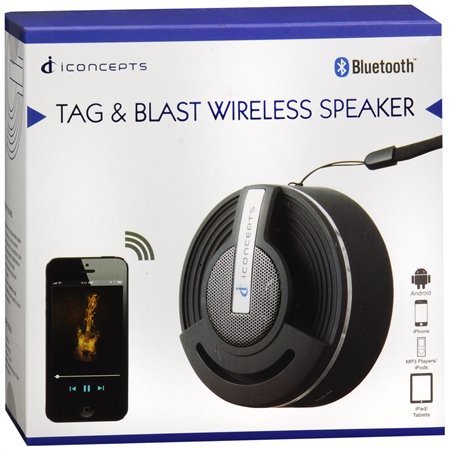
Ezaugarri nagusiak hauek dira:
- Bluetooth technology for wireless audio streaming.
- Compatibility with various Bluetooth-enabled devices such as iPod, iPhone, iPad, smartphones, and tablets.
- Designed for ultimate portability, allowing you to take your music anywhere.
Konfigurazioa
Hizlaria kargatzen
The Vivitar Tag & Blast speaker is powered by a rechargeable battery. Before initial use, ensure the speaker is fully charged.
- Kokatu bozgorailuan kargatzeko ataka.
- Connect the appropriate charging cable (not specified in product details, typically USB) to the speaker and a power source.
- Allow the speaker to charge until the charging indicator (if present) shows a full charge.
Bluetooth parekatzea
Bozgorailua Bluetooth gaitutako gailu batera konektatzeko:
- Ensure the speaker is powered on and in pairing mode. (Refer to the speaker's physical controls for specific pairing button/indicator, if available).
- Zure gailuan (smartphone-a, tableta, etab.), joan Bluetooth ezarpenetara.
- Gaitu Bluetootha eta bilatu eskuragarri dauden gailuak.
- Select "Vivitar Tag & Blast" or a similar name from the list of found devices.
- Once connected, the speaker will indicate a successful pairing (e.g., an audible tone or LED indicator).
Funtzionamendu-argibideak
Piztu/Itzali
To power the speaker on or off, locate the power button (control method is 'Touch' as per specifications) and press and hold it until the speaker indicates power status (e.g., LED light, sound cue).
Audio Erreprodukzioa
Once paired with your device, audio played on your device will stream through the Vivitar Tag & Blast speaker. Use your connected device to control playback (play/pause, skip tracks) and volume.
Mantentzea
To ensure the longevity and optimal performance of your Vivitar Tag & Blast speaker:
- Keep the speaker clean by wiping it with a soft, dry cloth. Avoid using harsh chemicals or abrasive cleaners.
- Ez jarri bozgorailua tenperatura altuen, eguzki-argiaren eraginpean edo hezetasun handiaren eraginpean.
- While designed for outdoor use, the speaker is not waterproof. Avoid submerging it in water or exposing it to heavy rain.
- Gorde bozgorailua leku fresko eta lehor batean erabiltzen ez duzunean.
Arazoak konpontzea
If you encounter issues with your Vivitar Tag & Blast speaker, try the following solutions:
- Potentziarik gabe: Ensure the speaker is fully charged. Connect it to a power source and allow it to charge for at least 30 minutes before attempting to power it on again.
- Ezin da gailuarekin parekatu:
- Ziurtatu bozgorailua parekatzeko moduan dagoela.
- Ensure Bluetooth is enabled on your device and it is within range (typically 10 meters or 33 feet).
- Itzali eta piztu bozgorailua eta gailuaren Bluetooth-a.
- If previously paired, try forgetting the speaker from your device's Bluetooth list and re-pairing.
- Ez dago soinurik edo bolumen baxurik:
- Egiaztatu bozgorailuaren eta konektatutako gailuaren bolumen-mailak.
- Ensure the speaker is properly paired and connected to your device.
- Saiatu zure gailuko beste aplikazio edo iturri batetik audioa erreproduzitzen.
- Audio kalitate eskasa:
- Interferentziak murrizteko, hurbildu bozgorailua gailura.
- Ziurtatu bozgorailuen eta gailuaren artean oztoporik ez dagoela.
- Check for other active Bluetooth devices in the vicinity that might cause interference.
Zehaztapenak
| Ezaugarri | Xehetasuna |
|---|---|
| Ereduaren izena | BTSP-TAG |
| Marka | Vivitar |
| Konektibitate Teknologia | Bluetootha |
| Haririk gabeko Komunikazio Teknologia | Bluetootha |
| Hizlari mota | Apalategia (eramangarria) |
| Audio irteera modua | Estereoa |
| Inguruko soinu-kanalaren konfigurazioa | 2.0 |
| Kontrol-metodoa | Ukitu |
| Energia iturria | Bateriaren bidez |
| Pilak | 2 litio ioi bateriak behar dira (barne) |
| Gailu bateragarriak | MP3 erreproduzitzailea, telefono adimenduna, tableta |
| Gomendatutako Erabilerak | For Smartphones or Tablets, For Outdoor Use |
| Kolorea | Zilarrezkoa |
| Produktuaren neurriak | 5 x 2.5 x 5 hazbete |
| Elementuaren pisua | 7.2 ontza (0.45 libra) |
| Iragazgaitza da | GEZURRA |
| Fabrikatzailea | Sakar Nazioartekoa, Inc. |
Bermea eta Laguntza
The Vivitar Tag & Blast Wireless Bluetooth Speaker comes with a Berme mugatua. For specific details regarding warranty coverage, duration, and how to obtain service, please refer to the warranty card included with your product or contact Vivitar customer support directly. Contact information for support can typically be found on the manufacturer's official webgunean edo produktuaren ontzian.


