1. Sarrera
Welcome to the user manual for your new Salora SM508 mobile phone. This guide provides essential information to help you set up, operate, maintain, and troubleshoot your device. Please read this manual carefully to ensure proper use and to maximize the performance and longevity of your phone.
2. Produktua amaitu daview
The Salora SM508 is a compact and reliable basic mobile phone designed for essential communication. It features a color display, a comfortable keypad, and dual SIM support.
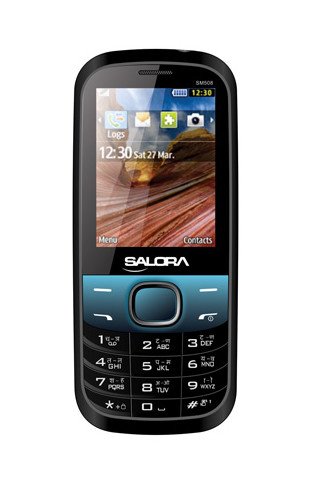
Irudi honek aurrealdea erakusten du view of the Salora SM508 mobile phone. It features a color display at the top, a central navigation button, and a standard alphanumeric keypad below. The phone has a black body with blue accents around the navigation cluster.
3. Konfigurazioa
3.1 SIM txartela(k) sartzea
- Turn off the phone and remove the back cover.
- Kontu handiz kendu bateria.
- Locate the SIM card slots. The Salora SM508 supports dual SIM cards.
- Insert your SIM card(s) into the designated slot(s) with the gold contacts facing down. Ensure they are securely seated.
3.2 Inserting Battery
- Align the battery contacts with the contacts in the phone's battery compartment.
- Gently press the 1800 mAh Li-Ion battery into place until it clicks.
- Replace the back cover, ensuring it is securely fastened.
3.3 Inserting Memory Card (Optional)
- With the back cover and battery removed, locate the memory card slot.
- Insert a microSD card (up to 8GB) into the slot with the gold contacts facing down.
- Jarri bateria eta atzeko estalkia.
3.4 Gailua kargatzea
- Konektatu kargagailua telefonoaren kargatzeko atakara.
- Entxufatu kargagailua korronte-hartune batera.
- The battery indicator on the screen will show the charging status. Charge the phone fully before first use.
3.5 Initial Power On/Off
- Pizteko: Sakatu eta eutsi pizteko/deia amaitzeko botoia pantaila piztu arte.
- Itzaltzeko: Press and hold the Power/End Call button until the power-off options appear, then select 'Power off'.
4. Funtzionamendu-argibideak
4.1 Oinarrizko nabigazioa
- Use the navigation keys (up, down, left, right) to move through menus and options.
- Press the central 'OK' or 'Select' button to confirm a selection.
- Use the 'Back' or 'Clear' button to return to the previous screen or delete characters.
4.2 Deiak egitea eta jasotzea
- Dei bat egiteko: Sartu telefono zenbakia teklatua erabiliz eta sakatu Deitzeko botoia berdea.
- Dei bat jasotzeko: Telefonoak jotzen duenean, sakatu Deitzeko botoia berdea erantzuteko.
- Dei bat amaitzeko: Sakatu deia amaitzeko botoia gorria.
4.3 SMSak bidaltzea eta jasotzea
- Joan 'Mezuak' menura.
- Select 'Write Message' or 'New SMS'.
- Idatzi zure mezua teklatua erabiliz.
- Add the recipient's number or select from contacts.
- Sakatu 'Bidali'.
4.4 Kameraren erabilera
- Sartu kameraren aplikaziora menu nagusitik.
- The phone features a 1.3 MP primary (rear) camera.
- Markatu zure argazkia pantaila erabiliz.
- Sakatu 'Ados' edo 'Hartu' botoia argazkia ateratzeko.
4.5 Multimedia eta Konektibitatea
- Audio Jack: The phone includes a 3.5 mm audio jack for connecting headphones or external speakers.
- Bluetootha: Enable Bluetooth from the settings menu to connect to compatible devices for file transfer or hands-free communication.
- GPRS: The phone supports GPRS for basic internet connectivity. Consult your network provider for data plan details.
5. Mantentzea
5.1 Gailua garbitzea
- Use a soft, dry, lint-free cloth to clean the phone's screen and body.
- Saihestu produktu kimiko gogorrak, garbiketa-disolbatzaileak edo garbigarri indartsuak erabiltzea.
- Do not allow water or liquids to enter the phone.
5.2 Bateria zaintzea
- Saihestu bateria muturreko tenperaturetan (beroan edo hotzean) jartzea.
- Ez zulatu, desmuntatu edo zirkuitulaburtu bateria.
- If the battery is damaged or swollen, discontinue use immediately and replace it with an authorized Salora battery.
5.3 Biltegiratzea
- Gorde telefonoa leku fresko eta lehor batean, eguzki-argitik eta hezetasunetik babestuta.
- If storing for an extended period, ensure the battery is partially charged (around 50%) to preserve its lifespan.
6. Arazoak
If you encounter issues with your Salora SM508, please refer to the following common solutions:
- Telefonoa ez da pizten:
Ensure the battery is charged. Connect the charger and wait a few minutes before attempting to power on. Check if the battery is properly inserted. - Sare seinalerik ez:
Check if your SIM card is correctly inserted. Ensure you are in an area with network coverage. Try restarting the phone. - Ezin ditut deiak egin/jaso:
Verify that your SIM card is active and has sufficient balance/plan. Check network signal strength. Ensure call barring or flight mode is not enabled. - Kargatzeko arazoak:
Ensure the charger is properly connected to both the phone and the power outlet. Try using a different compatible charger. Check the charging port for any debris. - Teklatuak ez du erantzuten:
Restart the phone. If the issue persists, ensure no physical damage to the keypad.
If the problem persists after trying these steps, please contact Salora customer support.
7. Zehaztapenak
Below are the detailed technical specifications for the Salora SM508 mobile phone:
| Ezaugarri | Zehaztapena |
|---|---|
| Marka | Salora |
| Eredua | SM508 |
| Sistema eragilea | Android 5.1, Android v5 1 OS (Note: This specification appears to be an error in the source data for a basic phone with a keypad interface. The phone operates on a proprietary feature phone OS.) |
| Pantailaren tamaina | 6.1 Centimetres (2.4" TFT Screen) |
| Ebazpena | 320 x 240 pixel |
| Kamera nagusia | 1.3 MP (Rear) |
| Bateria | 1800 mAh, Li-Ioi |
| Memoria Biltegiratzeko Ahalmena | 8 GBra arte zabal daiteke |
| SIM laguntza | SIM bikoitza |
| Konektibitate Teknologiak | Bluetooth, GPRS |
| Audio Jack | 3.5 mm |
| Gailuaren interfazea - Nagusia | Teklatua |
| Forma-faktorea | Taberna |
| Kolorea | Beltza, Urdina |
| Elementuaren pisua | 140 g |
| Paketearen neurriak | 14 x 9.4 x 6.2 cm |
| Eskuragarri dagoen lehen data | 18ko otsailaren 2014a |
8. Bermea eta Laguntza
8.1 Bermearen informazioa
The Salora SM508 comes with a 1 urteko fabrikatzailearen bermea gailuarentzat erosketa-datatik aurrera. Kutxako osagarriak, bateriak barne, babestuta daude 6 hilabeteko fabrikatzailearen bermea erosketa-datatik aurrera. Berme honek fabrikazio-akatsak eta erabilera normalaren ondoriozko arazoak estaltzen ditu.
Gorde erosketa-agiria erosketaren frogagiri gisa, berme-erreklamazioetarako.
8.2 Bezeroarentzako laguntza
For any technical assistance, warranty claims, or further inquiries regarding your Salora SM508 mobile phone, please contact Salora customer support directly. Refer to the packaging or the official Salora webgunea kontaktu-informazio eguneratuena lortzeko.


