1. Sarrera
This manual provides essential information for the safe and efficient installation, operation, and maintenance of your APEX AL-A300ATX 300W ATX12V Power Supply. Please read this manual thoroughly before installation and retain it for future reference.
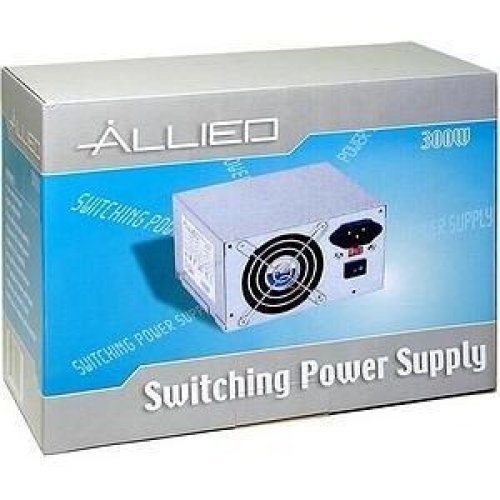
Image: The AL-A300ATX 300W ATX12V Power Supply shown in its retail packaging, indicating it is a "Switching Power Supply" from "ALLIED".
2. Segurtasun informazioa
Always observe the following safety precautions to prevent injury or damage to the power supply or other components:
- Ensure the power supply is disconnected from the AC outlet before installation or removal.
- Ez ireki elikatze-iturria casing. Bolumen handiatages are present inside, even when disconnected. There are no user-serviceable parts.
- Install the power supply in a well-ventilated area. Do not block ventilation openings.
- Avoid exposing the power supply to moisture or extreme temperatures.
- Use only the cables provided or approved for use with this power supply.
- If the power supply is damaged or malfunctioning, discontinue use immediately and contact support.
3. Paketearen edukia
Egiaztatu elementu guztiak paketean daudela:
- APEX AL-A300ATX 300W ATX12V Power Supply Unit
- AC Power Cord (may vary by region)
- Muntatzeko Torlojuak
- Erabiltzailearen eskuliburua (dokumentu hau)
4. Konfigurazioa eta instalazioa
Follow these steps to install the power supply into your computer system:
- Prestaketa:
- Itzali ordenagailua eta deskonektatu korronte alternoko kablea hormako entxufetik.
- Ireki ordenagailuaren karkasa. Ikusi ordenagailuaren karkasaren eskuliburua argibide zehatzak lortzeko.
- Elikatze-iturri bat ordezkatzen baduzu, deskonektatu kable guztiak PSU zaharretik eta atera kaxatik.
- Mounting the PSU:
- Carefully slide the AL-A300ATX power supply into the designated PSU bay in your computer case.
- Lerrokatu elikatze-iturriko torloju-zuloak kaxakoekin.
- Lotu elikadura hornidura hornitutako muntaketa-torlojuen bidez.
- Kableak konektatzen:
- 24-Pin ATX Main Power Connector: Connect this large connector to the corresponding port on your motherboard. Ensure it clicks into place.
- CPU Power Connector (4-pin or 8-pin): Connect the appropriate CPU power cable to the CPU power port on your motherboard.
- SATA Power konektoreak: Connect these flat connectors to your SATA hard drives, SSDs, and optical drives.
- Molex (Peripheral) Connectors: Connect these 4-pin connectors to older drives or case fans if needed.
- PCI-E Power Connectors (if applicable): If your graphics card requires additional power, connect the appropriate PCI-E power cable from the PSU to the graphics card. This model is listed with a "24 Pin" PCI-Express Connector Configuration, implying the main ATX connector.
- Kableen kudeaketa: Kableak txukun bideratu kaxa barruko aire-fluxua eta estetika hobetzeko.
- Azken egiaztapena: Egiaztatu birritan konexio guztiak seguruak direla ziurtatzeko.
- Itxi kasua: Close your computer case and secure it.
5. Funtzionamendu-argibideak
After successful installation, follow these steps to power on your system:
- Konektatu AC Power: Plug the AC power cord into the power supply's inlet and then into a grounded wall outlet or surge protector.
- Switch potentziala: Locate the power switch on the back of the power supply (usually a rocker switch labeled "I" for ON and "O" for OFF). Ensure it is in the "ON" (I) position.
- Power On Computer: Press the power button on your computer case. The system should now power on.
To turn off your computer, always use the operating system's shutdown procedure. Do not use the power supply's switch for regular shutdowns, as this can lead to data loss or system instability.
6. Mantentzea
Proper maintenance helps ensure the longevity and optimal performance of your power supply:
- Hautsa garbitzea: Periodically (every 3-6 months, depending on environment) clean dust from the power supply's fan and ventilation grilles using compressed air. Ensure the computer is powered off and unplugged before cleaning.
- Aire-fluxua: Ensure that the computer case has adequate airflow and that the power supply's fan is not obstructed.
- Kableen kudeaketa: Maintain tidy cable routing to prevent obstruction of airflow.
7. Arazoak
Zure energia-iturriarekin arazoak badituzu, jo ezazu honako arazo eta irtenbide ohikoenei:
| Arazoa | Kausa posiblea | Irtenbidea |
|---|---|---|
| Ordenagailua ez da pizten. |
|
|
| Sistema piztu egiten da baina berehala itzaltzen da. |
|
|
| Fan is noisy or not spinning. |
|
|
If the problem persists after attempting these solutions, contact APEX customer support or a qualified technician.
8. Zehaztapenak
| Ezaugarri | Xehetasuna |
|---|---|
| Ereduaren izena | AL-A300ATX |
| Marka | APEX |
| Irteera Wattage | 300 Watt |
| Forma-faktorea | ATX12V |
| Gailu bateragarriak | Ordenagailu pertsonala |
| Konektore mota | ATX (24 Pin PCI-Express Connector Configuration) |
| Hozteko metodoa | Airea |
| Gutxieneko sarrera boltage | 110 voltio (AC) |
| Elementuaren pisua | 3.64 kilo |
| Paketearen neurriak | 9.6 x 7.2 x 4.1 hazbete |
| Eskuragarri dagoen lehen data | 22ko apirilaren 2014a |
9. Bermea eta Laguntza
For information regarding warranty coverage, technical support, or service, please refer to the official APEX webwebgunera edo jarri harremanetan zuzenean bezeroarentzako arreta-zerbitzuarekin. Gorde erosketa-agiria erosketaren frogagiri gisa.
APEX Contact Information: Please visit the official APEX webwebgunea, harremanetarako datu eta laguntza baliabide eguneratuenak lortzeko.


