Sarrera
This manual provides essential instructions for the safe and efficient operation of your Muse M-28 VF Portable CD/MP3 Radio with USB Player. Please read this manual thoroughly before using the device and retain it for future reference.
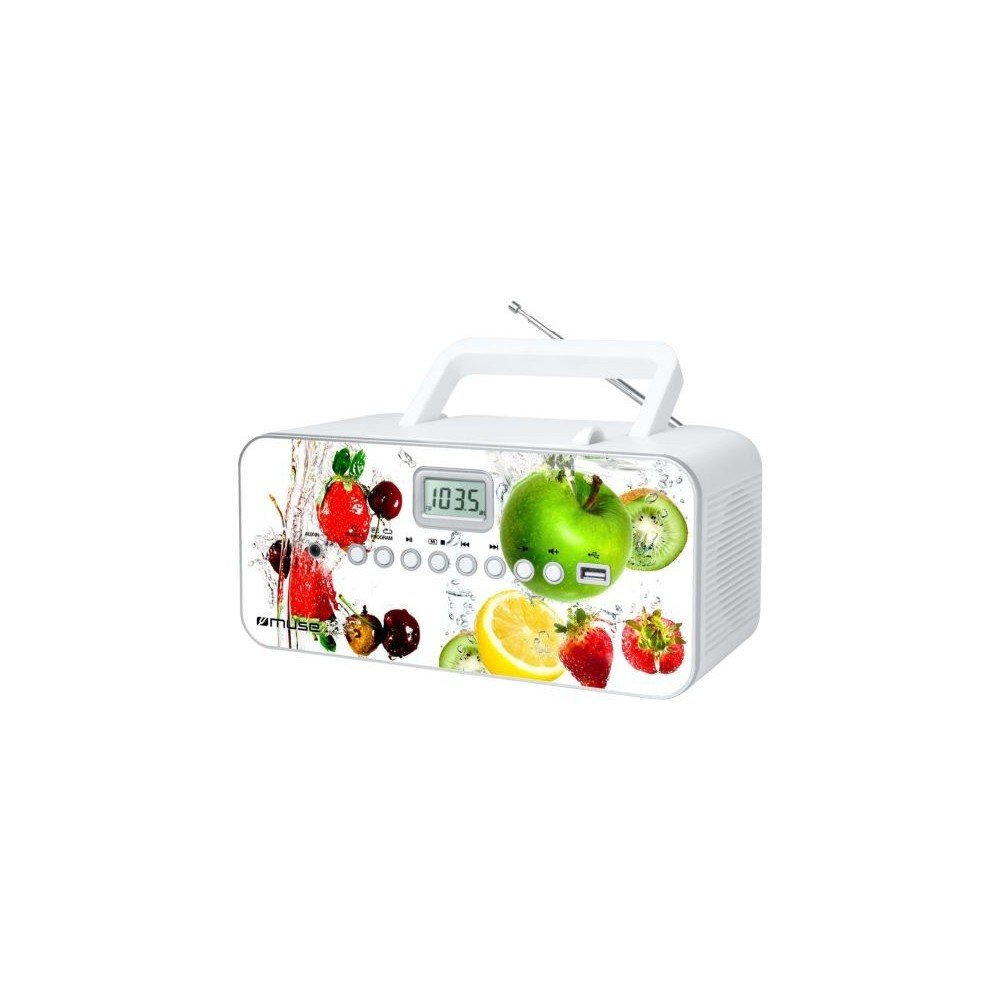
Aurrealdea view of the Muse M-28 VF portable CD/MP3 radio, showing the CD compartment, display, and control buttons.
Segurtasun Informazioa
- Ez jarri unitatea euri edo hezetasunera.
- Ez blokeatu aireztapen-zulorik.
- Ziurtatu aireztapen egokia unitatearen inguruan.
- Erabili fabrikatzaileak zehaztutako eranskinak/osagarriak soilik.
- Deskonektatu unitatea tximista-ekaitzetan edo denbora luzez erabiltzen ez duzunean.
- Jarri zerbitzu-zerbitzu guztiak zerbitzu-pertsonal kualifikatuari.
Konfigurazioa
1. Energia-konexioa
- Aurkitu korronte alternoko kablea.
- Insert the small end of the power cord into the AC IN jack on the back of the unit.
- Entxufatu kablearen beste muturra hormako entxufe estandar batera.
2. Antenaren doikuntza
For optimal FM radio reception, fully extend the telescopic antenna. For MW (AM) reception, the unit has a built-in antenna; rotate the unit for best reception.
Funtzionamendu-argibideak
1. Piztu/Itzali
Sakatu BOTEREA botoia unitatea pizteko edo itzaltzeko.
2. Modu hautaketa
Sakatu MODUA button repeatedly to switch between CD, USB, FM Radio, MW Radio, and AUX modes.
3. CD erreprodukzioa
- Ireki CD konpartimentuko atea.
- Place a CD (CD/CD-R/CD-RW/MP3 compatible) with the label side facing up.
- Itxi CD konpartimentuko atea.
- Hautatu CD modua tekla erabiliz MODUA botoia.
- Sakatu JOLASTU/PAUSTU botoia erreproduzitzen hasteko.
- Erabili SALTATU botoiak (<< / >>) ibilbideetan nabigatzeko.
- Sakatu GELDITU botoia erreprodukzioa amaitzeko.
- The unit features a full or partial repeat function. Refer to the display for repeat mode indicators.
4. USB erreprodukzioa
- Sartu USB flash unitate bat USB atakan.
- Hautatu USB modua erabiliz MODUA botoia.
- Playback will start automatically or by pressing the JOLASTU/PAUSTU botoia.
- Erabili SALTATU botoiak (<< / >>) ibilbideetan nabigatzeko.
5. FM/MW Radio Operation
- Select FM or MW mode using the MODUA botoia.
- Eduki sakatuta TUNE +/- botoiak automatikoki hurrengo irrati eskuragarria bilatzeko.
- Sakatu TUNE +/- botoiak labur sakatu maiztasuna fintzeko.
- To store a station: Tune to the desired station, then press and hold the PROGRAMA botoia. Erabili SALTATU botoiak aurrezarritako zenbaki bat hautatzeko, eta ondoren sakatu PROGRAMA again to confirm. The unit supports 20 FM and 10 MW storable stations.
- To recall a stored station: Press the MEMORIA or PRESET botoia, gero erabili SALTATU buttons to select the desired preset.
6. Auxiliary Input (AUX IN)
- Konektatu kanpoko audio gailu bat (adibidez, telefono adimenduna, MP3 erreproduzitzailea) AUX IN atakan 3.5 mm-ko audio kable bat erabiliz (ez da hornitzen).
- Hautatu AUX modua tekla erabiliz MODUA botoia.
- Control playback from the connected external device.
7. Bolumenaren kontrola
Biratu BOLUMENA botoia soinu-maila doitzeko.
Mantentzea
1. Unitatea garbitzea
- Before cleaning, ensure the unit is powered off and unplugged from the wall outlet.
- Erabili zapi leun eta lehor bat kanpoko gainazalak garbitzeko.
- Orban egoskorretarako, apur bat dampGarbitu zapiarekin urarekin. Ez erabili garbitzaile urratzailerik, argizaririk edo disolbatzailerik.
- Clean the CD lens periodically with a specialized CD lens cleaner disc (not supplied).
2. Biltegiratzea
Denbora luzez erabiltzen ez baduzu, gorde gailua leku fresko eta lehor batean, eguzki-argitik eta muturreko tenperaturetatik babestuta.
Arazoak konpontzea
| Arazoa | Kausa posiblea | Irtenbidea |
|---|---|---|
| Botererik ez | Elikatze-kablea ez da behar bezala konektatuta. | Check if the power cord is securely plugged into the unit and the wall outlet. |
| Soinurik ez | Bolumena baxuegia edo isilarazita dago. Hautatutako modu okerra. | Increase the volume. Ensure the correct playback mode (CD, USB, Radio, AUX) is selected. |
| CDa ez da erreproduzitzen | CD inserted incorrectly. CD is dirty or scratched. Incorrect mode. | Insert CD with label side up. Clean or replace the CD. Select CD mode. |
| USBa ez da erreproduzitzen | USB drive not inserted correctly. Incompatible file formatua. | Ensure USB drive is fully inserted. Check if fileMP3 formatukoak dira. |
| Irrati-harrera eskasa | Antenna not extended/positioned correctly. Interference. | Fully extend and adjust the FM telescopic antenna. Rotate the unit for MW reception. Move away from other electronic devices. |
Zehaztapenak
- Eredua: M-28 VF
- Marka: MUSA
- Disko mota bateragarriak: CDa, CD-R, CD-RW, MP3
- Irrati-sintonizatzailea: PLL FM/MW
- Aurrez ezarritako geltokiak: 20 FM, 10 MW
- Konektibitatea: USB Port (1), Auxiliary Input (3.5mm)
- Hizlari mota: Estereoa
- Energia iturria: AC kablea
- Irteera potentzia: 14 Watt
- Neurriak (L x W x H): 17 x 26 x 13 cm (gutxi gorabehera 6.7 x 10.2 x 5.1 hazbete)
- Pisua: 1.4 kilogramo (3.1 lb inguru)
- Bluetooth bateragarria: Ez
Bermearen informazioa
This product comes with a manufacturer's warranty of 1 urte from the date of purchase. Please retain your proof of purchase for warranty claims. The warranty covers defects in materials and workmanship under normal use. It does not cover damage caused by misuse, accident, unauthorized modification, or external causes.
Bezeroarentzako Arreta
For further assistance, technical support, or warranty inquiries, please refer to the contact information provided with your product packaging or visit the official MUSE website. Do not attempt to repair the unit yourself.


