1. Sarrera
This manual provides comprehensive instructions for the installation, operation, and maintenance of your Intermatic EC210WK Countdown Timer. This device is designed to provide silent, timed control for various electrical loads, enhancing energy savings and convenience in your home or office.
The EC210WK offers selectable countdown times of 10, 20, 30, and 60 minutes, along with a "HOLD" function for continuous operation. It is suitable for controlling indoor and outdoor lighting, bathroom and exhaust fans, and other energy-consuming appliances.
2. Segurtasun informazio garrantzitsua
OHARRA: Risk of electric shock. Improper installation can lead to serious injury or death. Always turn off power at the circuit breaker or fuse box before installing or servicing this device. Installation should be performed by a qualified electrician or in accordance with local electrical codes.
- Deskonektatu etengailuaren energia instalatu aurretik.
- Ziurtatu kable-konexio guztiak seguru daudela.
- Gailu hau barrualdean erabiltzeko soilik da.
- Ez gainditu zehaztapenen atalean zehaztutako gehienezko karga-balorazioa.
- A neutral wire is required for operation.
3. Paketearen edukia
Instalazioa hasi aurretik, egiaztatu osagai guztiak daudela:
- Intermatic EC210WK Countdown Timer (1 unit)
- Argibide eskuliburua (dokumentu hau)
Note: A wall plate is sold separately and is not included with this unit.
4. Instalazioa
4.1 Beharrezko tresnak
- Bihurkin bat (Phillips eta/edo punta laua)
- Hari-ebakitzaileak
- Zinta elektrikoa (aukerakoa)
- liburukiatage Tester (recommended)
4.2 Kableatu diagrama eta konexioak
The EC210WK timer requires a neutral wire for proper operation. Ensure your electrical box has a neutral wire available. Refer to the wiring diagram below for correct connections.
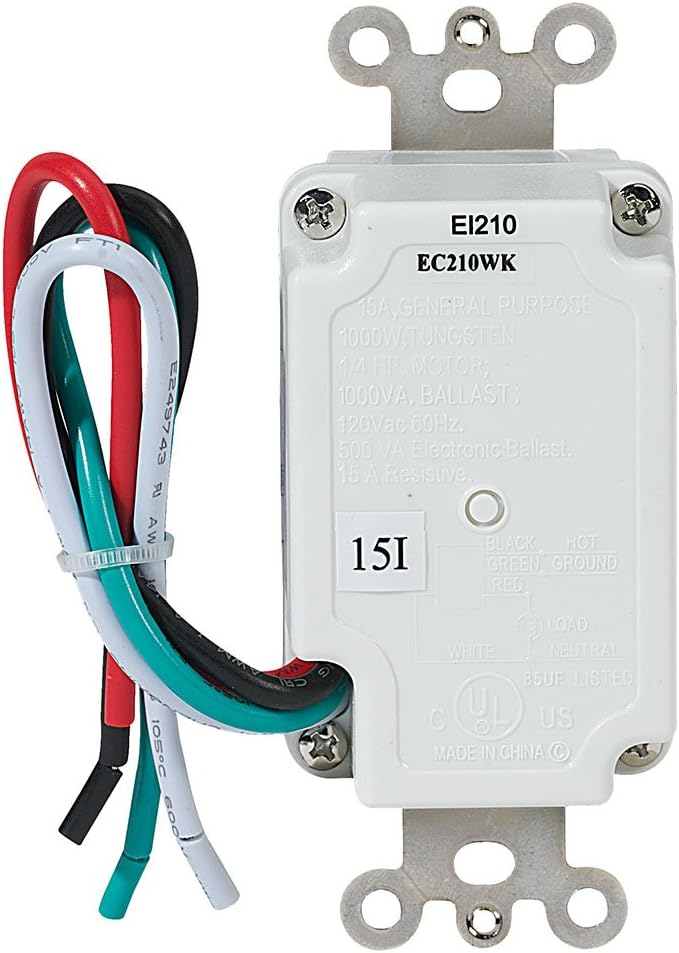
- Itzali energia: Bilatu ordezkatzen ari zaren etengailua kontrolatzen duen zirkuitu-hauslea eta itzali ezazu. Egiaztatu korrontea itzalita dagoela bolumen-neurgailu bat erabiliz.tage probatzailea.
- Kendu etengailu zaharra: Carefully remove the existing wall plate and unscrew the old switch from the electrical box. Disconnect the wires from the old switch.
- Identifikatu kableak:
- Hari beltza: Connects to the incoming 120 VAC HOT line.
- Hari zuria: Connects to the NEUTRAL line.
- Hari gorria: Connects to the LOAD (the appliance or light fixture).
- Hari berdea: Connects to the GROUND wire.
- Konektatu tenporizadore berria: Using wire nuts (not included), connect the wires from the EC210WK timer to the corresponding wires in the electrical box.
- Timer's Black wire to House Hot wire.
- Timer's White wire to House Neutral wire.
- Timer's Red wire to House Load wire.
- Timer's Green wire to House Ground wire.
- Muntaketa-tenporizadorea: Carefully fold the wires into the electrical box, ensuring no wires are pinched. Secure the timer to the electrical box using the provided screws.
- Instalatu horma-plaka: Attach a standard decorator-style wall plate (not included) over the timer.
- Berrezarri boterea: Piztu berriro korrontea etengailu elektrikoan.
5. Funtzionamendua
The Intermatic EC210WK timer features five push buttons for selecting countdown durations and a "HOLD" function.

- Selecting a Countdown Time: Press the desired time button (10 MIN, 20 MIN, 30 MIN, or 60 MIN). The corresponding LED indicator will illuminate, and the connected load will turn ON for the selected duration. The load will automatically turn OFF when the countdown expires.
- "HOLD" Function: Press the "HOLD" button to keep the connected load ON continuously. The "HOLD" LED indicator will illuminate. To exit the "HOLD" function, press any of the countdown time buttons, or press the "HOLD" button again to turn the load OFF.
- Canceling a Countdown: To turn OFF the connected load before the countdown expires, press the currently active countdown button again, or press the "HOLD" button (which will then require a second press to turn off if the load was already on).
6. Mantentzea
The Intermatic EC210WK Countdown Timer requires minimal maintenance.
- Garbiketa: To clean the surface of the timer, wipe with a soft, damp zapirik. Ez erabili garbitzaile edo disolbatzaile urratzailerik. Ziurtatu argindarra itzalita dagoela garbitu aurretik.
- Ikuskapena: Periodically inspect the timer and wall plate for any signs of damage or loose connections. If any issues are found, turn off power at the circuit breaker and consult a qualified electrician.
7. Arazoak
If you experience issues with your EC210WK timer, refer to the following common problems and solutions:
| Arazoa | Kausa posiblea | Irtenbidea |
|---|---|---|
| Timer does not turn ON. | No power to the timer; incorrect wiring; tripped circuit breaker. | Check circuit breaker. Verify wiring connections (Hot, Neutral, Load, Ground). Ensure power is restored. |
| Load does not turn OFF after countdown. | Timer is in "HOLD" mode; internal malfunction. | Press the "HOLD" button to disengage. If issue persists, contact customer support. |
| LED adierazleak ez dira pizten. | No power; faulty unit. | Check power supply and wiring. If power is present and wired correctly, the unit may be faulty. |
| Timer makes noise. | This timer is designed for silent operation. Noise indicates a potential issue. | Immediately turn off power at the circuit breaker and contact customer support. |
8. Zehaztapenak
Technical specifications for the Intermatic EC210WK Countdown Timer:
- Eredua: EC210WK
- Kolorea: Zuria
- Sarrera boltage: 120 VCA, 60 Hz
- Karga erresistentea: 15 A, 1800 W
- Wolframioaren karga: 8.3 A, 1000 W
- Inductive Ballast: 8A, 1000 VA
- Balasto Elektronikoa: 500 VA
- Motorra: 1 / 4 HP
- Countdown Settings: 10, 20, 30, 60 minutes, and HOLD
- Muntatze mota: Horma barnean
- Aldatu estiloa: SPST
- Elementuaren pisua: 5.3 ontza
- Ziurtagiriak: UL zerrendatua
9. Bermea eta Laguntza
Bermea: This Intermatic EC210WK Countdown Timer is covered by a 1-year limited warranty from the date of purchase. This warranty covers defects in materials and workmanship under normal use.
Bezeroarentzako laguntza: For technical assistance, warranty claims, or further information, please contact Intermatic customer service. Refer to the official Intermatic webuneko harremanetarako datuak lortzeko gunea.
Gorde erosketaren egiaztagiria bermearen ondorioetarako.


