1. Sarrera
This manual provides detailed instructions for the installation, operation, and maintenance of your ASUS X99-DELUXE motherboard. The ASUS X99-DELUXE is an ATX motherboard designed for high-performance computing, supporting Intel LGA 2011-3 processors and DDR4 memory.

1. irudia: Goitik behera view of the ASUS X99-DELUXE Motherboard, showing the CPU socket, RAM slots, and heatsinks.
2. Ezaugarri nagusiak
- ASUS OC Socket: Designed to enhance 8-core CPU and DDR4 performance beyond standard X99 expectations.
- DDR4 memoria euskarria: Features a special memory overclocking design, supporting DDR4 memory speeds up to 3200MHz (O.C.).
- Dual M.2 X4 Support: Provides two M.2 slots with PCIe 3.0 x4 interface, enabling data transfer speeds up to 32Gb/s for compatible NVMe SSDs.
- Fan Extension Card: Includes an extension card for advanced PC cooling management.
- 5-Way Optimization: Utilizes Dual Intelligent Processors 5 for system optimization, including performance tuning, power saving, digital power control, and fan control.
- UEFI BIOS: Features a media-acclaimed Unified Extensible Firmware Interface (UEFI) BIOS for intuitive system configuration.
- SATA Express: Supports SATA Express for storage speeds up to 10Gb/s.
3. Konfigurazioa eta instalazioa
Instalazioa hasi aurretik, ziurtatu sistema itzalita eta energia-iturritik deskonektatuta dagoela. Plaka baseari ertzetik heldu deskarga estatikoak saihesteko.
3.1. CPU Installation (LGA 2011-3 Socket)
- Kontu handiz ireki CPUaren socket-a eusteko mekanismoa.
- Lerrokatu CPUko triangelu formako marka socket-eko dagokion markarekin.
- Jarri CPUa astiro-astiro socketean, indarrik eman gabe.
- Close the retention mechanism to secure the CPU. Ensure no pins are bent during this process.

2. irudia: Angeludun view of the ASUS X99-DELUXE Motherboard, highlighting the LGA 2011-3 CPU socket.
3.2. Memoria (DDR4) instalazioa
The motherboard supports DDR4 memory modules. Refer to the motherboard manual for specific memory configurations and supported speeds.
- Ireki DIMM zirrikituaren bi muturretan dauden klipak.
- Lerrokatu DDR4 memoria-moduluko koska DIMM zirrikituan dagoen giltzarekin.
- Sartu modulua ondo zirrikituan, klipak bere lekuan sartu arte.
3.3. Storage Device Installation (M.2, SATA)
Install M.2 SSDs into the dedicated M.2 slots and SATA drives to the SATA ports. The motherboard supports SATA 3 (6Gb/s) and SATA Express.
3.4. Periferikoak konektatzea
Connect your display, keyboard, mouse, and other peripherals to the rear I/O panel. The motherboard provides various USB ports, Ethernet ports, and audio jacks.
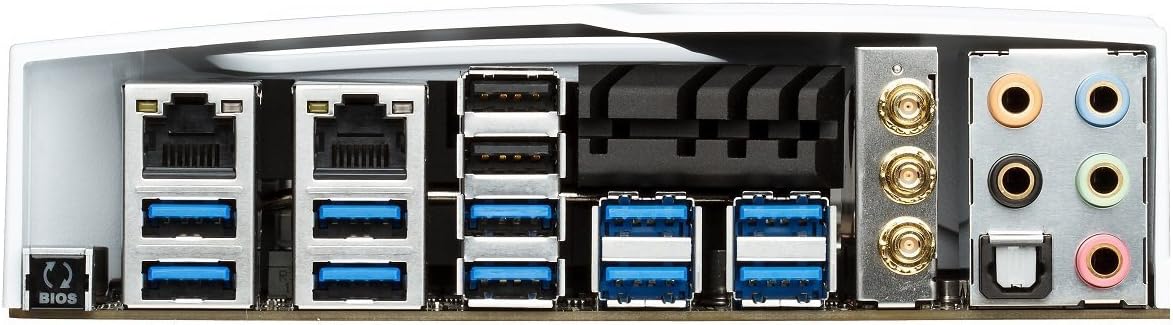
Figure 3: Rear I/O panel of the ASUS X99-DELUXE Motherboard, showing USB ports, Ethernet, and audio jacks.
4. Funtzionamendu-argibideak
4.1. UEFI BIOS Configuration
The UEFI BIOS allows you to configure system settings, boot options, and hardware parameters. To enter the BIOS, press the DEL gakoa sistema abiaraztean.
- EZ modua: Provides a simplified interface for basic settings.
- Modu aurreratua: Offers comprehensive control over all motherboard features, including overclocking and fan control.
4.2. Gidariaren instalazioa
After installing your operating system (e.g., Windows XP, as listed in specifications, and newer OS versions), install the necessary drivers for the motherboard chipset, audio, network, and other integrated components. These are typically provided on a support DVD or available for download from the ASUS webgunea.
4.3. 5-Way Optimization
The 5-Way Optimization feature, accessible through ASUS software, automatically tunes your system for optimal performance, power efficiency, digital power delivery, and fan acoustics based on your usage. It is recommended to manage overclocking and fan settings directly within the BIOS for more precise control.
5. Mantentzea
Mantentze-lan erregularrak zure plaka basearen iraupena eta funtzionamendu egonkorra bermatzen laguntzen du.
- Hautsa kentzea: Aldian-aldian, garbitu hautsa plaka nagusitik eta hozte-osagaietatik aire konprimitua erabiliz. Ziurtatu sistema itzalita eta deskonektatuta dagoela garbitu aurretik.
- Konexioaren egiaztapenak: Verify that all cables and components are securely seated.
- BIOS eguneraketak: Egiaztatu ASUSen laguntza website for the latest BIOS updates to improve compatibility and performance. Follow update instructions carefully.
6. Arazoak
If you encounter issues with your ASUS X99-DELUXE motherboard, consider the following troubleshooting steps:
- Argindarrik ez/Abiorik ez:
- Ziurtatu elikatze-kable guztiak (24 pineko ATX, 8 pineko CPU) ondo konektatuta daudela.
- Verify the power supply unit (PSU) is functioning correctly.
- Egiaztatu aurrealdeko paneleko etengailuaren eta plaka basearen arteko konexioa.
- Ez dago pantailarik:
- Confirm the graphics card is properly seated in its PCIe slot and has adequate power.
- Ensure the monitor cable is securely connected to the graphics card.
- Ahal bada, probatu beste pantaila-kable edo monitore batekin.
- Sistemaren ezegonkortasuna/matxurak:
- Egiaztatu RAM moduluak behar bezala kokatuta daudela; saiatu berriro jartzen edo modulu bana probatzen aldi berean.
- Ensure CPU cooler is correctly installed and making good contact with the CPU. Monitor CPU temperatures.
- Berrezarri BIOS ezarpenak lehenetsietara.
- Bent CPU Socket Pins:
Bent pins in the CPU socket can cause severe system malfunctions or prevent booting. This type of damage is typically not covered under warranty. Exercise extreme caution during CPU installation to avoid bending pins.
7. Zehaztapenak
| Kategoria | Zehaztapena |
|---|---|
| Marka | ASUS |
| Ereduaren izena | X99-DELUXE |
| CPU Socketa | LGA 2011-3 |
| Prozesadore bateragarriak | Intel Core i7 (LGA 2011-3) |
| Txip mota | Intel X99 |
| RAM Memoria Teknologia | DDR4 |
| Memoria Erlojuaren Abiadura | 3200 MHz-ra arte (OC) |
| Memoria zirrikituak eskuragarri | 8 |
| RAM memoriaren gehienezko tamaina | 64 GB |
| Txartel grafikoen interfazea | PCI Express |
| Total PCIe Ports | 5 |
| Total SATA Ports | 8 |
| Sistemaren Bus Estandarra Onartua | SATA 3 |
| USB 2.0 Portuak | 2 (internal headers, total ports may vary) |
| USB portuak guztira | Various (including USB 3.0 on rear I/O) |
| Ethernet ataken kopurua | 1 (Dual Gigabit LAN) |
| Potentzia-konektore mota nagusia | 24-Pin ATX |
| Gailu bateragarriak | Ordenagailu pertsonala |
| Plataforma | Windows XP (and newer OS versions) |
| Elementuaren pisua | 4.44 libra (gutxi gorabehera 2.01 kg) |
8. Bermea eta Laguntza
For warranty information and technical support, please refer to the official ASUS website or contact ASUS customer service. Keep your proof of purchase for warranty claims.
ASUS laguntza Webgunea: https://www.asus.com/support/
Note: Damage resulting from improper installation, misuse, or unauthorized modifications may void your product warranty.


