1. Sarrera
The Cellet Portable Bluetooth Wireless Keyboard BKP200 offers a convenient and functional solution for typing on the go. Its foldable design and QWERTY layout with low-profile keys provide an efficient typing experience. The built-in rechargeable lithium battery ensures extended use, making it ideal for smartphones, tablets, laptops, and other Bluetooth-enabled devices.
Kutxan dagoena
- Wireless foldable keyboard
- Keyboard case (doubles as a phone holder stand)
- Mikro USB kargatzeko kablea
- Erabiltzailearen eskuliburua

Image: The Cellet Portable Bluetooth Wireless Keyboard, shown unfolded, alongside its protective case which functions as a phone/tablet stand, and a micro USB charging cable.
2. Segurtasun-argibide garrantzitsuak
Before using this product, please read all instructions carefully and retain them for future reference. Adherence to these guidelines ensures safe operation and prevents damage.
- This product may be used by children and individuals with physical, sensory, or mental disabilities, or those lacking experience and knowledge, provided they receive proper supervision or instruction regarding safe use and understanding of associated hazards.
- Garbiketa eta mantentze-lanak ez dituzte haurrek gainbegiratu gabe egin behar.
- Haurrak gainbegiratu behar dira aparatuarekin jolasten ez dutela ziurtatzeko.
- Erabili produktua bere xederako soilik.
- For indoor use only. Do not expose the product to water, excessive moisture, or snow.
- Do not place the product in or near flammable, explosive, or hazardous objects.
- Ez erabili produktua hondatutako kable edo entxufe batekin.
- Ez erabili produktua inolaz ere hondatuta egon bada.
- Ez desmuntatu produktua. Desmuntatzeak segurtasun arriskuak sor ditzake.
- Avoid throwing or shaking the product.
3. Konfigurazioa
Hasierako karga
Before first use, fully charge the keyboard for approximately 1.5 to 2 hours using the provided Micro USB charging cable. The charging indicator light will glow red during charging and turn off once fully charged. If the battery is low, the Bluetooth status light will flash.
Bluetooth parekatze urratsak
- 1. urratsa: Unfold the keyboard. The Bluetooth status indicator light will illuminate for 3 seconds and then turn off.
- 2. urratsa: Sakatu Fn + C buttons simultaneously. The Bluetooth indicator light will begin blinking, indicating it is in pairing mode.
- 3. urratsa: On your device (smartphone, tablet, etc.), activate Bluetooth and search for available devices. Select "Cellet BKP200 Keyboard" from the list to connect.
- 4. urratsa: Once successfully connected, the Bluetooth indicator light on the keyboard will turn off.

Image: The Cellet foldable keyboard displayed with a tablet and smartphone, illustrating its universal compatibility.
4. Funtzionamendu-argibideak
Sistema eragilearen hautaketa
To optimize keyboard functionality for your device, select the correct operating system:
- For Android devices: Press and hold Fn + Q.
- For Windows devices: Press and hold Fn + W.
- For iOS devices: Press and hold Fn + E.
Laster-teklaren funtzioak
To use the shortcut keys, press and hold the Fn key while simultaneously pressing the desired shortcut key.
| Funtzioa | Tekla-konbinazioa | Oharrak |
|---|---|---|
| Aurreko Pista | fn+1 | |
| Bolumena jaitsi | fn+2 | |
| Bolumena igo | fn+3 | |
| Erreproduzitu/Pausatu | fn+4 | |
| Hizkuntza aldatzea | fn+5 | |
| Search | fn+6 | |
| Kopiatu | fn+7 | |
| Moztu | fn+8 | |
| Hautatu Guztiak | fn+9 |
System-Specific Functions:
| Android Sistemak | Funtzioa |
|---|---|
| PgUp | Azken orrialdea |
| PgDn | Hurrengo orrialdea |
| iOS Systems | Funtzioa |
|---|---|
| Hasiera | Hasiera |
| PgUp | Cursor to the top |
| PgDn | Cursor to the bottom |
| Windows Sistemak | Funtzioa |
|---|---|
| Web arakatzailea | Ireki web arakatzailea |
| ESC | Ihes egin |
| PgUp | Azken orrialdea |
| PgDn | Hurrengo orrialdea |

Image: The keyboard case is shown transforming into a stand, holding both a smartphone and a tablet in landscape orientation for convenient viewidazten ari den bitartean.
5. Mantentzea
Proper care and maintenance will extend the life of your Cellet keyboard.
- Garbitu teklatua zapi leun batekin dampurarekin edo alkoholarekin eginda.
- Mantendu teklatua objektu zorrotzetatik urrun.
- Ez jarri objektu astunak teklatuan.
- Do not microwave the keyboard.
- Ez behartu edo desitxuratu teklatua.
- Keep away from any oil, chemicals, or other organic liquids.
6. Arazoak
If you encounter issues with your keyboard, consider the following:
- Teklatua ez da parekatzen: Ensure the keyboard is fully charged and in pairing mode (Bluetooth indicator blinking). Check your device's Bluetooth settings to ensure it's discoverable and try re-scanning for devices.
- Teklak ez dute erantzuten: Verify the keyboard is connected to your device. If connected, try restarting both the keyboard and your device. Ensure no debris is lodged under the keys.
- Konexio etengabea: Ensure the keyboard is within the 10-meter operating range of your device and there are no significant obstructions. Other wireless devices might cause interference.
- Karaktere okerrak idatzi dira: Confirm that you have selected the correct operating system for your device (Fn + Q for Android, Fn + W for Windows, Fn + E for iOS).
- Bateria ez da kargatzen: Check the Micro USB cable and charging port for damage. Try using a different charging cable or power source.
If problems persist, refer to the Cellet support webgunera edo jarri harremanetan bezeroarentzako arreta-zerbitzuarekin laguntza gehiago lortzeko.
7. Zehaztapenak
Detailed technical specifications for the Cellet BKP200 Portable Bluetooth Wireless Keyboard:
| Ezaugarri | Zehaztapena |
|---|---|
| Bluetooth bertsioa | 5.1 |
| Interfazea | USB-C (kargatzeko) |
| Distantzia eragilea | Gehienez 10 metro |
| Modulazio Sistema | GFSK |
| Bolumen eragileatage | 3.0-4.2V |
| Funtzionamendu Korrontea | <3.0mA |
| Egoneko korrontea | <0.3mA |
| Lo egiteko Korrontea | <0.1mA |
| Karga-korrontea | <200mA |
| Egonean Denbora | 100 egun inguru |
| Kargatzeko Denbora | <2 ordu |
| Litiozko bateriaren edukiera | 110mAh |
| Eten gabeko Lanaldia | > 40 ordu |
| Litiozko bateriaren iraupena | 3 urte |
| Lithium Battery Dimensions | 30 x 15 x 23 mm |
| Indar Gakoa | 50-80 g |
| Gako Bizitza | 3 milioi kolpe |
| Laneko Tenperatura | -10 eta +55 ℃ |
| Elementuaren pisua | 7.5 ontza |
| Produktuaren neurriak (tolestuta) | 5.75 x 3.5 x 0.75 hazbete |
| Produktuaren neurriak (tolestuta) | 11.5 x 3.3 x 0.27 inches (approximate, derived from image) |
| Kolorea | Beltza |
| Sistema eragile bateragarriak | Android, iOS, Windows |
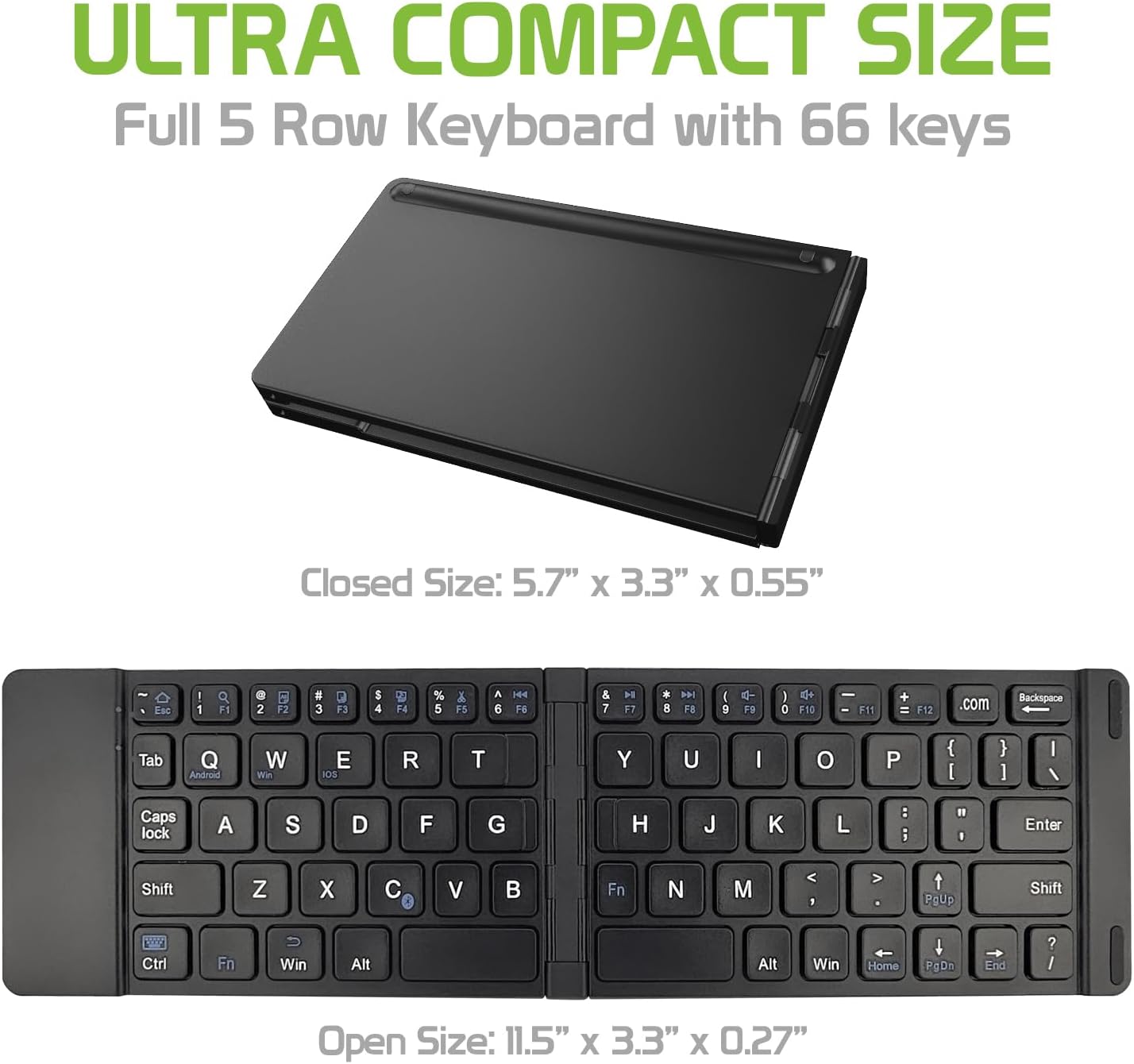
Image: The Cellet keyboard in both its closed, compact state and its unfolded, full-size state, with dimensions indicating its portability and functional size.
8. Bermea eta Laguntza
For warranty information or technical support, please visit the official Cellet webwebgunera edo jarri harremanetan bezeroarentzako arreta-zerbitzuarekin. Gorde erosketa-agiria berme-erreklamazioetarako.
Ingurumena errespetatzen duen deuseztatzea
To dispose of the product responsibly, follow these guidelines:
- Carefully pry up the plastic top to remove it completely. This action will likely render the keyboard unusable.
- Turn the top over and remove any tape securing the battery.
- Separate the battery from the circuit board.
- Dispose of the battery according to local regulations and laws. Recycle remaining keyboard parts where possible.