Sarrera
This manual provides comprehensive instructions for the setup, operation, and maintenance of your Genius SW-2.1 355 Speaker System. Please read this manual thoroughly before using the product to ensure proper functionality and to maximize your listening experience.
Segurtasun Informazioa
Jarraitu segurtasun neurri hauek gailuari kalterik edo zeure buruari kalterik ez egiteko:
- Do not expose the speakers to water or moisture.
- Saihestu bozgorailuak bero-iturrien ondoan edo eguzki-argiaren eraginpean jartzea.
- Ensure proper ventilation around the subwoofer to prevent overheating.
- Erabili unitatearekin hornitutako korronte-egokigailua soilik.
- Ez saiatu unitatea zeuk irekitzen edo konpontzen. Mantendu konponketa guztiak langile kualifikatuen esku.
- Mantendu haurren eskura.
Paketearen edukia
Egiaztatu elementu guztiak paketean daudela:
- 1 x Subwoofer unit
- 2 x Satelite bozgorailu
- 1 x Audio input cable (3.5mm stereo jack)
- 1 x Elikadura egokitzailea
- 1 x Erabiltzailearen eskuliburua (dokumentu hau)
Produktua amaituview
The Genius SW-2.1 355 Speaker System consists of a subwoofer and two satellite speakers designed to deliver clear audio and powerful bass for your multimedia needs.
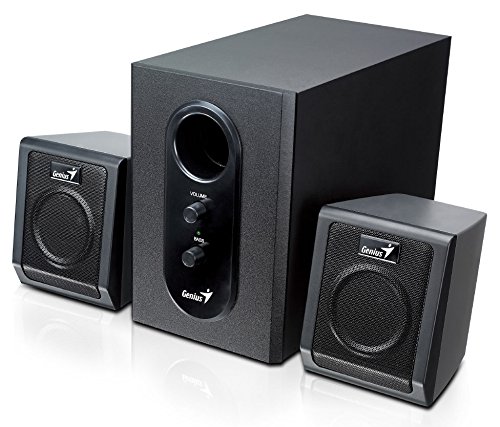
This image displays the Genius SW-2.1 355 Speaker System. It features a central, larger subwoofer unit with volume and bass control knobs on its front panel, and two smaller satellite speakers positioned on either side. All components are black.
Osagaiak:
- Subwoofer-a: The main unit housing the bass driver and control panel.
- Satelite hizlariak: Two compact speakers for mid-range and high-frequency audio.
- Kontrol-panela: Located on the subwoofer, featuring Volume and Bass adjustment knobs.
Konfigurazioa
- Bozgorailuak kokatzea: Place the subwoofer on the floor or a sturdy surface. Position the satellite speakers on either side of your listening area, facing towards you for optimal stereo separation.
- Satelite bozgorailuak konektatzea: Connect the cables from the two satellite speakers to the corresponding output jacks on the rear of the subwoofer unit. Ensure a secure connection.
- Audio iturria konektatzea: Connect one end of the 3.5mm audio input cable to the "Audio In" jack on the subwoofer. Connect the other end to the audio output jack (e.g., headphone jack) of your computer, MP3 player, smartphone, or other audio source.
- Konektatzeko potentzia: Plug the power adapter into the DC input jack on the subwoofer. Then, plug the power adapter into a standard electrical outlet.
- Piztu: Turn on the speaker system using the power switch, usually integrated with the volume knob.
Funtzionamendua
- Piztu/Itzali eta bolumen kontrola: The main knob on the subwoofer controls both power and overall volume. Rotate clockwise to turn on and increase volume; rotate counter-clockwise to decrease volume and turn off.
- Baxuen doikuntza: Use the "Bass" knob on the subwoofer to adjust the level of low-frequency sound. Rotate clockwise to increase bass, and counter-clockwise to decrease it, according to your preference.
- Audio Source Volume: For optimal sound quality, set the volume on your audio source (computer, phone, etc.) to about 75% and then use the speaker system's volume control for fine adjustments.
Mantentzea
- Garbiketa: Use a soft, dry cloth to clean the surfaces of the speakers. Do not use liquid cleaners or abrasive materials.
- Biltegiratzea: Bozgorailuak denbora luzez gordetzen badituzu, deskonektatu itzazu korrontetik eta gorde leku fresko eta lehor batean.
- Kableen kudeaketa: Ensure cables are not tangled or pinched to prevent damage.
Arazoak konpontzea
| Arazoa | Kausa posiblea | Irtenbidea |
|---|---|---|
| Soinurik ez |
|
|
| Soinu distortsionatua |
|
|
| Baxu ahula |
|
|
Zehaztapenak
| Ezaugarri | Xehetasuna |
|---|---|
| Ereduaren izena | SW-2.1 355 |
| Hizlari mota | 2.1 Channel Multimedia Speaker System (Bookshelf, Satellite, Subwoofer) |
| Irteera Potentzia osoa | 10 Watts RMS (5W Subwoofer + 2.5W x 2 Satellites) |
| Materiala | Wood (Subwoofer) |
| Konektibitate Teknologia | Kable bidezkoa (3.5 mm-ko audio sarrera) |
| Gailu bateragarriak | MP3 Player, Personal Computer, Smartphones, Tablets, Televisions |
| Kontrolak | Bolumena, Baxua |
| Energia iturria | DC |
| Elementuaren pisua | 2.78 kg |
| Paketearen neurriak | 39.6 x 25 x 18.4 cm |
Bermea eta Laguntza
Genius products are designed for reliability and performance. For information regarding warranty coverage, technical support, or service inquiries, please refer to the warranty card included with your product or visit the official Genius webgunea. Gorde erosketa-agiria erosketaren frogagiri gisa.


