1. Sarrera
This manual provides detailed instructions for the installation, operation, and maintenance of your D-Link DCS-8350LH 2K QHD Indoor Wi-Fi Camera. Please read this manual thoroughly before using the product to ensure proper setup and functionality.
The D-Link DCS-8350LH is designed to provide precise and detailed surveillance for your home or small office. It features 2K QHD resolution, color night vision, AI-based detection, and two-way audio for comprehensive monitoring.
2. Segurtasun informazioa
- Ensure the camera is installed in a stable location to prevent it from falling.
- Use only the power adapter supplied with the camera.
- Do not expose the camera to water or moisture. This product is for indoor use only.
- Saihestu kamera bero-iturrien ondoan edo eguzki-argiaren eraginpean jartzea.
- Ez saiatu kamera zeuk irekitzen edo konpontzen. Mantendu konponketa guztiak langile kualifikatuen esku.
- Gorde kamera eta haren osagarriak haurren eskura ez dauden lekuetan.
3. Produktua amaitu daview
Familiarize yourself with the components of your D-Link DCS-8350LH camera.
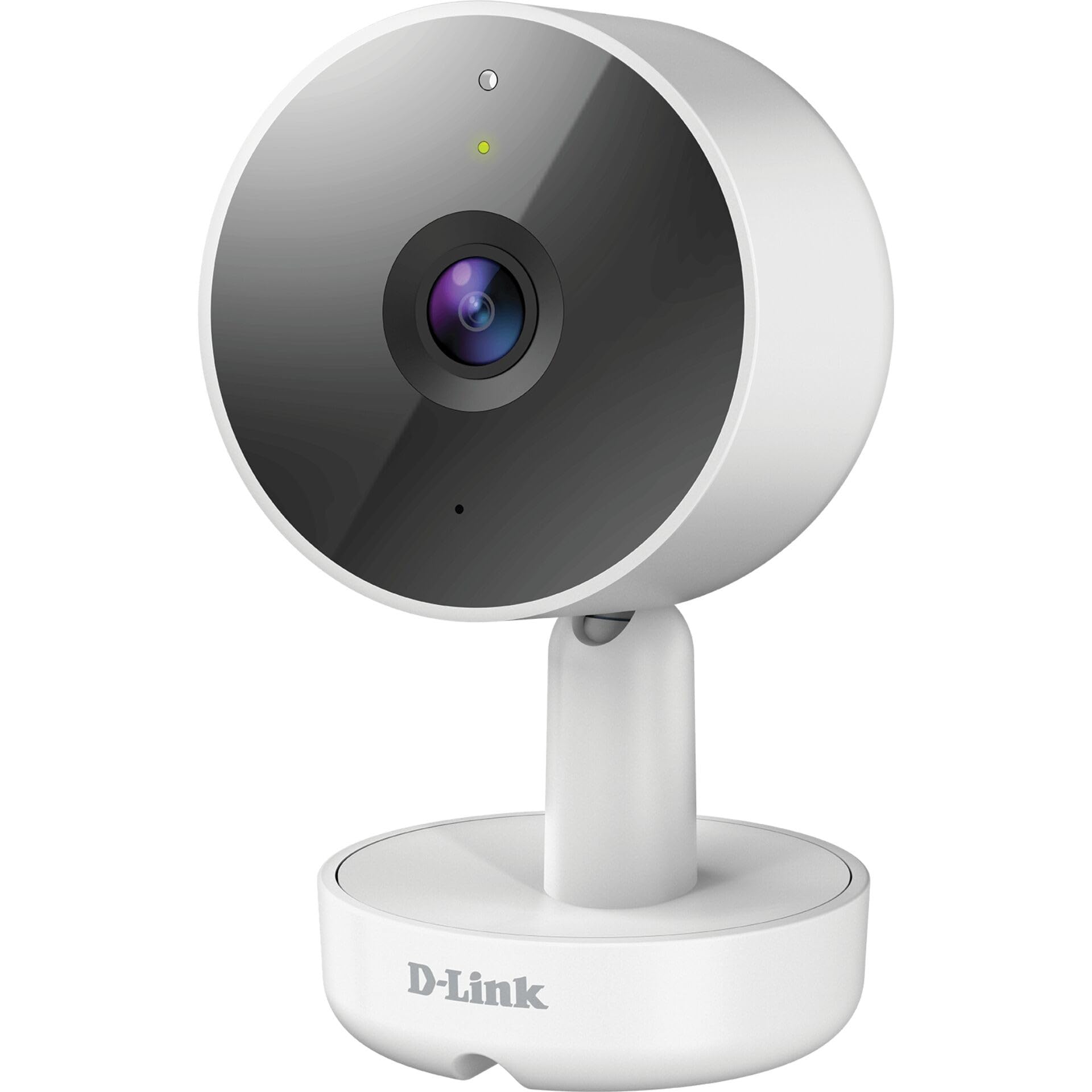
3.1. irudia: Aurrealdea View Kameraren
- 1. Lentea: Bideoa ateratzen du.
- 2. Egoera LED: Indicates camera status (e.g., power, connection).
- 3. Mikrofonoa: Bi norabideko komunikaziorako audioa grabatzen du.
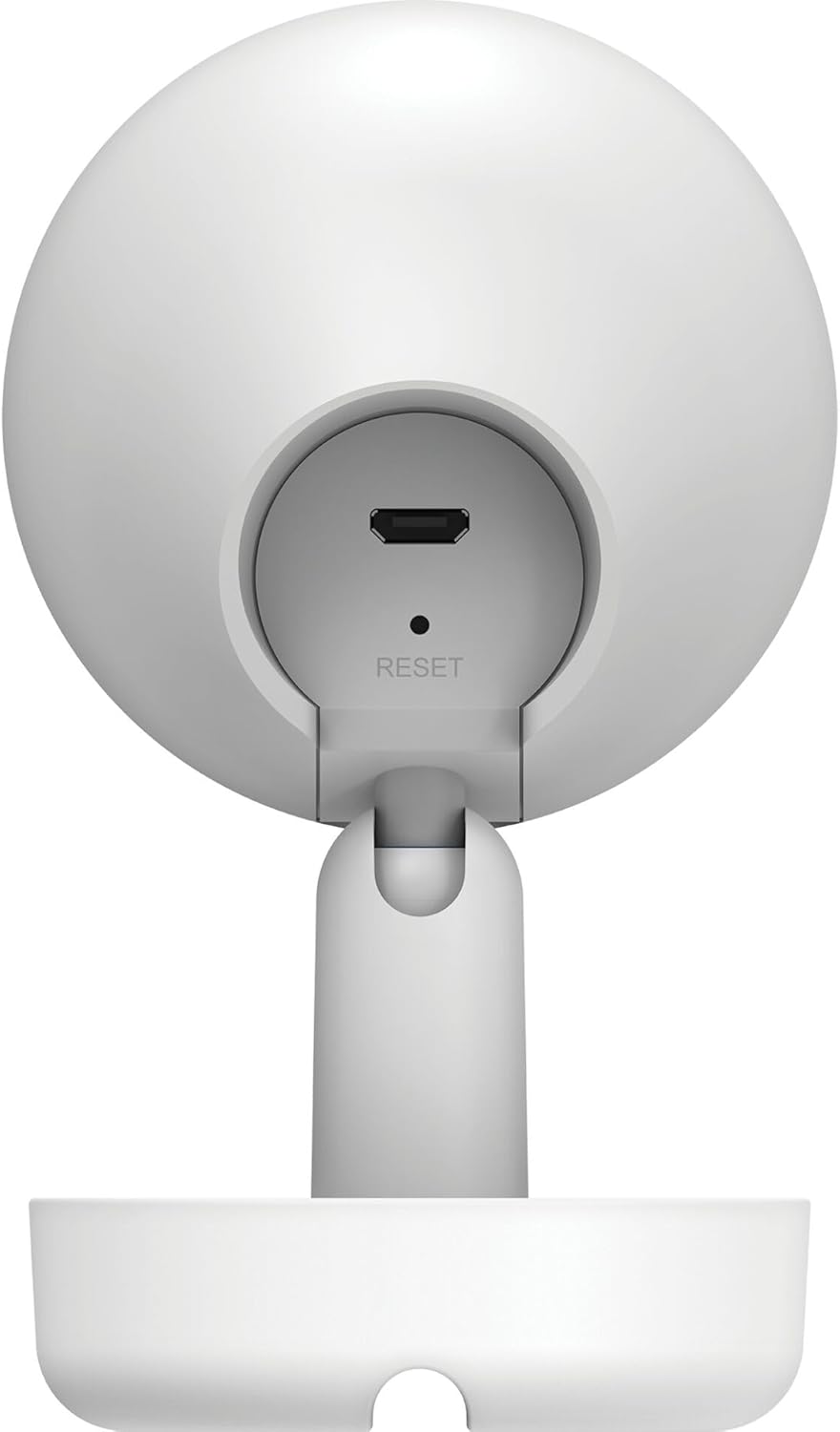
3.2. irudia: Atzekoa View Kameraren
- 1. Micro USB Power Port: Korronte-egokigailura konektatzen da.
- 2. Berrezarri botoia: Fabrika-ezarpen lehenetsiak berrezartzeko erabiltzen da.
- 3. Hizlaria: Bi norabideko komunikaziorako audioa ateratzen du.
- 4. MicroSD Card Slot: For local video storage (located on the side or bottom, not visible in this specific image, but mentioned in features).
4. Konfigurazioa
Follow these steps to set up your D-Link DCS-8350LH camera:
- Deskargatu mydlink aplikazioa: Bilatu "mydlink" on the App Store (iOS) or Google Play (Android) and download the official mydlink app.
- Create a mydlink Account: Open the app and follow the on-screen instructions to create a new mydlink account or log in if you already have one.
- Kamera piztu: Connect the provided power adapter to the camera's Micro USB port and plug it into a power outlet. The status LED will begin to blink.
- Gehitu gailua: In the mydlink app, tap the menu icon (usually three lines) and select "Add a Device". Scan the QR code located on the camera or its packaging.
- Konektatu wifira: Follow the app's instructions to connect your camera to your home Wi-Fi network. Ensure your mobile device is connected to the same Wi-Fi network during setup.
- Lekua: Position your camera in the desired indoor location.

4.1. irudia: Camera and mydlink App Integration
5. Instalazioa
The D-Link DCS-8350LH camera supports wall mounting for optimal placement.
- Aukeratu kokapena: Aukeratu barruko leku bat, argia duena view of the area you wish to monitor and within range of your Wi-Fi network.
- Muntatzeko azalera: Ensure the wall or surface is strong enough to support the camera.
- Ziurtatu oinarria: Use appropriate screws and anchors (not included) to secure the camera's base to the chosen surface.
- Egokitu Angelua: Once mounted, adjust the camera's angle to cover the desired viewing area. The camera has a 108-degree viewangelua.
6. Funtzionamendu-argibideak
Once set up, you can access and control your camera using the mydlink app.
6.1. Bizi View
Open the mydlink app and select your DCS-8350LH camera from the device list to view the live feed. The camera provides 2K QHD (1440p) resolution for clear images.
6.2. Gaueko koloretako ikusmena
The camera automatically switches to color night vision in low-light conditions, allowing you to see detailed color video even when it's dark.
6.3. AI-based Event Detection
The camera features intelligent detection capabilities:
- Pertsona hautematea: Identifies human presence, reducing false alarms from pets or moving objects.
- Soinuaren detekzioa: Alerts you to specific sounds, including carbon monoxide and smoke alarm sounds.
Configure detection zones and sensitivity settings within the mydlink app to customize alerts.
6.4. Bi norabideko audioa
Use the built-in microphone and speaker to communicate with people or pets near the camera. Tap the microphone icon in the live view within the mydlink app to speak.
6.5. Bideo grabaketa eta biltegiratzea
The DCS-8350LH offers multiple recording options:
- MicroSD txartela: Insert a microSD card (not included) into the camera's slot for local storage of recorded video clips.
- mydlink Cloud Recording: Utilize the mydlink Cloud service for secure off-site storage. Free and paid subscription plans are available.
- Smartphone bidezko grabaketa: Capture snapshots and video clips directly to your smartphone via the mydlink app.
7. Mantentzea
7.1. Garbiketa
To clean the camera, gently wipe the lens and exterior surfaces with a soft, dry cloth. Do not use liquid cleaners or abrasive materials.
7.2. Firmware eguneraketak
Regularly check for firmware updates through the mydlink app. Keeping your camera's firmware up-to-date ensures optimal performance, security, and access to new features.
8. Arazoak
If you encounter issues with your D-Link DCS-8350LH camera, refer to the following common solutions:
- Camera Offline / Wi-Fi Disconnection:
- Ziurtatu kamera zure Wi-Fi bideratzailearen irismenean dagoela.
- Check your Wi-Fi network status.
- Berrabiarazi kamera korronte-egokitzailea deskonektatuz eta berriro konektatuz.
- If the issue persists, try resetting the camera to factory defaults (see below) and re-adding it to the mydlink app.
- Bideoaren kalitate eskasa:
- Ziurtatu kameraren lentea garbi dagoela.
- Check your internet connection speed. A stable and fast connection is required for 2K QHD streaming.
- Adjust the camera's position to avoid glare or obstructions.
- Kamera berrezarri:
To restore the camera to its factory default settings, use a paperclip or a thin object to press and hold the recessed Berrezarri button (refer to Figure 3.2) for approximately 10 seconds while the camera is powered on. The status LED will change, indicating a reset. You will then need to reconfigure the camera through the mydlink app.
9. Zehaztapenak
| Ezaugarri | Xehetasuna |
|---|---|
| Ereduaren izena | DCS-8350LH |
| Bideo Grabaketa Ebazpena | 1440p (2K QHD) |
| Viewangelua | 108 gradu |
| Konektibitate-protokoloa | Wi-Fi |
| Haririk gabeko Komunikazio Teknologia | Bluetooth (for initial setup) |
| Barruko/Kanpoko erabilera | Barruan |
| Energia iturria | Kable elektrikoa |
| Energia-kontsumoa | 8 Watt |
| Forma-faktorea | Kupula |
| Muntatze Mota | Hormako Muntaia |
| Materiala | Plastikoa |
| Elementuaren neurriak (L x W x H) | 6.67 x 6.57 x 11.14 cm |
| Pisua | 320 gramo |
| Dakarten osagaiak | Barruko kamera |
| Kontrolagailu mota | Amazon Alexa |
10. Bermea eta Laguntza
For warranty information, technical support, and further assistance, please visit the official D-Link website or contact D-Link customer service. Keep your purchase receipt as proof of purchase.
You can find the latest support resources, FAQs, and contact details at www.dlink.com.


