Sarrera
Eskerrik asko erosketagatik.asing the Samsung 34-Inch Curved Screen LED-Lit Monitor S34E790C. This monitor features an ultra WQHD resolution (3440x1440) and a 21:9 curved panel designed to provide an immersive viewing experience. It includes an ergonomic, height-adjustable stand with tilt functionality and a 4-port USB hub for convenient peripheral access. This manual provides essential information for setting up, operating, maintaining, and troubleshooting your monitor.

1. irudia: Aurrealdea view of the Samsung S34E790C monitor, showcasing its curved display and sleek design.
Konfigurazioa
1. Deskargatzea
Kontu handiz atera osagai guztiak paketetik. Ziurtatu elementu hauek daudela:
- Samsung 34-Inch Curved Screen LED-Lit Monitor
- Height Adjustable Stand With Tilt Functionality
- Elikatze-kablea
- HDMI kablea (eskualdearen arabera alda daiteke)
- DisplayPort kablea (eskualdearen arabera alda daiteke)
- USB 3.0 upstream kablea
2. Stand-asanblada
Attach the height-adjustable stand to the monitor panel. Ensure the stand is securely fastened according to the instructions provided in the quick setup guide included in the box. Place the assembled monitor on a stable, flat surface.
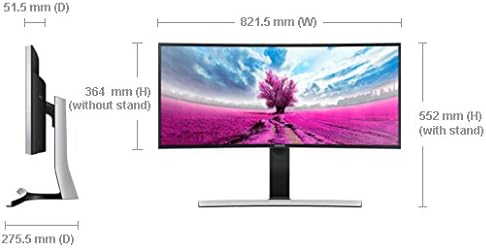
Figure 2: Dimensions of the Samsung S34E790C monitor, illustrating its width, height (with and without stand), and depth.
3. Connecting to a Source Device
Connect your PC, game console, Blu-ray player, or other compatible device to the monitor using the available ports.
- HDMI konexioa: Use an HDMI cable to connect the monitor to your device's HDMI output.
- DisplayPort konexioa: Use a DisplayPort cable to connect the monitor to your device's DisplayPort output.
- USB Hub: Connect the monitor's USB 3.0 upstream port to your computer using the provided USB 3.0 upstream cable to enable the 4-port USB hub for peripherals.
4. Piztu
Connect the power cable to the monitor and then to a power outlet. Press the power button on the monitor to turn it on.
Funtzionamendu-argibideak
1. Oinarrizko Kontrolak
The monitor features an intuitive joystick-style menu button, typically located on the rear or bottom-right of the display. This button allows you to navigate the On-Screen Display (OSD) menu to adjust various settings.
2. Pantailaren ezarpenak
Access the OSD menu to configure display settings:
- Ebazpena: The native resolution is 3440x1440 (WQHD). Ensure your connected device is set to this resolution for optimal clarity.
- Aspektu-erlazioa: The monitor features a 21:9 aspect ratio.
- Distira/Kontrastea: Adjust these settings to your preference. Note that in PC mode, some image adjustments might be controlled via your computer's graphics settings.
- Irudi moduak: Select from various preset picture modes (e.g., Standard, Custom, Cinema) to optimize viewing for different content types.
3. Picture-by-Picture (PBP) Functionality
The S34E790C supports Picture-by-Picture (PBP), allowing you to view content from two different sources simultaneously on the screen. This feature is ideal for multitasking or comparing content side-by-side.
- Connect two source devices to the monitor (e.g., one via HDMI, one via DisplayPort).
- Sartu OSD menura eta joan PBP ezarpenetara.
- Select the desired input sources for each side of the screen.
- Adjust the layout as needed.
4. Doikuntza ergonomikoak
Monitorearen euskarriak altuera eta inklinazioa doitzeko aukera ematen du zure egoera optimizatzeko. viewing comfort and reduce strain.
- Altuera doitzea: Gently push or pull the monitor panel up or down to adjust its height.
- Inklinazio doikuntza: Tilt the monitor panel forward or backward to find your preferred viewangelua.
Mantentzea
1. Pantaila garbitzea
Pantaila garbitzeko, astiro-astiro zapi leun eta pelusik gabeko batekin garbitu. Orban egoskorrak izanez gero, astiro-astiro garbitu.ampGarbitu zapi bat urarekin edo pantaila-garbitzaile espezializatu batekin. Saihestu produktu kimiko gogorrak, material urratzaileak edo likidoa zuzenean pantailan ihinztatzea.
2. Cleaning the Monitor Casing
Garbitu monitorearen casing with a soft, dry cloth. If necessary, use a slightly damp oihal. Ez erabili disolbatzaile edo garbitzaile urratzailerik.
3. Zaintza orokorra
- Saihestu objektu astunak monitorearen edo haren kableen gainean jartzea.
- Do not expose the monitor to direct sunlight, high temperatures, or excessive humidity.
- Ziurtatu aireztapen egokia monitorearen inguruan, gehiegi berotu ez dadin.
Arazoak konpontzea
Monitorearekin arazoak badituzu, jarraitu arazoak konpontzeko ohiko urrats hauek:
- Potentziarik gabe: Ziurtatu kablea ondo konektatuta dagoela monitoreari eta entxufeari. Egiaztatu entxufea funtzionatzen duen.
- Seinalerik ez: Verify that the video cable (HDMI or DisplayPort) is correctly connected to both the monitor and the source device. Ensure the correct input source is selected on the monitor via the OSD menu. Check if the source device is powered on and outputting a signal.
- Display Issues (e.g., flickering, distorted image): Check the video cable for damage. Try a different cable or port. Ensure your computer's graphics drivers are up to date. Adjust the resolution and refresh rate settings on your computer to match the monitor's specifications.
- Soinu arazoak: If using the monitor's built-in speakers, ensure the volume is not muted and is set to an audible level in both the monitor's OSD and your computer's sound settings.
- Picture-by-Picture (PBP) Not Working: Confirm both source devices are connected and active. Ensure the PBP function is correctly configured in the OSD menu.
For more complex issues or persistent problems, please refer to the full user manual available on the Samsung support webgunearekin edo jarri harremanetan Samsung-en bezeroarentzako arreta-zerbitzuarekin.
Zehaztapenak
| Ezaugarri | Zehaztapena |
|---|---|
| Modelo zenbakia | S34E790C |
| Pantailaren tamaina | 34 hazbete |
| Pantailaren bereizmena | 3440 x 1440 Pixels (WQHD) |
| Aspektu-erlazioa | 21:9 |
| Panel mota | Curved LED-Lit |
| Konektibitatea | HDMI, DisplayPort, 4x USB 3.0 ataka |
| Elementuaren pisua | 22 libra (gutxi gorabehera 9.98 kg) |
| Produktuaren neurriak (LxWxH) | 32.37 x 10.84 x 21.73 hazbete (82.22 x 27.53 x 55.19 cm) |
| Kolorea | Black High Glossy |
| Fabrikatzailea | Samsung IT |
| Eskuragarri dagoen lehen data | 2ko abuztuaren 2013a |
Bermea eta Laguntza
Your Samsung S34E790C monitor is covered by a limited warranty. For detailed information regarding warranty terms, conditions, and duration, please refer to the warranty card included with your product or visit the official Samsung support webgunea.
For technical assistance, product registration, or to download the latest drivers and software, please visit the Samsung laguntza webgunea edo jarri harremanetan zuzenean Samsung bezeroarentzako arreta-zerbitzuarekin.


